Parental Control App - Kidslox

Parental Control App - Kidslox

ダウンロード: App Storeダウンロード: Google Play
ロゴ: Parental Control App - Kidslox

Kidslox:スクリーンタイムの管理と家族の保護のためのよりスマートな方法

強力なペアレンタルコントロールでデジタルな戦いに終止符を打ちましょう。アプリをブロックし、コンテンツをフィルタリングし、10台のデバイスにわたる位置情報を追跡して、より安全でバランスの取れた子供時代を保証します。

ダウンロード: App Store

開発元

Kidslox Trading Limited

カテゴリ

Lifestyle

ダウンロード

6M+

ユーザー評価

4.3/5

評価数

84K+

対応言語

52

安心をカタチに

このインターフェースを利用する 6M+ 人のユーザー.

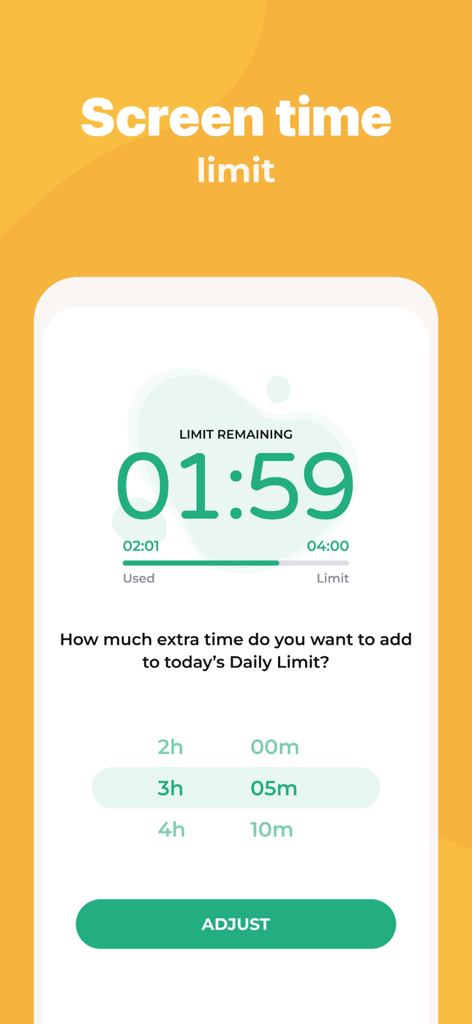
Kidsloxアプリのインターフェースに、残りのスクリーンタイム制限と追加時間オプションが表示されています。
Kidsloxアプリのインターフェースに、残りのスクリーンタイム制限と追加時間オプションが表示されています。

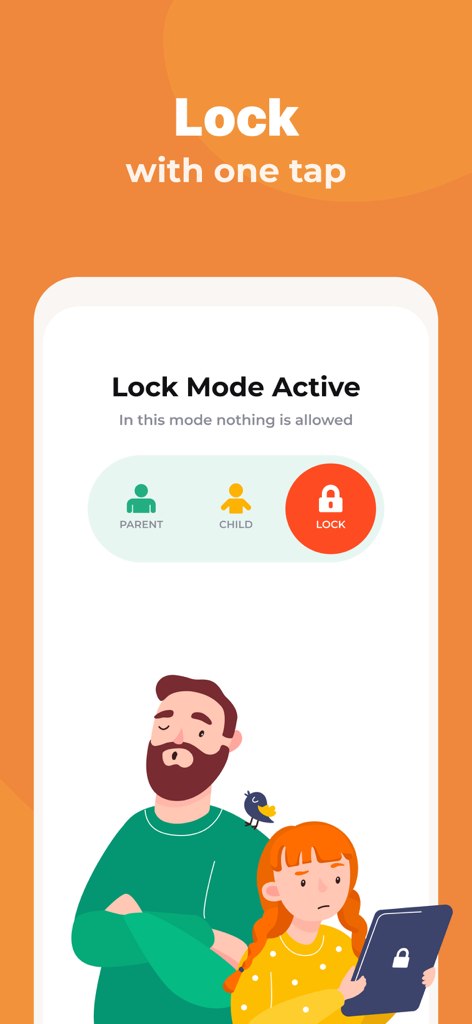
Kidsloxアプリのインターフェースに、ワンタップロック機能とペアレンタルコントロールモードが表示されています。
Kidsloxアプリのインターフェースに、ワンタップロック機能とペアレンタルコントロールモードが表示されています。

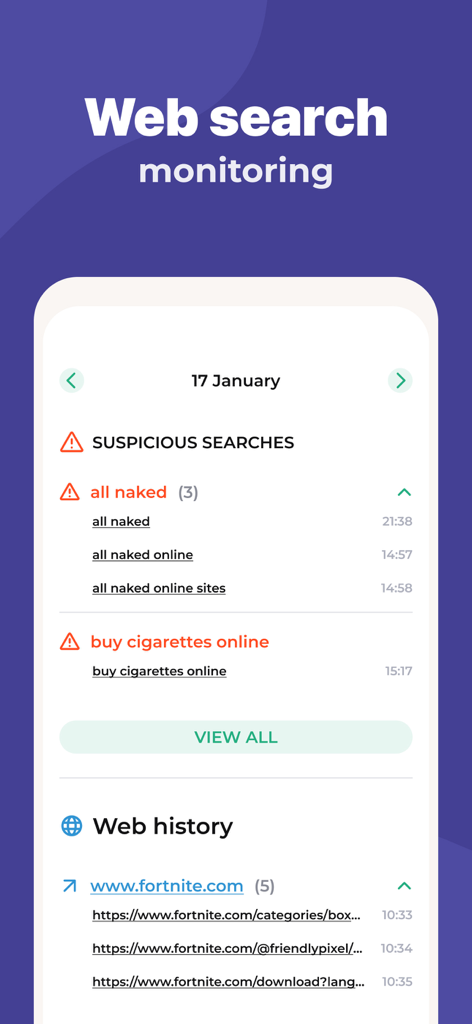
Kidsloxアプリのインターフェースに、不審な検索アラートと閲覧履歴が表示されるウェブ検索監視機能が表示されています。
Kidsloxアプリのインターフェースに、不審な検索アラートと閲覧履歴が表示されるウェブ検索監視機能が表示されています。

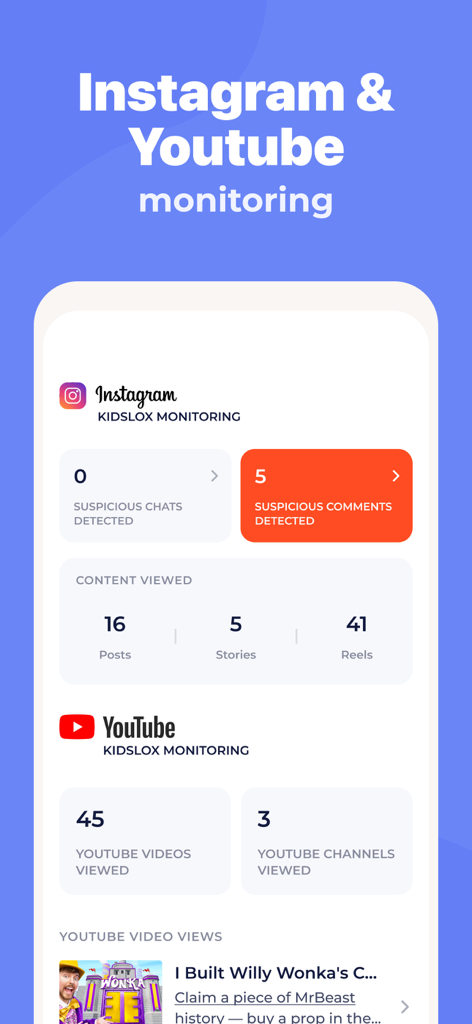
Kidsloxアプリの画面に、InstagramとYouTubeのアクティビティの監視統計(不審なコメントや閲覧コンテンツを含む)が表示されています。
Kidsloxアプリの画面に、InstagramとYouTubeのアクティビティの監視統計(不審なコメントや閲覧コンテンツを含む)が表示されています。

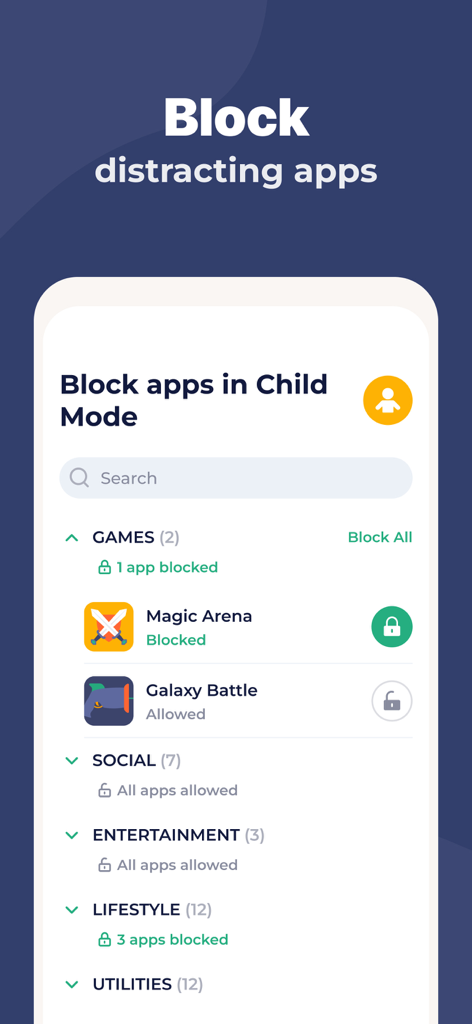
Kidsloxアプリのインターフェースに、子供モードで気を散らすモバイルアプリをブロックする方法が表示されています。
Kidsloxアプリのインターフェースに、子供モードで気を散らすモバイルアプリをブロックする方法が表示されています。

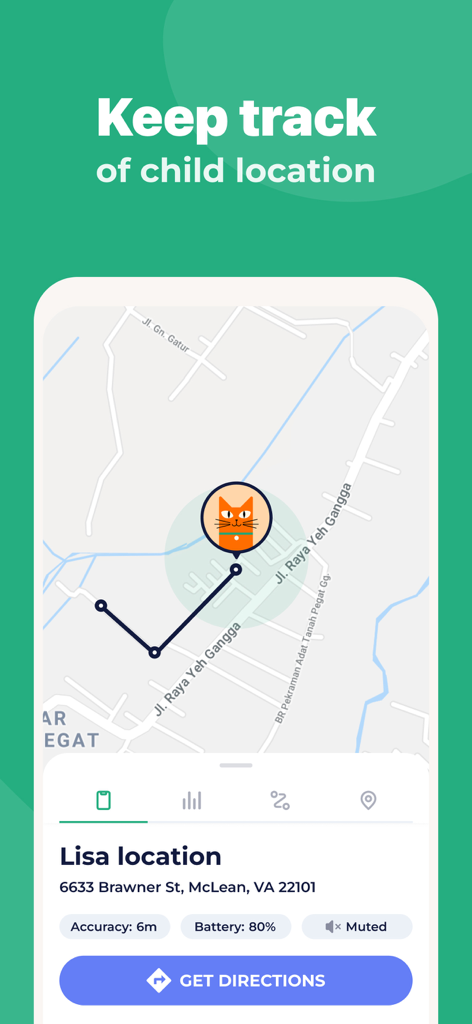
Kidsloxペアレンタルコントロールアプリに、子供のリアルタイムの位置が地図上に住所とバッテリー状況とともに表示されています。
Kidsloxペアレンタルコントロールアプリに、子供のリアルタイムの位置が地図上に住所とバッテリー状況とともに表示されています。

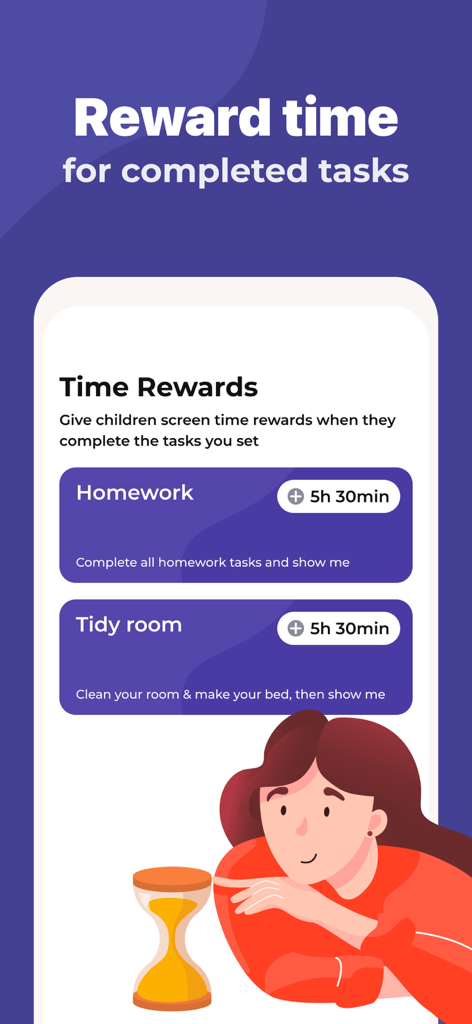
Kidsloxアプリの画面に、宿題や片付けなどの完了したタスクに対してスクリーンタイムを与える時間報酬機能が表示されています。
Kidsloxアプリの画面に、宿題や片付けなどの完了したタスクに対してスクリーンタイムを与える時間報酬機能が表示されています。

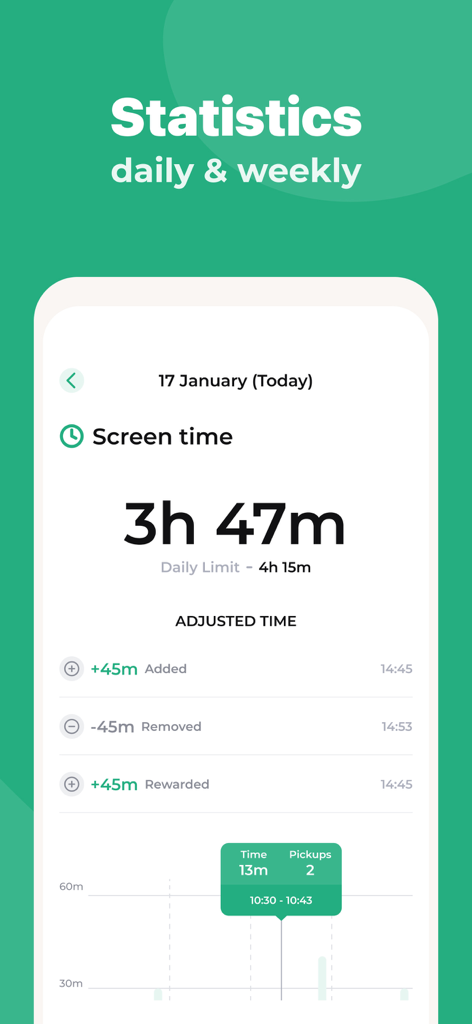
Kidsloxアプリの画面に、毎日のスクリーンタイム統計と報酬が表示されています。
Kidsloxアプリの画面に、毎日のスクリーンタイム統計と報酬が表示されています。

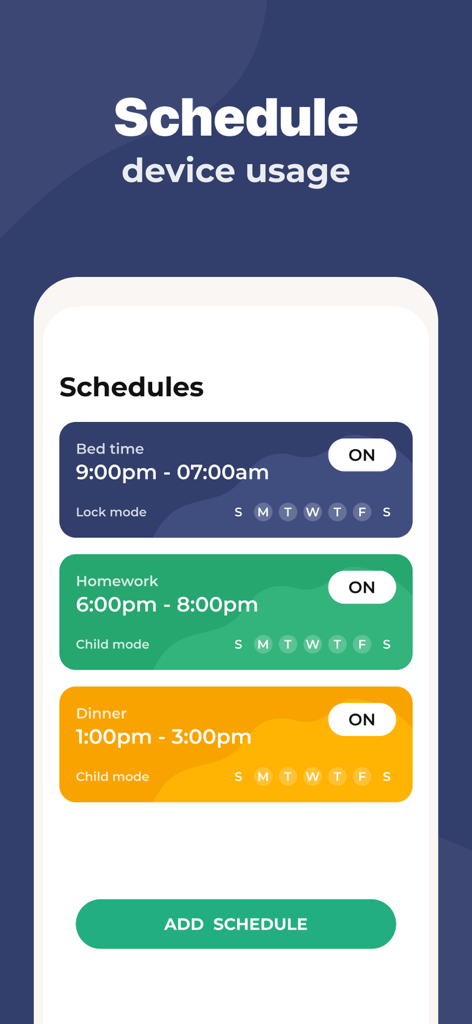
Kidsloxアプリのインターフェースに、就寝時間、宿題、夕食のためのデバイス使用をスケジュールする方法が表示されています。
Kidsloxアプリのインターフェースに、就寝時間、宿題、夕食のためのデバイス使用をスケジュールする方法が表示されています。

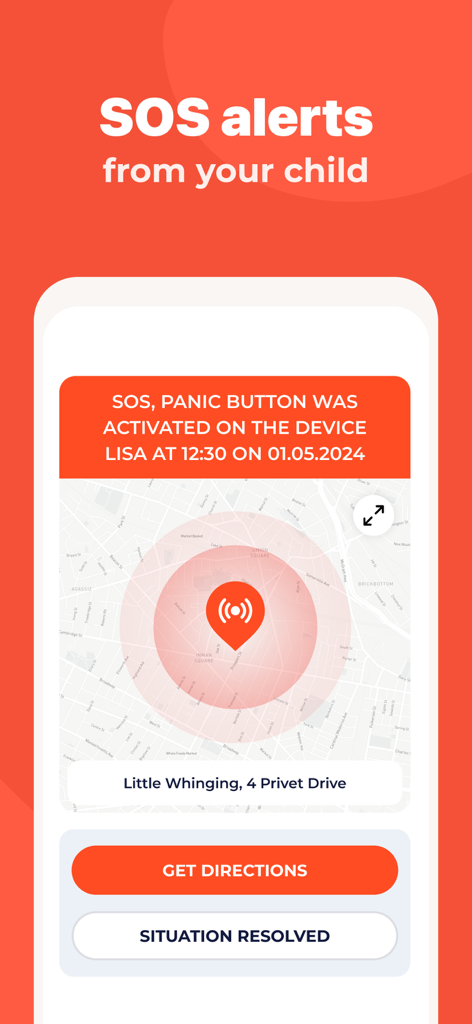
Kidsloxアプリの画面に、地図上に子供の位置が表示されたSOSパニックボタンアラートが表示されています。

Kidsloxアプリの画面に、地図上に子供の位置が表示されたSOSパニックボタンアラートが表示されています。

デジタルバランスに必要なすべて

このアプリを際立たせるツール、 6M+ 人のユーザーが選択.

自動スクリーン時間制限

宿題や就寝時間のための毎日の境界線とスケジュールを設定します。アプリに自動的に時計を管理させることで、「スクリーンタイムの戦い」を終わらせましょう。

🛡️

強力なコンテンツフィルタリング

成人向けコンテンツを即座にフィルタリングし、気を散らすソーシャルメディアやゲームをブロックします。子供一人ひとりに合わせた、安全で年齢にふさわしいインターネット体験を作成します。

🎁

スクリーンタイム報酬

家事を追加の数分と交換することで、責任感を育みます。家事をゲーム化し、子供たちにデジタル特権を得る価値を教えましょう。

アプリについて

について知っておくべきこと Parental Control App - Kidslox.

説明

Kidslox parental control app is the perfect way to manage your family’s screen time. Our parental controls let you block apps, block internet access, and filter web content with ease. Kidslox gives you control over your family’s device usage. Filter web content, block apps or websites, set weekly schedules with screen time limits, and see what your kids do with their devices, all from one place. Kidslox new Screen Time Rewards feature encourages your kids to do their homework and household chores! As the first multi-platform parental controls, Kidslox gives you remote control over iPhones from other devices or vice-versa. One account is all you need to manage your family’s screen time. Add up to 10 iPhones, iPads, iPods and other mobile devices and control your devices using the Kidslox app or any desktop or mobile web browser. The Kidslox location tracker helps you keep your family safe offline as well as online. Prioritize your family time now by taking a moment to place daily limits on your child’s screen time. Parental control has never been so easy. Kidslox features: Screen Time Controls • Set daily screen time limits • Give screen time rewards for completed chores • Use Schedules for device free homework time, dinnertime, bedtime and family time Family Location Tracker • See the location of your kids’ devices on the map • Get notifications when your kids leave or arrive at preset zones Parental Controls • See what your child's been doing on their device • Switch between different restriction levels at the touch of a button • Stop your clever kids from changing the restrictions with a unique Kidslox PIN Content Blocker • Disable disruptive apps individually • Filter pornography, gambling, violence and other adult content to give your child a safe browser experience • Block internet access completely for added safety • Block in-app purchases • Block Instagram, Facebook, Snapchat and other social networks • Block games like Minecraft, Clash of Clans and Pokémon Go Cross-Platform Coverage • Keep your child or teen safe across devices • Add up to 10 devices • Manage all devices from one app or web browser EXPERTS LOVE KIDSLOX Recommended by ITV This Morning Parenting Expert Sue Atkins, Sarah Ockwell-Smith, Mother of four, Parenting Expert and bestselling author of six parenting books and Amber Mac, Canadian TV personality and technology commentator. To use Kidslox you will need to download the app onto each device you wish to control. One paid account allows you to control up to 10 devices. Kidslox contains no advertisements. Kidslox parental control app offers a 3-day free trial of all Premium features. When the trial is over, access to features requires a subscription, with discounts for longer commitments. Subscription and payment are made via your iTunes account at confirmation of purchase and subscription automatically renews unless auto-renew is turned off at least 24-hours before the end of the current period. Otherwise, the account will be charged for renewal within 24-hours prior to the end of the current period. Cancellation of the current subscription is not allowed during the active subscription period. 'Lifetime subscription' does not auto-renew but gives ongoing access to Premium features for a one-off payment. Help and Support: Once you have downloaded Kidslox you will find all the help and online support you need from inside the app under our Help section. Find copies of our terms and conditions using the link below: https://kidslox.com/terms/ and privacy policy here: https://kidslox.com/privacy-policy/ Kidslox requires an internet connection to operate If a device has already been set up with an education or business MDM profile (Mobile Device Management) then you will not be able to add Kidslox unless you remove the original profile.

最新バージョン

10.9.0

サイズ

390.4 MB

リリース日

2014年9月23日

スクリーンタイムの戦いに終止符を打つ準備はできましたか?

Kidsloxを信頼して子供たちを保護し、デジタルバランスを回復させている600万人以上の親に加わりましょう。3日間の無料トライアルを今日から開始して、1つのシンプルなアプリから家族全員のデバイスを管理しましょう。

ダウンロード: App Storeダウンロード: Google Play
FAQ

よくある質問

について知っておくべきこと Parental Control App - Kidslox

Kidsloxとは何ですか?

Kidsloxは、家族がスクリーンタイムを管理するのに役立つペアレンタルコントロールアプリです。アプリやウェブサイトをブロックし、コンテンツをフィルタリングし、スケジュールを設定し、複数のプラットフォームでデバイスの使用状況を監視します。

Kidsloxはどのようにスクリーンタイムを管理しますか?

Kidsloxでは、1日のスクリーンタイム制限の設定、デバイス使用のための週次スケジュールの作成、完了したタスクに対するスクリーンタイム報酬の提供が可能です。デバイスの使用バランスを取るのに役立ちます。

Kidsloxは特定のアプリやウェブサイトをブロックできますか?

はい、Kidsloxは個々のアプリやウェブサイトをブロックします。ポルノやギャンブルのような露骨なコンテンツをフィルタリングし、Instagramのようなソーシャルメディアアプリをブロックし、インターネットアクセスを制限します。

Kidsloxには位置情報追跡機能が含まれていますか?

はい、Kidsloxにはファミリー位置情報トラッカーが含まれています。子供たちのデバイスの位置を地図上に表示し、事前に設定したゾーンに入ったり出たりしたときに通知を送信します。

Kidsloxのアカウントはいくつのデバイスを管理できますか?

1つのKidsloxアカウントで最大10台のデバイスを管理できます。これには、iPhone、iPad、iPod、その他のモバイルデバイスが含まれ、アプリまたはウェブブラウザ経由で制御されます。

Kidsloxは無料トライアルを提供していますか?

はい、Kidsloxは3日間の無料トライアルを提供しており、すべてのプレミアム機能にアクセスできます。トライアル終了後、継続してアクセスするにはサブスクリプションが必要です。

Kidsloxはウェブアクティビティやソーシャルメディアをどのように監視しますか?

Kidsloxはウェブ検索履歴を監視し、不審な検索を特定します。また、InstagramやYouTubeのアクティビティを監視し、不審なコメント/チャットを検出し、閲覧されたコンテンツを追跡します。

子供たちはKidsloxで追加のスクリーンタイムを獲得できますか?

はい、Kidsloxにはスクリーンタイム報酬機能があります。子供たちは、宿題や家事のようなタスクを完了することで追加のスクリーンタイムを獲得でき、ポジティブな行動を促進します。

MDMプロファイルがすでにデバイスに存在する場合はどうなりますか?

既存の教育またはビジネスモバイルデバイス管理(MDM)プロファイルがデバイスにある場合、Kidsloxを追加することはできません。元のMDMプロファイルをまず削除する必要があります。

KidsloxはSOSアラートを提供していますか?

はい、KidsloxはSOSアラートを提供しています。子供たちはデバイス上のパニックボタンを起動でき、その位置情報とともにアラートを保護者に送信します。

Kidsloxのサブスクリプションはどのように機能しますか?

サブスクリプションはiTunes経由で処理され、期間終了の24時間前にキャンセルされない限り自動的に更新されます。「ライフタイムサブスクリプション」は、1回の支払いで継続的なアクセスを提供します。

App information, icons, screenshots, and descriptions displayed on this page are sourced from the Apple App Store and are the property of their respective developers. Download estimates and rankings are based on MWM's proprietary models and may not reflect actual figures. This page is provided for informational and analytical purposes only.

Believe this page infringes your intellectual property? File a dispute