
このページはアプリまたはその開発者の公式ページではなく、情報提供および論評を目的として作成された独立した編集出版物です。明示的に別段の記載がない限り、アプリおよびその開発者は、MWM、Apple、Google Play、アプリのパブリッシャー、またはアプリの開発者と提携、承認、後援、認可、またはその他の公式的な関係はなく、このページのいかなる内容も、アプリがMWMのサービスを使用して開発されたことを意味するものではありません。すべての商標、ロゴ、スクリーンショット、その他のコンテンツはそれぞれの所有者の財産です。

PDF Scanner Converter Document
このアプリは、紙の束をデジタルの力に変える。手の中に事務処理の司令塔を構築する能力をユーザーに提供する。
ダウンロード
250k+ユーザー評価
評価数
1.4K開発元
カテゴリ
Utilities対応言語
33最新バージョン
3.5.6サイズ
98.0 MBリリース日
2021年2月15日多機能なモバイルドキュメント管理ソリューションの包括的評価
アプリ分析: PDF Scanner Converter Document
ドキュメントスキャン
このアプリは、紙文書、IDカード、領収書などを迅速かつ高品質にスキャンし、スマートなエッジ検出と自動補正で鮮明な結果を保証します。
PDF編集機能
本ツールは、注釈の追加、テキストのハイライト、ページの挿入・削除、内容の再配置、署名の追加など、PDFファイルを直接編集する機能を提供します。
PDF変換
ユーザーは、PDF、TXT、DOCなどのファイル形式間でシームレスに変換でき、画像を高品質なPDFドキュメントに変換することも可能です。
ファイルのインポートとエクスポート
このアプリは、さまざまな形式のファイルをデバイス、メール、クラウドからインポートでき、PDF、TXT、Word、Excel形式で簡単にエクスポートすることを可能にします。
ドキュメント共有
このアプリは、スキャンまたはインポートされたドキュメントを、メール、メッセンジャー、クラウドサービスを通じて迅速かつ安全に共有する機能を提供します。
PDF印刷
本ツールは、スキャンまたは編集されたドキュメントをワイヤレス印刷でスマートフォンから直接印刷することを可能にし、AirPrintなどの主要なプロトコルに対応しています。
数式ソルバー
この機能は、手書きの数式をスキャンして即座に解を提供し、数学を扱うユーザーにとって強力なツールとなります。
リアルタイム定規機能
ユーザーは、デバイスのカメラを使用してリアルタイムで正確な距離を測定でき、日常的なタスクや空間計画に役立ちます。
よくある質問
について知っておくべきこと PDF Scanner Converter Document
What types of documents can the PDF Scanner app scan?
The PDF Scanner app scans paper documents, passports, ID cards, books, invoices, images, receipts, and notes. It features smart edge detection and auto-enhancement for clear results.
What file formats does the PDF Scanner app support for export?
The PDF Scanner app supports exporting documents in PDF, TXT, Word, DOC, and Excel formats. This ensures versatile compatibility for sharing and further use of scanned files.
Can users edit PDF files within the PDF Scanner app?
Yes, users can edit PDF files directly within the PDF Scanner app. Features include adding annotations, highlighting text, inserting or deleting pages, rearranging content, and adding signatures.
Does PDF Scanner allow conversion of images to PDF?
Yes, PDF Scanner allows users to convert images to high-quality PDF documents. You can capture photos instantly or import from your gallery, with customizable layouts and page order.
How does the PDF Scanner & Document Editor app facilitate document sharing?
The PDF Scanner & Document Editor app facilitates easy document sharing. Users can share scanned or imported files with others via email, messengers, or various cloud services directly.
Does the PDF Scanner app include a math equation solver?
Yes, the PDF Scanner app includes a Math Equations Solver. It scans handwritten math equations and provides instant solutions, making it a powerful tool for academic or professional use.
Is OCR (Optical Character Recognition) available in the PDF Scanner app?
Yes, the PDF Scanner app provides OCR (Optical Character Recognition) functionality. This feature recognizes text from scanned documents, enabling extraction and further editing of content.
Can users protect their PDFs with a password in PDF Scanner?
Yes, users can protect their PDFs within the PDF Scanner app. The application offers a feature to secure documents with a password for enhanced privacy and control over files.
What are the supported file formats for importing into PDF Scanner?
The PDF Scanner app supports importing DOC, DOCX, TXT, RTF, HTML, EML, XLS, XLSX, PPT, PPTX, HEIC, BMP, and GIF file types from devices or cloud storage.
What is the user count for the PDF Scanner & Document Editor app?
The PDF Scanner & Document Editor app has over 1 million users. This significant user base demonstrates its reliability and popularity as an all-in-one document management solution.
以下のスクリーンショットと説明は、アプリの公式ストアリスティングから直接取得されたものであり、アプリ開発者の所有物です。
アプリストア
スクリーンショット

スマートフォンで書類を高速スキャンし、PDFやTXT形式で保存できます。自動エッジ検出と鮮明なスキャンにより、プロフェッショナルな品質を実現します。
高速スキャン

PDFファイルにテキストを追加したり、デジタル署名を行ったりできます。テキストの追加と署名の挿入により、承認プロセスが迅速化されます。
PDF編集機能

パスポートやIDカードを簡単にスキャンして電子化します。カード形式のスキャンとパスポートの認識により、重要な情報を安全にデジタル保存できます。
身分証を電子化

スキャンした書類をメールやクラウドサービスで手軽に共有できます。AirDropやメッセージングアプリ経由での共有と、クラウドへの直接保存に対応しています。
簡単共有
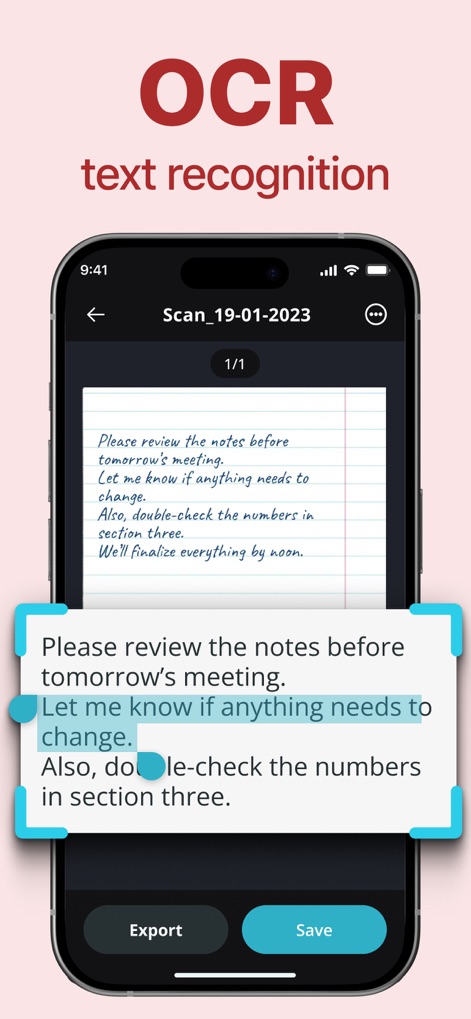
スキャンした画像からテキストを認識し、編集可能な形式に変換します。認識されたテキストの表示と選択により、必要な情報を簡単に抽出できます。
高精度OCR

重要なPDFドキュメントをパスワードで保護し、セキュリティを強化します。パスワード入力画面と視覚的なロックアイコンにより、ファイルの安全性が確保されます。
PDFを保護
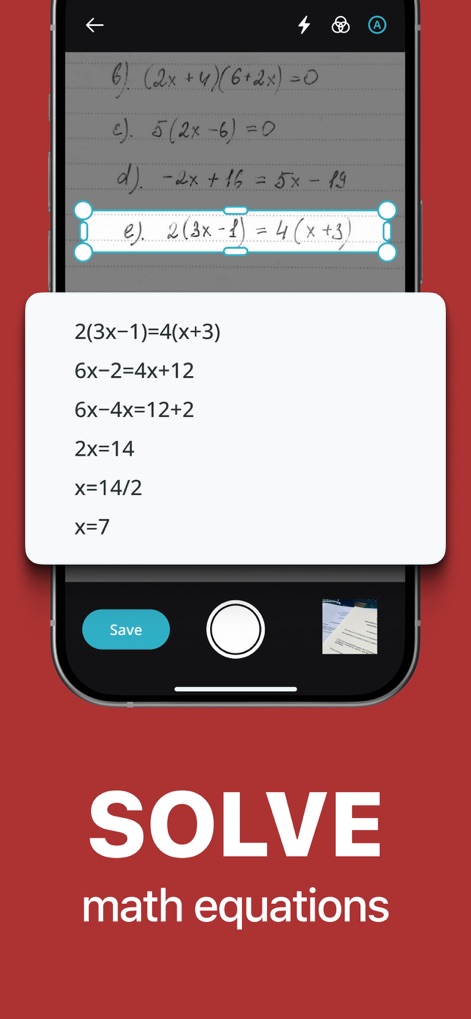
手書きの数式をスキャンし、リアルタイムで解答を得ることができます。数式のスキャン機能と詳細な解決ステップの表示により、学習や仕事が効率化されます。
数式を解決
説明
Download
類似アプリ
似た機能とユーザー体験を持つアプリ

PDF PRO Scan Image & Documents
Balzo srl

The PDF Scanner, PDF editor HQ
NEXT K.U.M. LTD

CamScanner - PDF Scanner App
INTSIG Information Co., Ltd

Adobe Scan: PDF & OCR Scanner
Adobe Inc.

WPS Office: PDF, Docs, Sheets
KINGSOFT OFFICE SOFTWARE CORPORATION LIMITED

iLovePDF - PDF Editor & Scan
ILOVEPDF S.L.

Scanner App: Genius Scan
The Grizzly Labs

Microsoft Lens: PDF Scanner
Microsoft Corporation

Clear Scan: Doc Scanner App
INDY MOBILE APP COMPANY LIMITED
このページはアプリまたはその開発者の公式ページではなく、情報提供および論評を目的として作成された独立した編集出版物です。明示的に別段の記載がない限り、アプリおよびその開発者は、MWM、Apple、Google Play、アプリのパブリッシャー、またはアプリの開発者と提携、承認、後援、認可、またはその他の公式的な関係はなく、このページのいかなる内容も、アプリがMWMのサービスを使用して開発されたことを意味するものではありません。すべての商標、ロゴ、スクリーンショット、その他のコンテンツはそれぞれの所有者の財産です。