
このページはアプリまたはその開発者の公式ページではなく、情報提供および論評を目的として作成された独立した編集出版物です。明示的に別段の記載がない限り、アプリおよびその開発者は、MWM、Apple、Google Play、アプリのパブリッシャー、またはアプリの開発者と提携、承認、後援、認可、またはその他の公式的な関係はなく、このページのいかなる内容も、アプリがMWMのサービスを使用して開発されたことを意味するものではありません。すべての商標、ロゴ、スクリーンショット、その他のコンテンツはそれぞれの所有者の財産です。


Square Fit Photo Video Editor
ソーシャルメディアの制限を打ち破り、完璧な投稿を実現する。
ダウンロード
10M+ユーザー評価
評価数
177.3K開発元
カテゴリ
Photo & Video対応言語
14最新バージョン
1.62.0サイズ
66.2 MBリリース日
2013年9月13日ソーシャルメディアコンテンツ作成の課題を解決
Square Fit Photo Video Editor アプリ分析
トリミング不要のフルサイズ投稿
ユーザーは、Instagramなどのソーシャルメディアに画像をトリミングせずにフルサイズで投稿でき、視覚的なインパクトを最大限に引き出すことが可能です。
豊富な背景・フレームオプション
本ツールは、ぼかし背景、パターン、単色など、多様な要素を用いてクリエイティブな背景をデザインし、非スクエア画像を魅力的に表示することを可能にします。
ソーシャルメディア向けサイズ調整
このアプリは、FacebookやInstagramの投稿およびストーリー向けに、様々なソーシャルメディアに合わせた最適なサイズ調整機能を提供し、コンテンツが各プラットフォームで完璧に表示されることを保証します。
ステッカーとテキストの追加
ユーザーは、多様なステッカーやフォントとスタイルを持つテキストキャプションを追加して、投稿に個性とメッセージ性を加え、エンゲージメントを高めることができます。
高解像度での保存と共有
ユーザーは、編集したコンテンツをカメラロールに高解像度で保存できるほか、主要なソーシャルメディアプラットフォームへ直接共有することが可能です。
プロフェッショナルなフィルター
このアプリは、30種類以上の無料フィルターを提供し、ユーザーのメディアを簡単に魅力的に際立たせ、視覚的な品質を向上させることができます。
よくある質問
について知っておくべきこと Square Fit Photo Video Editor
What is Square Fit Photo Video Editor?
Square Fit Photo Video Editor is an application designed to post full-size photos and videos to Instagram and other social media without cropping. It offers tools to move, rotate, scale media, and apply filters, text, stickers, borders, and backgrounds.
Can I post full-size photos on Instagram using Square Fit Photo Video Editor?
Yes, Square Fit Photo Video Editor enables users to post full-size photos and videos to Instagram without cropping. The app automatically fits the image to the selected canvas size or aspect ratio for social media sharing.
Does Square Fit Photo Video Editor include filters for editing?
Yes, Square Fit Photo Video Editor includes over 30 free professional filters. Users can apply these filters to their photos and videos to enhance their media before sharing.
What customization options are available for backgrounds in Square Fit Photo Video Editor?
Square Fit Photo Video Editor offers various background customization options, including blurred backgrounds, solid colors, and patterns. There are 40 free pattern backgrounds available, with over 100 patterns for premium users.
Can I add text and stickers to my photos in Square Fit Photo Video Editor?
Yes, Square Fit Photo Video Editor allows users to add text captions with many fonts and styles, as well as stickers, to their photos. Premium access unlocks all stickers and pro fonts.
What social media platforms does Square Fit Photo Video Editor support for sharing?
Square Fit Photo Video Editor supports sharing to various social media platforms including Instagram, Facebook, Twitter, and WhatsApp. Users can also save media to their camera roll or share via email and other apps.
How does the premium subscription for Square Fit Photo Video Editor work?
The Square Fit Photo Video Editor premium subscription provides unlimited access to features like all stickers, pro patterns, pro fonts, custom photo backgrounds, and no ads. It is a monthly subscription with a 3-day free trial.
Does Square Fit Photo Video Editor offer a free trial for its premium features?
Yes, Square Fit Photo Video Editor offers a 3-day free trial for its premium subscription. This allows users to access and experience unlimited premium content before committing to a monthly payment.
Where can I find the privacy policy for Square Fit Photo Video Editor?
The privacy policy for Square Fit Photo Video Editor is available online. Users can access it via the link provided in the app description: http://cushwayapps.com/app-privacy/squarefit/privacy.html.
Are there frames available in Square Fit Photo Video Editor?
Yes, Square Fit Photo Video Editor offers a selection of frames. There are over 50 frames to choose from, allowing users to add artistic borders and enhancements to their photos.
以下のスクリーンショットと説明は、アプリの公式ストアリスティングから直接取得されたものであり、アプリ開発者の所有物です。
アプリストア
スクリーンショット
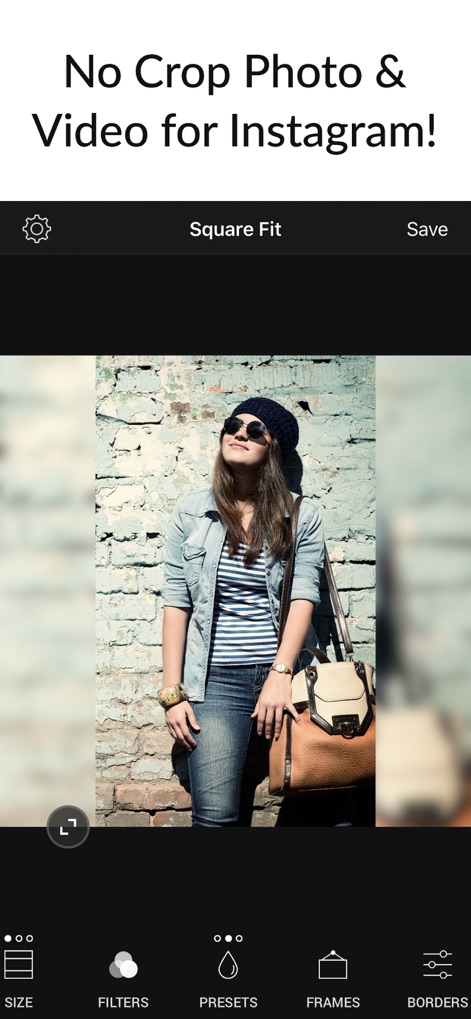
InstagramなどのSNSで、ユーザーは画像をクロップすることなく、元の縦横比を保ったまま投稿できます。本機能は、**ぼかし背景**と**元の画像サイズを維持する機能**で、写真の魅力を最大限に引き出します。
クロップ不要投稿

本ツールは、写真に洗練された雰囲気を加える**30種類以上のフィルター**を提供します。ユーザーは**豊富な背景デザイン**と組み合わせて、メディアを際立たせることができます。
美しいフィルター
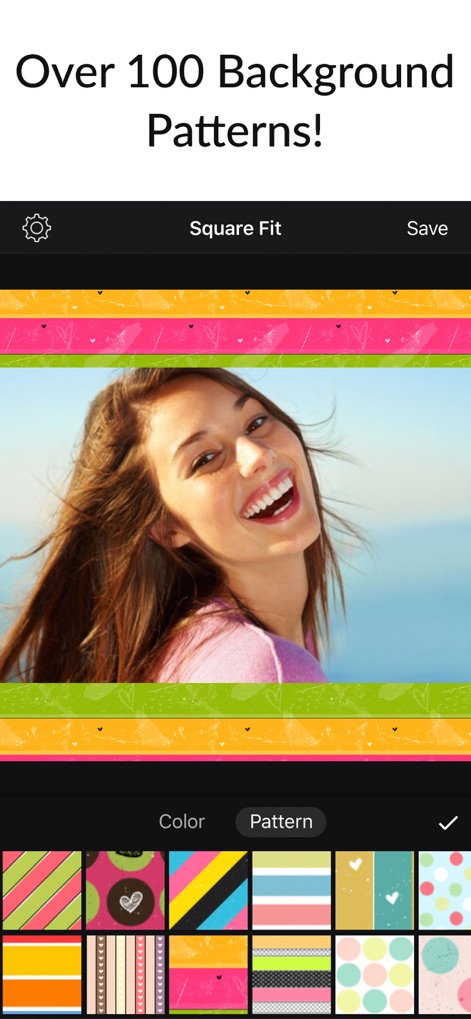
写真の雰囲気に合わせて、**100種類以上の魅力的な背景パターン**から選択可能です。ユーザーは**色鮮やかなデザイン**を自由自在に適用し、視覚的に魅力的な投稿を作成できます。
多彩な背景パターン
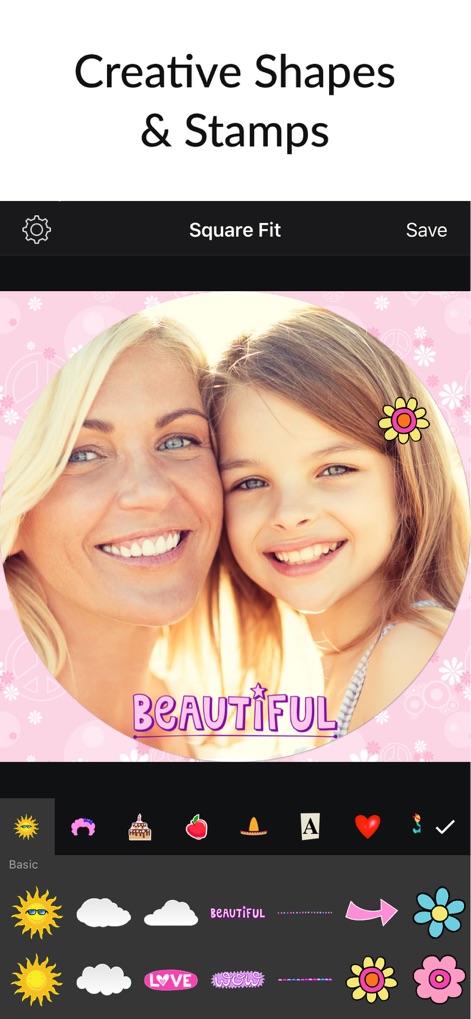
ユーザーは写真に個性を加えるために、**多様なスタンプ**やテキストを配置できます。**写真の形状を円形に調整する機能**と組み合わせることで、ユニークな表現が可能です。
クリエイティブスタンプ

写真にアートのようなタッチを加えるため、**50種類以上のフレームデザイン**を利用できます。ユーザーは**様々なスタイルの枠線**を選択し、画像の魅力をさらに引き立てることができます。
選べるフレーム
説明
Download
類似アプリ
似た機能とユーザー体験を持つアプリ

Image Size
Vitalij Schaefer

Compress Photos & Pictures
New Marketing Lab, Inc

JPEG-PNG Image file converter
handyCloset Inc.

Compress Photos, Resize Image
SMDA GROUP SP. Z OO

Photo Resizer: resize image
Ryoichi Fukugawa

Photo Compress - Shrink Pics
Brachmann Online Marketing GmbH & Co. KG

Size Image
Abdullah Albalawi

Photo & Picture Resizer
Farluner Apps Grzegorz Balcerzak

Easy Photo Compressor
Osawa Shunsuke
このページはアプリまたはその開発者の公式ページではなく、情報提供および論評を目的として作成された独立した編集出版物です。明示的に別段の記載がない限り、アプリおよびその開発者は、MWM、Apple、Google Play、アプリのパブリッシャー、またはアプリの開発者と提携、承認、後援、認可、またはその他の公式的な関係はなく、このページのいかなる内容も、アプリがMWMのサービスを使用して開発されたことを意味するものではありません。すべての商標、ロゴ、スクリーンショット、その他のコンテンツはそれぞれの所有者の財産です。