
このページはアプリまたはその開発者の公式ページではなく、情報提供および論評を目的として作成された独立した編集出版物です。明示的に別段の記載がない限り、アプリおよびその開発者は、MWM、Apple、Google Play、アプリのパブリッシャー、またはアプリの開発者と提携、承認、後援、認可、またはその他の公式的な関係はなく、このページのいかなる内容も、アプリがMWMのサービスを使用して開発されたことを意味するものではありません。すべての商標、ロゴ、スクリーンショット、その他のコンテンツはそれぞれの所有者の財産です。


ダウンロード
50M+ユーザー評価
評価数
530.6K開発元
カテゴリ
Photo & Video対応言語
12最新バージョン
2.82サイズ
495.0 MBリリース日
2017年9月24日Videoleap: AI動画エディターの機能分析
ソーシャルメディアクリエイター向けに最適化された主要機能の評価
AIを活用した高度な編集機能
このアプリは、AIによる動画エフェクト、既製テンプレート、オブジェクト除去機能を提供し、革新的なコンテンツ作成を可能にします。
トレンドを反映したテンプレートとコミュニティ連携
ユーザーは、リールやTikTok向けの多様な既製テンプレートを活用し、コミュニティからトレンドの編集を再現したり、自身のテンプレートを共有したりできます。
プロフェッショナルなレイヤーベース編集
本ツールは、グリーンバック合成、キーフレームアニメーション、レイヤーベース編集、モーション追跡などのプロフェッショナルな機能を提供し、複雑な映像表現を実現します。
多彩な特殊効果とフィルター
このアプリは、グリッチ、光線、フレアなどの特殊効果や、多彩なテキストオプション、ユニークなフィルターを備え、動画の雰囲気を自由に演出できます。
直感的かつ精密な編集コントロール
ユーザーは、直感的なタイムライン、非破壊編集、動画速度制御、クリップのトリミング・分割、色補正などにより、高精度な動画調整が可能です。
高品質なサウンド編集
本ツールは、100種類以上の効果音、音声の吹き込み、オーディオボリューム調整、音楽のリズムへの同期機能を提供し、動画の音質を向上させます。
よくある質問
について知っておくべきこと Videoleap: AI Video Editor
What is Videoleap by Lightricks?
Videoleap by Lightricks is an intuitive video editor that offers seamless video creation. It includes premade templates, AI tools, professional effects, and features for various social media platforms.
Does Videoleap offer AI video editing features?
Yes, Videoleap provides a full AI video editor. It includes AI video effects, premade AI templates, and the ability to remove unwanted objects from videos using AI technology.
Can I use Videoleap to create videos for TikTok and Reels?
Yes, Videoleap offers a vast selection of ready-to-use templates specifically designed for platforms like Reels, TikToks, and YouTube Shorts to simplify content creation.
What video editing tools are available in Videoleap?
Videoleap includes keyframe animations, Green Screen/Chroma Key, non-destructive editing, unlimited undo/redo, an intuitive timeline with zoom, and a video speed controller.
How can I change the speed of a video clip in Videoleap?
Videoleap features a video speed controller that allows users to adjust the speed of clips. You can slow down for dramatic effects or speed up the action directly within the app.
Does Videoleap support layer-based video editing?
Yes, Videoleap supports layer-based editing. Users can add videos, effects, text, and images, then reorder and customize them with transformation, masking, and blending modes for complex compositions.
Can Videoleap remove objects from videos using AI?
Yes, Videoleap includes an AI feature that can remove unwanted elements from videos. This "Remove objects from video with AI" tool is part of its comprehensive AI video editor.
What kind of text effects does Videoleap provide?
Videoleap offers a variety of trendy fonts, emojis, shadows, colors, opacity controls, and blending options for text effects. Users can also add animation and tracking to text.
Does Videoleap auto-save projects?
Yes, Videoleap automatically saves all projects. This feature allows users to confidently work on their videos whenever and wherever they choose without concerns about losing progress.
Where can I find the privacy policy for Videoleap?
The privacy policy for Videoleap is available on the Lightricks website. A direct link is provided within the app's description for user reference and transparency.
Can I use Videoleap to add music and sound effects to my videos?
Yes, Videoleap offers extensive sound editing features. It includes over 100 sound effects, options to dub audio and voice-overs, volume control, equalizer presets, and music syncing.
以下のスクリーンショットと説明は、アプリの公式ストアリスティングから直接取得されたものであり、アプリ開発者の所有物です。
アプリストア
スクリーンショット
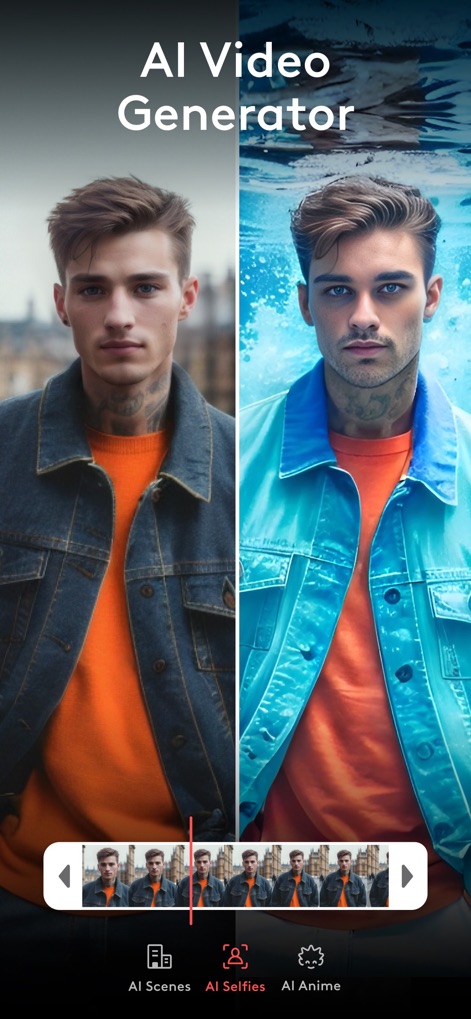
AIが生成するセルフィー
ユーザーはAIを使用してセルフィーを芸術的なスタイルに変換し、AIによるシーン変換機能やAIアニメフィルターを適用できます。

AIテンプレートを活用
このアプリは、未来的なシーンやキャラクターを含むAI生成のテンプレートを提供し、ユーザーはこれらのプリセットを活用して動画コンテンツを瞬時に作成できます。

タイムラプス編集
美しいタイムラプス動画を簡単に作成し、スライダーで再生速度を調整したり、特定のフレームをフリーズさせてドラマチックな効果を生み出すことができます。

リール用テンプレート
人気のリール用テンプレートを使って、トレンディなビジュアルコンテンツを素早く作成でき、テキストオーバーレイ機能でメッセージを魅力的に伝えられます。

魅力的なフィルター
ユーザーは、選択肢豊富なビデオフィルターを適用して動画の雰囲気を一変させることができ、視覚的に鮮やかなエフェクトや独自のスタイルを追加できます。

速度調整機能
動画の再生速度を細かくコントロールし、スローモーションでドラマチックな瞬間を強調したり、高速化して時間の経過を表現したりできます。

テキストエフェクト
多彩なフォントとエフェクトでテキストをカスタマイズし、動画に魅力的なタイトルやメッセージを追加したり、アニメーションやトラッキング機能を活用できます。

背景のカスタマイズ
被写体を背景から正確に切り抜き、別の背景に合成することで、クリエイティブな動画を作成でき、背景のぼかしや色調整も可能です。

プロフェッショナル編集
ユーザーはレイヤーベースの編集を駆使して、動画クリップの複製やミラーリングを行い、テキスト、ステッカー、フィルターなど複数の要素を直感的に重ね合わせることができます。
創造性の解放
このアプリを使えば、ユーザーは無限の創造性を解き放ち、AI機能とプロ仕様の編集ツールで魅力的な動画コンテンツを簡単に作成し、共有できます。
説明
Download
類似アプリ
似た機能とユーザー体験を持つアプリ

Edits: Video Editor
Instagram, Inc.

VLLO- Video Editor, Vlog Edits
vimosoft

YouCut - AI Video Editor
SHANTANU PTE. LTD.

必剪-B站官方出品
Shanghai Bilibili Animation Co.,Ltd

剪影 - 视频剪辑 & 卡点影集制作
Shanghai Jian Ji Software Technology Co., Ltd

Videoshop - Video Editor
Jajijujejo Inc.

VDIT - Video Maker & Editor
ImgBase, Inc.

Video Editor with Music・VidLab
Onelight Apps CY Ltd

Video Maker-movie maker&Editor
Changsha Fugui Bamboo Network Technology Co., Ltd.
このページはアプリまたはその開発者の公式ページではなく、情報提供および論評を目的として作成された独立した編集出版物です。明示的に別段の記載がない限り、アプリおよびその開発者は、MWM、Apple、Google Play、アプリのパブリッシャー、またはアプリの開発者と提携、承認、後援、認可、またはその他の公式的な関係はなく、このページのいかなる内容も、アプリがMWMのサービスを使用して開発されたことを意味するものではありません。すべての商標、ロゴ、スクリーンショット、その他のコンテンツはそれぞれの所有者の財産です。