
このページはアプリまたはその開発者の公式ページではなく、情報提供および論評を目的として作成された独立した編集出版物です。明示的に別段の記載がない限り、アプリおよびその開発者は、MWM、Apple、Google Play、アプリのパブリッシャー、またはアプリの開発者と提携、承認、後援、認可、またはその他の公式的な関係はなく、このページのいかなる内容も、アプリがMWMのサービスを使用して開発されたことを意味するものではありません。すべての商標、ロゴ、スクリーンショット、その他のコンテンツはそれぞれの所有者の財産です。


ダウンロード
5M+ユーザー評価
評価数
133.8K開発元
カテゴリ
Productivity対応言語
2最新バージョン
4.38.0サイズ
589.8 MBリリース日
2020年2月5日モバイル印刷と学術サポートのための主要機能
「小白学習印刷」アプリの機能分析
豊富な学習リソース
主要な教材バージョンをカバーし、学年別に最適化された豊富な学習リソースをユーザーに提供します。これにより、学業サポートが強化されます。
スマートドキュメント認識と補正
撮影したドキュメント画像をインテリジェントに認識し、傾きや歪みを補正することで、元のドキュメントに近いクリアな印刷品質を実現します。特に錯題整理において重要です。
広範なプリンター互換性
主要なWi-Fiプリンターブランドおよびモデルに幅広く対応しており、ユーザーは手持ちのプリンターを簡単に活用できます。
多様なファイル形式対応
WORD、PPT、EXCEL、PDF、画像など、様々なファイル形式を直接印刷することができ、ドキュメントの準備にかかる手間を削減します。
プラットフォーム連携によるドキュメント直接印刷
WeChat、QQ、WPS、釘釘、Baidu Netdisk、QQメールなどの主要プラットフォームから、モバイルデバイス上のドキュメントを直接アップロードし、簡単に印刷できます。
簡単なプリンター接続設定
モバイルデバイスから数ステップでプリンターを簡単にバインド(接続設定)でき、複数のブランドのプリンターに対応しています。
スマート画像編集
ドキュメントや写真のトリミング、コントラスト調整などの基本的な編集機能を提供し、印刷前に画像の品質を最適化できます。
家族共有機能
アプリの利用権限を家族とワンクリックで共有でき、複数のユーザーが印刷サービスを共同で利用できるため、家庭内での利便性が向上します。
よくある質問
について知っておくべきこと 小白学习打印-手机打印,教辅试卷错题整理
What is the 小白学习打印 app?
小白学习打印 is an intelligent mobile printing application. It supports mainstream WiFi printers, offers extensive learning resources, and provides advanced document management and correction features.
Is 小白学习打印 compatible with all WiFi printers?
Yes, 小白学习打印 is compatible with mainstream WiFi printers. It supports multiple printer models and brands, allowing for easy binding directly from your phone.
What file formats does 小白学习打印 support for printing?
小白学习打印 supports various formats including WORD, PPT, EXCEL, PDF, and image files. Users can print these document types directly from their mobile device.
Does 小白学习打印 offer learning resources?
Yes, 小白学习打印 provides massive learning resources. These resources cover mainstream textbook versions, are intelligently adapted by grade, and include content for primary, junior, and senior high levels.
How much does the SVIP subscription for 小白学习打印 cost?
The continuous weekly SVIP subscription for 小白学习打印 costs 19.8 RMB per week. Payment is processed through the user's iTunes account upon purchase confirmation.
How can I cancel my SVIP subscription for 小白学习打印?
To cancel your SVIP subscription, navigate to your iPhone's Settings. Then go to iTunes Store & App Store, tap Apple ID, select View Apple ID, and under Account Settings, tap Subscriptions. Locate and cancel the continuous weekly SVIP.
Does 小白学习打印 include photo editing capabilities?
Yes, 小白学习打印 includes smart photo editing functions. These features allow users to perform actions like cropping and adjusting contrast to optimize images before printing.
Can I use 小白学习打印 to manage error questions?
Yes, the app functions as an "Error Question Machine." It enables users to capture error questions, review them, and utilize features such as AI review plans and weekly error reviews.
Where can I upload documents for printing with 小白学习打印?
小白学习打印 supports one-click document uploads from various platforms. These include WeChat, QQ, WPS, DingTalk, Baidu Netdisk, and QQ Mailbox for direct printing.
Does 小白学习打印 correct scanned documents?
Yes, 小白学习打印 features an intelligent recognition system. This system applies gradient correction to photographed documents, effectively restoring them to their original clear and accurate appearance.
Does 小白学习打印 offer document conversion tools?
Yes, 小白学习打印 offers document conversion tools. Users can convert PDF files to Word, PPT, or Excel formats, and access features like document size conversion.
以下のスクリーンショットと説明は、アプリの公式ストアリスティングから直接取得されたものであり、アプリ開発者の所有物です。
アプリストア
スクリーンショット
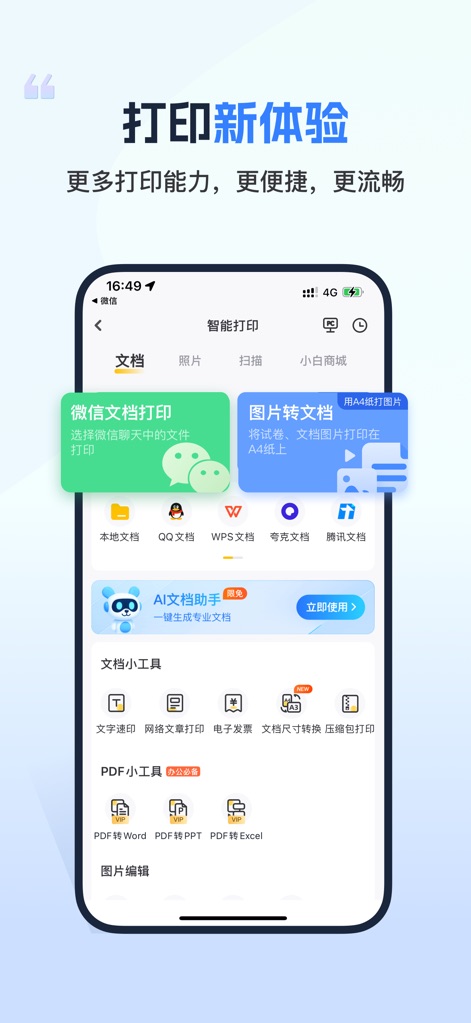
このアプリは、WeChat経由で受け取った文書や、画像をPDFなどの印刷可能な形式に変換する機能により、多様な文書の印刷ニーズに対応します。
手軽な印刷機能
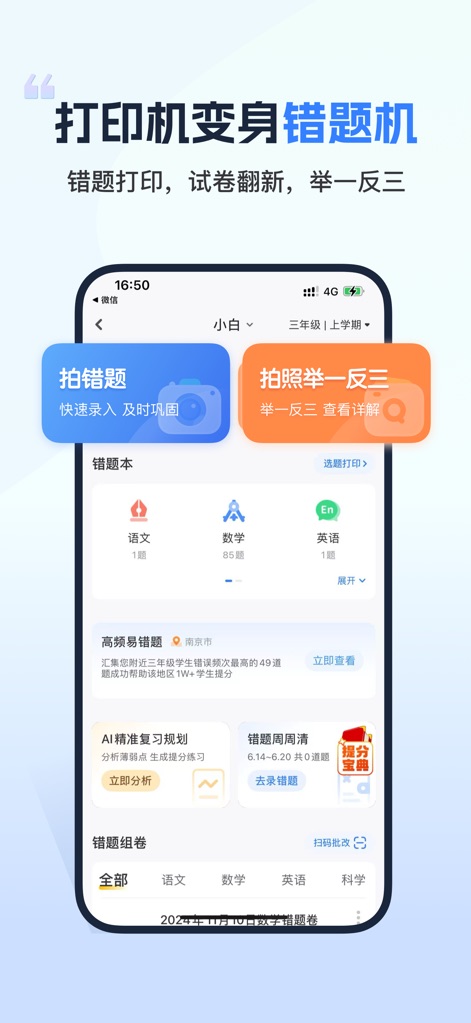
本ツールは、ユーザーが間違えた問題を写真に撮って記録し、さらに「一問三答」機能で類似問題を効果的に練習できる学習支援を提供します。
間違え克服を効率化
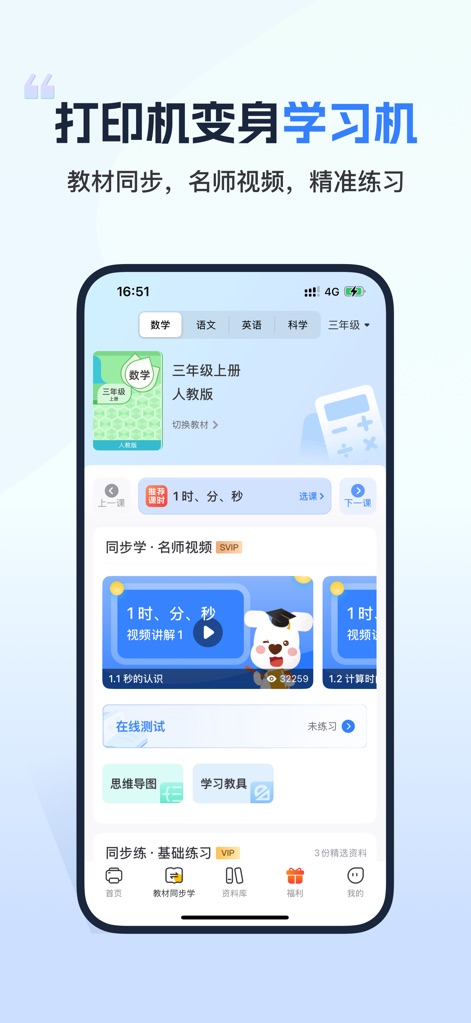
このアプリは、有名教師による動画授業や、教材に合わせた演習問題を提供することで、生徒の理解を深め、学力向上をサポートします。
学習を強力サポート
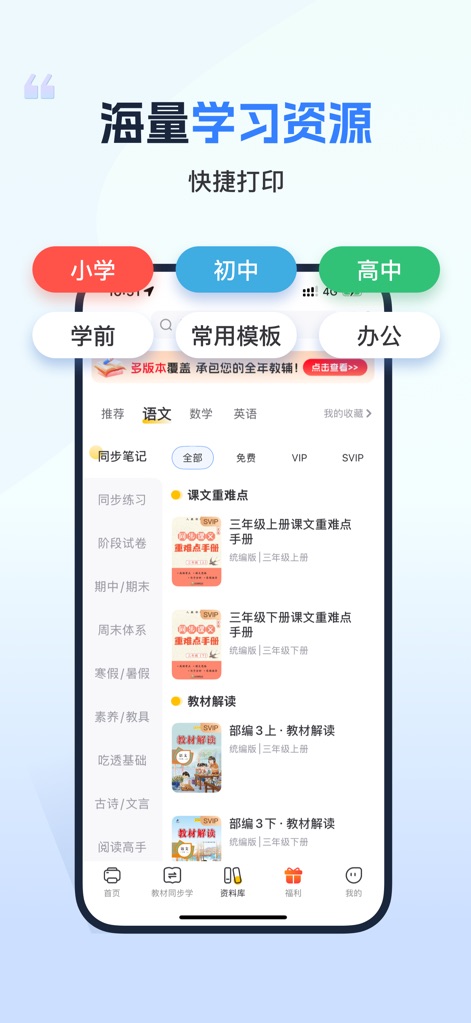
本ツールは、小学校から高校までの学年別学習資料と、同期ノートや段階別テストなど、豊富な種類の教育コンテンツを網羅しています。
豊富な学習コンテンツ
説明
Download
類似アプリ
似た機能とユーザー体験を持つアプリ

Docuslice - Poster Printing
Jeremiah Lachica

Printer Pro: Smart Printer App
Ivan Spyrydonov

HP
HP Inc.

Canon PRINT
Canon Inc.

Epson Smart Panel
Seiko Epson Corporation

Brother Mobile Connect
Brother Industries, LTD.

Epson iPrint
Seiko Epson Corporation

Printer App: Smart Print
Netpeak EOOD

Smart Printer App: iPrint
AppFusion OU
このページはアプリまたはその開発者の公式ページではなく、情報提供および論評を目的として作成された独立した編集出版物です。明示的に別段の記載がない限り、アプリおよびその開発者は、MWM、Apple、Google Play、アプリのパブリッシャー、またはアプリの開発者と提携、承認、後援、認可、またはその他の公式的な関係はなく、このページのいかなる内容も、アプリがMWMのサービスを使用して開発されたことを意味するものではありません。すべての商標、ロゴ、スクリーンショット、その他のコンテンツはそれぞれの所有者の財産です。