ATracker Time Tracker

ATracker Time Tracker

다운로드: App Store
로고: ATracker Time Tracker

ATracker 시간 추적기: 당신의 삶, 원탭으로 최적화

전문가, 부모, 성취가들을 위한 궁극의 라이프 대시보드. 시간 시각화, 지속적인 습관 형성, 노력 없이 전체적인 추적을 통해 하루를 되찾으세요.

개발사

WonderApps AB

카테고리

Productivity

다운로드

938K+

사용자 평점

4.6/5

총 평가 수

1K+

지원 언어

19

한눈에 보는 당신의 삶

이 인터페이스를 사용하는 938K+ 명의 사용자.

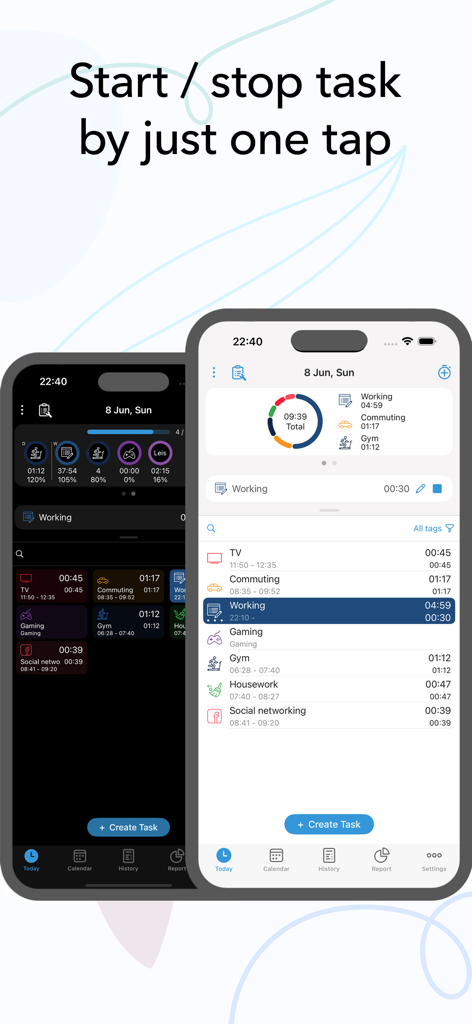
ATracker 앱 인터페이스는 원탭 작업 추적 및 일일 활동 로그를 보여줍니다.
ATracker 앱 인터페이스는 원탭 작업 추적 및 일일 활동 로그를 보여줍니다.

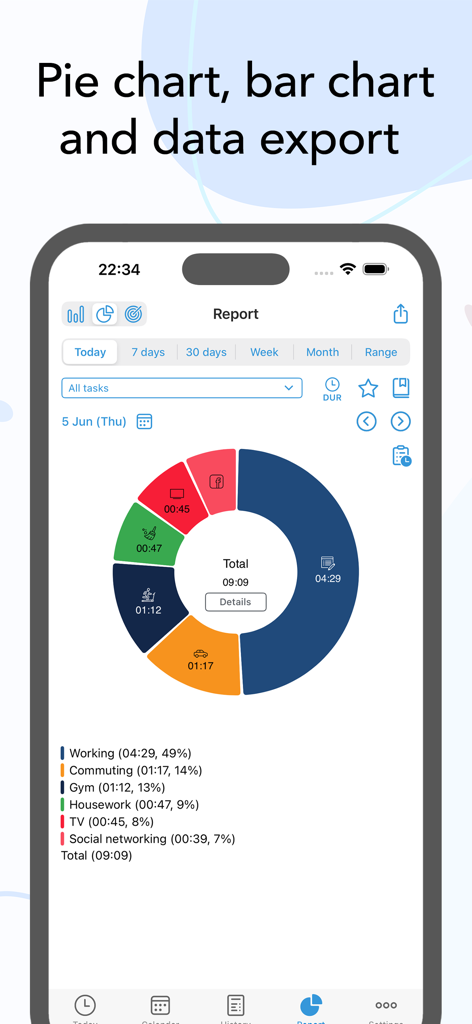
ATracker 앱 일일 보고서는 작업 및 체육관과 같은 활동의 다채로운 파이 차트 분석을 보여줍니다.
ATracker 앱 일일 보고서는 작업 및 체육관과 같은 활동의 다채로운 파이 차트 분석을 보여줍니다.

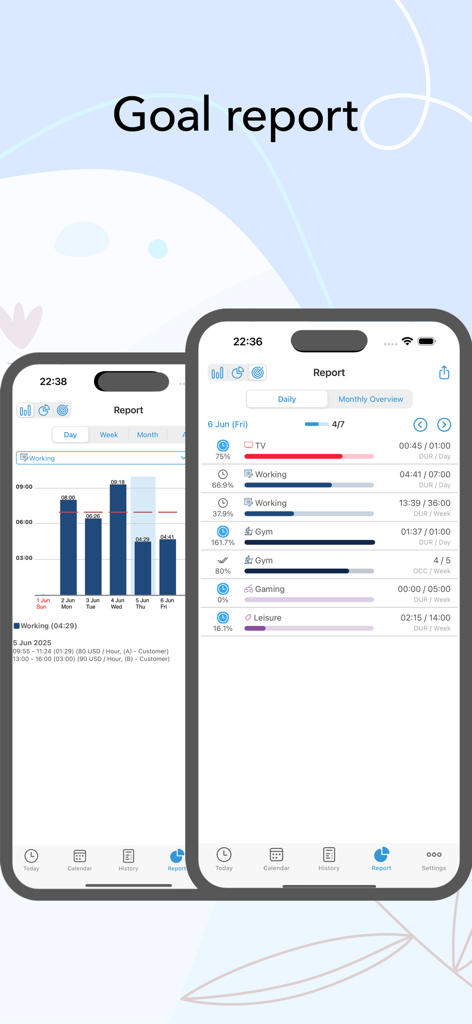
모바일 앱 인터페이스는 진행률 표시줄 및 다양한 일일 활동에 대한 막대 그래프가 있는 시간 추적 목표 보고서를 보여줍니다.
모바일 앱 인터페이스는 진행률 표시줄 및 다양한 일일 활동에 대한 막대 그래프가 있는 시간 추적 목표 보고서를 보여줍니다.

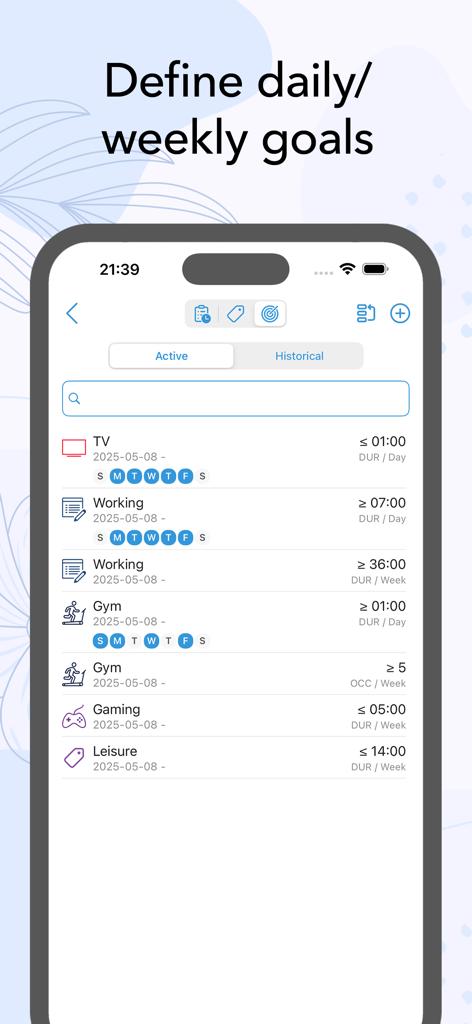
휴대폰 화면에 ATracker 앱 목표 인터페이스가 표시되며, 업무, 체육관, 게임에 대한 일일 및 주간 목표가 표시됩니다.
휴대폰 화면에 ATracker 앱 목표 인터페이스가 표시되며, 업무, 체육관, 게임에 대한 일일 및 주간 목표가 표시됩니다.

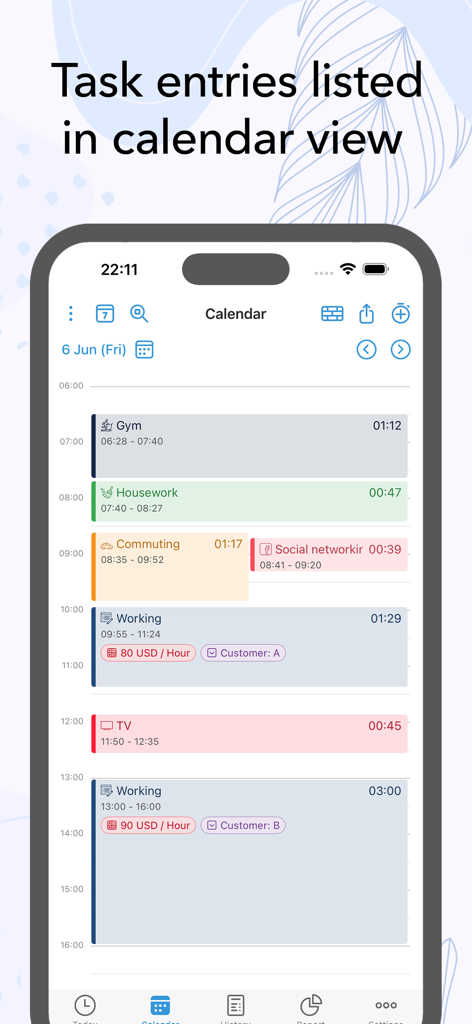
ATracker 앱 인터페이스는 달력 보기에 색상으로 구분된 작업 항목이 있는 일일 일정을 보여줍니다.
ATracker 앱 인터페이스는 달력 보기에 색상으로 구분된 작업 항목이 있는 일일 일정을 보여줍니다.

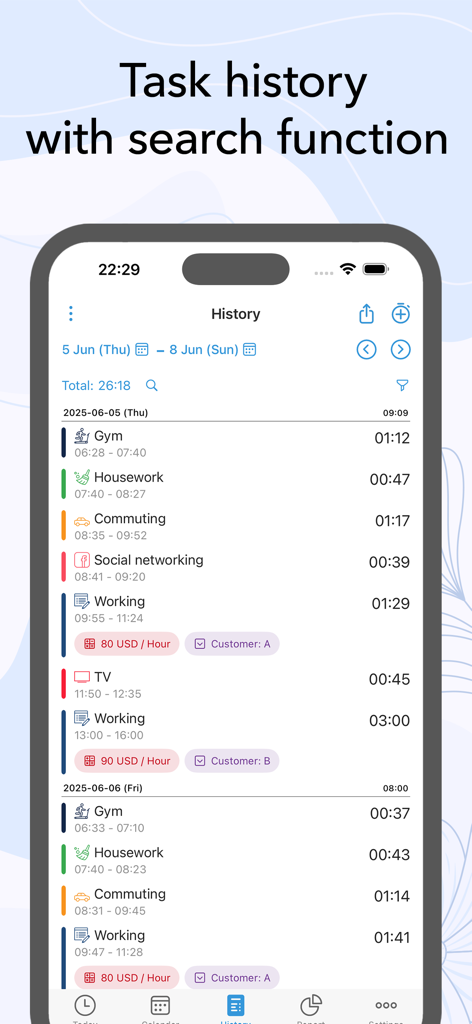
ATracker 앱의 상세한 작업 기록 로그는 다양한 일일 활동과 검색 기능을 보여줍니다.
ATracker 앱의 상세한 작업 기록 로그는 다양한 일일 활동과 검색 기능을 보여줍니다.

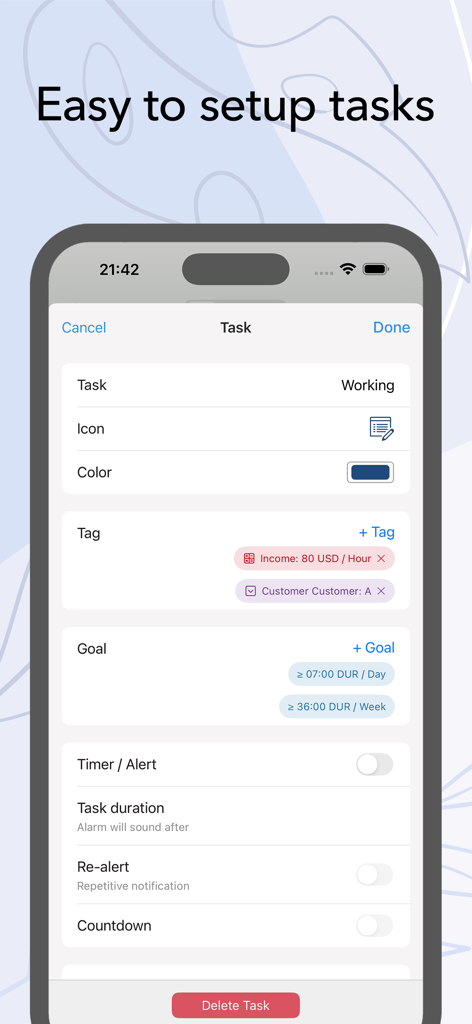
ATracker 모바일 앱 인터페이스는 태그, 목표 및 타이머 설정 옵션을 포함한 쉬운 작업 설정을 보여줍니다.
ATracker 모바일 앱 인터페이스는 태그, 목표 및 타이머 설정 옵션을 포함한 쉬운 작업 설정을 보여줍니다.

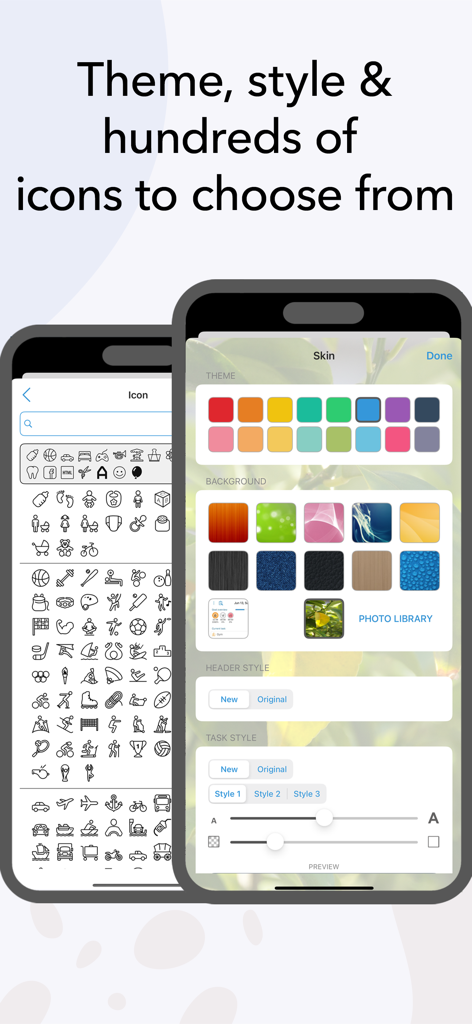
ATracker 앱 화면은 색상 테마, 배경 이미지 및 대규모 작업 아이콘 라이브러리에 대한 다양한 사용자 정의 옵션을 보여줍니다.
ATracker 앱 화면은 색상 테마, 배경 이미지 및 대규모 작업 아이콘 라이브러리에 대한 다양한 사용자 정의 옵션을 보여줍니다.

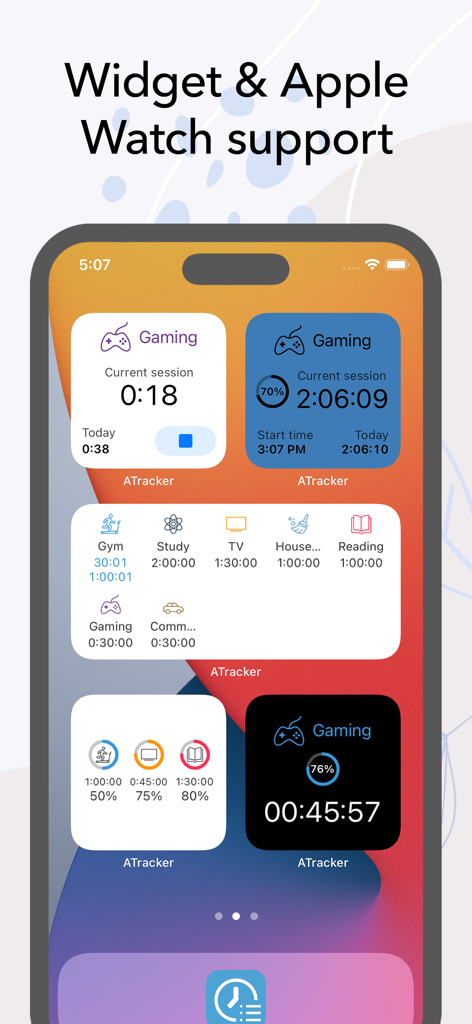
iPhone 홈 화면에는 게임, 학습, 체육관 세션과 같은 작업을 추적하는 다양한 ATracker 생산성 위젯이 표시됩니다.
iPhone 홈 화면에는 게임, 학습, 체육관 세션과 같은 작업을 추적하는 다양한 ATracker 생산성 위젯이 표시됩니다.

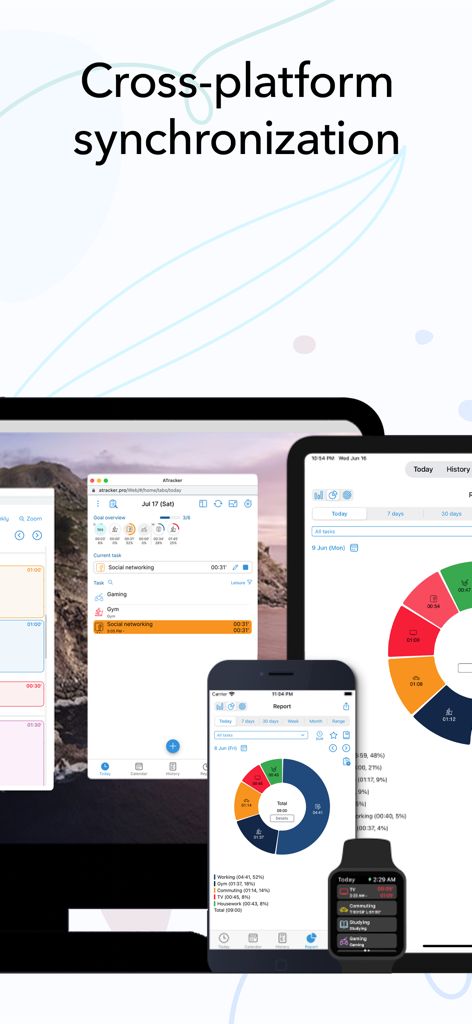
iPhone, iPad, Apple Watch 및 데스크톱 컴퓨터 간에 동기화된 ATracker 시간 추적 데이터

iPhone, iPad, Apple Watch 및 데스크톱 컴퓨터 간에 동기화된 ATracker 시간 추적 데이터

시간을 관리하고 삶을 최적화하세요

이 앱을 돋보이게 하는 도구, 938K+ 명의 사용자가 선택.

즉각적인 원탭 정확성

결정 피로를 제거하고 흐름을 유지하세요. 단 한 번의 탭으로 모든 활동을 추적하거나 중지하세요. 이동 중인 바쁜 멀티태스커에게 완벽합니다.

🎨

개인 맞춤형 라이프 대시보드

경력 마일스톤부터 가족 시간까지, 당신의 삶 전체를 시각화하세요. 개인의 정체성을 반영하는 수백 가지 아이콘과 색상 코드로 경험을 맞춤 설정하세요.

📈

실행 가능한 통찰력 및 보고서

인터랙티브 차트와 내보낼 수 있는 보고서로 시간을 데이터로 전환하세요. 진행 상황에 대한 시각적 증거를 통해 목표를 달성하고 지속 가능한 습관을 만드세요.

앱 소개

에 대해 알아야 할 모든 것 ATracker Time Tracker.

설명

Life is precious and so is your time. And keeping that in mind, ATracker is here to help you achieve more of your goals, build a sustainable habit, and boost your productivity to a new height. ATracker is a simple yet very powerful time tracking app and productivity tool that allows you to use it with minimal setup. Having a track of your precious time has never been easier with our one-tap to start/stop time tracking. As the leading time tracking app, ATracker also offers bar or pie charts showcasing where your time went. Lots of features for self-development The fully customizable user interface allows you to turn this habit tracker into your own. The tracking app also comes with the option of categorizing tasks with tags; data export; sync data between multiple devices for the shortest path towards self-improvement and the perfect boost of productivity. It's a fresh way to organize your day and make the most out of it … with just a few taps. SCOPE ATracker is a clean and minimalistic approach to, • Track time of different tasks and projects at work • Track time of School studies and projects • Track time of Exercises • Track time of Socializing • Track time of Homemaking tasks • Track time of Baby or child daily activities • Hobby projects • Or any activity people want to track and control We believe that time tracking should be effortless. Here are some of the key features ATracker offers • Start and stop tracking a task with just one tap. • Overview of today's time spending on the Today tab. • Interactive goal system for self-improvement. • Complete activity log. Show activities on any given date. Add missed or modify existing activity. • Customization of activities with hundreds of unique icons to choose from. You can also color code the activities for a personalized time tracking experience. • Ability to keep notes for each task entry. • Statistics showed in bar charts and pie charts. • Group tasks by tags and allow users to filter tasks by tag on the Today tab, as well as aggregate the data by tag in reporting. • The activity timer does not stop even when the application is not running, or your mobile is in sleep mode. • Set alarm for activities. The alarm will sound even when the app is not running. • Widget to see your data on-screen at all times. • Gesture support • Full customization of UI with more skins and allow the user to use their own image as background. PRO FEATURES With an only one-time investment, you will get to enjoy, - No Ads. - Unlimited tasks - Data export with PDF and CSV file. - Able to keep notes for each task entry. - Full customization of UI with more skins and allow user to use own image as background. WEB SUBSCRIPTION With web subscription, ATracker supports sync across multiple devices. It also provides web access to ATracker services besides the app. This add-on is optional. • ATracker subscriptions purchased in-app renew monthly or yearly depending on your plan. Plan pricing may vary by country. • Payment will be charged to iTunes Account at confirmation of purchase • Subscription automatically renews unless auto-renew is turned off at least 24-hours before the end of the current period • Account will be charged for renewal within 24-hours prior to the end of the current period, and identify the cost of the renewal • Subscriptions may be managed by the user and auto-renewal may be turned off by going to the user's Account Settings after purchase • Any unused portion of a free trial period, if offered, will be forfeited when the user purchases a subscription to that publication, where applicable SUPPORT Visit https://support.wonderapps.se or contact us at support@wonderapps.se Terms of Service: https://atracker.pro/atracker_TOS_APP.html Privacy Policy: https://atracker.pro/atracker_policy_APP.html Life is precious and so is your Time. So, stop wasting your time and organize your life the right way NOW.

최신 버전

17.21

크기

135.2 MB

출시일

2012년 5월 1일

시간 관리를 시작할 준비가 되셨나요?

원탭으로 업무, 취미, 가정생활을 추적하는 938,000명 이상의 사용자와 함께하세요. 지금 ATracker를 다운로드하고 하루가 실제로 어디로 가는지 알아보세요.

다운로드: App Store

App information, icons, screenshots, and descriptions displayed on this page are sourced from the Apple App Store and are the property of their respective developers. Download estimates and rankings are based on MWM's proprietary models and may not reflect actual figures. This page is provided for informational and analytical purposes only.

Believe this page infringes your intellectual property? File a dispute