CalenGoo Calendar
CalenGoo Calendar
다운로드: App Store

이 페이지는 앱이나 개발자의 공식 페이지가 아니며, 정보 제공 및 논평을 목적으로 작성된 독립 편집 간행물입니다. 명시적으로 달리 언급되지 않는 한, 해당 앱이나 개발자는 MWM, Apple, Google Play, 앱 퍼블리셔 또는 앱 개발자와 제휴, 보증, 후원, 승인 또는 공식적으로 연결되어 있지 않으며, 이 페이지의 어떤 내용도 해당 앱이 MWM의 서비스를 사용하여 개발되었음을 의미하지 않습니다. 모든 상표, 로고, 스크린샷 및 기타 콘텐츠는 해당 소유자의 자산입니다.

로고: CalenGoo Calendar
다운로드: App Store

CalenGoo Calendar

이동 중에도 Google 캘린더와 iOS 캘린더를 데스크탑 수준으로 완벽하게 제어하세요. 깊이 있는 사용자 지정, 통합 작업, 타협 없는 안정적인 오프라인 액세스를 필요로 하는 높은 효율성의 전문가를 위해 설계되었습니다.

주요 수치

다운로드

400K+

사용자 평점

3.7/5

총 평가 수

10K+

개발사

Gunia UG (haftungsbeschrankt)

카테고리

Productivity

지원 언어

9

최신 버전

1.5.103

크기

30.1 MB

출시일

2009년 1월 16일
기능

타협 없는 전문적인 캘린더 관리

데스크탑 Google 캘린더의 모든 강력한 기능을 iPhone으로 가져오세요. 정밀성, 깊이 있는 사용자 지정, 원활한 작업 통합을 요구하는 파워 유저를 위해 설계되었습니다.

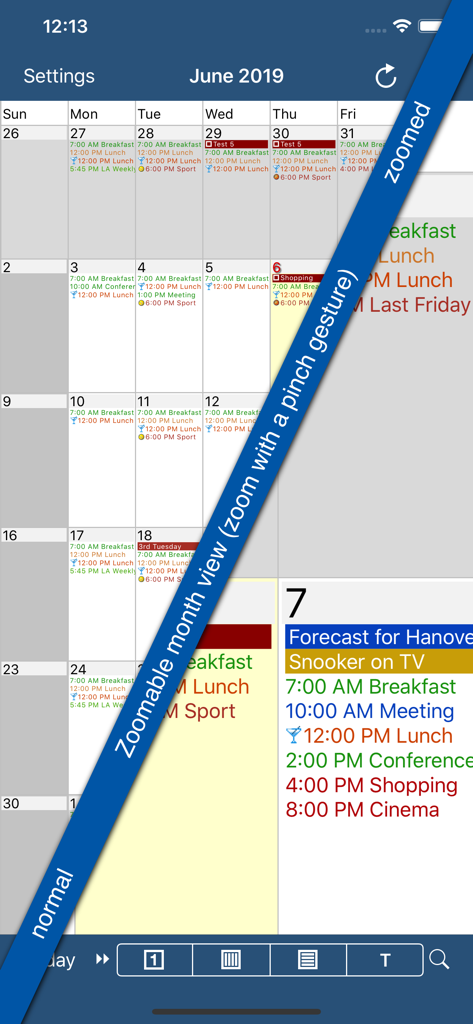
데스크탑급 월별 보기

점만 보고 찡그리지 마세요. 사용자 지정 Google 이벤트 색상과 아이콘으로 완벽하게 재현되는, 데스크탑 경험을 복제한 확대/축소 가능한 고화질 월별 보기를 얻으세요.

통합 작업 워크플로

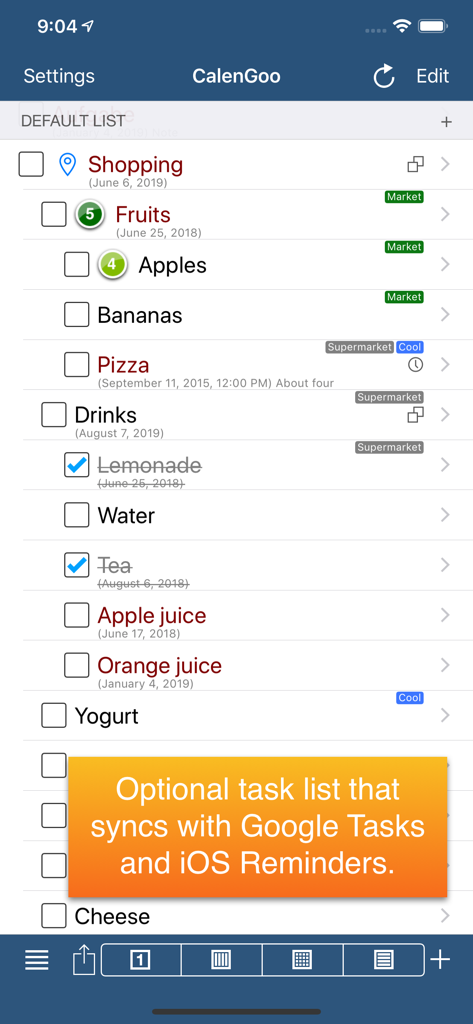
Google 작업 및 iOS 미리 알림을 캘린더에서 직접 관리하세요. 마감일과 약속을 하나의 통합된 보기로 보고 일일 계획을 간소화하세요.

다음 스크린샷과 설명은 앱의 공식 스토어 목록에서 직접 가져온 것이며 앱 개발자의 자산입니다.

앱 스토어

스크린샷
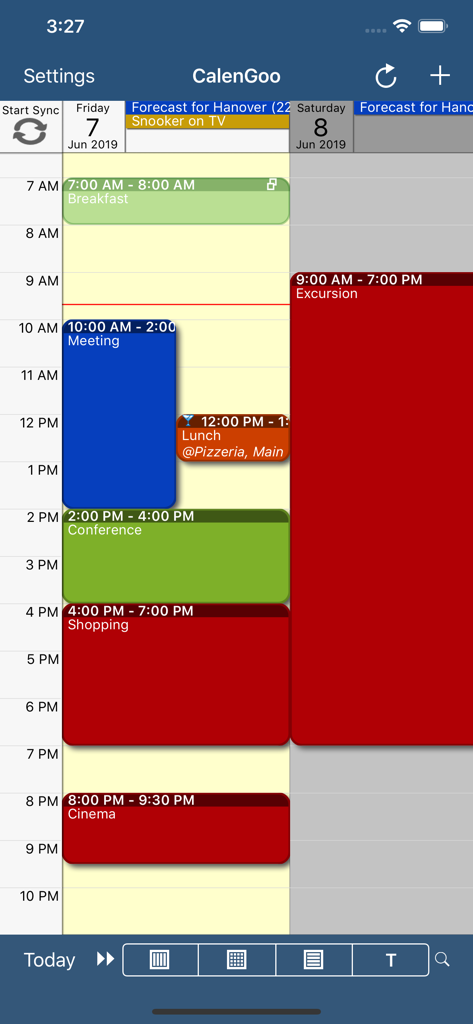
CalenGoo Calendar - CalenGoo 캘린더 앱의 색상 구분된 이벤트가 있는 일일 일정

CalenGoo 캘린더 앱의 색상 구분된 이벤트가 있는 일일 일정

CalenGoo Calendar - 색상 구분된 이벤트 세부 정보가 있는 확대/축소 가능한 월별 보기 기능을 선보이는 CalenGoo 캘린더 앱 스크린샷
색상 구분된 이벤트 세부 정보가 있는 확대/축소 가능한 월별 보기 기능을 선보이는 CalenGoo 캘린더 앱 스크린샷

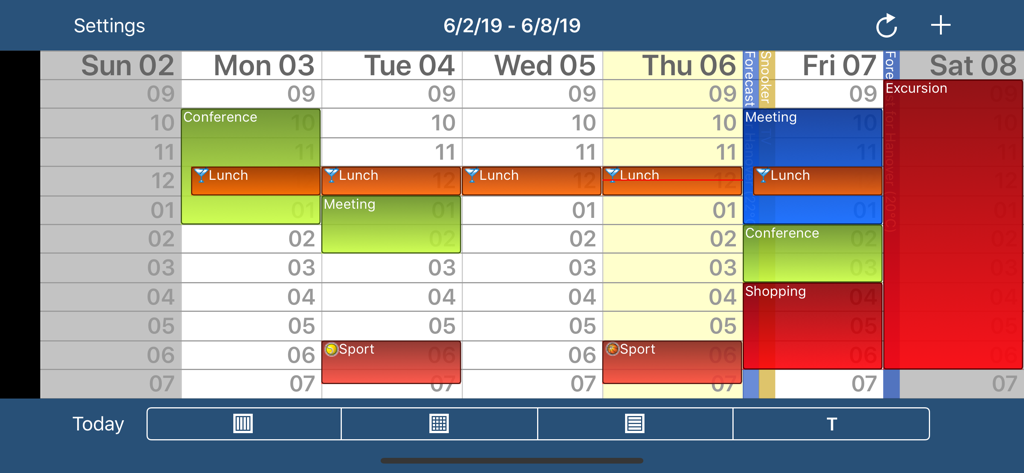
CalenGoo Calendar - 색상 구분된 이벤트 및 시간 슬롯이 있는 CalenGoo 캘린더 앱의 주간 보기
색상 구분된 이벤트 및 시간 슬롯이 있는 CalenGoo 캘린더 앱의 주간 보기

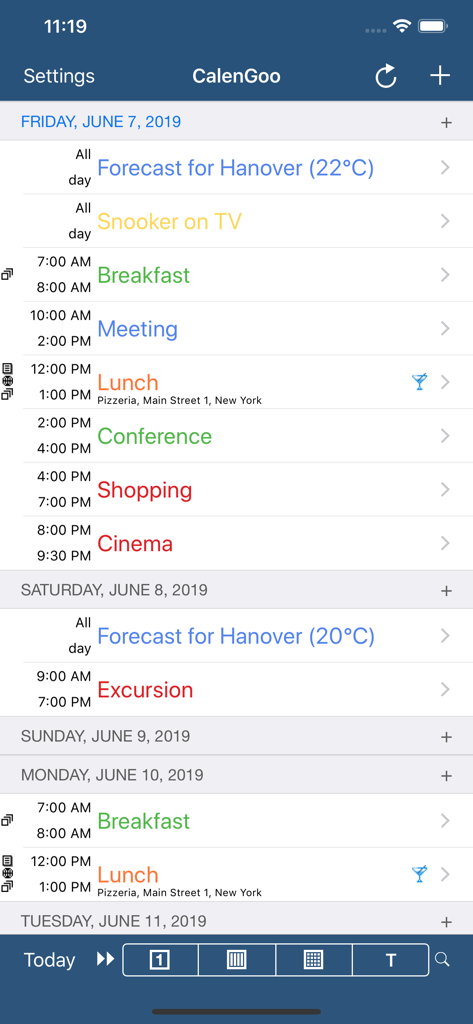
CalenGoo Calendar - 이벤트 및 시간이 있는 색상 구분된 일일 일정을 표시하는 CalenGoo 캘린더 의제 보기
이벤트 및 시간이 있는 색상 구분된 일일 일정을 표시하는 CalenGoo 캘린더 의제 보기

CalenGoo Calendar - Google 작업 및 iOS 미리 알림 동기화 알림이 있는 쇼핑 작업 목록을 보여주는 CalenGoo 앱 스크린샷

Google 작업 및 iOS 미리 알림 동기화 알림이 있는 쇼핑 작업 목록을 보여주는 CalenGoo 앱 스크린샷

설명

CalenGoo gives you a fast and easy way to access and modify your Google Calendar with your iPhone, iPod Touch or iPad. It can also be used when you have no Internet connection, using the cached data. Changes are saved and uploaded the next time you are connected. The calendar view is similar to the web view of Google Calendar. Events are displayed using the same calendar colors that you use in your Google Calendar, even Google's event colors are supported (please see http://www.calengoo.com/cc ). It also recognizes which calendars are visible and which are hidden. So the view should match the view of your Google Calendar as much as possible. CalenGoo also has a month view similar to that of Google Calendar. It can be zoomed and panned to quickly get an overview over the events of a month. Zooming the month is done by using the two-finger-zoom gesture that you know from Safari and the photo application. A double tap opens the tapped day. It also supports the same kinds of recurrence rules as Google Calendar and displays recurring events correctly even when you are offline or scroll far into the future. You can also use Google Calendar's feature to invite people to events and see their status (accepted, declined, maybe, no answer). They will get an invitation email with links to e.g. accept or decline the invitation. Google Calendar has an integrated task list, called Google Tasks. Tasks with a due date are displayed on the corresponding days of the calendar. CalenGoo can do the same, it can sync this list, display your tasks in the calendar views and in a list view and it even makes your tasks available offline. You can edit and add tasks and the changes will be synced with Google Tasks. You either need a (free) Google Calendar account to use this app or you can use it with your iOS calendars. However using it with Google Calendar has a few advantages. To get more information, screenshots and a tutorial, please go to http://www.calengoo.com If you have any problems or suggestions, please send an email to calengoo@dgunia.de or take a look at CalenGoo's support website to get help. If you think the font is too small and hard to read, you can increase the font size of all calendar views in the settings under "Settings", "Display and Use". Features ( http://www.calengoo.com ): - Drag&drop to quickly copy and move events - Templates to quickly create similar events again. They can even be combined, e.g. one template for the location of an event and another for the attendees - Print/PDF function to print the day, week, month or agenda view via AirPrint or to email it as a PDF file - Supports the same recurrence rules as Google Calendar - Supports Google Calendar's event colors when syncing via OAuth2 - Icons can be assigned to Google Calendar events - Date/time can be entered using the iOS wheels or by using a keypad - Fast search function - Show/edit iOS calendars in addition to Google calendars (or instead of Google calendars) - Sync with Google Tasks and iOS Reminders - Reminders can be snoozed and they can be (optionally) repeated every minute - Birthdays and anniversaries of your contacts can be displayed - Zoomable month view, which can be configured to scroll horizontally (month by month) or vertically (week by week) - Events can be linked to contacts - Floating events and completable events - Photos and PDF files can be created and attached to events (via Google Drive) - Calendar selection bar to quickly show and hide single calendars - The location of an event can be opened with Apple Maps, Google Maps, Navigon, TomTom, Skobbler, Sygic, iGo or Waze - View/edit calendars that are shared with others via Google Calendar - Many configuration options to change the way the app looks and works

Download

다운로드: App Store

이 페이지는 앱이나 개발자의 공식 페이지가 아니며, 정보 제공 및 논평을 목적으로 작성된 독립 편집 간행물입니다. 명시적으로 달리 언급되지 않는 한, 해당 앱이나 개발자는 MWM, Apple, Google Play, 앱 퍼블리셔 또는 앱 개발자와 제휴, 보증, 후원, 승인 또는 공식적으로 연결되어 있지 않으며, 이 페이지의 어떤 내용도 해당 앱이 MWM의 서비스를 사용하여 개발되었음을 의미하지 않습니다. 모든 상표, 로고, 스크린샷 및 기타 콘텐츠는 해당 소유자의 자산입니다.