Clips - Video Editor
다운로드: App Store

이 페이지는 앱이나 개발자의 공식 페이지가 아니며, 정보 제공 및 논평을 목적으로 작성된 독립 편집 간행물입니다. 명시적으로 달리 언급되지 않는 한, 해당 앱이나 개발자는 MWM, Apple, Google Play, 앱 퍼블리셔 또는 앱 개발자와 제휴, 보증, 후원, 승인 또는 공식적으로 연결되어 있지 않으며, 이 페이지의 어떤 내용도 해당 앱이 MWM의 서비스를 사용하여 개발되었음을 의미하지 않습니다. 모든 상표, 로고, 스크린샷 및 기타 콘텐츠는 해당 소유자의 자산입니다.


로고: Clips - Video Editor
다운로드: App Store

Clips - Video Editor

무제한 음악, 음성 내레이션, 전문가 수준의 도구를 사용하여 멋진 릴과 틱톡을 만드세요. 바이럴될 준비가 된 선명하고 워터마크 없는 동영상을 내보내세요.

주요 수치

다운로드

204K+

사용자 평점

4.7/5

총 평가 수

4K+

개발사

Video Bakery Ltd.

카테고리

Photo & Video

지원 언어

1

최신 버전

1.9.6

크기

66.8 MB

출시일

2020년 6월 7일
기능

소셜 활동을 한 단계 끌어올리세요

트렌디한 릴과 틱톡을 전문가 수준의 오디오와 선명한 품질로 제작하는 데 필요한 모든 것.

오디오 마스터하기

최신 소셜 트렌드의 모든 비트에 맞춰 무제한 음악 트랙과 음성 내레이션을 정밀하게 레이어링하세요.

전문가 수준의 품질, 워터마크 없음

성가신 로고나 압축 없이 고해상도 동영상을 내보내 피드를 전문적이고 미학적으로 유지하세요.

다음 스크린샷과 설명은 앱의 공식 스토어 목록에서 직접 가져온 것이며 앱 개발자의 자산입니다.

앱 스토어

스크린샷
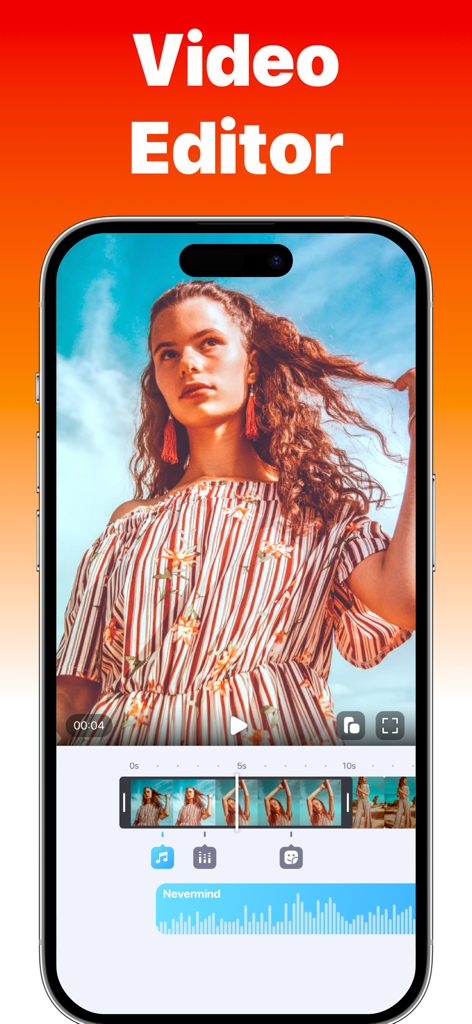
Clips - Video Editor - 소셜 미디어 콘텐츠 제작을 위한 동영상 타임라인과 오디오 파형이 표시된 Clips 동영상 편집기 앱 인터페이스를 보여주는 스마트폰 화면
소셜 미디어 콘텐츠 제작을 위한 동영상 타임라인과 오디오 파형이 표시된 Clips 동영상 편집기 앱 인터페이스를 보여주는 스마트폰 화면

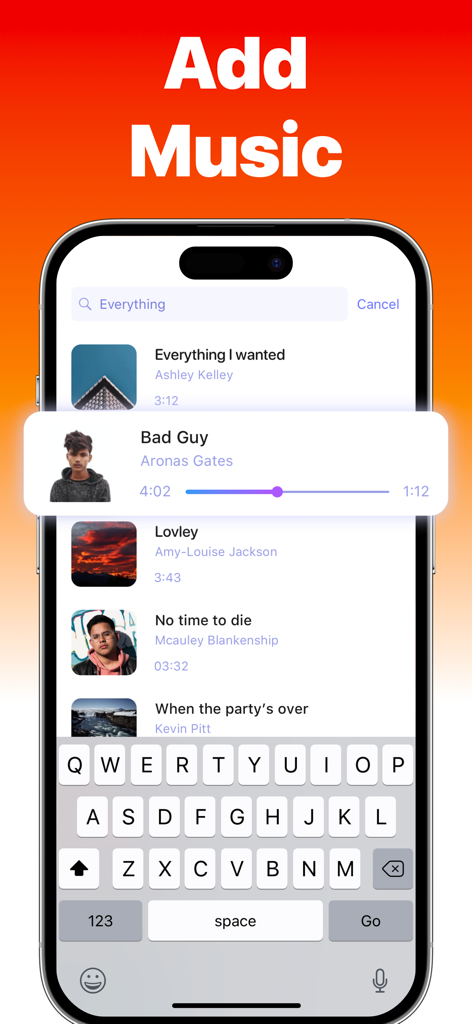
Clips - Video Editor - 검색 가능한 노래 라이브러리를 특징으로 하는 Clips 앱에서 동영상에 음악을 추가하는 인터페이스
검색 가능한 노래 라이브러리를 특징으로 하는 Clips 앱에서 동영상에 음악을 추가하는 인터페이스

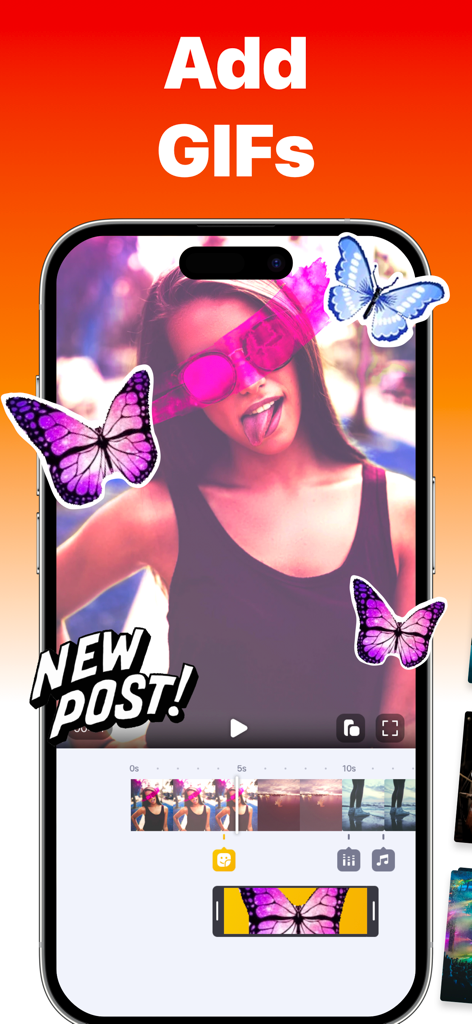
Clips - Video Editor - Clips 앱의 화면에서 나비 스티커와 애니메이션 GIF로 편집 중인 동영상을 보여줌
Clips 앱의 화면에서 나비 스티커와 애니메이션 GIF로 편집 중인 동영상을 보여줌

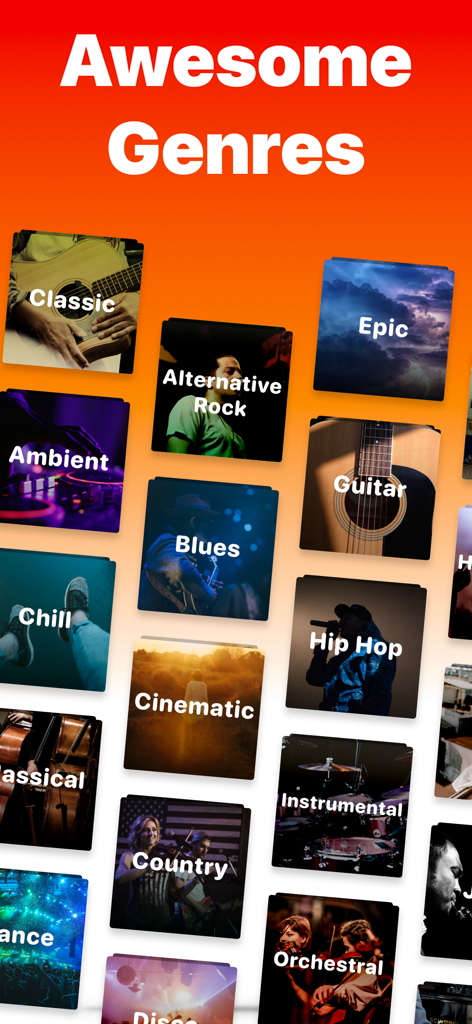
Clips - Video Editor - Clips 앱에서 동영상 편집을 위한 힙합, 시네마틱, 컨트리 등 다양한 음악 장르 카테고리

Clips 앱에서 동영상 편집을 위한 힙합, 시네마틱, 컨트리 등 다양한 음악 장르 카테고리

설명

Clips is an easy-to-use yet powerful video editor. Useful when you want to add any song for video/reel/story to social media. Clips helps you choose different soundtracks to spice up your video in seconds. Features: ▶ Add Unlimited Photos and Videos to your Project ▶ Multiple Music Tracks: Add unlimited background audio tracks, music & voice to your video. ▶ Voiceover & Sound effects ▶ Trim Audio & Video ▶ Positioning Tracks ▶ 50+ Music Genres ▶ Control the Speed of your Videos ▶ Add Text, Stickers & Picture-in-Picture ▶ No Watermark ▶ Dark mode Support ▶ Videos are exported without compression ▶ No distorted videos on social networks ▶ Share Videos: Share your content on TikTok, Instagram & Facebook, and more. Enjoy Editing Videos :) ◆ Customer Support You can reach us at hello@videobakery.co and we'll do our best to satisfy you and solve all of your problems and wishes related to Add Music to Video. ◆ Subscriptions & Terms The usage of the Add Music app requires a valid subscription plan. Our plan is starting with 3 days of the free trial, without any charge during the trial period. Cancel anytime. After the free trial ends, you'll be charged $4.99/month. Good to know: • No charge during the Free Trial period. • Free trial automatically converts to a paid subscription unless canceled at least 24 hours before the end of the trial period. From that point onwards, the subscription automatically renews unless canceled at least 24 hours before the end of the current period. • The payment will be charged to your iTunes Account when you confirm the purchase. • The subscription automatically renews for the same price and duration period depending on the selected plan (monthly, half-annual or annual) unless canceled at least 24 hours before the end of the current period. • You can disable the automatic renewal function anytime by adjusting your account settings. • Any unused portion of a free trial period will be forfeited when the user purchases a subscription. Privacy Policy: https://videobakery.co/pp.pdf Terms of Use: https://videobakery.co/tos.pdf We would love to hear from you. Please let us know by sending an email to hello@videobakery.co

Download

다운로드: App Store

이 페이지는 앱이나 개발자의 공식 페이지가 아니며, 정보 제공 및 논평을 목적으로 작성된 독립 편집 간행물입니다. 명시적으로 달리 언급되지 않는 한, 해당 앱이나 개발자는 MWM, Apple, Google Play, 앱 퍼블리셔 또는 앱 개발자와 제휴, 보증, 후원, 승인 또는 공식적으로 연결되어 있지 않으며, 이 페이지의 어떤 내용도 해당 앱이 MWM의 서비스를 사용하여 개발되었음을 의미하지 않습니다. 모든 상표, 로고, 스크린샷 및 기타 콘텐츠는 해당 소유자의 자산입니다.