
이 페이지는 앱이나 개발자의 공식 페이지가 아니며, 정보 제공 및 논평을 목적으로 작성된 독립 편집 간행물입니다. 명시적으로 달리 언급되지 않는 한, 해당 앱이나 개발자는 MWM, Apple, Google Play, 앱 퍼블리셔 또는 앱 개발자와 제휴, 보증, 후원, 승인 또는 공식적으로 연결되어 있지 않으며, 이 페이지의 어떤 내용도 해당 앱이 MWM의 서비스를 사용하여 개발되었음을 의미하지 않습니다. 모든 상표, 로고, 스크린샷 및 기타 콘텐츠는 해당 소유자의 자산입니다.


Video Maker with Music Editor
당신의 영상은 더 이상 배경 소음을 허용하지 않는다. 오직 당신이 선택한 사운드만이 지배한다.
다운로드
12.5M+사용자 평점
총 평가 수
43.1K개발사
카테고리
Photo & Video지원 언어
1최신 버전
3.7.21크기
64.6 MB출시일
2015년 6월 25일Video Maker with Music Editor 핵심 기능 분석
모바일에서 빠르고 쉽게 음악 영상 제작 및 공유를 위한 핵심 기능 분석
영상에 음악 추가 및 편집
이 앱은 사용자가 영상에 무제한으로 배경 음악 트랙을 추가하고, 오디오를 정교하게 트리밍하며, 페이드 인/아웃 효과를 적용하여 전문적인 사운드를 연출할 수 있도록 지원합니다. 또한, 각 오디오의 볼륨을 자유롭게 조절할 수 있는 기능을 제공합니다.
간편한 편집 및 공유
이 도구는 매우 직관적이고 사용하기 쉬운 인터페이스를 통해 사용자가 영상을 빠르고 효율적으로 편집할 수 있게 합니다. 편집이 완료된 영상은 갤러리에 저장하거나 인기 있는 소셜 미디어 플랫폼에 즉시 공유할 수 있어 콘텐츠 확산을 용이하게 합니다.
영상 자르기 및 트리밍
이 앱은 사용자가 원치 않는 부분을 제거하거나 영상 길이를 조절하기 위해 프레임별로 정밀하게 영상을 자르고 트리밍할 수 있는 기능을 갖추고 있습니다.
다양한 음악 카테고리
이 앱은 사용자의 다양한 취향과 영상 테마에 맞춰 무료, 클럽/파티, 시네마틱, 록, 팝 등 방대한 음악 트랙 컬렉션과 카테고리를 제공하여 창의적인 표현을 돕습니다.
보이스 오버 녹음
사용자는 이 앱을 통해 영상 위에 자신의 목소리를 직접 녹음할 수 있어, 개인적인 내레이션이나 설명, 혹은 재미있는 콘텐츠를 손쉽게 추가할 수 있습니다.
영상 음소거 기능
이 앱은 사용자가 원본 영상의 오디오를 쉽게 음소거하거나 다시 활성화할 수 있도록 해주어, 새로운 배경 음악이나 보이스 오버를 추가할 때 유용합니다.
자주 묻는 질문
에 대해 알아야 할 모든 것 Video Maker with Music Editor
How can I add music to my videos using Video Maker with Music Editor?
Yes, Video Maker with Music Editor allows users to add music from their iPhone, the app's track list, or by recording. Users press the '+ Add Music' button, then edit and trim audio.
Does Video Maker with Music Editor offer video trimming features?
Yes, Video Maker with Music Editor provides video trimming and cutting capabilities. Users can trim and cut videos frame by frame to remove unwanted sections from their footage.
Can I record my own voice over a video in Video Maker with Music Editor?
Yes, Video Maker with Music Editor enables users to record their own voice over videos. This feature is integrated into the app's audio editing functionalities.
What music categories are available in Video Maker with Music Editor?
Video Maker with Music Editor offers diverse music categories including Free, Club/Party, Cinematic, Rock, Romantic, Sad/Emotional, Acoustic, Pop, Ambient, and Relaxing soundtracks.
Is Video Maker with Music Editor a subscription-based app?
Yes, Video Maker with Music Editor operates on a subscription model. Access to its features requires an auto-renewable In-App Purchase, with a weekly subscription length.
How do I manage my subscription for Video Maker with Music Editor?
Users manage their Video Maker with Music Editor subscription and auto-renewal settings via their iTunes Account Settings. This process is accessible after the initial purchase.
Can I adjust audio levels in Video Maker with Music Editor?
Yes, Video Maker with Music Editor includes volume control for audios. It also supports audio trimming, fade-in, and fade-out effects for comprehensive sound editing.
다음 스크린샷과 설명은 앱의 공식 스토어 목록에서 직접 가져온 것이며 앱 개발자의 자산입니다.
앱 스토어
스크린샷
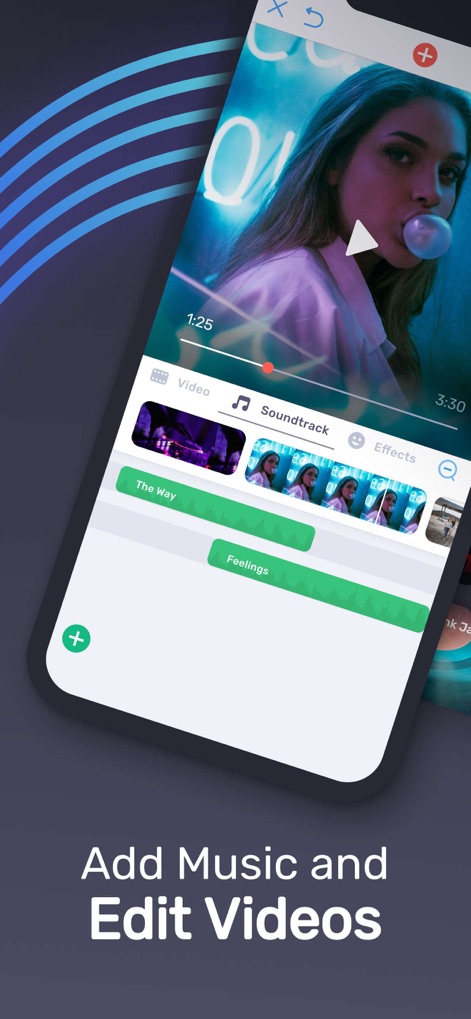
영상에 음악 추가
이 앱은 사용자가 비디오 타임라인에 여러 오디오 트랙을 추가하고, 직관적인 편집 인터페이스를 통해 다양한 기능을 활용할 수 있도록 지원합니다.

방대한 사운드트랙
사용자는 "Pop" 및 "Cinematic"과 같은 다채로운 음악 카테고리에서 수백 가지의 사운드트랙을 손쉽게 탐색하고 선택할 수 있습니다.

정교한 영상 편집
이 앱은 타임라인에서 비디오를 정밀하게 자르는 기능과 "TRIM", "SPEED" 옵션을 통해 영상 길이나 재생 속도를 자유롭게 조절하게 해줍니다.
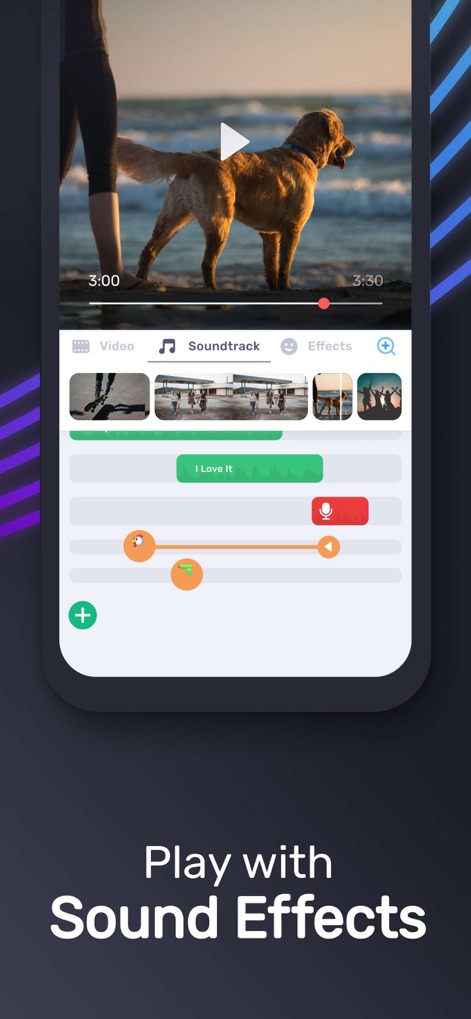
섬세한 오디오 조절
사용자는 마이크 아이콘을 통해 보이스오버를 녹음하고, 오디오 트랙의 오렌지색 조절점을 사용하여 볼륨 및 페이드 효과를 섬세하게 제어할 수 있습니다.
설명
Download
비슷한 앱
유사한 기능과 사용자 경험을 가진 앱

Dolby On: Record Audio & Video
Dolby Laboratories, Inc.

Add Music to Video, Maker
Honk Honk Punch Pty Ltd

Clips - Video Editor
Video Bakery Ltd.

Add Music into Video Editor
Saturday Technologies Incorporated

Add Background Music To Video
Mosaic S.r.l.

Add Music to Video Editor
Add Music to Video Maker & Editor LLC

Add Music to Video Voice Over
Brain Craft Ltd

Add Music to Video
Md Jasim Uddin

Video Music Add Background
Raja Ahmad Ayaz Noor
이 페이지는 앱이나 개발자의 공식 페이지가 아니며, 정보 제공 및 논평을 목적으로 작성된 독립 편집 간행물입니다. 명시적으로 달리 언급되지 않는 한, 해당 앱이나 개발자는 MWM, Apple, Google Play, 앱 퍼블리셔 또는 앱 개발자와 제휴, 보증, 후원, 승인 또는 공식적으로 연결되어 있지 않으며, 이 페이지의 어떤 내용도 해당 앱이 MWM의 서비스를 사용하여 개발되었음을 의미하지 않습니다. 모든 상표, 로고, 스크린샷 및 기타 콘텐츠는 해당 소유자의 자산입니다.