Complicated - complications
다운로드: App Store

이 페이지는 앱이나 개발자의 공식 페이지가 아니며, 정보 제공 및 논평을 목적으로 작성된 독립 편집 간행물입니다. 명시적으로 달리 언급되지 않는 한, 해당 앱이나 개발자는 MWM, Apple, Google Play, 앱 퍼블리셔 또는 앱 개발자와 제휴, 보증, 후원, 승인 또는 공식적으로 연결되어 있지 않으며, 이 페이지의 어떤 내용도 해당 앱이 MWM의 서비스를 사용하여 개발되었음을 의미하지 않습니다. 모든 상표, 로고, 스크린샷 및 기타 콘텐츠는 해당 소유자의 자산입니다.


로고: Complicated - complications
다운로드: App Store

Complicated - complications

커스텀 Apple Watch 컴플리케이션을 만들기 위한 개발자 및 자동화 애호가를 위한 궁극의 도구입니다. 앱을 구축하지 않고도 모든 JSON 소스를 실시간으로 볼 수 있는 대시보드로 전환하세요.

주요 수치

다운로드

500

사용자 평점

1.0/5

총 평가 수

0

개발사

DevsInCloud, Inc.

카테고리

Productivity

지원 언어

1

최신 버전

1.3

크기

2.2 MB

출시일

2023년 5월 8일
기능

손목을 위한 보편적인 데이터 브릿지

공식 앱을 기다리지 마세요. 간단한 JSON 파일과 기존 자동화 워크플로우를 사용하여 웹 기반 데이터 소스를 커스텀 컴플리케이션으로 전환하세요.

코드 없는 통합

Swift 개발을 건너뛰세요. GitHub, Dropbox 또는 자체 서버에 JSON 파일을 호스팅하기만 하면 커스텀 데이터 포인트를 즉시 시계 화면에 푸시할 수 있습니다.

자동화 준비 완료

IFTTT, Zapier 또는 CRON 작업과 원활하게 연결하세요. 데이터 업데이트를 자동화하여 서버 상태, 암호화폐 가격 또는 스마트 홈 메트릭을 실시간으로 모니터링하세요.

다음 스크린샷과 설명은 앱의 공식 스토어 목록에서 직접 가져온 것이며 앱 개발자의 자산입니다.

앱 스토어

스크린샷
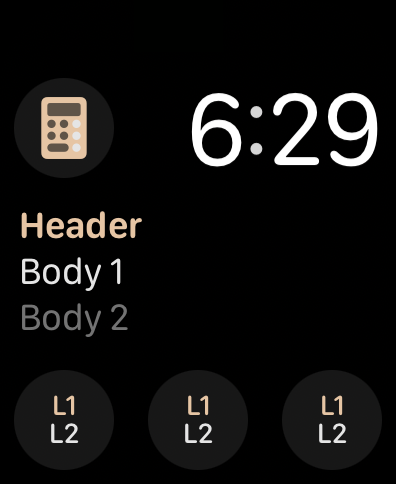
Complicated - complications - 커스텀 텍스트 및 아이콘 컴플리케이션을 표시하는 Apple Watch 화면
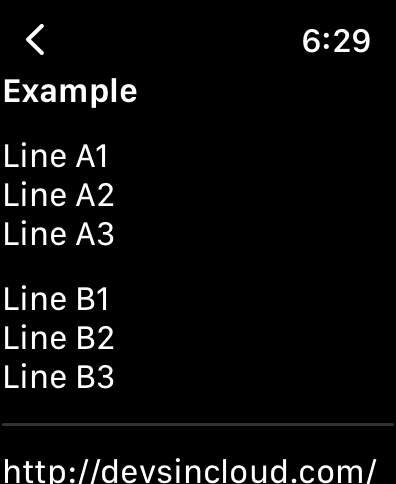
커스텀 텍스트 및 아이콘 컴플리케이션을 표시하는 Apple Watch 화면

Complicated - complications - Complicated 앱에서 JSON 파일의 커스텀 텍스트 줄을 보여주는 Apple Watch 인터페이스
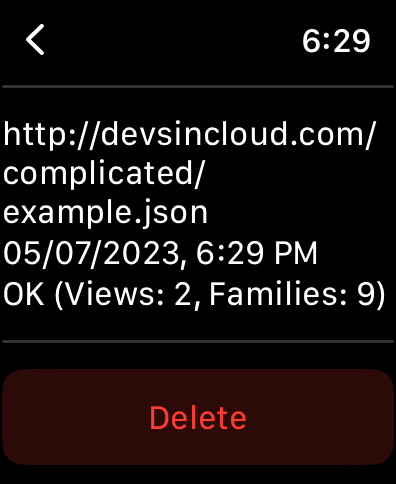
Complicated 앱에서 JSON 파일의 커스텀 텍스트 줄을 보여주는 Apple Watch 인터페이스

Complicated - complications - 커스텀 컴플리케이션을 위한 등록된 JSON 파일 URL을 표시하는 Apple Watch 앱 화면
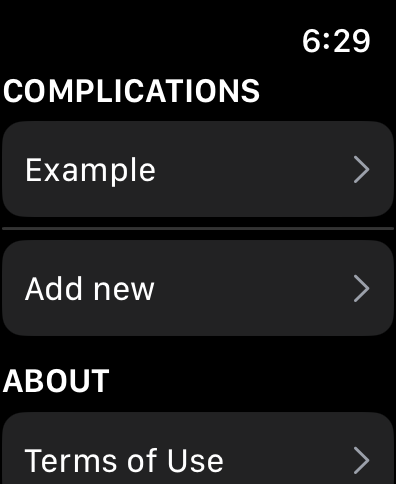
커스텀 컴플리케이션을 위한 등록된 JSON 파일 URL을 표시하는 Apple Watch 앱 화면

Complicated - complications - 커스텀 컴플리케이션 관리를 위한 Complicated 앱 메뉴 인터페이스
커스텀 컴플리케이션 관리를 위한 Complicated 앱 메뉴 인터페이스

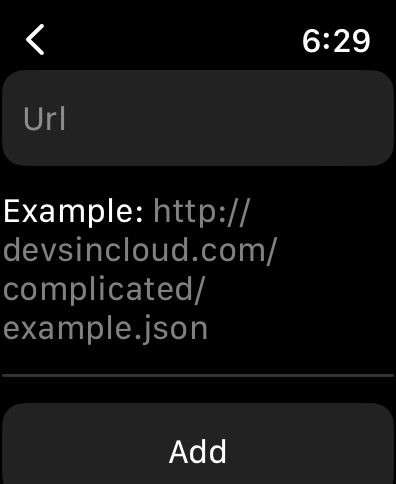
Complicated - complications - 커스텀 Apple Watch 컴플리케이션을 위한 JSON 데이터 소스 URL 추가 인터페이스

커스텀 Apple Watch 컴플리케이션을 위한 JSON 데이터 소스 URL 추가 인터페이스

설명

Create your own custom watch complications! How does it work? * Create a simple JSON file and upload it to your favorite web hosting provider * Register the JSON file URL in the watch app itself (both HTTP and HTTPS are supported) * Now simply add complications with your custom data directly to your watch faces Examples of what you can do with the app: * Generate JSON files automatically by your existing web application to provide your users with an easy way to see selected information directly on their wrist * Publish your personal JSON files via OneDrive/Google Drive/Dropbox/etc. to add any static content directly on your personal watch * Automatically generate and publish JSON files using services like IFTTT/Zapier/etc. to seamlessly integrate complications with your automation routines * Use simple cron/scheduler jobs to scrape/compile/compute data from any source (weather, stock prices) into your own custom complications Features: * You can add as many JSON files as needed (to support multiple complication data sources) * The JSON file structure supports up to 9 different complication styles (so you can pick the ones that meet your needs) * The JSON file structure also supports simple "views" (so you can define additional text that gets displayed when the complication is tapped) * The app re-loads JSON files roughly every 10 to 15 minutes (to make sure your complications are always up to date) * We are hosting a sample JSON file (so you can easily test the app after its installation as well as have a simple template that you can immediately use for your own files) Our sample JSON file (which can be added to the app right after its installation to test all its features): http://devsincloud.com/complicated/example.json Terms Of Use / License agreement: http://www.devsincloud.com/complicated/terms-of-use.htm Privacy Policy: http://www.devsincloud.com/complicated/privacy-policy.htm

Download

다운로드: App Store

이 페이지는 앱이나 개발자의 공식 페이지가 아니며, 정보 제공 및 논평을 목적으로 작성된 독립 편집 간행물입니다. 명시적으로 달리 언급되지 않는 한, 해당 앱이나 개발자는 MWM, Apple, Google Play, 앱 퍼블리셔 또는 앱 개발자와 제휴, 보증, 후원, 승인 또는 공식적으로 연결되어 있지 않으며, 이 페이지의 어떤 내용도 해당 앱이 MWM의 서비스를 사용하여 개발되었음을 의미하지 않습니다. 모든 상표, 로고, 스크린샷 및 기타 콘텐츠는 해당 소유자의 자산입니다.








