e-signature app SIGNply
다운로드: App Store

이 페이지는 앱이나 개발자의 공식 페이지가 아니며, 정보 제공 및 논평을 목적으로 작성된 독립 편집 간행물입니다. 명시적으로 달리 언급되지 않는 한, 해당 앱이나 개발자는 MWM, Apple, Google Play, 앱 퍼블리셔 또는 앱 개발자와 제휴, 보증, 후원, 승인 또는 공식적으로 연결되어 있지 않으며, 이 페이지의 어떤 내용도 해당 앱이 MWM의 서비스를 사용하여 개발되었음을 의미하지 않습니다. 모든 상표, 로고, 스크린샷 및 기타 콘텐츠는 해당 소유자의 자산입니다.


로고: e-signature app SIGNply
다운로드: App Store

e-signature app SIGNply

가장 안정적인 오프라인 전자 서명 도구로 매달 100건의 무료 서명을 받으세요. 법적 효력이 있으며, 생체 인식 기능을 갖추고 언제 어디서든 거래를 성사시켜야 하는 1인 기업가 및 현장 팀을 위해 제작되었습니다.

주요 수치

다운로드

19K+

사용자 평점

4.7/5

총 평가 수

0

개발사

Edatalia Data Solutions SL

카테고리

Productivity

지원 언어

4

최신 버전

5.5.2

크기

76.6 MB

출시일

2022년 5월 12일
기능

추가 비용 없이 전문적인 서명

수천 명의 1인 기업가 및 현장 전문가들이 SIGNply를 사용하여 시장에서 가장 유연하고 안전하며 비용 효율적인 전자 서명 도구로 거래를 더 빠르게 성사시키고 있습니다.

매달 100건의 무료 서명

비싼 기업용 구독료는 이제 그만. 매달 최대 100건의 법적 효력이 있는 서명을 무료로 받으세요. 일상적인 비즈니스 계약 및 NDA 관리에 완벽합니다.

오프라인에서도 어디서든 작동

인터넷 연결이 끊겨도 업무 흐름이 중단되지 않습니다. 인터넷 연결 없이 문서를 서명하거나 현장에서 고객 서명을 받을 수 있습니다. 현장 서비스 및 방문 업무에 완벽합니다.

다음 스크린샷과 설명은 앱의 공식 스토어 목록에서 직접 가져온 것이며 앱 개발자의 자산입니다.

앱 스토어

스크린샷
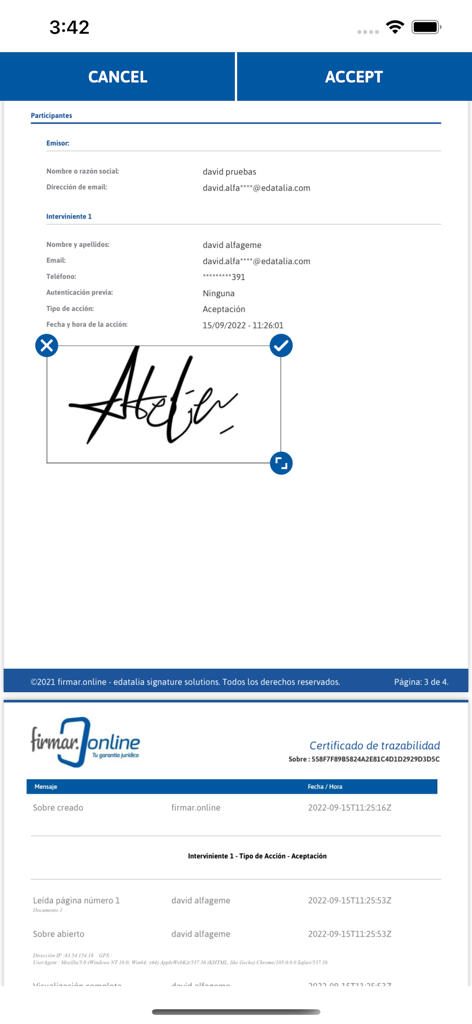
e-signature app SIGNply - SIGNply 앱에서 PDF 문서에 손글씨 디지털 서명

SIGNply 앱에서 PDF 문서에 손글씨 디지털 서명

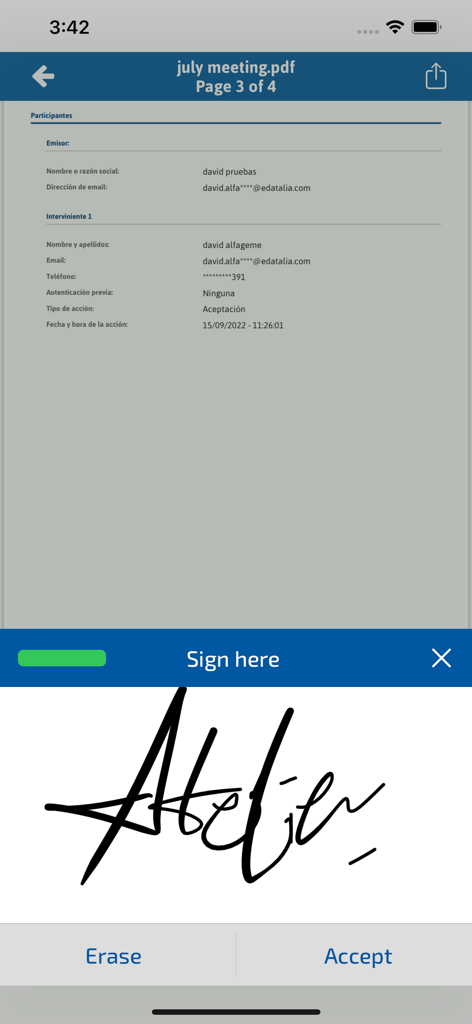
e-signature app SIGNply - 추적성 인증서와 함께 디지털 문서에 손글씨 서명을 적용하는 모습을 보여주는 SIGNply 앱의 모바일 인터페이스
추적성 인증서와 함께 디지털 문서에 손글씨 서명을 적용하는 모습을 보여주는 SIGNply 앱의 모바일 인터페이스

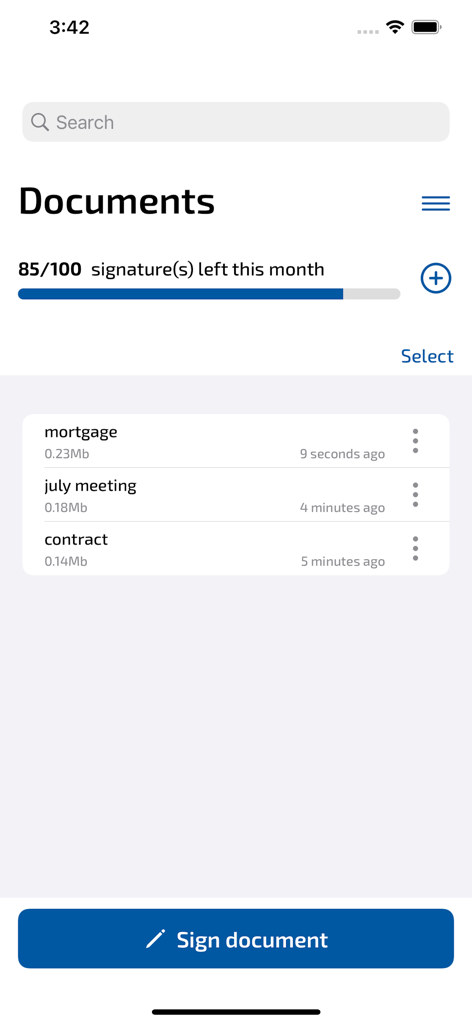
e-signature app SIGNply - 이번 달 남은 서명을 보여주는 SIGNply 앱 문서 대시보드.

이번 달 남은 서명을 보여주는 SIGNply 앱 문서 대시보드.

설명

Sign PDF document easily. Agile, simple and secure digital signature: Sign your documents as if they were paper! SIGNply allows you to sign electronic documents with all the guarantees, signing on your screen with your hand or with a pencil. The electronic signature is legally binding and has a guarantee of proof. Sign documents from your smartphone or tablet with a handwritten digital signature! SIGNply is the perfect solution for: Contracts, GDPR, purchase orders, delivery notes, inspection records, HR documents, authorizations, medical consents, etc… With the FREE version you can sign up to 100 PDF documents per month. The SIGNply Premium version allows you to sign any other type of document, transforming text and images into PDF before applying the digital signature You can self-sign (sign your own documents) and in-person sign (have someone else sign for you). No ads. From wherever you want. No internet connection is necessary to sign. SIMPLE and COMPLETE Digitally sign and send any document: 1. Select the document directly from your device, Gmail, Google Drive, OneDrive... 2. Sign with SIGNply 3. Save it or send it to whoever you want LEGAL SECURITY the digital signature is legally binding according to the eIDAS directive - Advanced electronic signature, complies with the guarantees required by the European Regulations and the Electronic Signature Law: Guarantees of authenticity and integrity. - SIGNply collects the biometric data in each trace that guarantees the authenticity of the biometric signature. - Biometric data is encrypted using AES256 asymmetric cryptography. - All connections between the different servers or clients are made through HTTPS connections. - The document is signed electronically to guarantee its integrity. The conventional digital signature protects the handwritten signature. SIGNply uses the SHA512 algorithm - PAdES-LTV long-term signature: allows the activation of the TSP time stamp and the validation of the revocation status of the certificate at the time of the OCSP signature, with which a long-term PAdES-XL signature is obtained. These elements constitute the evidence that guarantees success in any expert process. FREE SIGNply: FEATURES - Sign up to 100 PDF documents for free. No ads. From wherever you want. - Autosignature: Sign your PDF documents, with your finger or with a pencil - Signature in person: ask another person to sign you on your screen. Collect the signature of your clients on site - It allows combining various types of signatures in the same document, preserving the validity of all the signatures. - Advanced electronic signature, with technical security and legally binding. - Allows you to sign a document several times while maintaining the validity of all the signatures. - All documents are stored on your device, they are not available to us or to third parties. You can easily share them with the menu option. - No signature made is stored. The signatures are generated in each transaction, for the signing of a certain document by a certain person. - Guarantees the integrity of the signed document SIGNply Premium features: - Sign any type of document: doc, txt, images... SIGNply converts any document into PDF before applying the digital signature - Validate digital signatures - Priority support - Unlimited signatures: you can sign all the documents you want from your device. - Free trial 30 days - Cancel your subscription whenever you want. Without permanence. - Support our team: with your support we can better help all the people who need to sign their documents without paper and preserve the environment Thanks for your support! SIGNply More information, access here https://signply.com Use terms: https://signply.com/politica-de-privacidad/ Privacy Policy: https://www.apple.com/legal/internet-services/itunes/dev/stdeula/

Download

다운로드: App Store

이 페이지는 앱이나 개발자의 공식 페이지가 아니며, 정보 제공 및 논평을 목적으로 작성된 독립 편집 간행물입니다. 명시적으로 달리 언급되지 않는 한, 해당 앱이나 개발자는 MWM, Apple, Google Play, 앱 퍼블리셔 또는 앱 개발자와 제휴, 보증, 후원, 승인 또는 공식적으로 연결되어 있지 않으며, 이 페이지의 어떤 내용도 해당 앱이 MWM의 서비스를 사용하여 개발되었음을 의미하지 않습니다. 모든 상표, 로고, 스크린샷 및 기타 콘텐츠는 해당 소유자의 자산입니다.