이 페이지는 앱이나 개발자의 공식 페이지가 아니며, 정보 제공 및 논평을 목적으로 작성된 독립 편집 간행물입니다. 명시적으로 달리 언급되지 않는 한, 해당 앱이나 개발자는 MWM, Apple, Google Play, 앱 퍼블리셔 또는 앱 개발자와 제휴, 보증, 후원, 승인 또는 공식적으로 연결되어 있지 않으며, 이 페이지의 어떤 내용도 해당 앱이 MWM의 서비스를 사용하여 개발되었음을 의미하지 않습니다. 모든 상표, 로고, 스크린샷 및 기타 콘텐츠는 해당 소유자의 자산입니다.
eDrawings Pro
이동 중에도 정밀 측정, 강력한 마크업 도구, 몰입형 AR 시각화를 통해 워크플로우를 강화하세요. 네이티브 SolidWorks®, DWG 및 DXF 파일을 지원합니다.
현장부터 회의실까지 어디서든 CAD 데이터를 보고, 공유하고, 검증할 수 있는 최고의 전문가 도구입니다.
몰입형 AR 시각화
3D 디자인을 실제 세계에 1:1 스케일로 가져와 공간적 적합성을 검증하고 현장에서 프로젝트를 선보이세요.
원활한 팀 협업
통합 마크업 도구로 디자인 주기를 가속화하세요. 즉시 주석을 달고, 저장하고, 피드백을 공유할 수 있습니다.
다음 스크린샷과 설명은 앱의 공식 스토어 목록에서 직접 가져온 것이며 앱 개발자의 자산입니다.
앱 스토어
스크린샷
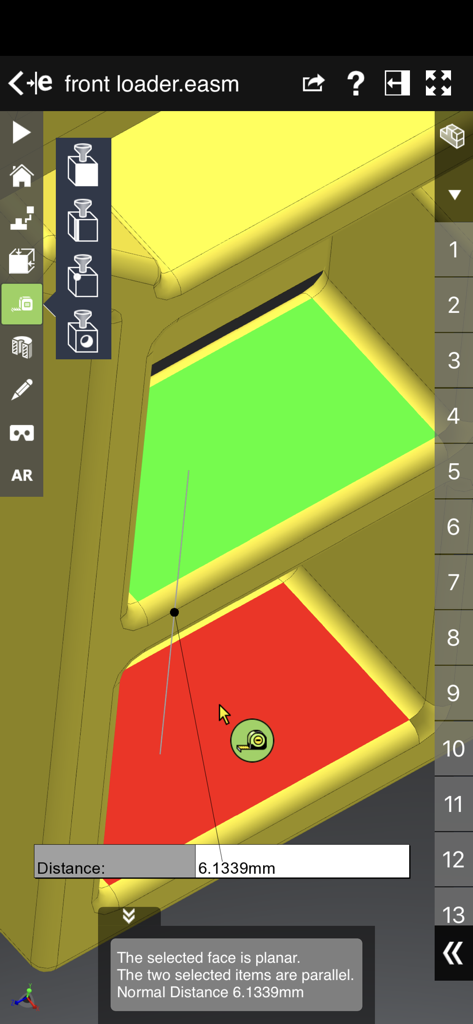
eDrawings Pro 앱의 3D CAD 모델 측정 인터페이스로, 평행한 면 사이의 거리가 표시됩니다.
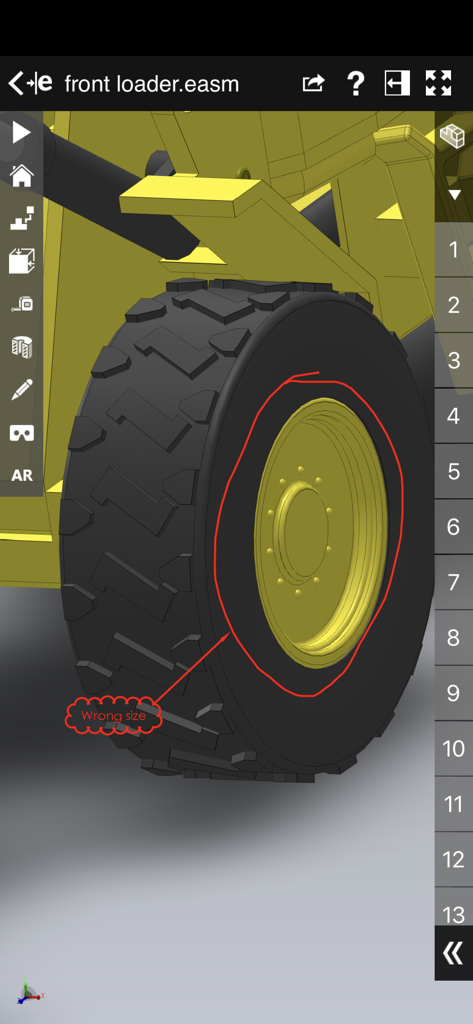
eDrawings Pro에서 빨간색 마크업 주석이 있는 프론트 로더 휠의 3D CAD 모델
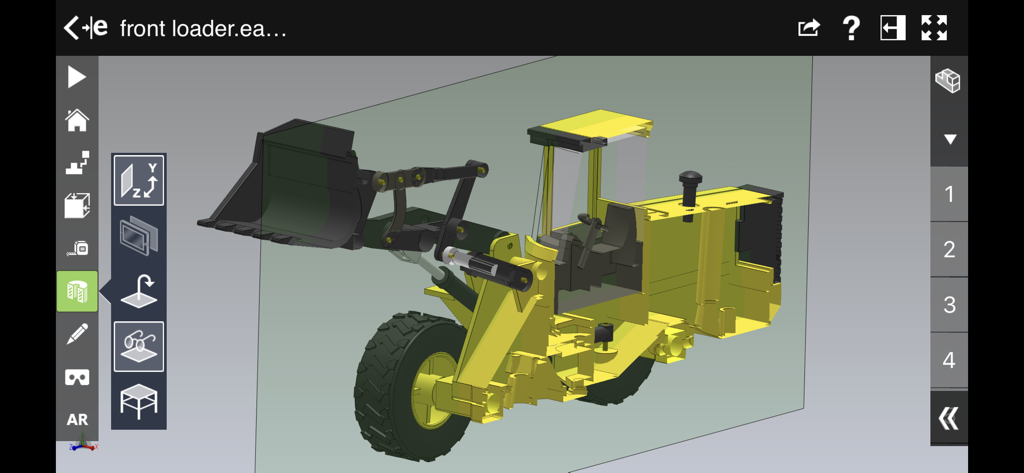
eDrawings Pro 인터페이스 내에서 단면 보기로 표시된 프론트 로더의 3D CAD 모델
설명
eDrawings® Pro is the professional 2D and 3D CAD collaboration app for the iPad, iPhone and iPod Touch that can view native SolidWorks® files (part, assembly, drawings), eDrawings files and DraftSight® (DWG™, DXF™) files. You can easily view models and access configurations, drawing sheets, and exploded views for eDrawings files published from SolidWorks and all other supported CAD software.
Markup! Measure! Section! eDrawings® Pro takes you to the next level of 2D and 3D collaboration with more functionality, including dynamic cross section views, measurements, markups & annotations and the unique ability to share it all by email!
eDrawings includes Augmented Reality (AR). This allows you to view your 3D models in 1:1 scale into the real world. By simply activating the device’s camera, you can bring your virtual 3D designs in a real context and see them in situ, sitting on your desk or on your conference room table or even in the palm of your hand, through your iPad, Pad mini, iPhone or iPod Touch’s screen. Move around the room and see your design from any perspective.
With an intuitive user interface, eDrawings® Pro enables you to dynamically view cross sections of your models in XY, YZ, or ZX directions from both sides and easily drag the cross section plane on screen or with a convenient slider. You can also measure distances in your designs, with easy-to-use selection filters for faces, edges, vertices and holes.
With eDrawings® Pro you can create markups on your drawings, including text notes, freehand notations, dimensions, cross-section views, photos and camera snapshots.
You can share your marked up eDrawings files with others for review and further comments. All markups with history are saved within the eDrawings file.
Features:
* Intuitive and easy-to-use user interface
* Visualize your 3D models in real context with Augmented Reality (AR)
* Open 3D (EASM, EPRT, SLDASM, SLDPRT, IGES, IGS, JT, STEP, STP, IFC), 2D (EDRW, SLDDRW, DWG, DXF) and associated files from any source: email attachments, cloud storage services (Dropbox™, SkyDrive®, Google Drive, YouSendIt®, and others), web and FTP sites, networks, and iTunes® File Sharing.
* Zoom, pan, and rotate your 3D and 2D CAD data using multi-touch
* Browse your assembly components tree, model configurations and drawing sheets
* Hide, show, or make components transparent
* Select View mode: standard orthogonal views, shaded with edges, perspective view
* Play animated 3D standard views as well as 2D drawing views
* View your designs in full screen and double tap to fit it on screen
* Double tap zooms to drawing views
* Markup your designs and send to others and read others’ markups
* Measure your design data
* View cross sections of your 3D designs, even in AR mode
* Adapt the scale of your 3D model in AR mode
* Freeze the background in AR mode with viewpoint lock to prolong AR experience without holding up your device.
* Sample files included
For more information, visit:
http://www.edrawingsviewer.com
이 페이지는 앱이나 개발자의 공식 페이지가 아니며, 정보 제공 및 논평을 목적으로 작성된 독립 편집 간행물입니다. 명시적으로 달리 언급되지 않는 한, 해당 앱이나 개발자는 MWM, Apple, Google Play, 앱 퍼블리셔 또는 앱 개발자와 제휴, 보증, 후원, 승인 또는 공식적으로 연결되어 있지 않으며, 이 페이지의 어떤 내용도 해당 앱이 MWM의 서비스를 사용하여 개발되었음을 의미하지 않습니다. 모든 상표, 로고, 스크린샷 및 기타 콘텐츠는 해당 소유자의 자산입니다.