eDrawings

eDrawings

다운로드: App Store
로고: eDrawings

eDrawings: 최고의 모바일 CAD 뷰어 및 AR 협업 도구

어디서든 SolidWorks 및 3D 디자인을 현실로 만드세요. 증강 현실로 복잡한 모델을 실제 스케일로 시각화하고, 팀 피드백을 간소화하며, 디자인과 제조 간의 격차를 정밀하게 해소하세요.

다운로드: App Store

개발사

Dassault Systemes SolidWorks Corporation

카테고리

Productivity

다운로드

441K+

사용자 평점

2.8/5

총 평가 수

700

지원 언어

1

모든 차원에서 디자인

이 인터페이스를 사용하는 441K+ 명의 사용자.

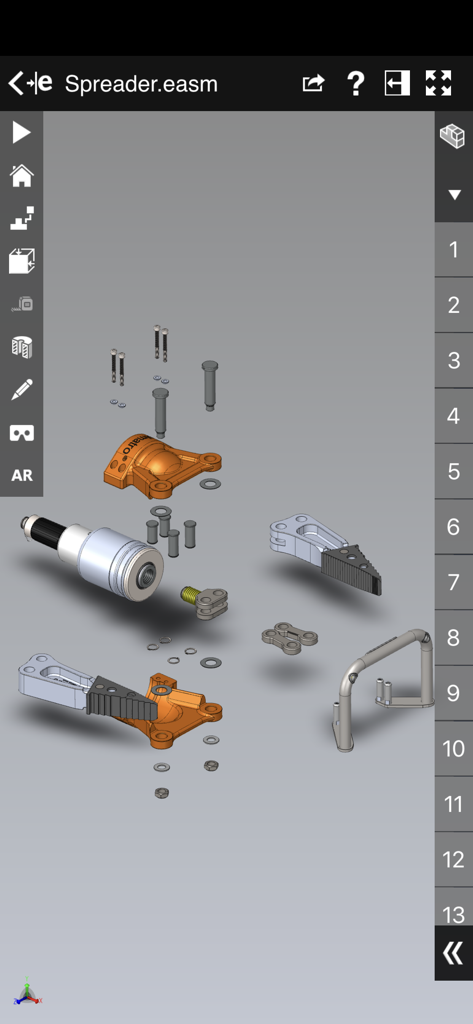
eDrawings CAD 뷰어 앱에서 3D 기계 어셈블리의 분해된 뷰.
eDrawings CAD 뷰어 앱에서 3D 기계 어셈블리의 분해된 뷰.

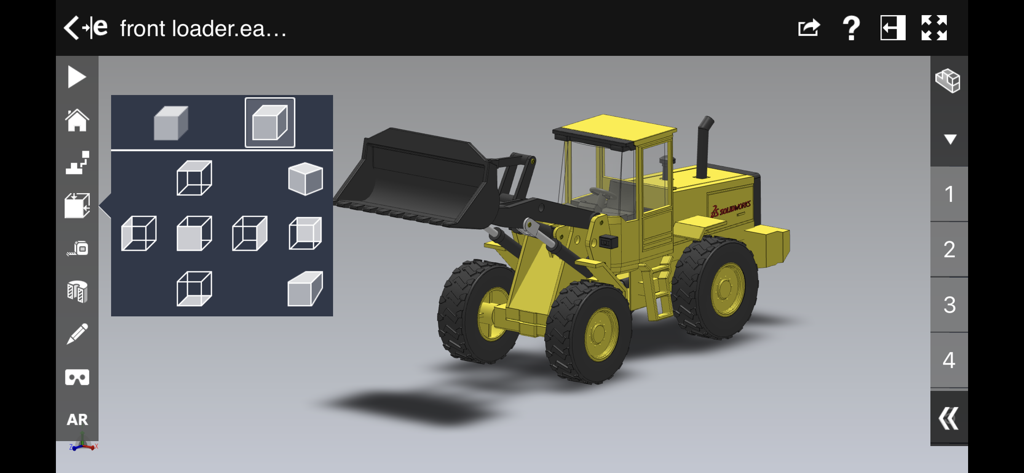
eDrawings 앱 인터페이스에 뷰 선택 메뉴가 있는 노란색 산업용 프론트 로더의 3D CAD 모델이 표시됩니다.
eDrawings 앱 인터페이스에 뷰 선택 메뉴가 있는 노란색 산업용 프론트 로더의 3D CAD 모델이 표시됩니다.

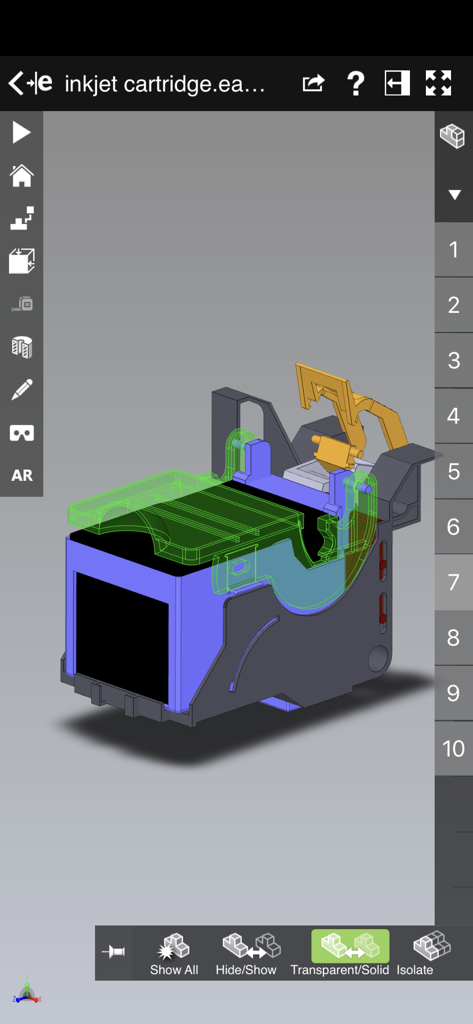
eDrawings 모바일 앱에 잉크젯 카트리지의 상세한 3D CAD 모델이 표시됩니다.

eDrawings 모바일 앱에 잉크젯 카트리지의 상세한 3D CAD 모델이 표시됩니다.

정제된 설계 검토

이 앱을 돋보이게 하는 도구, 441K+ 명의 사용자가 선택.

📱

실제 스케일 시각화

증강 현실을 사용하여 1:1 스케일 모델을 환경에 배치하여 즉각적인 공간 검증과 인상적인 고객 워크스루를 가능하게 합니다.

📂

범용 파일 지원

이메일이나 클라우드 스토리지에서 바로 네이티브 SolidWorks®, DXF, STEP 파일을 열고 볼 수 있어 어디서든 프로젝트를 진행할 수 있습니다.

🔍

동적 어셈블리 통찰력

직관적인 분해된 뷰, 구성 요소 트리, 애니메이션으로 모든 세부 사항을 탐색하여 복잡한 데이터를 모든 사람이 이해할 수 있도록 합니다.

리뷰 분석

사용자 리뷰 인사이트.

감정 점수

17%
부정적

요약

This mobile app receives predominantly negative feedback from users. While its basic viewing functionality for certain CAD files and the AR live preview are occasionally praised, a significant number report critical issues, including the inability to open various file formats and frequent crashes or endless rendering, especially with larger models. Many users express frustration over the absence of essential features like measurement and dimensioning tools. Additionally, an issue specific to iPhone 14 Pro devices causes users to become locked in the target view, further contributing to overall dissatisfaction and questions about the app's value for money.

주요 테마

File Viewing & Compatibility(6)
Performance & Stability(6)
Measurement Tools(1)
Augmented Reality (AR) Features(1)
Value for Money(1)
User Interface & Navigation(1)

앱 소개

에 대해 알아야 할 모든 것 eDrawings.

설명

eDrawings® is the only CAD viewer on iPad, iPad mini, iPhone and iPod Touch that allows you to view native eDrawings files as well as native SolidWorks® parts, assemblies and drawings files. In addition, eDrawings allows convenient viewing of DWG and DXF files. eDrawings includes Augmented Reality (AR). This allows you to view your 3D models in 1:1 scale into the real world. By simply activating the device’s camera, you can bring your virtual 3D designs in a real context and see them in situ, sitting on your desk or on your conference room table or even in the palm of your hand, through your iPad, Pad mini, iPhone or iPod Touch’s screen. Move around the room and see your design from any perspective. eDrawings is the email-enabled communication tool that dramatically eases sharing of product design information. You can load and send files via email to collaborate more effectively with everyone involved in product development, including people who are not regular CAD software users to interpret and understand 2D and 3D designs. Multi-touch gestures let you pan, zoom, and rotate models easily. eDrawings also supports configurations, drawing sheets, and exploded views for eDrawings files published from SolidWorks® and all other supported CAD software. Features: * Intuitive and easy-to-use user interface * Visualize your 3D models in real context with Augmented Reality (AR) * Open 3D (EASM, EPRT, SLDASM, SLDPRT, IGES, IGS, JT, STEP, STP, IFC), 2D (EDRW, SLDDRW, DWG, DXF) and associated files from any source: email attachments, cloud storage services (Dropbox™, SkyDrive®, Google Drive, YouSendIt®, and others), web and FTP sites, networks, and iTunes® File Sharing. * Zoom, pan and rotate your 2D or 3D CAD data using multi-touch * Animate 3D standard views as well as 2D drawing views. * Browse your assembly components tree, configurations and drawing sheets * View your designs in full screen and double tap to fit it on screen * Adapt the scale of your 3D model in AR mode * Freeze the background in AR mode with viewpoint lock to prolong AR experience without holding up your device. * Sample files included For more information, visit: http://www.edrawingsviewer.com

최신 버전

33.4.0038

크기

185.2 MB

출시일

2012년 5월 1일

데스크톱 디자인을 현실로 가져오세요

iPad 및 iPhone에서 eDrawings를 사용하여 협업, AR 시각화, 생산 간소화를 하는 수천 명의 엔지니어 및 디자이너와 함께하세요.

다운로드: App Store

App information, icons, screenshots, and descriptions displayed on this page are sourced from the Apple App Store and are the property of their respective developers. Download estimates and rankings are based on MWM's proprietary models and may not reflect actual figures. This page is provided for informational and analytical purposes only.

Believe this page infringes your intellectual property? File a dispute