Markdown+ Text & Code Editor
다운로드: App Store

이 페이지는 앱이나 개발자의 공식 페이지가 아니며, 정보 제공 및 논평을 목적으로 작성된 독립 편집 간행물입니다. 명시적으로 달리 언급되지 않는 한, 해당 앱이나 개발자는 MWM, Apple, Google Play, 앱 퍼블리셔 또는 앱 개발자와 제휴, 보증, 후원, 승인 또는 공식적으로 연결되어 있지 않으며, 이 페이지의 어떤 내용도 해당 앱이 MWM의 서비스를 사용하여 개발되었음을 의미하지 않습니다. 모든 상표, 로고, 스크린샷 및 기타 콘텐츠는 해당 소유자의 자산입니다.


로고: Markdown+ Text & Code Editor
다운로드: App Store

Markdown+ Text & Code Editor

140개 이상의 언어에 대한 실시간 수학 렌더링, 스마트 변수 및 구문 강조 기능을 사용하여 워크플로우를 마스터하세요. Vision Pro, Mac, iPad 및 iPhone에 대한 일회성 구매.

주요 수치

다운로드

400

사용자 평점

1.0/5

총 평가 수

0

개발사

Zetegy LLC

카테고리

Productivity

지원 언어

1

최신 버전

1.8.9

크기

25.2 MB

출시일

2023년 4월 1일
기능

기술적 우수성을 위해 설계됨

웹 기반 편집기의 지연을 없애세요. Markdown+는 순수 네이티브 성능과 STEM 전문가 및 파워 유저를 위해 특별히 설계된 고급 도구를 결합합니다.

스마트 변수 및 라이브 수학

재사용 가능한 변수를 정의하고 문서 내에서 직접 수학적 표현식을 계산합니다. 실시간 LaTeX 렌더링으로 복잡한 공식을 생생하게 구현합니다.

순수 네이티브 성능

Vision Pro, Mac 및 iOS에 최적화되었습니다. 방대한 기술 파일을 다룰 때도 즉각적인 미리 보기, 동기화된 스크롤, 낮은 배터리 소모를 즐기세요.

다음 스크린샷과 설명은 앱의 공식 스토어 목록에서 직접 가져온 것이며 앱 개발자의 자산입니다.

앱 스토어

스크린샷
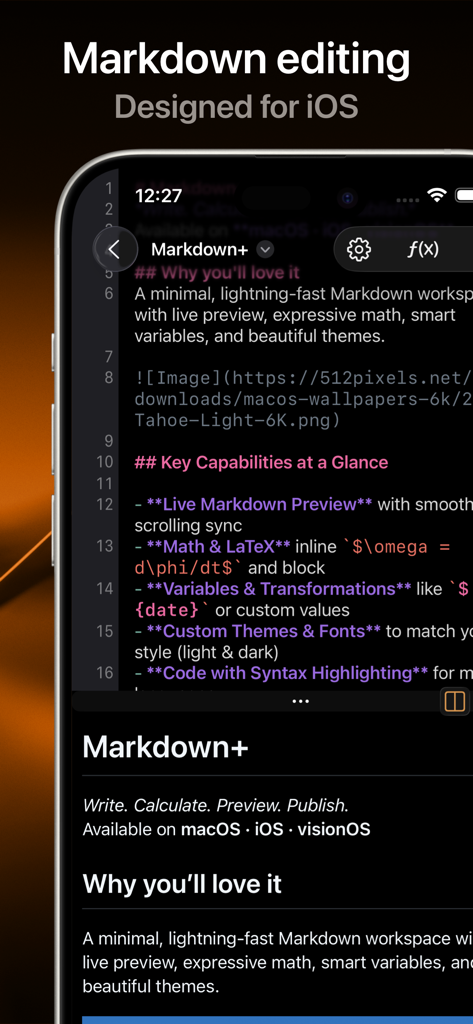
Markdown+ Text & Code Editor - iPhone에서 코드 편집기 및 라이브 미리 보기를 보여주는 Markdown plus 앱 인터페이스
iPhone에서 코드 편집기 및 라이브 미리 보기를 보여주는 Markdown plus 앱 인터페이스

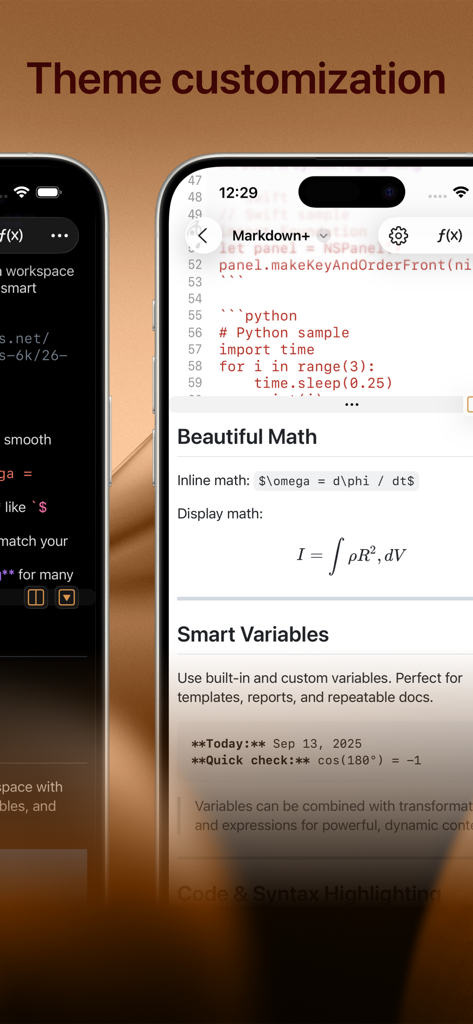
Markdown+ Text & Code Editor - iPhone에서 테마 사용자 지정 수학 공식 및 스마트 변수를 표시하는 Markdown plus 텍스트 편집기
iPhone에서 테마 사용자 지정 수학 공식 및 스마트 변수를 표시하는 Markdown plus 텍스트 편집기

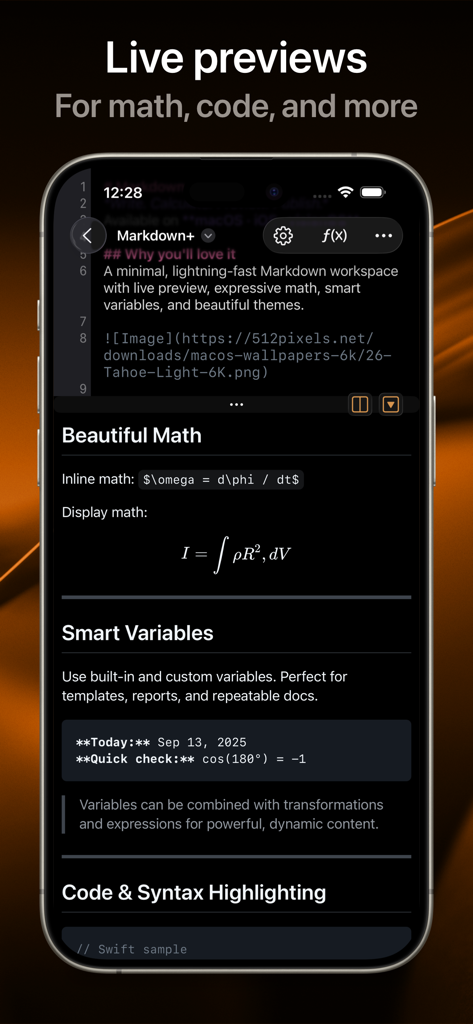
Markdown+ Text & Code Editor - 수학 공식 및 코드 블록의 라이브 미리 보기를 보여주는 Markdown plus 앱 스크린샷
수학 공식 및 코드 블록의 라이브 미리 보기를 보여주는 Markdown plus 앱 스크린샷

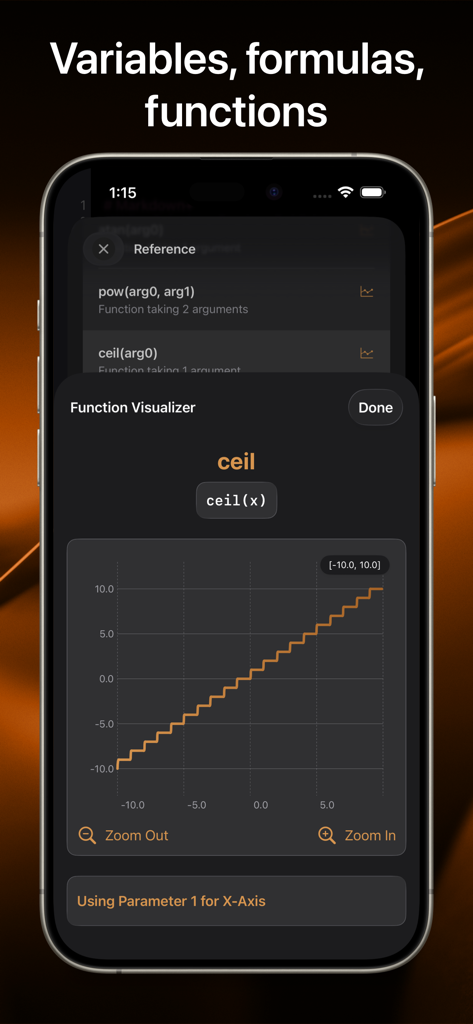
Markdown+ Text & Code Editor - Markdown Plus 앱이 iPhone 화면에서 ceil 함수의 단계별 그래프와 함께 수학 함수 시각화 도구를 표시함
Markdown Plus 앱이 iPhone 화면에서 ceil 함수의 단계별 그래프와 함께 수학 함수 시각화 도구를 표시함

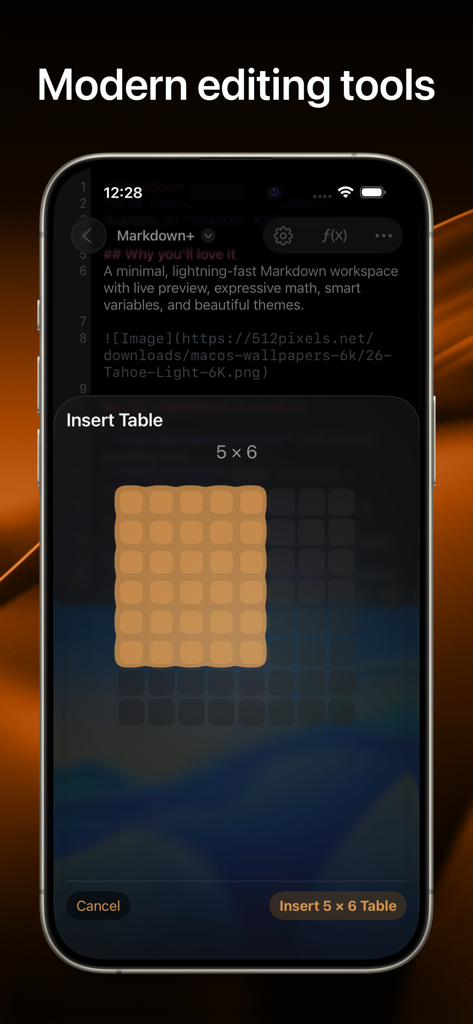
Markdown+ Text & Code Editor - iPhone의 Markdown plus 앱 스크린샷으로 문서에 5x6 테이블을 삽입하기 위한 시각적 그리드 선택기를 보여줌

iPhone의 Markdown plus 앱 스크린샷으로 문서에 5x6 테이블을 삽입하기 위한 시각적 그리드 선택기를 보여줌

설명

Introducing the native, real-time Markdown editor with superpowers. Markdown+ has been meticulously crafted for Vision Pro, iPhone, iPad, and Mac. With blazing-fast performance and powerful features like dynamic variables and real-time math rendering, Markdown+ delivers an unparalleled experience across all your Apple devices. Modern Editing Tools Experience the perfect balance of simplicity and power with our distraction-free interface. The split-view design lets you edit Markdown on one side while watching your content come alive instantly on the other—with perfect synchronized scrolling and jump-to-selection capabilities. Tables, Images, Links Easily create embed tables, images, and links, without having to memorize the markup. Live Code & Math Highlighting Create beautiful documents with advanced syntax highlighting for code blocks across 140+ programming languages. Write complex mathematical formulas with LaTeX-style syntax and watch them render in real-time with professional typesetting. Smart Variables System Transform your documents with the unique Variables feature. Create reusable components for names, dates, and complex expressions. Need to calculate sin(90)+cos(80)? Simply define it once, then reference it throughout your document—changes update everywhere automatically. Use Variables to evaluate or chain multiple mathematical expression right within your document, and use the vast library of built-in functions. Dark Mode & Custom Themes Work comfortably day or night with full dark mode support and customizable themes that perfectly complement your workflow and personal style. Performance Without Compromise Built with a native-first approach, Markdown+ delivers exceptional speed even with massive documents. Our optimized parsing engine ensures real-time previews update instantly as you type, without draining your battery or slowing down your device. Seamless Cross-Device Experience Whether you're working on Vision Pro, Mac, iPad, or iPhone, Markdown+ adapts perfectly to each screen with device-specific optimizations. Start a document on your Mac and seamlessly continue on your iPhone—your experience remains consistently excellent. One-Time Purchase, Lifetime Value No subscriptions. No in-app purchases. No hidden costs. Buy Markdown+ once and use it forever on all your devices with Family Sharing included. All future updates and features are yours at no additional cost. Learn more: EULA: https://zetegy.com/eula/markdown/ Privacy policy: https://zetegy.com/privacy/markdown/ Terms of use: https://zetegy.com/terms/markdown/

Download

다운로드: App Store

이 페이지는 앱이나 개발자의 공식 페이지가 아니며, 정보 제공 및 논평을 목적으로 작성된 독립 편집 간행물입니다. 명시적으로 달리 언급되지 않는 한, 해당 앱이나 개발자는 MWM, Apple, Google Play, 앱 퍼블리셔 또는 앱 개발자와 제휴, 보증, 후원, 승인 또는 공식적으로 연결되어 있지 않으며, 이 페이지의 어떤 내용도 해당 앱이 MWM의 서비스를 사용하여 개발되었음을 의미하지 않습니다. 모든 상표, 로고, 스크린샷 및 기타 콘텐츠는 해당 소유자의 자산입니다.








