My Contacts Backup Pro
다운로드: App Store

이 페이지는 앱이나 개발자의 공식 페이지가 아니며, 정보 제공 및 논평을 목적으로 작성된 독립 편집 간행물입니다. 명시적으로 달리 언급되지 않는 한, 해당 앱이나 개발자는 MWM, Apple, Google Play, 앱 퍼블리셔 또는 앱 개발자와 제휴, 보증, 후원, 승인 또는 공식적으로 연결되어 있지 않으며, 이 페이지의 어떤 내용도 해당 앱이 MWM의 서비스를 사용하여 개발되었음을 의미하지 않습니다. 모든 상표, 로고, 스크린샷 및 기타 콘텐츠는 해당 소유자의 자산입니다.


로고: My Contacts Backup Pro
다운로드: App Store

My Contacts Backup Pro

모든 연락처를 완벽하게 제어하는 전문가 선택. 주소록을 VCF 또는 Excel로 한 번의 탭으로 내보내고, 중복을 제거하고, 데이터를 비공개로 유지하세요—서버, 동기화, 광고 없이.

주요 수치

다운로드

462K+

사용자 평점

4.7/5

총 평가 수

31K+

개발사

GLOBILE BILISIM BILGISAYAR HIZMETLERI ILETISIM DANISMANLIK SANAYI TICARET LIMITED SIRKETI

카테고리

Productivity

지원 언어

32

최신 버전

2.2.3

크기

36.9 MB

출시일

2011년 10월 3일
기능

전문적인 네트워크를 완벽하게 제어하세요

클라우드 복잡성보다 개인 정보 보호와 신뢰성을 중요하게 생각하는 전문가를 위해 설계된 안전하고 오프라인 연락처 관리 기능입니다.

100% 오프라인 및 개인 정보 보호

클라우드 없음, 동기화 없음, 위험 없음. 연락처는 기기에 그대로 유지되어 완벽한 마음의 평화와 완전한 데이터 소유권을 제공합니다.

Excel 및 CRM 준비 완료

전체 연락처 목록을 CSV 또는 VCF 파일로 내보냅니다. Excel에서 잠재 고객을 쉽게 관리하거나 선호하는 CRM으로 이동하세요.

다음 스크린샷과 설명은 앱의 공식 스토어 목록에서 직접 가져온 것이며 앱 개발자의 자산입니다.

앱 스토어

스크린샷
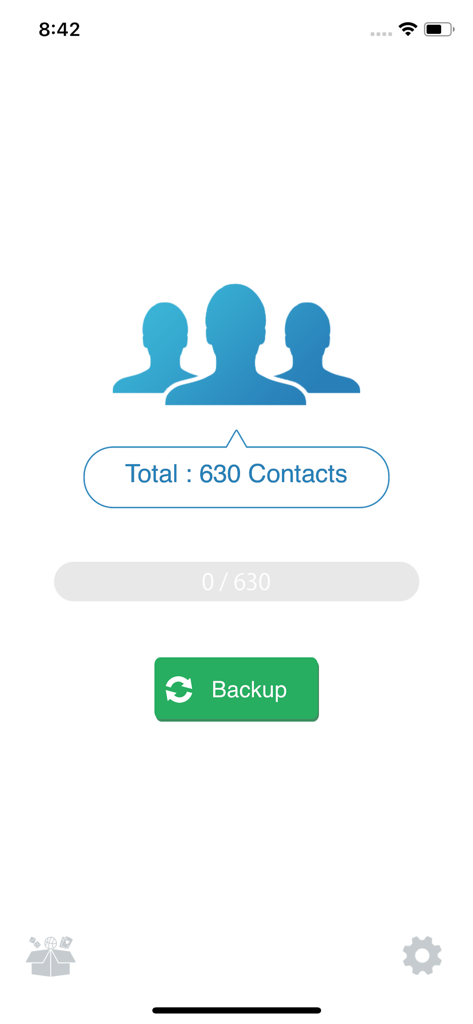
My Contacts Backup Pro - My Contacts Backup Pro의 기본 인터페이스, 630개의 연락처와 녹색 백업 버튼 표시
My Contacts Backup Pro의 기본 인터페이스, 630개의 연락처와 녹색 백업 버튼 표시

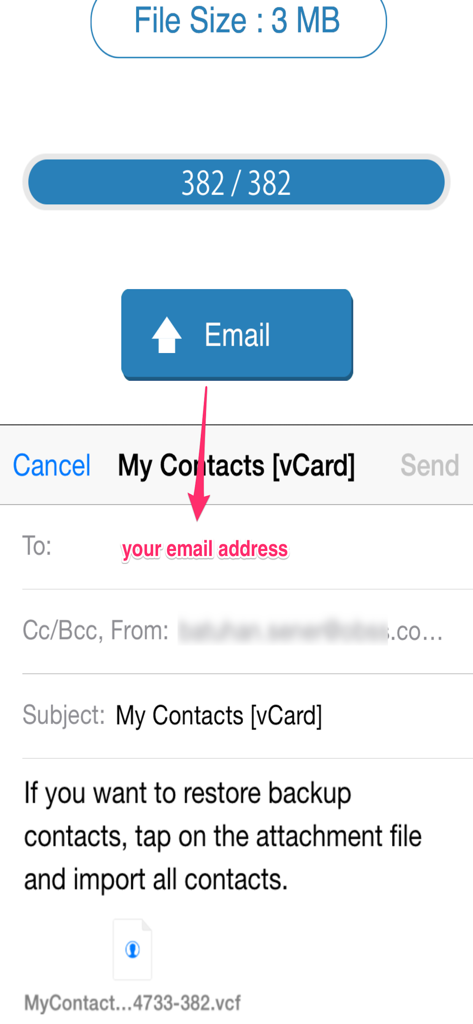
My Contacts Backup Pro - vCard 연락처 백업 파일을 이메일로 보내는 프로세스를 보여주는 앱 인터페이스
vCard 연락처 백업 파일을 이메일로 보내는 프로세스를 보여주는 앱 인터페이스

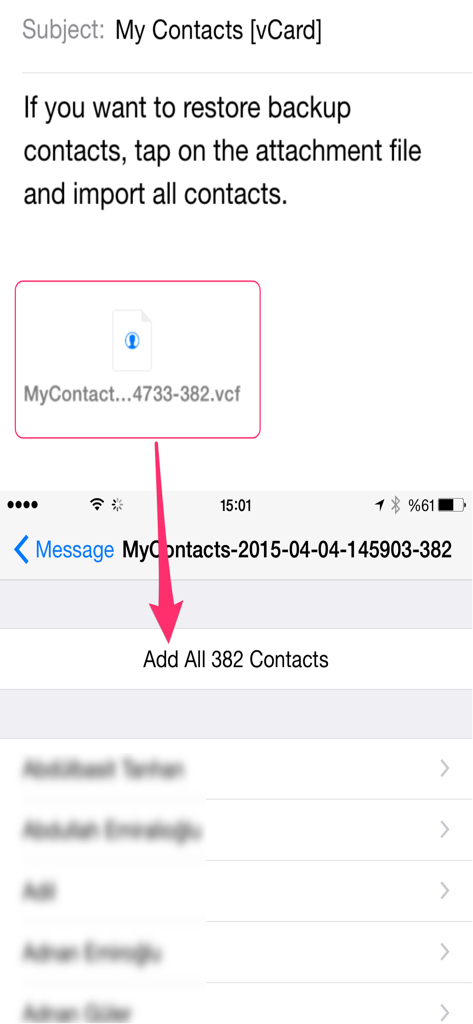
My Contacts Backup Pro - iPhone에서 vCard 이메일 첨부 파일에서 연락처를 복원하는 방법을 보여주는 튜토리얼 화면

iPhone에서 vCard 이메일 첨부 파일에서 연락처를 복원하는 방법을 보여주는 튜토리얼 화면

설명

My Contacts Backup Pro is the easiest way to backup and restore your contacts all from your phone without needing a computer or synchronization. You can backup all your contacts with a single touch and send it to yourself as a .vcf attachment via email. All contacts can then easily be restored any time by simply opening the .vcf file in your mailbox. Key Features: * Offline Backup. No need to sync to any server. Just email the backup file to yourself. * Easy restore. No need to use any app to restore backup file. Just tap on the *.vcf backup file in the iPhone, iPod Touch or iPad mail client. * Easily transfer contacts between iOS Devices using just an email client. * Edit contacts (update, delete, add) using Wi-Fi Manager option via browser on your computer. * Save vCard (VCF) backup file to your computer or upload from your computer via Wi-Fi Manager feature. * In App vCard Restore * Dropbox Support * Remove identical or duplicate contacts. * Export your contacts in the form of multiple vCard files. * Save backup file to your computer via iTunes File Sharing feature. * Set REMINDER to backup regularly (weekly or monthly) * Backup Contacts as VCF (VCard) or Export Contacts as CSV (Excel) file * Delete All Contacts in Address Book * No ads. ---------- IMPORTANT NOTE: After sending backup file (*.vcf) to yourself, please check your inbox to sees if message arrived and contains attachment (backup file). Sometimes email providers block attachments if attachment size is too large. Try with another mail account if possible, to send your backup file. Or save backup file to your computer via Wi-Fi Download option..

Download

다운로드: App Store

이 페이지는 앱이나 개발자의 공식 페이지가 아니며, 정보 제공 및 논평을 목적으로 작성된 독립 편집 간행물입니다. 명시적으로 달리 언급되지 않는 한, 해당 앱이나 개발자는 MWM, Apple, Google Play, 앱 퍼블리셔 또는 앱 개발자와 제휴, 보증, 후원, 승인 또는 공식적으로 연결되어 있지 않으며, 이 페이지의 어떤 내용도 해당 앱이 MWM의 서비스를 사용하여 개발되었음을 의미하지 않습니다. 모든 상표, 로고, 스크린샷 및 기타 콘텐츠는 해당 소유자의 자산입니다.








