PDF pages Extractor & Splitter

PDF pages Extractor & Splitter

다운로드: App Store
로고: PDF pages Extractor & Splitter

PDF 페이지 추출 및 분할기: 모바일 워크플로를 위한 정밀 문서 관리

부피가 큰 파일 공유는 이제 그만하고, 중요한 내용만 공유하세요. 특정 페이지 범위를 추출하고, 암호를 제거하며, iOS 파일 앱과 완벽하게 통합된 정밀한 PDF 정리 기능을 경험하세요.

다운로드: App Store

개발사

Ruchira Ramesh

카테고리

Productivity

다운로드

3K+

사용자 평점

1.0/5

총 평가 수

0

지원 언어

1

손끝에서 느끼는 정밀함

이 인터페이스를 사용하는 3K+ 명의 사용자.

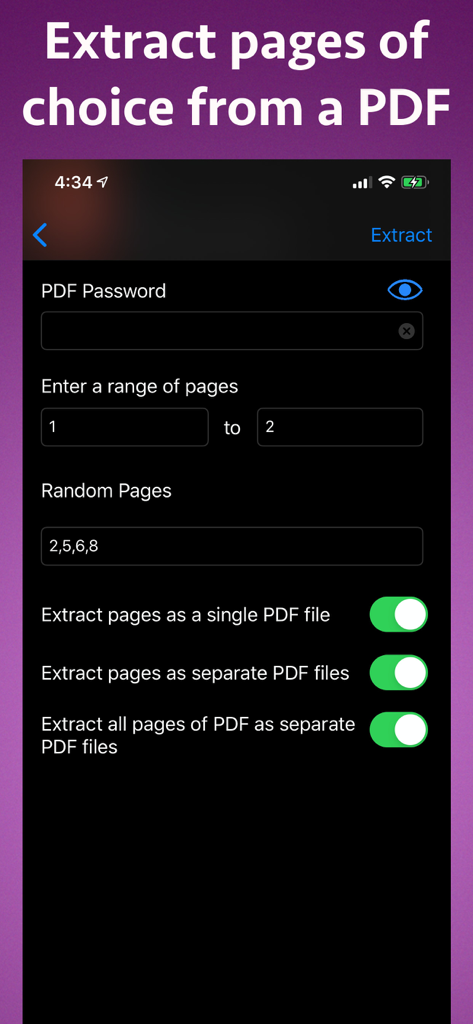
iPhone에서 PDF 파일의 특정 페이지를 추출하는 인터페이스

iPhone에서 PDF 파일의 특정 페이지를 추출하는 인터페이스

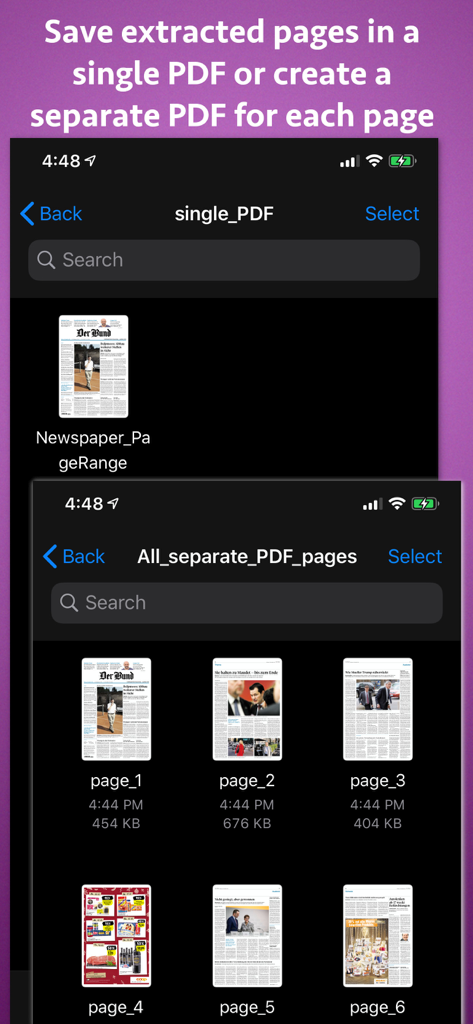
추출된 PDF 페이지를 단일 문서 또는 각 페이지별 개별 파일로 저장하는 옵션을 보여주는 인터페이스
추출된 PDF 페이지를 단일 문서 또는 각 페이지별 개별 파일로 저장하는 옵션을 보여주는 인터페이스

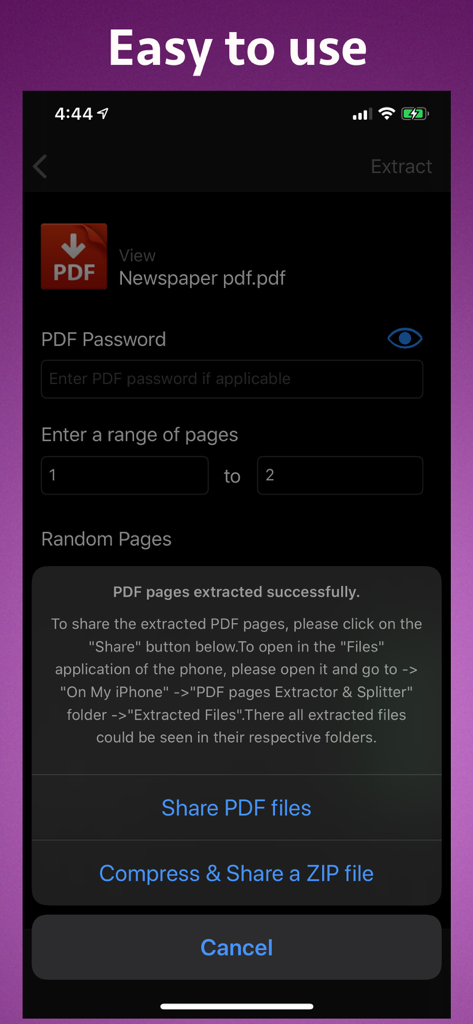
파일 공유 또는 ZIP 파일로 압축하는 옵션과 함께 PDF 페이지 추출 성공을 보여주는 인터페이스
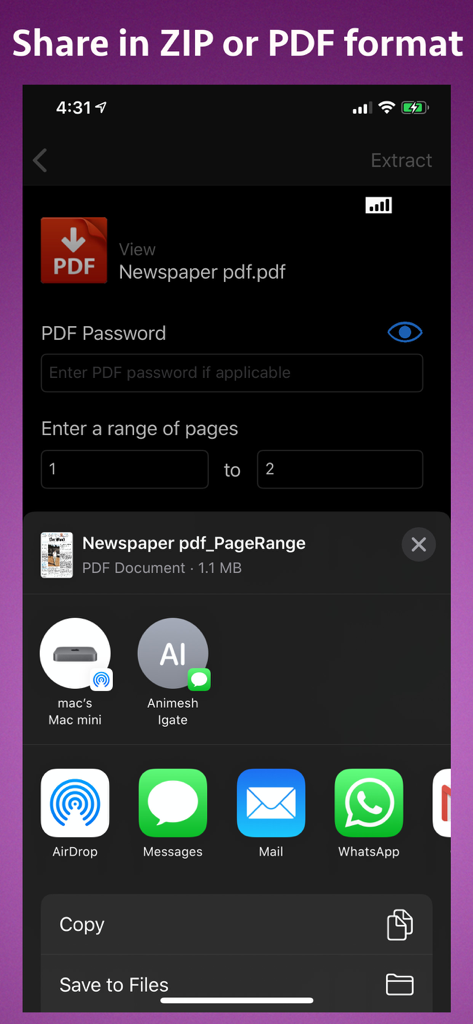
파일 공유 또는 ZIP 파일로 압축하는 옵션과 함께 PDF 페이지 추출 성공을 보여주는 인터페이스

iPhone에서 PDF 페이지 추출 설정 및 공유 옵션을 보여주는 인터페이스

iPhone에서 PDF 페이지 추출 설정 및 공유 옵션을 보여주는 인터페이스

정밀 PDF 도구로 더 스마트하게 작업하세요

이 앱을 돋보이게 하는 도구, 3K+ 명의 사용자가 선택.

✂️

정밀 페이지 추출

특정 페이지 범위 또는 2, 8, 25와 같은 개별 페이지 번호를 선택하세요. 불필요한 내용 없이 서명 페이지나 핵심 학습 챕터를 추출하는 데 완벽합니다.

🔓

안전한 암호 처리

보호된 문서를 쉽게 처리하고 암호를 제거하여 더 빠르게 공유하세요. 이동 중에도 민감한 법률 또는 재무 파일을 관리하는 데 이상적입니다.

📉

파일 축소, 속도 향상

필수 페이지는 유지하고 문서의 불필요한 부분을 제거하여 파일 크기를 줄이세요. iOS 파일 앱과 완벽하게 통합되어 원활한 워크플로를 제공합니다.

앱 소개

에 대해 알아야 할 모든 것 PDF pages Extractor & Splitter.

설명

Extract pages of choice from a PDF and save as separate PDF file.Pages could be selected by page range or explicit page numbers.The application also supports password protected PDF. Using the application, you could specify a range of the pages to be extracted and saved.For example, if you want to extract from page 10 to page 20 of a PDF file, you could specify this range of 10 to 20 in the application.The application will extract these pages and save them either as a single PDF file or each page as a separate PDF file as per your choice. Sometimes, we want to extract random pages from PDF. For example, if you want to extract only pages numbered 2,6,8,25, and 50 from PDF, this could be done as well.Inside the application just specify all page numbers separated by comma.The application will extract these random pages and save them either as a single PDF file or as a separate pdf file as per your choice. If you want to extract all pages of PDF and save each of these pages as separate PDF, you could do this as well. If the PDF pages are annotated, the application will process & retain the annotations into the extracted pages as well. The application also supports Password Protected PDF files. This means that the application could easily extract pages even from PDF files that are protected by a password.Also, the application removes the password from the extracted pages. (Note: You will have to enter the password in application.) The application is integrated with "Files" app of the phone.All extracted pages & PDF files could be easily accessed & managed using the Files application. The extracted pages could be saved in following three ways : a) All pages of choice could be extracted and saved as a single PDF file. b) Each extracted page could be saved as a separate PDF file. c) All pages of the PDF could be saved as a separate PDF file. Benefits : -- Reduce the file size by only taking the pages that are needed. -- Share only the PDF containing the required pages. -- Save PDF files without password -- Remove unwanted pages from a PDF -- Maintain documentation easily by extracting and keeping only important pages from a PDF. -- Integration with the phone's "Files" application for easy access to the extracted pages & PDF. -- Extracted pages could be easily used inside a document or a presentation.This makes documentation and presentation easy to prepare. -- Save a particular chapter or only selected pages from a PDF file, the application will be quite useful to you.It helps in saving & sharing a particular chapter from a book or novel.If there is a page containing an important study topic ,it could be extracted & saved using the application as well.

최신 버전

15

크기

6.8 MB

출시일

2018년 1월 31일

더 이상 불필요한 파일을 공유하지 마세요. 지금 추출하세요.

수천 명의 전문가와 학생들이 iPhone 또는 iPad에서 직접 중요한 내용만 분할, 추출 및 공유하는 당사의 정밀 PDF 도구를 사용하고 있습니다.

다운로드: App Store

App information, icons, screenshots, and descriptions displayed on this page are sourced from the Apple App Store and are the property of their respective developers. Download estimates and rankings are based on MWM's proprietary models and may not reflect actual figures. This page is provided for informational and analytical purposes only.

Believe this page infringes your intellectual property? File a dispute