
이 페이지는 앱이나 개발자의 공식 페이지가 아니며, 정보 제공 및 논평을 목적으로 작성된 독립 편집 간행물입니다. 명시적으로 달리 언급되지 않는 한, 해당 앱이나 개발자는 MWM, Apple, Google Play, 앱 퍼블리셔 또는 앱 개발자와 제휴, 보증, 후원, 승인 또는 공식적으로 연결되어 있지 않으며, 이 페이지의 어떤 내용도 해당 앱이 MWM의 서비스를 사용하여 개발되었음을 의미하지 않습니다. 모든 상표, 로고, 스크린샷 및 기타 콘텐츠는 해당 소유자의 자산입니다.


Pixel Studio for pixel art
이 앱은 당신에게 디지털 연금술사의 힘을 부여합니다. 픽셀을 황금으로 바꾸는 도구, 그것이 바로 이 앱의 본질입니다.
다운로드
1M+사용자 평점
총 평가 수
6.0K개발사
카테고리
Graphics & Design지원 언어
26최신 버전
5.42크기
125.0 MB출시일
2018년 7월 30일Pixel Studio는 직관적인 인터페이스와 강력한 기능으로 픽셀 아트 창작의 모든 단계를 지원하는 포괄적인 도구입니다.
Pixel Studio for pixel art 주요 기능 분석
레이어 및 프레임별 애니메이션 지원
이 앱은 복잡한 픽셀 아트와 역동적인 프레임별 애니메이션을 생성하는 데 필수적인 레이어 기능을 제공하며, 사용자가 작품의 깊이와 움직임을 정교하게 제어할 수 있게 해줍니다.
어니언 스킨을 이용한 정교한 애니메이션 제작
이 도구는 애니메이터가 이전 및 다음 프레임을 반투명하게 볼 수 있는 어니언 스킨 기능을 갖추고 있어, 사용자가 부드럽고 정확한 애니메이션 전환을 만들 수 있도록 돕습니다.
자동 저장, 백업 및 광범위한 파일 형식 지원
이 도구는 자동 저장 및 백업 기능을 통해 사용자의 작업 손실 위험을 최소화하며, PNG, JPG, PSD 등 다양한 인기 파일 형식을 지원하여 다른 소프트웨어와의 호환성을 보장합니다.
다양한 기기 간 Google Drive 동기화
이 앱은 Google Drive 동기화 기능을 제공하여, 사용자가 모바일 기기와 데스크톱 컴퓨터 간에 작업을 원활하게 전환하며 언제 어디서든 자신의 프로젝트에 접근할 수 있게 해줍니다.
GIF, 스프라이트 시트 및 MP4 비디오 내보내기
이 도구는 완성된 애니메이션을 GIF, 스프라이트 시트 및 MP4 비디오 형식으로 내보낼 수 있는 기능을 갖추고 있어, 사용자가 자신의 작품을 게임 개발이나 소셜 미디어 플랫폼에서 쉽게 활용하고 공유할 수 있게 해줍니다.
고급 드로잉 도구 세트 (대칭, 도형, 브러시)
이 앱은 대칭 그리기, 다양한 도형 생성, 사용자 정의 브러시 등 광범위한 고급 드로잉 도구를 제공하여, 사용자가 정교하고 독창적인 픽셀 아트를 제작할 수 있도록 지원합니다.
Pixel Network™ 커뮤니티 및 소셜 공유
이 플랫폼은 Pixel Network™ 커뮤니티와의 통합을 통해 사용자가 자신의 픽셀 아트 작품을 전 세계 아티스트들과 공유하고, 피드백을 받으며, 영감을 주고받을 수 있는 환경을 제공합니다.
색상 팔레트 관리 및 Lospec 통합
이 앱은 사용자 정의 팔레트 생성 기능과 Lospec 팔레트 가져오기 기능을 제공하여, 사용자가 자신의 작품에 일관되고 미학적인 색상 구성을 적용하고 관리할 수 있게 해줍니다.
자주 묻는 질문
에 대해 알아야 할 모든 것 Pixel Studio for pixel art
What is Pixel Studio?
Pixel Studio is a pixel art editor for artists and game developers, designed to create pixel art and animations. It offers simplicity, speed, and portability for users of all skill levels.
Can I create animations with Pixel Studio?
Yes, Pixel Studio supports creating frame-by-frame animations. Users can export these animations to GIF, sprite sheets, or MP4 videos, and also add music to them.
Does Pixel Studio support cloud synchronization?
Yes, Pixel Studio offers Google Drive sync. This feature allows users to synchronize their work across various mobile and desktop devices, ensuring access from anywhere.
Is there a community platform for Pixel Studio users?
Yes, Pixel Studio integrates with Pixel Network™, a dedicated community for pixel art enthusiasts. Users can join to share their creations and connect with other artists.
What file formats does Pixel Studio support?
Pixel Studio supports a wide array of formats including PNG, JPG, GIF, BMP, TGA, PSP, PSD, and EXR. It also supports JASC Palette (PAL) format and Aseprite file import.
Is Pixel Studio PRO a one-time purchase?
Yes, Pixel Studio PRO is a one-time purchase. It removes ads, enables Dark Theme, unlocks 256-color palettes, extends project size, and adds extra format support among other benefits.
Does Pixel Studio support Apple Pencil?
Yes, Pixel Studio officially supports Apple Pencil. This provides enhanced precision and control for users creating pixel art on compatible Apple devices.
What are the system requirements for Pixel Studio?
The minimum system requirements for Pixel Studio include 2GB or more RAM for large projects and animations. A powerful CPU with an AnTuTu score of 100,000+ is also necessary.
Where can I find the Privacy Policy for Pixel Studio?
The Privacy Policy for Pixel Studio is available on GitHub. Users can find the complete policy document at https://github.com/hippogamesunity/PixelStudioHub/wiki/Privacy-Policy.
다음 스크린샷과 설명은 앱의 공식 스토어 목록에서 직접 가져온 것이며 앱 개발자의 자산입니다.
앱 스토어
스크린샷

사용자는 이 앱에서 색상 팔레트와 다양한 편집 도구를 활용하여 이동 중에도 픽셀 아트를 쉽게 생성할 수 있습니다.
모바일 픽셀 아트
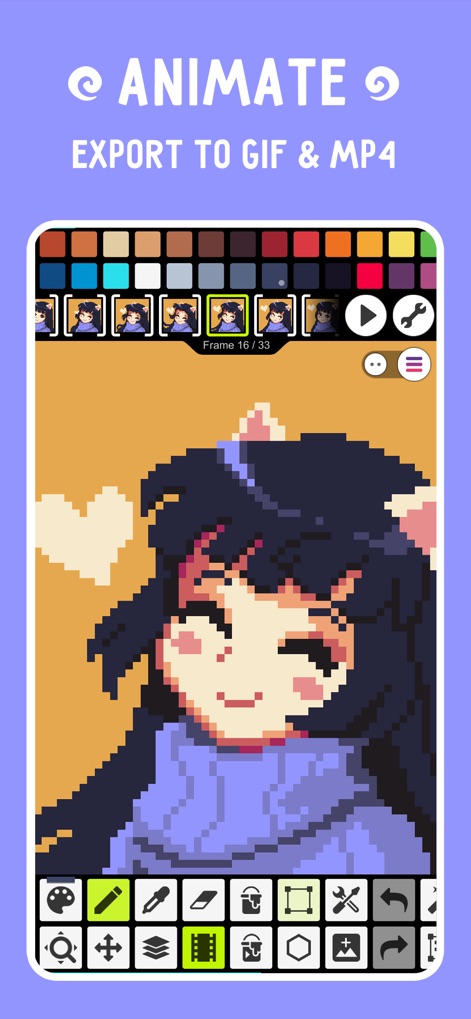
이 도구를 사용하면 여러 프레임을 관리하여 캐릭터에 생동감을 불어넣고, 완성된 애니메이션을 GIF 또는 MP4 형식으로 내보낼 수 있습니다.
생동감 있는 애니메이션

사용자는 Pixel Network 커뮤니티에 참여하여 다양한 픽셀 아트를 탐색하고, 자신의 창작물을 다른 아티스트들과 공유하며 소통할 수 있습니다.
커뮤니티와 공유

이 앱은 레이어 기능을 지원하여 복잡한 이미지를 효율적으로 구성하고, 각 레이어의 시인성을 조절하여 세밀한 편집이 가능합니다.
정교한 레이어 작업

사용자는 애니메이션에 배경 음악을 추가하여 더욱 풍부한 콘텐츠를 제작하고, 오디오 트랙의 시작 및 끝 지점을 정밀하게 조절할 수 있습니다.
음악과 영상 결합

이 앱은 HSV 및 RGBA 모드를 포함한 고급 색상 선택기를 제공하여, 사용자가 원하는 색상을 정확하게 지정하고 팔레트를 저장 및 로드할 수 있습니다.
전문적인 색상 관리

사용자는 간단한 제스처로 캔버스 크기를 조절하거나 개체를 이동시킬 수 있으며, 하단 도구 모음에서 다양한 편집 옵션을 손쉽게 선택할 수 있습니다.
직관적인 조작 도구
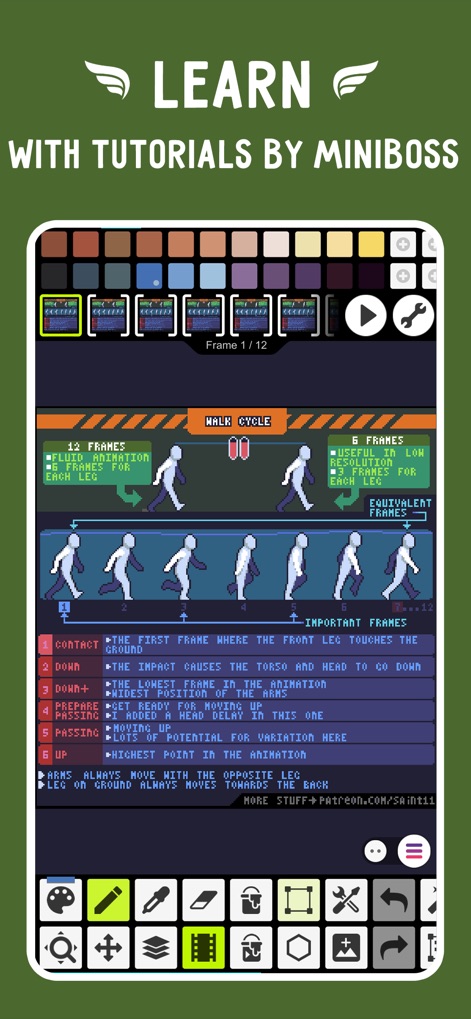
이 앱은 프레임별 애니메이션 튜토리얼을 제공하여 사용자가 복잡한 동작을 단계별로 이해하고, 애니메이션의 중요한 프레임과 타이밍을 배울 수 있도록 돕습니다.
튜토리얼로 배우기
설명
Download

이 페이지는 앱이나 개발자의 공식 페이지가 아니며, 정보 제공 및 논평을 목적으로 작성된 독립 편집 간행물입니다. 명시적으로 달리 언급되지 않는 한, 해당 앱이나 개발자는 MWM, Apple, Google Play, 앱 퍼블리셔 또는 앱 개발자와 제휴, 보증, 후원, 승인 또는 공식적으로 연결되어 있지 않으며, 이 페이지의 어떤 내용도 해당 앱이 MWM의 서비스를 사용하여 개발되었음을 의미하지 않습니다. 모든 상표, 로고, 스크린샷 및 기타 콘텐츠는 해당 소유자의 자산입니다.