이 페이지는 앱이나 개발자의 공식 페이지가 아니며, 정보 제공 및 논평을 목적으로 작성된 독립 편집 간행물입니다. 명시적으로 달리 언급되지 않는 한, 해당 앱이나 개발자는 MWM, Apple, Google Play, 앱 퍼블리셔 또는 앱 개발자와 제휴, 보증, 후원, 승인 또는 공식적으로 연결되어 있지 않으며, 이 페이지의 어떤 내용도 해당 앱이 MWM의 서비스를 사용하여 개발되었음을 의미하지 않습니다. 모든 상표, 로고, 스크린샷 및 기타 콘텐츠는 해당 소유자의 자산입니다.
Resprite: pixel art studio
모바일 환경에서 데스크톱급 게임 에셋, 스프라이트시트 및 GIF 애니메이션을 만드세요. 정밀 도구와 고성능 렌더링이 모바일 워크플로우에 최적화되어 있습니다.
Resprite는 모바일 워크플로우에 데스크톱급 편집 기능을 제공하며, 고성능 렌더러와 게임 개발자 및 일러스트레이터를 위한 전문 도구를 결합합니다.
데스크톱급 애니메이션
오니언 스키닝, 여러 애니메이션 클립, 수백 프레임에 걸쳐 부드러운 전문 타임라인으로 복잡한 프레임별 시퀀스를 마스터하세요.
픽셀 단위 정밀도
Apple Pencil 최적화, 사용자 지정 가능한 제스처, 깔끔하고 높은 충실도의 게임 에셋을 위해 설계된 픽셀 퍼펙트 도구로 최고의 제어 기능을 경험하세요.
FAQ
자주 묻는 질문
에 대해 알아야 할 모든 것 Resprite: pixel art studio
Resprite는 무엇인가요?
Resprite는 모바일 장치를 위한 전문 픽셀 아트 편집기입니다. 픽셀 일러스트레이션, 스프라이트 시트, GIF 애니메이션 및 게임 아트 에셋을 만들기 위한 완벽한 도구 세트, 혁신적인 색상 시스템, 고급 레이어 및 타임라인을 제공합니다.
Resprite는 픽셀 아트를 위한 고급 레이어 기능을 지원하나요?
네, Resprite는 복사, 병합, 평탄화, 래스터화, 양파 껍질(Onion Skin) 지원, 다단계 그룹화 및 불투명도 제어를 포함한 포괄적인 레이어 기능을 제공합니다. 수백 개의 프레임에서도 부드러운 성능을 보장합니다.
Resprite에서 다른 파일 형식을 가져오고 내보낼 수 있나요?
네, Resprite는 GIF, 스프라이트 시트, Resprite 패키지, APNG 애니메이션 및 PSD 파일을 포함한 다양한 형식의 가져오기 및 내보내기를 지원합니다. GPL 및 RPL 팔레트 형식도 처리합니다.
Resprite에는 프리미엄 기능이 있나요?
네, Resprite Premium은 내보내기 제한 제거, 색상 조정, 스트로크 기능, 대칭 도구 및 텍스트 도구와 같은 추가 기능을 잠금 해제합니다. 프리미엄 액세스는 iPad와 iPhone 간에 공유됩니다.
Resprite에는 그림 및 편집을 위한 제스처 컨트롤이 있나요?
네, Resprite는 낮은 기울기와 강한 압력의 스타일러스 지원, 실행 취소/다시 실행을 위한 두 손가락/세 손가락 탭, 사용자 정의 가능한 펜 더블 탭 작업, 프레임 전환을 위한 한 손가락 제스처를 포함한 빠른 제스처 작업을 제공합니다.
Resprite에서 인앱 구매 및 구독은 어떻게 관리되나요?
Resprite는 iTunes 계정에서 요금을 차감하여 선택적 인앱 구매를 처리합니다. 구독은 현재 기간이 끝나기 최소 24시간 전에 해제하지 않으면 자동으로 갱신됩니다. Apple ID 설정에서 자동 갱신을 관리할 수 있습니다.
Resprite는 사용자 정의 가능하고 유연한 사용자 인터페이스를 제공하나요?
네, Resprite는 유연한 인터페이스 레이아웃을 제공합니다. 사용자는 부동 패널을 자유롭게 배열하고, 모든 패널을 최소화하고, 화면의 어느 곳에나 도구 모음을 배치하여 효율성을 높이고 워크플로우를 최적화할 수 있습니다.
Resprite 픽셀 아트 프로젝트에서 텍스트에 사용자 정의 글꼴을 사용할 수 있나요?
네, Resprite는 여러 줄 또는 세로 텍스트 삽입을 허용하고 사용자 정의 글꼴 사용을 지원하여 픽셀 아트 디자인 내에서 텍스트 통합을 위한 광범위한 옵션을 제공합니다. 텍스트 도구는 프리미엄 기능입니다.
다음 스크린샷과 설명은 앱의 공식 스토어 목록에서 직접 가져온 것이며 앱 개발자의 자산입니다.
앱 스토어
스크린샷
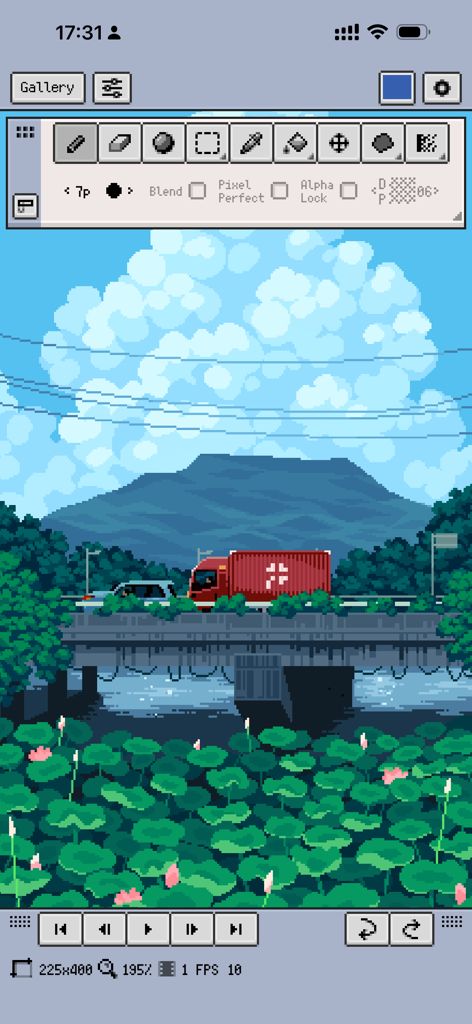
산과 다리가 있는 상세한 풍경 일러스트레이션을 보여주는 전문 픽셀 아트 편집기 인터페이스
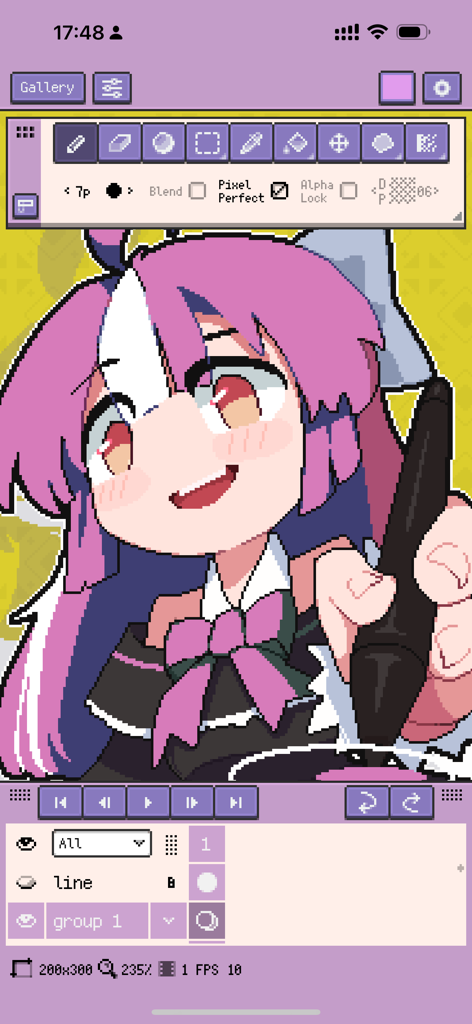
애니메이션 캐릭터 일러스트레이션과 그리기 도구가 있는 Resprite 픽셀 아트 스튜디오 인터페이스
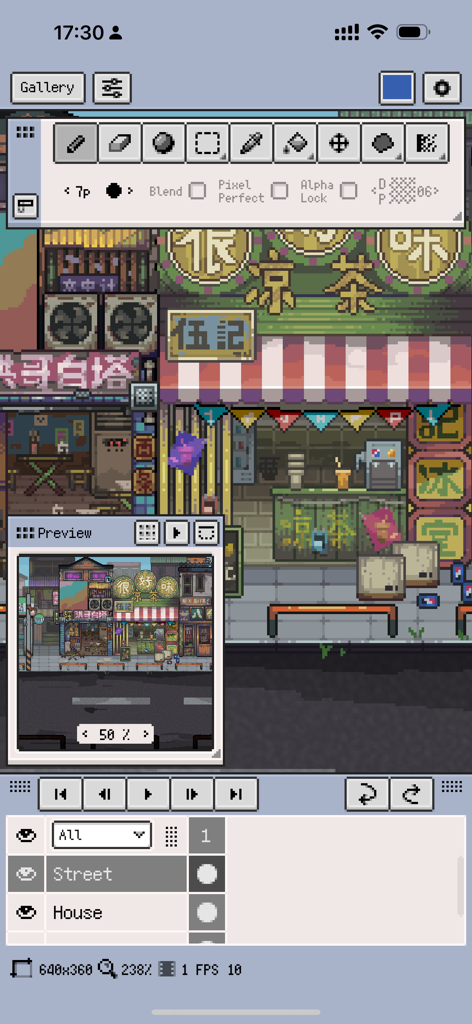
전문적인 그리기 도구와 레이어 관리가 있는 상세한 픽셀 아트 거리 장면을 보여주는 Resprite 모바일 앱 인터페이스
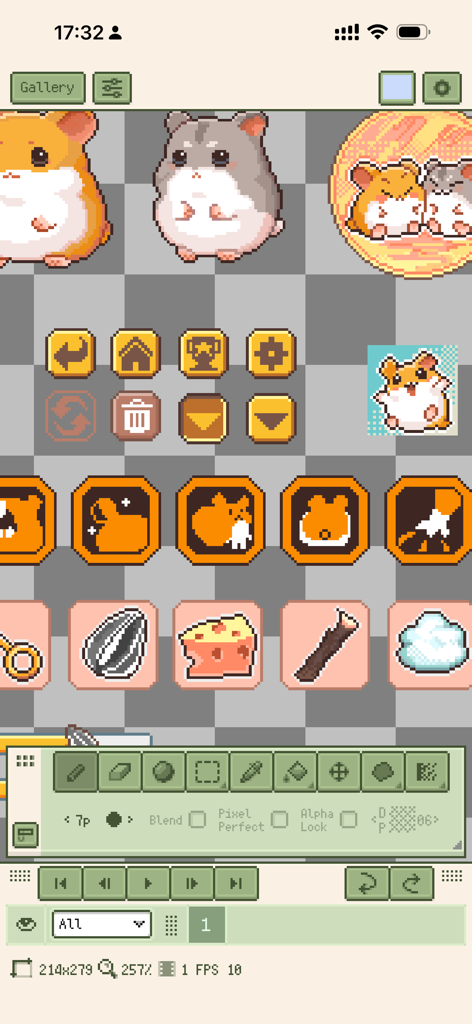
픽셀 캔버스에 귀여운 햄스터 스프라이트와 게임 에셋을 보여주는 Resprite 픽셀 아트 스튜디오의 모바일 사용자 인터페이스
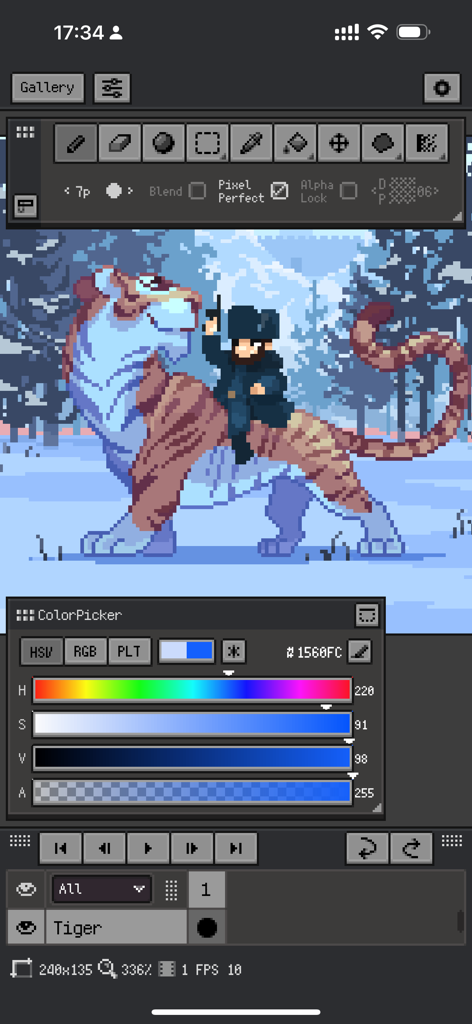
색상 선택기와 도구 패널이 있는 눈 덮인 장면에서 호랑이를 타고 있는 캐릭터를 보여주는 Resprite 픽셀 아트 스튜디오 앱 인터페이스
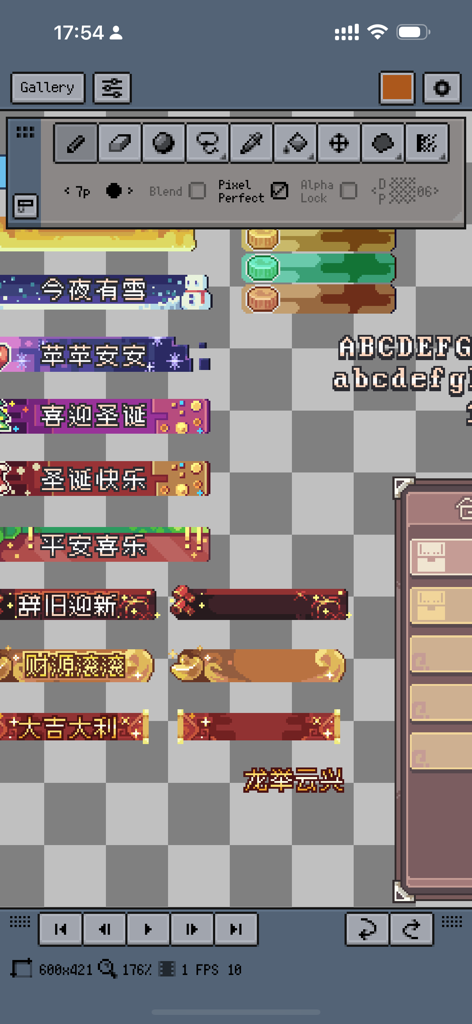
다양한 픽셀 배너와 창의적인 도구를 표시하는 Resprite 픽셀 아트 스튜디오의 사용자 인터페이스.
설명
Resprite is a professional pixel art editor. Desktop-class features combined with touch/pen optimizations let you create efficiently anywhere.
Resprite brings together a complete pixel toolset, an innovative coloring system, advanced layers and timelines, and a Metal-powered high-performance renderer so you can easily make pixel illustrations, spritesheets, GIF animations, and game art assets.
Wherever you are—at home, camping, on the beach, or waiting at the gate—you can start creating. Resprite is your mobile pixel art studio.
Resprite includes:
- High-performance drawing engine
- Innovative and efficient palette and coloring tools
- Complete dithering pattern support
- Flexible interface layout, always one tap away
- Optimized gesture and pen controls for precision
Flexible interface layout:
- Arrange floating panels freely
- All panels can be minimized
- Shorten the distance between pen and target to boost efficiency
- Cohesive pixel-styled UI
All-in-one toolset:
- Brushes, innovative coloring tools, three selection tools, eyedropper, paint bucket, three shape tools, plus rich sub-options
- Pixel Perfect, Alpha Lock, dithering textures, and other advanced features
- Place the toolbar anywhere for instant access
- Copy, paste (including across files), flip horizontally/vertically, rotate, scale
- Zoom and transform both canvas and image
- Quick outline, HSV tuning, brightness/contrast adjustment, blur filter
- Insert multi-line or vertical text, with custom fonts
Convenient reference images:
- Load multiple reference images
- References can be zoomed and minimized
- Place them anywhere
Innovative palette:
- Free placement layout
- Linked workflow with coloring tools
- Interpolate to create intermediate colors
- Palette import and export
- Automatically sample palettes from the canvas
Import and sharing:
- Import/export GIF, spritesheet, and Resprite packages
- Export with scale, frame margin, spritesheet layout options, and more
- Export per animation clip or by row
- Import/export palettes (GPL, RPL formats)
- Export PSD files
- Import/export APNG animations
- Export timelapse recordings of your drawing
Layer and timeline system:
- Comprehensive features for flexible layer-based creation
- Copy, merge, flatten, rasterize, and other advanced operations
- Onion Skin support
- Set multiple animation clips and select them individually
- Reliable performance—smooth even with hundreds of frames
- Color tags, multi-level grouping, and opacity control
Fast gesture operations:
- Supports low-tilt and heavy-press stylus gestures
- Two-finger/three-finger tap for undo/redo
- Customizable pen Double-Tap actions
- One-finger gestures to switch frames, play, and toggle onion skin
- Long-press gesture
- Flexibly map gestures to actions
Pixel art in the demos comes from these artists:
史大巴、斯尔娜娜、扑倒奥利奥、吱小墨、妘归、KATLEE十三、石睐暮
PREMIUM:
Your Resprite PREMIUM unlocks:
- Remove export limits
- Color adjustments
- Stroke
- Symmetry tool
- Text tool
All app features are available, and Premium is shared between iPad and iPhone.
Customer support:
Docs: https://resprite.fengeon.com/
Email: support@fengeon.com
Optional in-app purchases:
Charges are deducted from your iTunes account. Subscriptions renew automatically unless auto-renew is turned off at least 24 hours before the current period ends. After purchase, you can manage auto-renewal anytime in your Apple ID account settings.
Terms and conditions:
Your use of this app is governed by the Terms at https://resprite.fengeon.com/terms and the Privacy Policy at https://resprite.fengeon.com/privacy, including future versions.
이 페이지는 앱이나 개발자의 공식 페이지가 아니며, 정보 제공 및 논평을 목적으로 작성된 독립 편집 간행물입니다. 명시적으로 달리 언급되지 않는 한, 해당 앱이나 개발자는 MWM, Apple, Google Play, 앱 퍼블리셔 또는 앱 개발자와 제휴, 보증, 후원, 승인 또는 공식적으로 연결되어 있지 않으며, 이 페이지의 어떤 내용도 해당 앱이 MWM의 서비스를 사용하여 개발되었음을 의미하지 않습니다. 모든 상표, 로고, 스크린샷 및 기타 콘텐츠는 해당 소유자의 자산입니다.