PrintHand Mobile Print Premium
다운로드: App Store

이 페이지는 앱이나 개발자의 공식 페이지가 아니며, 정보 제공 및 논평을 목적으로 작성된 독립 편집 간행물입니다. 명시적으로 달리 언급되지 않는 한, 해당 앱이나 개발자는 MWM, Apple, Google Play, 앱 퍼블리셔 또는 앱 개발자와 제휴, 보증, 후원, 승인 또는 공식적으로 연결되어 있지 않으며, 이 페이지의 어떤 내용도 해당 앱이 MWM의 서비스를 사용하여 개발되었음을 의미하지 않습니다. 모든 상표, 로고, 스크린샷 및 기타 콘텐츠는 해당 소유자의 자산입니다.

로고: PrintHand Mobile Print Premium
다운로드: App Store

PrintHand Mobile Print Premium

원활한 모바일 인쇄를 위한 전문가의 선택입니다. iPhone 또는 iPad를 거의 모든 프린터(레거시 및 AirPrint 미지원 모델 포함)에 연결하여 몇 초 만에 문서, 클라우드 파일, 사진을 인쇄하세요.

주요 수치

다운로드

57K+

사용자 평점

2.3/5

총 평가 수

0

개발사

Dynamix Software

카테고리

Productivity

지원 언어

9

최신 버전

3.18

크기

29.6 MB

출시일

2013년 6월 20일
기능

프린터의 모든 기능을 활용하세요

호환성 문제로 어려움을 겪지 마세요. PrintHand 프리미엄은 모바일 장치와 모든 프린터 간의 격차를 해소하여 어디서든 전문적인 사무실 워크플로우를 제공합니다.

보편적인 프린터 지원

레거시 하드웨어와의 격차를 해소하세요. AirPrint를 기본적으로 지원하지 않는 프린터를 포함하여 거의 모든 Wi-Fi, Bluetooth 또는 USB 프린터로 인쇄하세요.

직접 클라우드 통합

문서를 먼저 다운로드할 필요 없이 Google Drive, Dropbox, OneDrive 및 Box에서 직접 인쇄하여 워크플로우를 간소화하세요.

다음 스크린샷과 설명은 앱의 공식 스토어 목록에서 직접 가져온 것이며 앱 개발자의 자산입니다.

앱 스토어

스크린샷
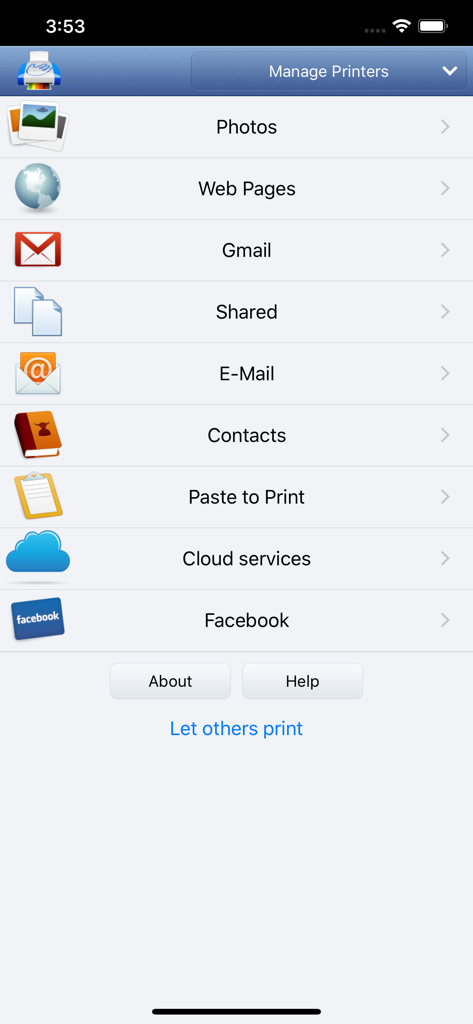
PrintHand Mobile Print Premium - 사진 웹 페이지 이메일 및 클라우드 서비스에 대한 인쇄 옵션을 보여주는 PrintHand 모바일 프린트 프리미엄 앱의 메인 메뉴
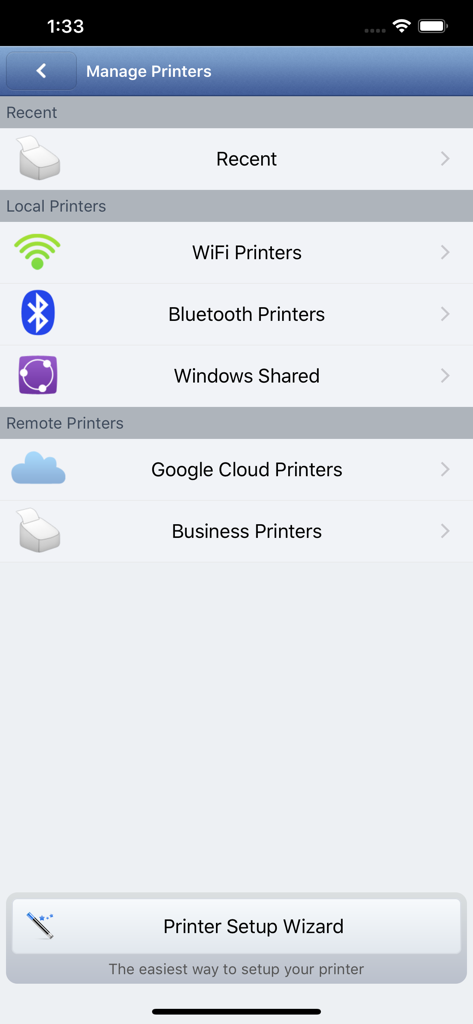
사진 웹 페이지 이메일 및 클라우드 서비스에 대한 인쇄 옵션을 보여주는 PrintHand 모바일 프린트 프리미엄 앱의 메인 메뉴

PrintHand Mobile Print Premium - WiFi 및 Bluetooth 옵션을 포함하여 로컬 및 원격 프린터 관리를 위한 인터페이스
WiFi 및 Bluetooth 옵션을 포함하여 로컬 및 원격 프린터 관리를 위한 인터페이스

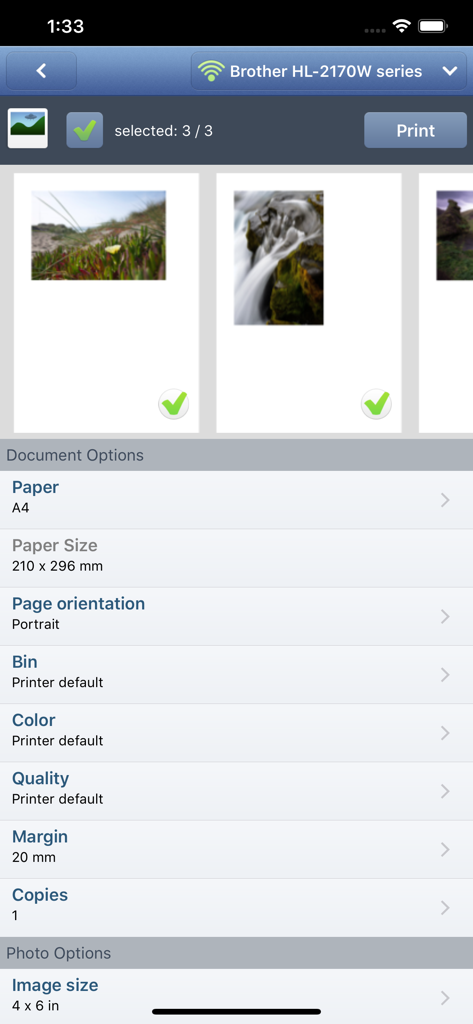
PrintHand Mobile Print Premium - Brother 프린터에 대한 사진 선택 및 문서 인쇄 설정을 보여주는 모바일 앱 인터페이스

Brother 프린터에 대한 사진 선택 및 문서 인쇄 설정을 보여주는 모바일 앱 인터페이스

설명

With PrintHand Mobile Print Premium you can print photos, web pages, emails, attachments, contacts and files saved to various cloud services. Many other apps, including Mail, Safari and Notes, allow you to copy something and paste it to PrintHand for printing or even share content to the printing app using the Action button. One can print on Wi-Fi, Bluetooth, AirPrint, Windows Shared and Google Cloud Print printers. IMPORTANT Prior to purchasing the app we do recommend referring to the list of supported printers and printing a test page from the free PrintHand Mobile Print app. Here is the list of printers supported by PrintHand app: http://printhand.com/list_of_supported_printers.php Please make sure that your printer is supported. In case your printer is not supported, direct printing from your mobile device might be impossible. However, printing from PrintHand Mobile Print Premium using PrintHand Remote desktop software installed on your computer is an option if you can print from your computer on the same printer. Please visit http://www.printhand.com/shared_printers.php to download the PrintHand Remote desktop software. FEATURES Using PrintHand you can print the following content: - Office documents, including MS Word, Excel, PowerPoint, PDF shared from web browser or stored in Cloud services; - Text files shared from web browser or stored in Cloud services; - Photos and images; - Web pages; - Emails and attachments; - Google Drive content; - Contacts; - Facebook albums; - Files from Dropbox; - Files from Box; - Files from OneDrive; - Content copied to clipboard (using Paste to Print); - Content shared from other apps using the Action button. You can print via: - Wi-Fi (using a Wi-Fi Direct printer or using a Wi-Fi router as a middleman); - Bluetooth (only on supported Apple MFi certified printers); - PC or Mac (if your printer is shared using PrintHand Remote desktop client or standard tools of your computer's OS); - Google Cloud Print; - AirPrint. USING PRINTERS Printing on Nearby wireless printers Most of the Wi-Fi printers are detected automatically. PrintHand can print on such printers directly in case they are supported by the app. As long as your printer is available from a Windows or Mac computer, you can print via the PrintHand Remote. To use it, please visit http://www.printhand.com/shared_printers.php to download the PrintHand Remote desktop software. Print Hammermill app installed on your mobile device will find printers shared via the PrintHand Remote desktop app automatically. However, please note that your printer should be connected to the same Wi-Fi network to which your mobile device is connected. Remote printing via the Internet Also, you can print on printers located anywhere in the world via the Internet. This will require the same PrintHand Remote software installed on the computer at the receiving end, and a PrintHand Remote account registered. Complimentary 100 pages for Remote Printing under the same account.

Download

다운로드: App Store

이 페이지는 앱이나 개발자의 공식 페이지가 아니며, 정보 제공 및 논평을 목적으로 작성된 독립 편집 간행물입니다. 명시적으로 달리 언급되지 않는 한, 해당 앱이나 개발자는 MWM, Apple, Google Play, 앱 퍼블리셔 또는 앱 개발자와 제휴, 보증, 후원, 승인 또는 공식적으로 연결되어 있지 않으며, 이 페이지의 어떤 내용도 해당 앱이 MWM의 서비스를 사용하여 개발되었음을 의미하지 않습니다. 모든 상표, 로고, 스크린샷 및 기타 콘텐츠는 해당 소유자의 자산입니다.








