QuickStar
QuickStar
다운로드: App Store

이 페이지는 앱이나 개발자의 공식 페이지가 아니며, 정보 제공 및 논평을 목적으로 작성된 독립 편집 간행물입니다. 명시적으로 달리 언급되지 않는 한, 해당 앱이나 개발자는 MWM, Apple, Google Play, 앱 퍼블리셔 또는 앱 개발자와 제휴, 보증, 후원, 승인 또는 공식적으로 연결되어 있지 않으며, 이 페이지의 어떤 내용도 해당 앱이 MWM의 서비스를 사용하여 개발되었음을 의미하지 않습니다. 모든 상표, 로고, 스크린샷 및 기타 콘텐츠는 해당 소유자의 자산입니다.


로고: QuickStar
다운로드: App Store

QuickStar

목록 피로에서 벗어나세요. 시계와 같은 무한 루프에 하루를 계획하고 iPad를 가장 중요한 작업을 위한 전용 상시 미션 컨트롤로 바꾸세요.

주요 수치

다운로드

0

사용자 평점

1.0/5

총 평가 수

0

개발사

Ines Landberg

카테고리

Productivity

지원 언어

1

최신 버전

11.3

크기

25.9 MB

출시일

2024년 7월 31일
기능

시각적 정밀도로 하루를 마스터하세요

QuickStar는 압도적인 목록을 직관적인 시계와 같은 타임라인으로 대체하여 시각적 사고가와 한눈에 하루를 봐야 하는 전문가를 위해 설계되었습니다.

시각적 시계 타임라인

실제 시계를 반영하는 원형 인터페이스에 작업을 계획하세요. '시간 맹목'을 극복하고 수직 목록의 불안 없이 흐름을 관리하는 데 완벽합니다.

상시 데스크 모드

iPad를 전용 생산성 대시보드로 바꾸세요. 작업하는 동안 화면이 꺼지지 않도록 타임라인을 눈에 보이게 유지하고 집중력을 유지하세요.

다음 스크린샷과 설명은 앱의 공식 스토어 목록에서 직접 가져온 것이며 앱 개발자의 자산입니다.

앱 스토어

스크린샷
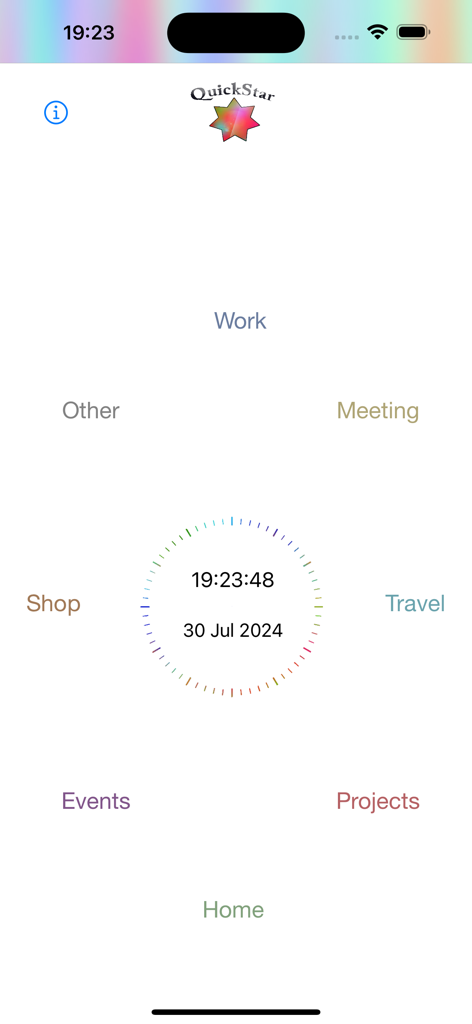
QuickStar - QuickStar 앱 홈 화면으로, 중앙 디지털 시계와 날짜를 둘러싼 작업, 집, 프로젝트와 같은 범주의 원형 레이아웃을 보여줍니다.
QuickStar 앱 홈 화면으로, 중앙 디지털 시계와 날짜를 둘러싼 작업, 집, 프로젝트와 같은 범주의 원형 레이아웃을 보여줍니다.

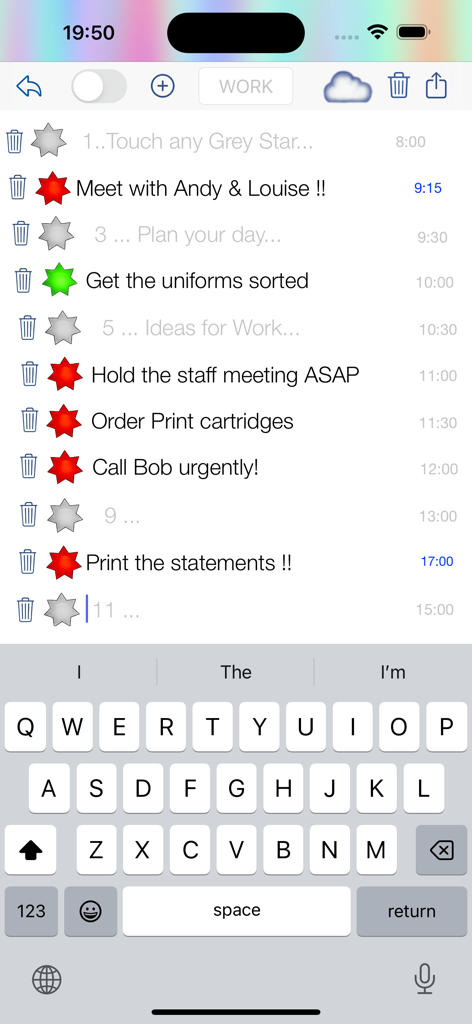
QuickStar - QuickStar 앱 모바일 인터페이스로, 빨간색과 녹색 상태 별이 있는 작업 목록과 활성 키보드를 보여줍니다.
QuickStar 앱 모바일 인터페이스로, 빨간색과 녹색 상태 별이 있는 작업 목록과 활성 키보드를 보여줍니다.

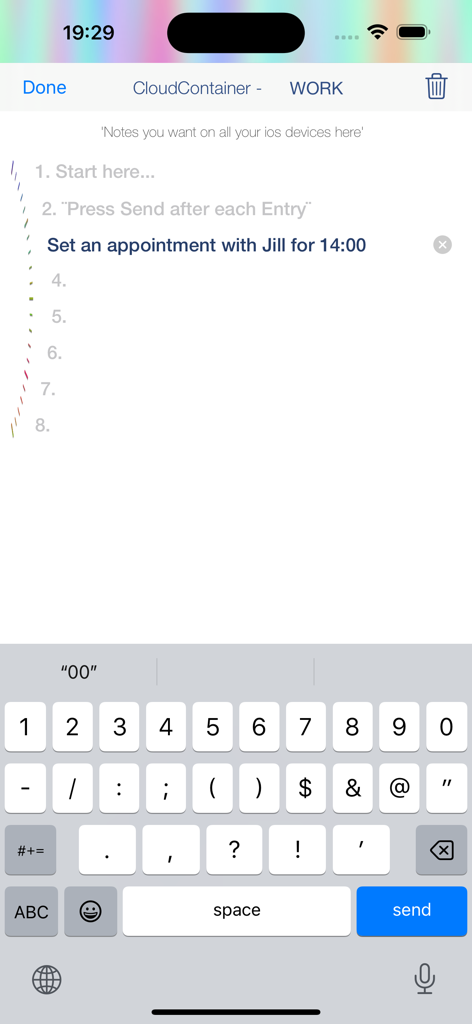
QuickStar - iPhone의 QuickStar 앱 인터페이스로, 키보드가 활성화된 상태에서 오후 2시 작업 약속을 추가하는 사용자를 보여줍니다.
iPhone의 QuickStar 앱 인터페이스로, 키보드가 활성화된 상태에서 오후 2시 작업 약속을 추가하는 사용자를 보여줍니다.

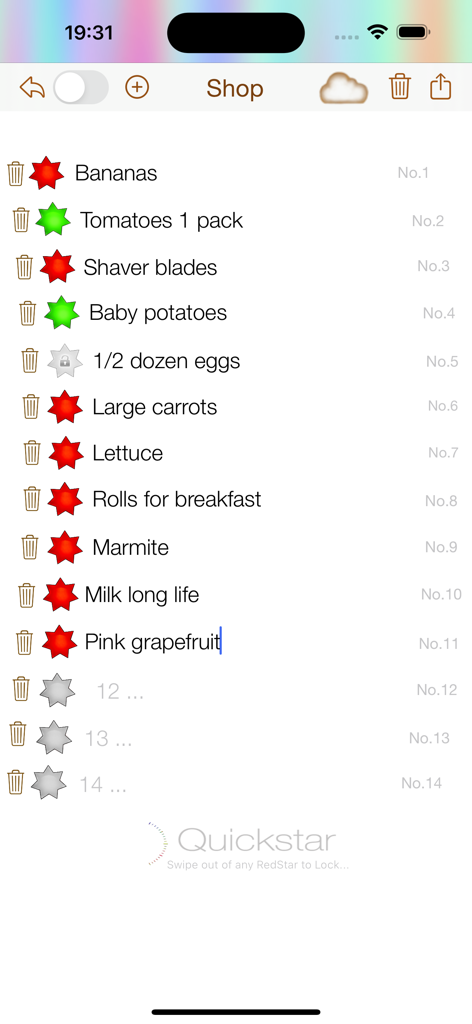
QuickStar - QuickStar 앱 인터페이스로, 빨간색과 녹색 완료 별이 있는 식료품 쇼핑 목록을 보여줍니다.
QuickStar 앱 인터페이스로, 빨간색과 녹색 완료 별이 있는 식료품 쇼핑 목록을 보여줍니다.

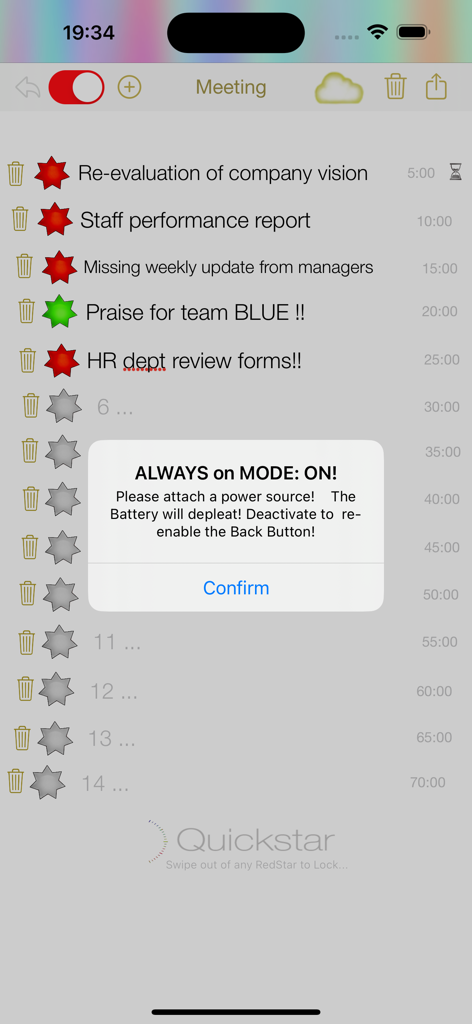
QuickStar - QuickStar 앱 인터페이스로, 빨간색과 녹색 별이 있는 작업 목록과 상시 모드 알림을 보여줍니다.

QuickStar 앱 인터페이스로, 빨간색과 녹색 별이 있는 작업 목록과 상시 모드 알림을 보여줍니다.

설명

Welcome to QuickStar. This app has been designed to be used mainly with iPad, but the iPhone app can be used as stand alone or better in conjunction with the iPad version for all your super fast, saved entries for all your Daily Planning, Ideas, Tasks and To Do’s. About QuickStar: QuickStar is an app for planning. Instead of lists, QuickStar allows you to plan within a clocklike timeline, that you are in control of and can change however you want. Fill in your procedure for the day. Using the infinity loop method, as soon as you edit or make a new entry the star turns red. Adjust the time, continuing your existing timeline and keep ‘starring’ away. Using the App for the first Time - Select a Tab at the bottom of the screen. The entry points are set in a clockwise direction. Start at the top or anywhere you like. Touch the Grey Star and Punch in your entry. Touch the Red Star to mark completion, which turns the star Green. Tap trash can ONCE to delete entry, TWICE to delete both entry and schedule entry. You’re done INSTRUCTIONS: for example WORK TAB. Plan your Work day. Fill in your meetings, ToDo’s… @ work, First TOUCH the Grey Star at the top. The Keyboard should display and you can immediately enter your ToDo or Note & Adjust the time if need be.Now you can simply dismiss the keyboard and the entry is saved or touch the next Grey Star. Pop the next entries into the circular timeline. You can scroll the screen to get to any of the STARS. Next try 'Always on Mode’. This will keep your iPad awake permanently or on a countdown timer for 10min. You will need to attach a power source. This is for your very busy day. When you need to reference your screen all the time & you don’t want the iPad, to go to sleep. Setup your iPad in front of you, so it is always there through the WORK day. So everything gets done, in order, on time and you arrive prepared and not stressed for your appointments. Once you have put all your entries in you will notice the star goes RED immediately. Once you have completed an item 'Star' it off. Your RED star turns GREEN. Once you have completed the. loop start deleting old entries and thus using the infinity loop method and you can keep going. Lastly… QuickStar planning in a clock theme means your entries are endless. With QuickStar you have nice big stars to ‘star off’ as you go. QuickStar forces you to condense your scheduling entries to a minimum, so you know at a glance what you need to do quickly and you can keep on top of everything. Your timeline could be minutes, hours, days, items or just numbered or anything you can dream up! Go QuickStar!

Download

다운로드: App Store

이 페이지는 앱이나 개발자의 공식 페이지가 아니며, 정보 제공 및 논평을 목적으로 작성된 독립 편집 간행물입니다. 명시적으로 달리 언급되지 않는 한, 해당 앱이나 개발자는 MWM, Apple, Google Play, 앱 퍼블리셔 또는 앱 개발자와 제휴, 보증, 후원, 승인 또는 공식적으로 연결되어 있지 않으며, 이 페이지의 어떤 내용도 해당 앱이 MWM의 서비스를 사용하여 개발되었음을 의미하지 않습니다. 모든 상표, 로고, 스크린샷 및 기타 콘텐츠는 해당 소유자의 자산입니다.








