RecCloud VoiceCap

RecCloud VoiceCap

다운로드: App Store
로고: RecCloud VoiceCap

RecCloud VoiceCap: AI 음성 기록 및 즉각적인 회의 요약

수동 메모에 시간을 낭비하지 마세요. 98% 정확도로 모든 단어를 기록하고, 한 번의 탭으로 녹취 내용을 구조화된 보고서, 소셜 카드 또는 실행 가능한 통찰력으로 변환하세요.

다운로드: App Store

개발사

Wangxu Technology Co., Ltd

카테고리

Productivity

다운로드

3K+

사용자 평점

1.0/5

총 평가 수

0

지원 언어

8

정확성의 작동 방식

이 인터페이스를 사용하는 3K+ 명의 사용자.

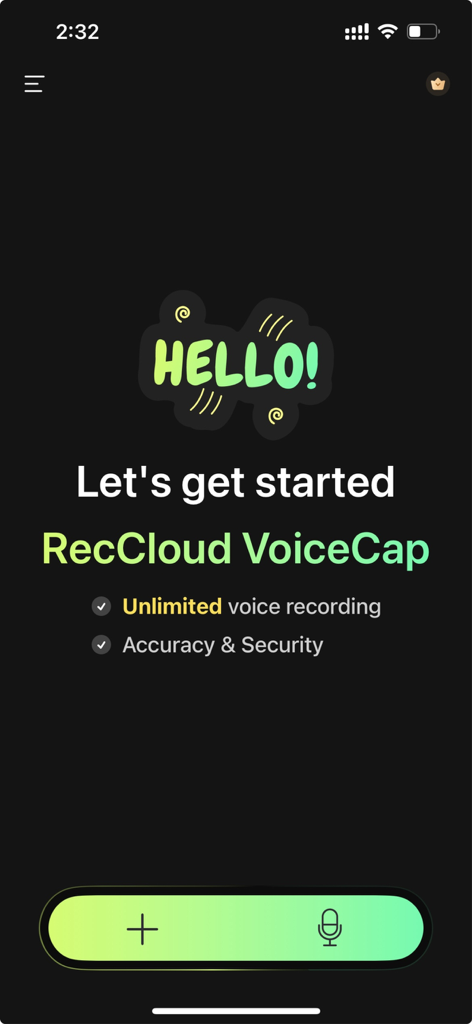
RecCloud VoiceCap 환영 화면, 무제한 음성 녹음 기능 및 마이크 버튼 표시
RecCloud VoiceCap 환영 화면, 무제한 음성 녹음 기능 및 마이크 버튼 표시

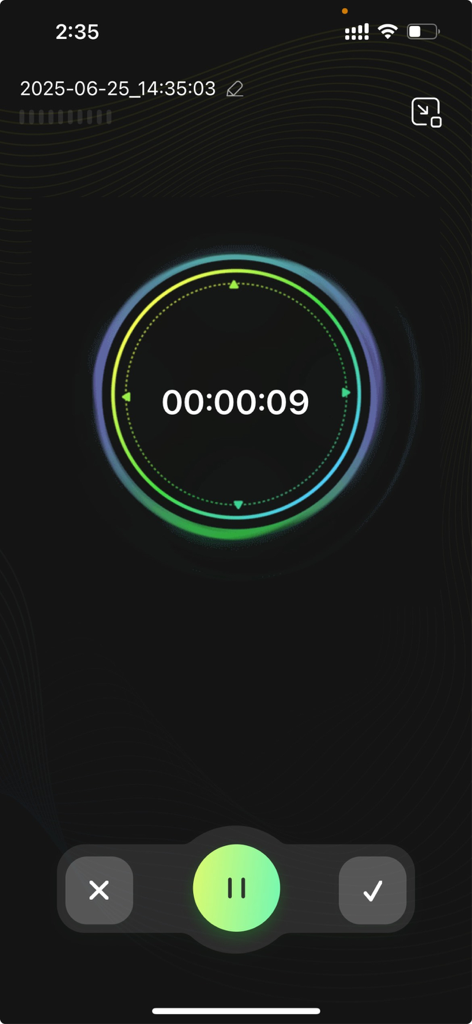
RecCloud VoiceCap 모바일 앱 녹음 인터페이스, 디지털 타이머 및 제어 버튼 포함
RecCloud VoiceCap 모바일 앱 녹음 인터페이스, 디지털 타이머 및 제어 버튼 포함

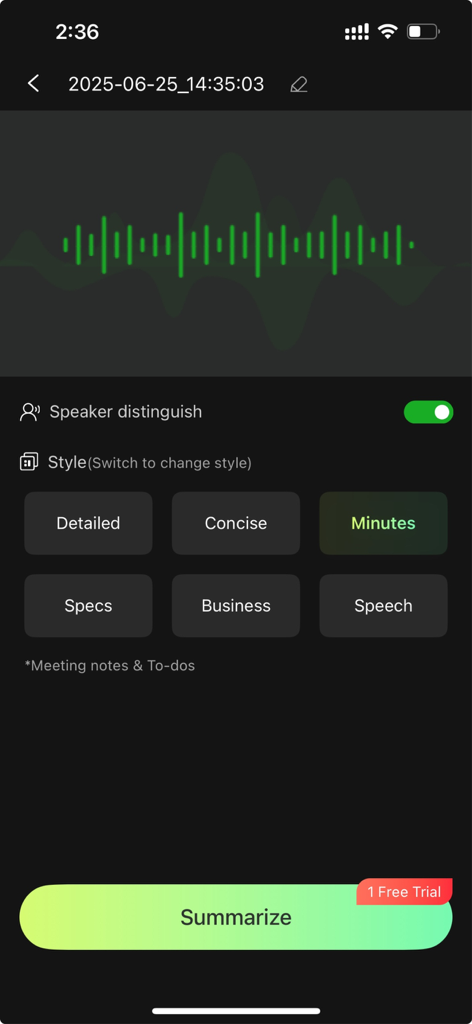
RecCloud VoiceCap 앱 인터페이스, 회의록 및 비즈니스 보고서 등 AI 요약 스타일 옵션 표시
RecCloud VoiceCap 앱 인터페이스, 회의록 및 비즈니스 보고서 등 AI 요약 스타일 옵션 표시

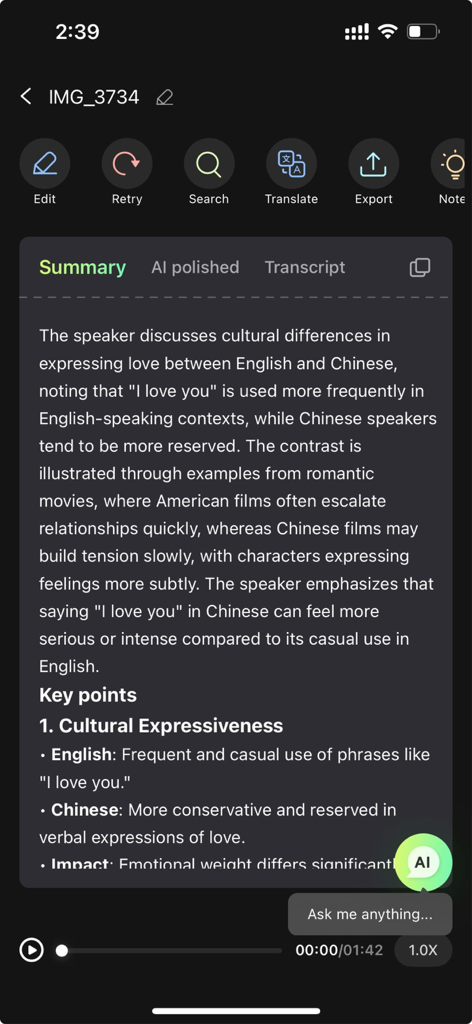
RecCloud VoiceCap 앱의 녹취 요약 및 주요 포인트
RecCloud VoiceCap 앱의 녹취 요약 및 주요 포인트

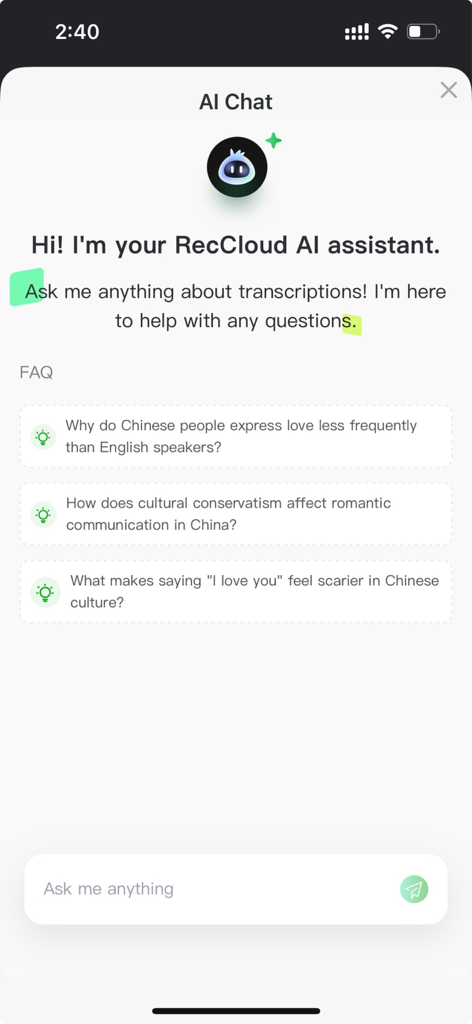
RecCloud AI 어시스턴트 채팅 인터페이스, 녹취 통찰력에 대한 제안 질문 포함

RecCloud AI 어시스턴트 채팅 인터페이스, 녹취 통찰력에 대한 제안 질문 포함

모든 대화를 경쟁 우위로 전환하세요

이 앱을 돋보이게 하는 도구, 3K+ 명의 사용자가 선택.

📊

스마트 멀티 템플릿 요약

사용자 지정 AI 템플릿을 사용하여 한 번의 탭으로 한 시간 분량의 녹취를 구조화된 회의록 또는 간결한 보고서로 만드세요.

💬

대화형 AI 챗봇 비서

녹취록을 단순히 읽지 말고 질문하세요. 질문하여 특정 세부 정보와 핵심 통찰력을 즉시 추출하세요.

👤

정확한 발언자 구분

다자간 회의에서 발언자를 자동으로 식별하고 레이블을 지정하여 98%의 정확도로 기록이 항상 명확하도록 보장합니다.

앱 소개

에 대해 알아야 할 모든 것 RecCloud VoiceCap.

설명

RecCloud VoiceCap is an AI-powered transcription tool offering unlimited recording duration and multiple template summaries. It accurately converts speech, recordings, and videos into editable text, supports multiple languages, provides intelligent summarization, and includes a built-in AI chat assistant to streamline workflows for meetings, lectures, interviews, and content creation. Key Features: [Unlimited Recording Duration] Enjoy unlimited recording and transcription for meetings, lectures, and interviews, ensuring no detail is missed. [Multi-Template Summarization] Automatically generate structured summaries: detailed reports, concise overviews, meeting minutes, product descriptions, or interview highlights - all with one tap. [High-Accuracy Transcription] Achieve 98%+ accuracy with adaptive noise suppression and disfluency filtering. Support audio/video-to-text conversion for meetings, interviews, and lectures. Export results seamlessly to .TXT, .DOC, .PDF and more. [99+ Languages Supported] Transcribe content in over 99 languages including English, Japanese, and French. Features bilingual displays and AI-enhanced technical term translation for global teams and language learners. [Smart Speaker Recognition] AI identifies and labels speakers automatically in multi-person recordings. Customizable speaker tagging ensures clarity in meetings, focus groups, and interviews. [Social-Optimized Transcript Cards] Transform transcripts into visually appealing cards for social media, email, or print. Save directly to your photo gallery for instant sharing. [Real-Time AI Assistant] Get instant answers about your content through the integrated AI chatbot. Ask questions, clarify points, or extract key insights effortlessly. [Inspiration Capture Mode] Highlight crucial content and capture ideas in real-time during transcription. Never lose a creative spark again. Ideal For *Professionals: Meeting transcription, interview processing, report generation *Students/Teachers: Class notes, lecture transcription, research inspiration *Content Creators: Interview transcripts, video script generation *Personal Use: Daily memos, travel records, multilingual communication Continuous Improvement We value your input! Submit feedback via in-app options or join our user community to shape future updates. RecCloud VoiceCap — Instant Transcription • Automated Summarization • Actionable Insights!

최신 버전

1.0.3

크기

63.3 MB

출시일

2025년 6월 30일

받아쓰기는 멈추고, 리딩을 시작하세요

무제한 녹취를 즉각적인 실행 가능한 요약으로 변환하는 RecCloud VoiceCap을 사용하는 수천 명의 뛰어난 성과자들과 함께하세요. 지금 다운로드하고 다시는 놓치지 마세요.

다운로드: App Store

App information, icons, screenshots, and descriptions displayed on this page are sourced from the Apple App Store and are the property of their respective developers. Download estimates and rankings are based on MWM's proprietary models and may not reflect actual figures. This page is provided for informational and analytical purposes only.

Believe this page infringes your intellectual property? File a dispute