Remote Plus - Smart TV Remote
다운로드: App Store

이 페이지는 앱이나 개발자의 공식 페이지가 아니며, 정보 제공 및 논평을 목적으로 작성된 독립 편집 간행물입니다. 명시적으로 달리 언급되지 않는 한, 해당 앱이나 개발자는 MWM, Apple, Google Play, 앱 퍼블리셔 또는 앱 개발자와 제휴, 보증, 후원, 승인 또는 공식적으로 연결되어 있지 않으며, 이 페이지의 어떤 내용도 해당 앱이 MWM의 서비스를 사용하여 개발되었음을 의미하지 않습니다. 모든 상표, 로고, 스크린샷 및 기타 콘텐츠는 해당 소유자의 자산입니다.


로고: Remote Plus - Smart TV Remote
다운로드: App Store

Remote Plus - Smart TV Remote

이 앱은 사용자의 손아귀에 TV를 지배하는 힘을 쥐여줍니다. 물리적 리모컨의 한계를 부수고, 당신의 아이폰을 TV 제어의 지휘봉으로 탈바꿈시킵니다.

주요 수치

다운로드

25k+

사용자 평점

3.4/5

총 평가 수

5

개발사

anh pham

카테고리

Productivity

지원 언어

1

최신 버전

1.2.2

크기

85.2 MB

출시일

2026년 2월 11일
기능

스마트 TV 제어의 새로운 표준을 제시하는 핵심 기능 탐구

Remote Plus - Smart TV Remote 앱 기술 분석 보고서

키보드 및 마우스 제어

이 앱은 사용자가 iPhone 또는 iPad를 스마트 TV의 트랙패드 및 키보드로 활용하여 쉽고 빠르게 텍스트를 입력하고 화면 커서를 제어할 수 있게 해줍니다.

자동 TV 검색 및 즉시 연결

이 도구는 사용자의 네트워크에서 호환 가능한 TV를 자동으로 찾아내어 번거로운 수동 설정 과정 없이 즉시 연결할 수 있도록 지원합니다.

빠른 앱 실행 및 바로가기

사용자는 즐겨 사용하는 TV 앱 및 바로가기를 앱 내에서 즉시 실행하여 엔터테인먼트 경험의 접근성을 높일 수 있습니다.

다음 스크린샷과 설명은 앱의 공식 스토어 목록에서 직접 가져온 것이며 앱 개발자의 자산입니다.

앱 스토어

스크린샷
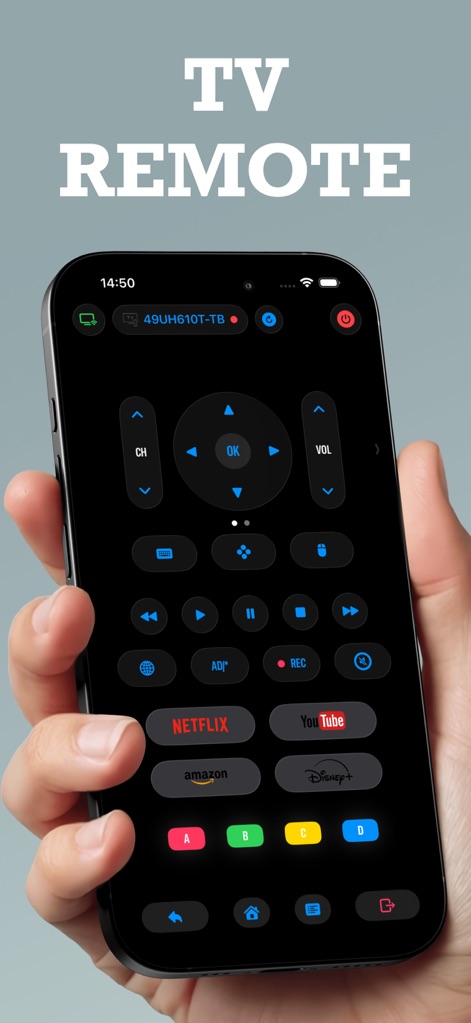
Remote Plus - Smart TV Remote - 이 앱은 iPhone 또는 iPad를 완전한 기능의 스마트 TV 리모컨으로 변환하여, 채널 및 볼륨 제어 버튼과 넷플릭스, 유튜브와 같은 스트리밍 서비스 바로 가기 버튼을 포함한 다양한 제어 기능을 제공합니다.

이 앱은 iPhone 또는 iPad를 완전한 기능의 스마트 TV 리모컨으로 변환하여, 채널 및 볼륨 제어 버튼과 넷플릭스, 유튜브와 같은 스트리밍 서비스 바로 가기 버튼을 포함한 다양한 제어 기능을 제공합니다.

완벽한 TV 리모컨
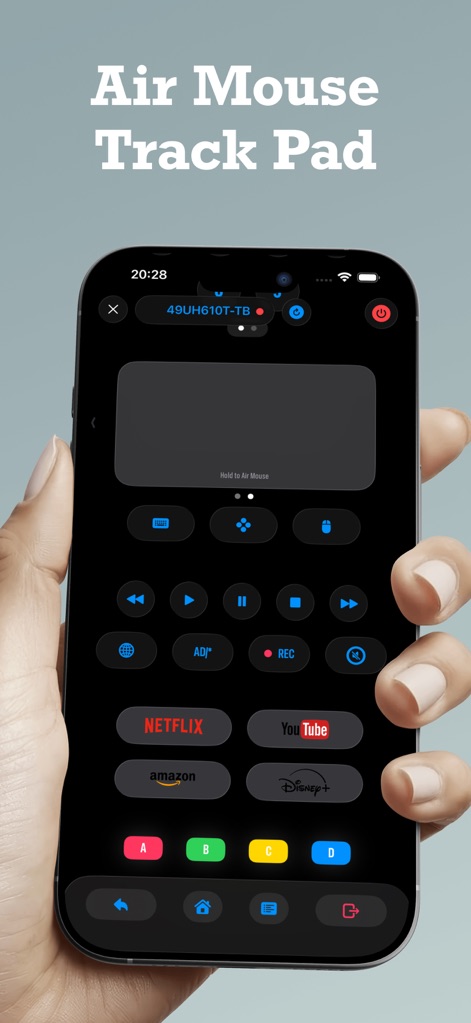
Remote Plus - Smart TV Remote - 사용자는 이 기능을 통해 스마트폰 화면을 트랙패드처럼 활용하여 TV의 커서를 정밀하게 제어할 수 있으며, 직관적인 제스처와 터치로 미디어 재생 버튼을 조작할 수 있습니다.

사용자는 이 기능을 통해 스마트폰 화면을 트랙패드처럼 활용하여 TV의 커서를 정밀하게 제어할 수 있으며, 직관적인 제스처와 터치로 미디어 재생 버튼을 조작할 수 있습니다.

에어 마우스 트랙패드
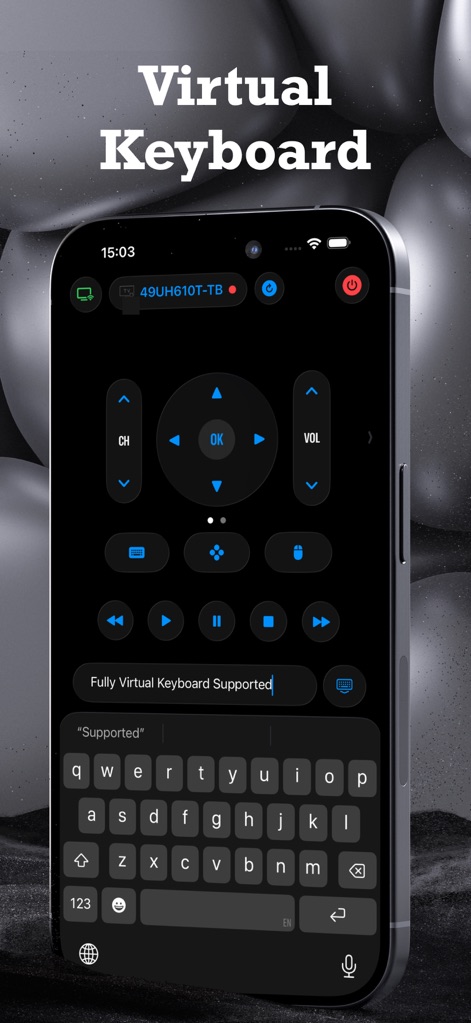
Remote Plus - Smart TV Remote - 이 도구는 TV에서 텍스트를 쉽고 빠르게 입력할 수 있도록 풀 스크린 가상 키보드를 제공하며, 방향 패드 및 미디어 제어 버튼과 함께 원활한 검색 경험을 가능하게 합니다.

이 도구는 TV에서 텍스트를 쉽고 빠르게 입력할 수 있도록 풀 스크린 가상 키보드를 제공하며, 방향 패드 및 미디어 제어 버튼과 함께 원활한 검색 경험을 가능하게 합니다.

스마트 가상 키보드
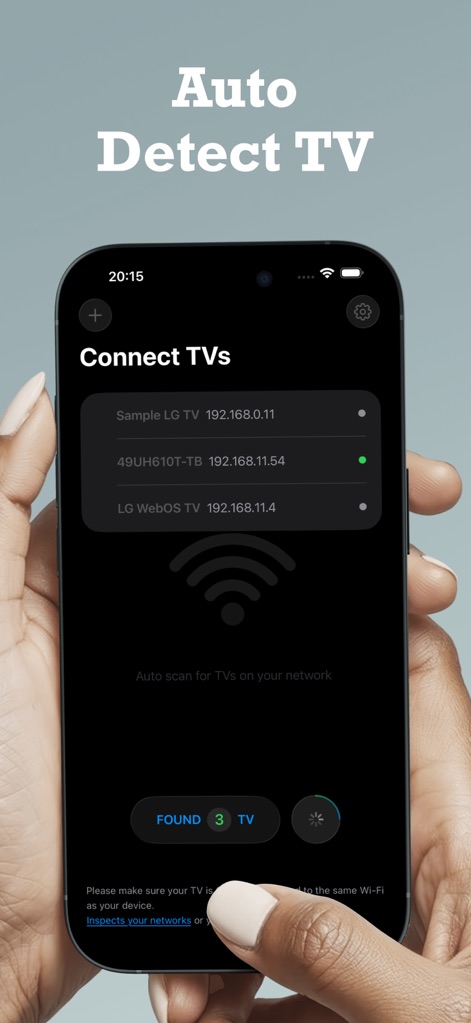
Remote Plus - Smart TV Remote - 이 앱은 네트워크에 연결된 호환 가능한 TV를 자동으로 찾아 목록으로 보여주어, 사용자가 수동 설정 없이 빠르게 연결할 수 있도록 하며, 연결된 기기 목록과 Wi-Fi 연결 상태를 명확히 표시합니다.

이 앱은 네트워크에 연결된 호환 가능한 TV를 자동으로 찾아 목록으로 보여주어, 사용자가 수동 설정 없이 빠르게 연결할 수 있도록 하며, 연결된 기기 목록과 Wi-Fi 연결 상태를 명확히 표시합니다.

TV 자동 감지

설명

Remote Plus turns your iPhone or iPad into a powerful smart TV remote, giving you a faster and more comfortable way to control your TV. Built to solve real everyday problems, Remote Plus focuses on reliability, simplicity, and useful features like keyboard and mouse control, all without ads or paywalls. Why Remote Plus? Many TV remote apps are unreliable, complicated to set up, or lock essential features behind subscriptions. Remote Plus was created to deliver a smooth, no-nonsense experience that just works. Features - Auto Scan & Detection: Automatically finds compatible TVs on your network. No manual setup required. - Multiple TV Support: Control multiple TVs in your home from a single app. - Keyboard & Mouse Control: Use your phone as a trackpad and keyboard to navigate, type, and control the on-screen cursor with ease. - Modern Light & Dark Mode: Adapts automatically to your system appearance. - Clean, Fluid Design: Simple interface with a smooth, modern glass-style look. - Quick App Launch: Instantly open popular TV apps and shortcuts, with more coming in future updates. Simple. Fast. Free. Controlling your TV from your phone has never been easier. Remote Plus gives you advanced control tools like keyboard, mouse, and shortcuts, completely free, with no ads and no in-app purchases. Just install, connect, and start controlling your TV in seconds. Subscription You can subscribe to remove ads and get premium features. Price are equal to the value that "Apple's Appstore matrix" determines the equivalent of the subscription price in USD Payment will be charged to your iTunes Account upon confirmation of purchase. Subscriptions automatically renew unless auto-renewal is turned off at least 24 hours before the end of the current subscription period. Your account will be charged for renewal within 24 hours prior to the end of the current period, at the renewal price. Subscriptions can be managed by the user, and auto-renewal can be disabled in the Account Settings after purchase If your trial or subscription period expires, the subscription will not renew unless reactivated. The current active subscription period cannot be canceled. Once the subscription expires, content marked as Premium will no longer be accessible. Term of Uses: https://one-remotetv.web.app/intro/terms.html Privacy Policy: https://one-remotetv.web.app/intro/privacy.html Disclaimer Remote Plus is a third-party remote control app and is not affiliated with, endorsed by, or sponsored by any TV manufacturer.

Download

다운로드: App Store

이 페이지는 앱이나 개발자의 공식 페이지가 아니며, 정보 제공 및 논평을 목적으로 작성된 독립 편집 간행물입니다. 명시적으로 달리 언급되지 않는 한, 해당 앱이나 개발자는 MWM, Apple, Google Play, 앱 퍼블리셔 또는 앱 개발자와 제휴, 보증, 후원, 승인 또는 공식적으로 연결되어 있지 않으며, 이 페이지의 어떤 내용도 해당 앱이 MWM의 서비스를 사용하여 개발되었음을 의미하지 않습니다. 모든 상표, 로고, 스크린샷 및 기타 콘텐츠는 해당 소유자의 자산입니다.