Shift Planning Calendar Pro

Shift Planning Calendar Pro

다운로드: App Store
로고: Shift Planning Calendar Pro

Shift Planning Calendar Pro: 근무 일정을 초 단위로 마스터하세요

의료, 서비스, 물류 전문가를 위한 궁극의 도구. 한 달 치 근무를 30초 만에 입력하고, 친구와 동기화하며, 가족에게 쉽게 최신 정보를 전달하세요.

개발사

Kosuke Hamada

카테고리

Productivity

다운로드

102K+

사용자 평점

4.5/5

총 평가 수

200

지원 언어

6

손쉬운 제어

이 인터페이스를 사용하는 102K+ 명의 사용자.

색깔로 구분된 근무 아이콘과 야간 및 주간 근무에 대한 특정 근무 시간을 보여주는 월별 캘린더 인터페이스.
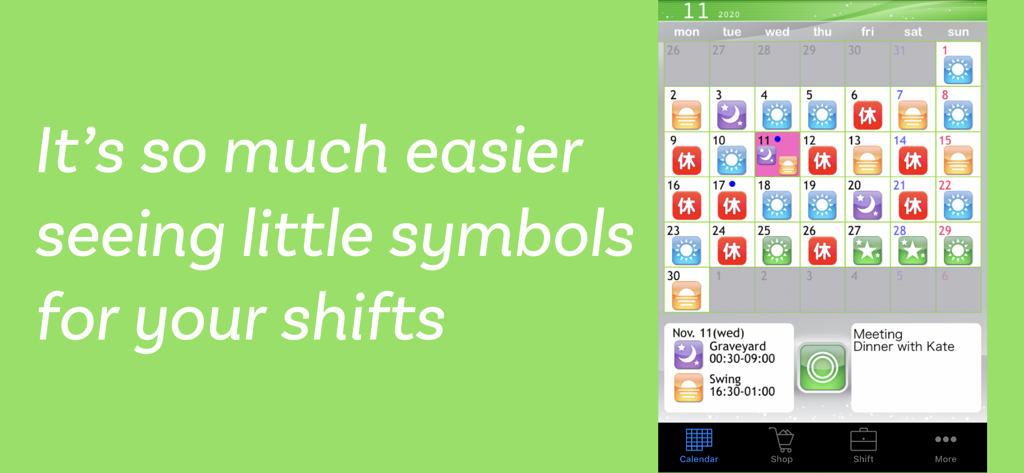
색깔로 구분된 근무 아이콘과 야간 및 주간 근무에 대한 특정 근무 시간을 보여주는 월별 캘린더 인터페이스.

월별 캘린더에 색깔 있는 근무 아이콘과 야간 근무 일정에 대한 특정 근무 시간 세부 정보가 채워져 있는 월별 캘린더를 보여주는 모바일 앱 스크린샷
월별 캘린더에 색깔 있는 근무 아이콘과 야간 근무 일정에 대한 특정 근무 시간 세부 정보가 채워져 있는 월별 캘린더를 보여주는 모바일 앱 스크린샷

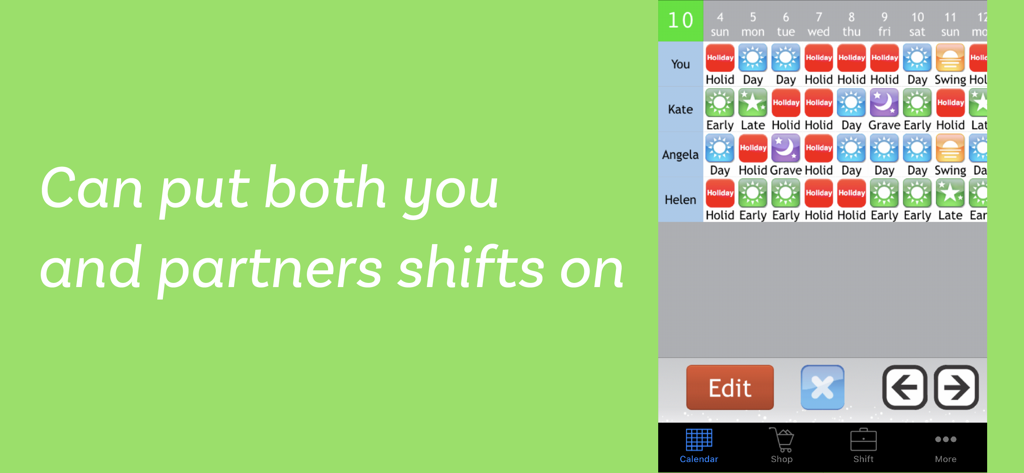
Shift Planning Calendar Pro 앱에서 파트너와 친구를 위한 여러 근무 일정의 나란히 비교
Shift Planning Calendar Pro 앱에서 파트너와 친구를 위한 여러 근무 일정의 나란히 비교

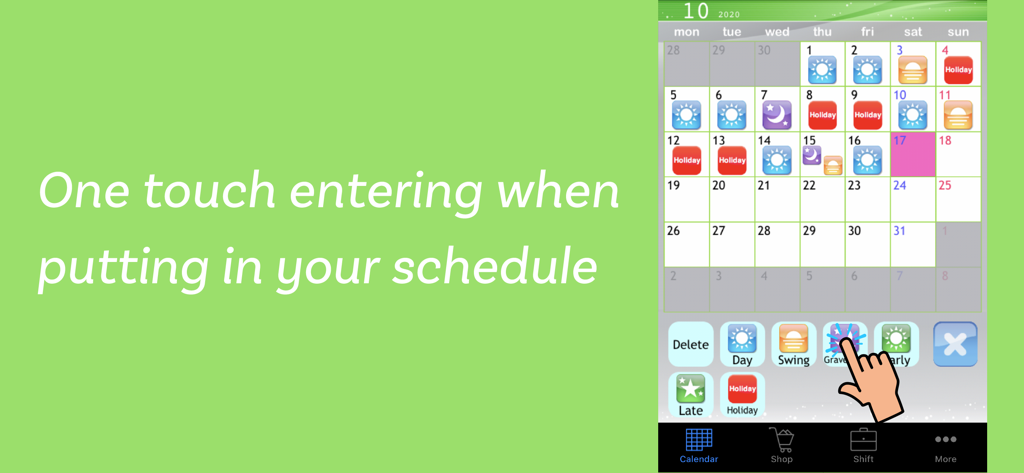
월별 캘린더에서 원터치 근무 입력을 보여주는 Shift Planning Calendar Pro 앱의 모바일 인터페이스.
월별 캘린더에서 원터치 근무 입력을 보여주는 Shift Planning Calendar Pro 앱의 모바일 인터페이스.

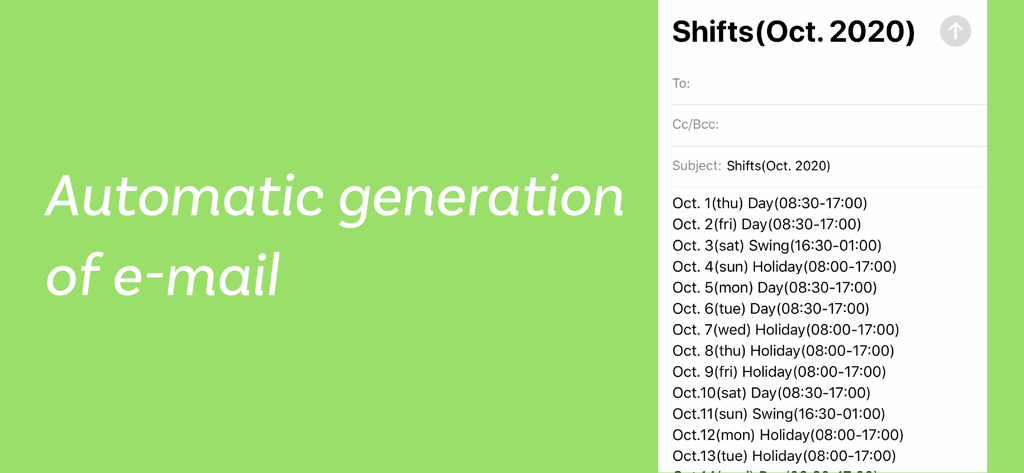
월별 근무 일정에 대한 자동 이메일 생성

월별 근무 일정에 대한 자동 이메일 생성

근무 일정을 마스터하세요

이 앱을 돋보이게 하는 도구, 102K+ 명의 사용자가 선택.

30초 만에 일정 입력

시작 시간 입력을 중단하세요. 원터치 아이콘을 사용하여 몇 초 안에 월별 근무 순환 일정을 채우세요. 몇 분이 아닙니다.

🤝

가족 및 친구와 동기화

자동 생성 이메일로 파트너에게 최신 정보를 제공하고, 친구와 근무 일정을 비교하여 함께 보낼 완벽한 날을 찾으세요.

📱

잠금 화면에 표시되는 근무 일정

배경화면용 맞춤 캘린더 스냅샷을 만드세요. 휴대폰 잠금을 해제하지 않고도 다음 근무 일정을 즉시 확인할 수 있습니다.

앱 소개

에 대해 알아야 할 모든 것 Shift Planning Calendar Pro.

설명

This app provides powerful support for people who do shift work. This app was created based on comments like these. • Entering shifts on the calendar one by one is a lot trouble. > By using the Shift Input Function, you can fill in shifts for a whole month in less than 30 seconds. • I want to view shifts for me and my friends side by side when we're planning a day to hang out together. > By using the Shift List Function, you can quickly find out which day is best for everyone. • Writing emails when I want to tell my friends and family my shifts is difficult. > With the Autocreate Email Function, you can automatically create an email of your shift schedule with one touch. • I want to check my shifts quickly on the lock screen. > With the Calendar Snapshot Function, you can easily create an image of your calendar that can be used for the standby display. *** Main Features *** * You can use all of the features right from the start without having to purchase any add-ons. • Shift Input Mode You can fill in shifts on the calendar with simple one touch controls using icons. • Shift List Function You can manage shifts for multiple other users, and compare shifts for you and your friends on a single list. • Autocreate Email Function Creates an email of your work schedule with one touch. • Link with GoogleCalendar Outputs your shift schedule to GoogleCalendar. • Bluetooth Shift Exchange Function Exchange your shift information by bringing your iPhone/iPod Touch close together, similar to IR communication. • Calendar Snapshot Function Creates an image of your calendar that you can use as your lock screen or wallpaper. You can check your shifts quickly on your lock screen. • Launch App with URL Scheme open:ShiftWorkingCalendar open:shift *** User Reviews *** * Very helpful app. Makes life easier for shift workers. * Easy to use. Great for odd shifts. Love the icons. * Thanks it's easy to use and free * Absolutely fantastic. * Very handy for me and quick to use Easy to email to others * Very convenient. Nice app. * Glad a shift planner is free, without any adverts. * Just what I have been waiting for. Up till now, I have had to write shifts on calendar for my wife to see, and help plan. A simple email now does it all, great!

최신 버전

4.1

크기

34.7 MB

출시일

2012년 9월 18일

근무 일정을 초 단위로 마스터하세요

100,000명 이상의 의료, 소매, 필수 서비스 종사자들이 사용하는 근무-생활 균형을 간소화하세요. 광고 없음, 구독 없음 - 24/7 라이프스타일을 위한 순수한 생산성만 제공합니다.

다운로드: App Store

App information, icons, screenshots, and descriptions displayed on this page are sourced from the Apple App Store and are the property of their respective developers. Download estimates and rankings are based on MWM's proprietary models and may not reflect actual figures. This page is provided for informational and analytical purposes only.

Believe this page infringes your intellectual property? File a dispute