SW Maps
SW Maps
다운로드: App Store

이 페이지는 앱이나 개발자의 공식 페이지가 아니며, 정보 제공 및 논평을 목적으로 작성된 독립 편집 간행물입니다. 명시적으로 달리 언급되지 않는 한, 해당 앱이나 개발자는 MWM, Apple, Google Play, 앱 퍼블리셔 또는 앱 개발자와 제휴, 보증, 후원, 승인 또는 공식적으로 연결되어 있지 않으며, 이 페이지의 어떤 내용도 해당 앱이 MWM의 서비스를 사용하여 개발되었음을 의미하지 않습니다. 모든 상표, 로고, 스크린샷 및 기타 콘텐츠는 해당 소유자의 자산입니다.

로고: SW Maps
다운로드: App Store

SW Maps

전문가를 위해 설계된 포괄적인 매핑 도구로 현장 업무를 강화하세요. 외부 GNSS 수신기에 연결하고, 복잡한 Shapefile을 관리하며, 센티미터 수준의 정확도로 지리 데이터를 손쉽게 수집할 수 있습니다. 모두 무료이며 광고가 없습니다.

주요 수치

다운로드

32K+

사용자 평점

3.8/5

총 평가 수

0

개발사

Aviyaan Tech

카테고리

Productivity

지원 언어

1

최신 버전

1.2.4

크기

17.2 MB

출시일

2022년 11월 17일
기능

전문 현장 데이터 수집

엔터프라이즈 가격 없이 안정적인 데이터가 필요한 측량사, 엔지니어 및 연구원을 위해 설계된 완전하고 고정밀 GIS 툴킷입니다.

센티미터 수준의 정확도

Bluetooth를 통해 외부 GNSS/RTK 수신기를 연결하여 모바일 장치에서 직접 전문가 수준의 정밀도를 달성하세요.

신뢰할 수 있는 오프라인 매핑

기본 지도를 캐싱하고 사용자 정의 mbtiles 또는 KML 오버레이를 가져와 원격 현장에서도 완벽하게 작동하여 어디서든 작업할 수 있습니다.

다음 스크린샷과 설명은 앱의 공식 스토어 목록에서 직접 가져온 것이며 앱 개발자의 자산입니다.

앱 스토어

스크린샷
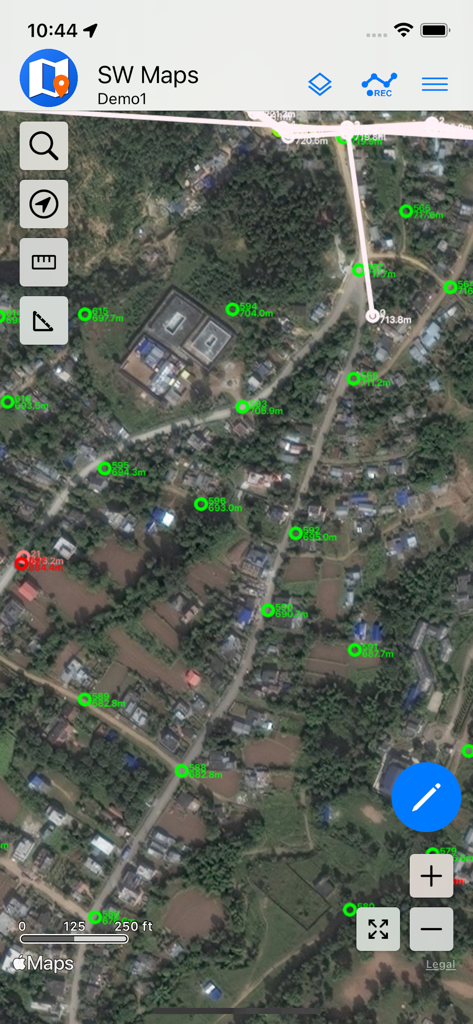
SW Maps - SW Maps 인터페이스가 위성 배경에 GIS 측량 포인트를 표시하고 있습니다
SW Maps 인터페이스가 위성 배경에 GIS 측량 포인트를 표시하고 있습니다

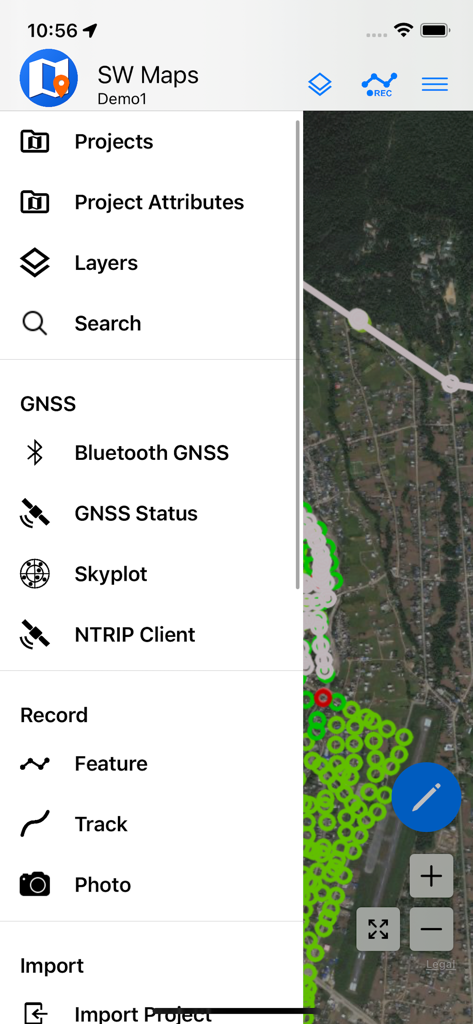
SW Maps - SW Maps 모바일 앱 메뉴가 GIS 데이터 수집 및 GNSS 측량 옵션을 보여주고 있습니다
SW Maps 모바일 앱 메뉴가 GIS 데이터 수집 및 GNSS 측량 옵션을 보여주고 있습니다

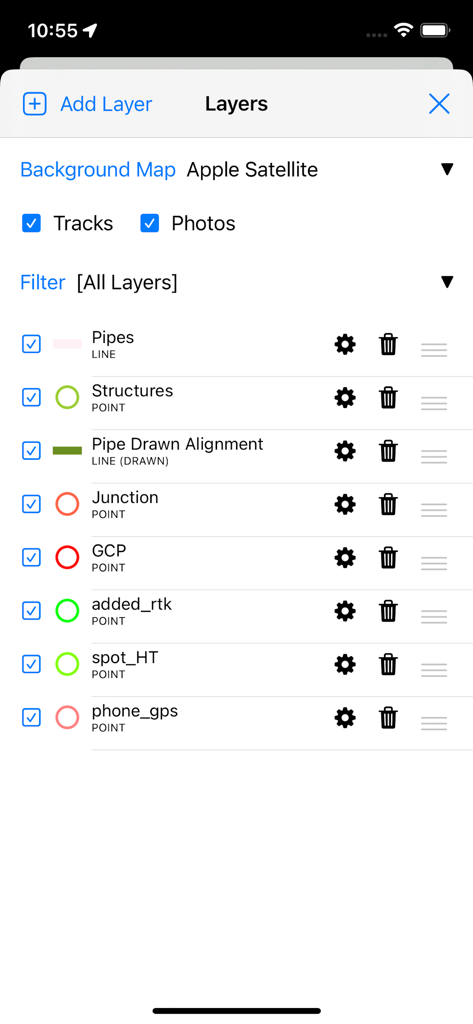
SW Maps - SW Maps 앱 인터페이스가 측량 및 매핑을 위한 전문 GIS 데이터 레이어 관리를 보여주고 있습니다
SW Maps 앱 인터페이스가 측량 및 매핑을 위한 전문 GIS 데이터 레이어 관리를 보여주고 있습니다

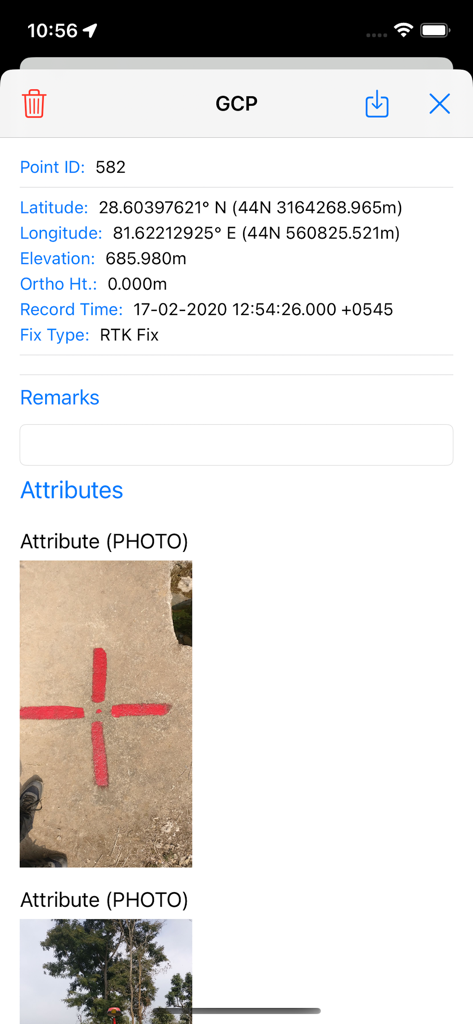
SW Maps - SW Maps에서 측량 지점의 상세 보기가 좌표와 실제 측량 마커 사진을 보여줍니다
SW Maps에서 측량 지점의 상세 보기가 좌표와 실제 측량 마커 사진을 보여줍니다

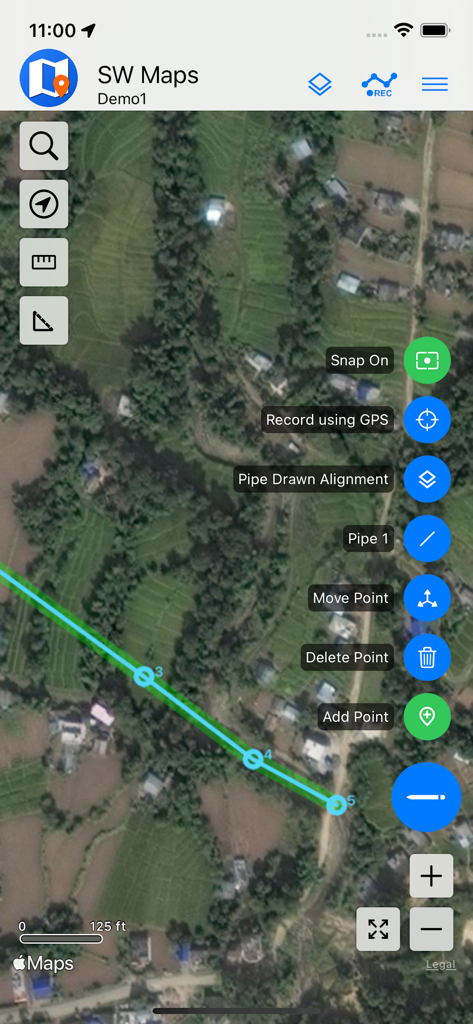
SW Maps - SW Maps의 모바일 GIS 매핑이 위성 영상에 파이프 정렬을 보여줍니다
SW Maps의 모바일 GIS 매핑이 위성 영상에 파이프 정렬을 보여줍니다

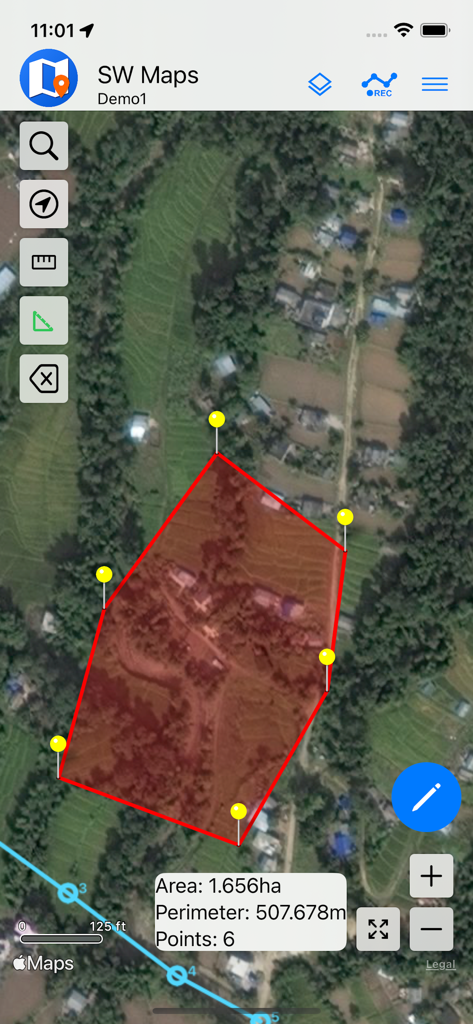
SW Maps - SW Maps 앱의 위성 지도 보기가 계산된 면적과 둘레를 가진 빨간색 다각형을 보여주며 토지 측량에 사용됩니다
SW Maps 앱의 위성 지도 보기가 계산된 면적과 둘레를 가진 빨간색 다각형을 보여주며 토지 측량에 사용됩니다

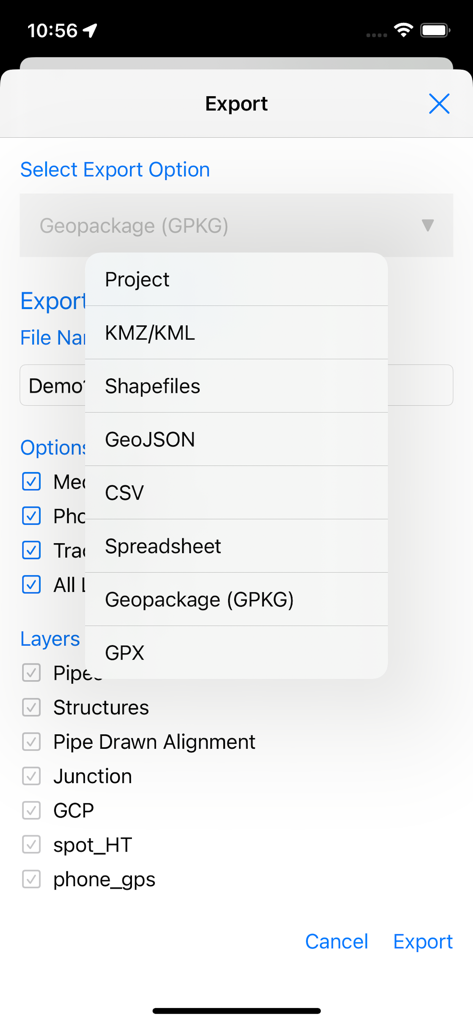
SW Maps - SW Maps 내보내기 화면이 전문 GIS 파일 형식 목록과 레이어 선택 옵션을 표시합니다
SW Maps 내보내기 화면이 전문 GIS 파일 형식 목록과 레이어 선택 옵션을 표시합니다

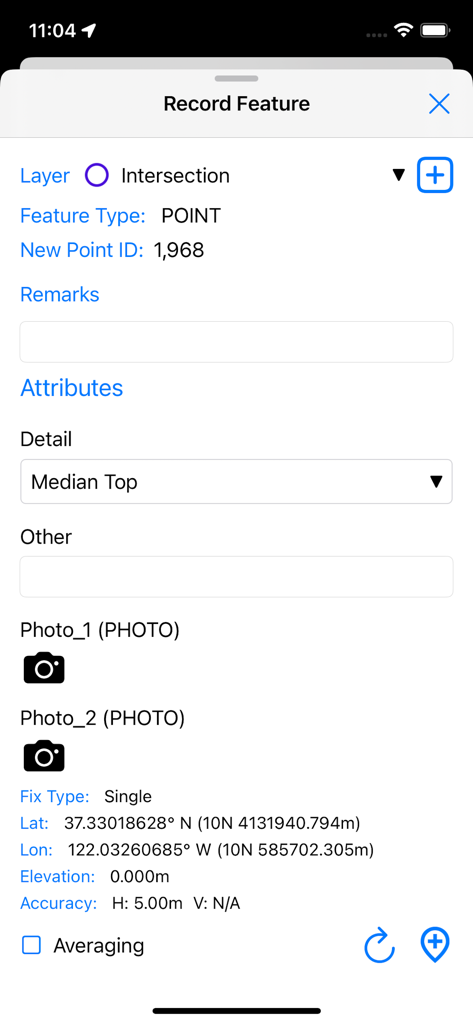
SW Maps - SW Maps에서 GPS 좌표와 사용자 정의 속성을 가진 새로운 GIS 포인트 기능을 기록하는 인터페이스
SW Maps에서 GPS 좌표와 사용자 정의 속성을 가진 새로운 GIS 포인트 기능을 기록하는 인터페이스

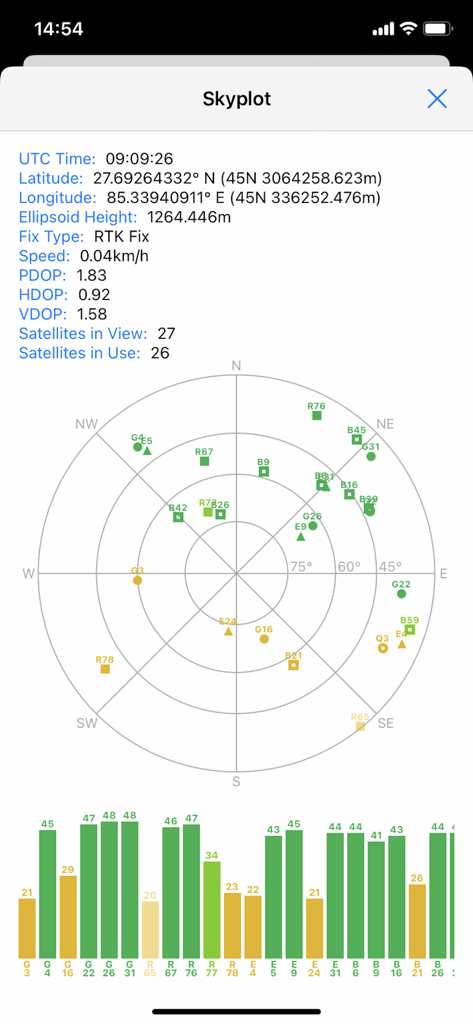
SW Maps - SW Maps 스카이플롯 화면이 전문 매핑 프로젝트를 위한 위성 위치 및 GNSS 신호 품질을 표시합니다
SW Maps 스카이플롯 화면이 전문 매핑 프로젝트를 위한 위성 위치 및 GNSS 신호 품질을 표시합니다

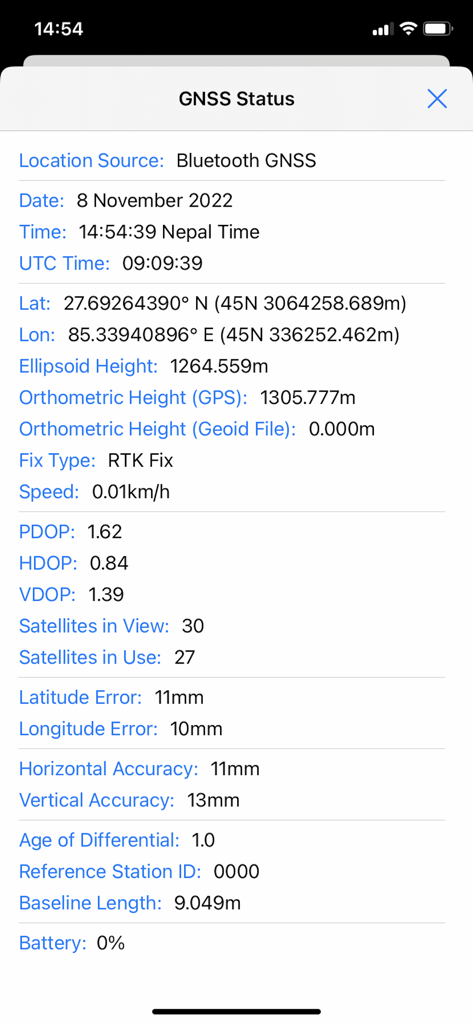
SW Maps - SW Maps의 GNSS 상태 화면이 고정밀 RTK 고정 및 정확도 지표를 보여줍니다

SW Maps의 GNSS 상태 화면이 고정밀 RTK 고정 및 정확도 지표를 보여줍니다

설명

SW Maps is a free GIS and mobile mapping app for collecting, presenting and sharing geographic information. Whether you are conducting a full scale GNSS survey with high precision instruments, need to collect large amount of location based data using nothing but your phone, or just need to view a few shapefiles with labels over a background map on the go, SW Maps has it all covered. Record points, lines, polygons and even photos and have them displayed over your choice of background map, and attach custom attribute data to any feature. Attribute types include text, numbers, an option from a predefined set of choices, photos, audio clips and videos. Conduct high accuracy GPS surveys using external RTK capable receivers over Bluetooth LE. Draw features on the map by adding markers, and measure distance and area. Reuse the layers and attributes of a previous project for another survey, or create templates and share them with other users. Share the collected data with other users as Geopackages, KMZ or shapefiles, or export them to your device storage. Also share and export recorded data as Spreadsheets or CSV files. All data is recorded and exported in the standard WGS84 Geographic coordinate system (EPSG:4326). Features -Online Base maps: Apple Maps or Open Street Map -Support for multiple mbtiles and KML overlays -Shapefile and Geopackage layers, with attribute categorized styling. View shapefiles in any coordinate system supported by the PROJ.4 library. -Add multiple online WMTS, TMS, XYZ or WMS layers and cache tiles for offline use. -Connect to external GPS receivers using Bluetooth for high accuracy surveying using RTK with built-in NTRIP client. Also record data from external receiver for post processing. -Define multiple number of feature layers, each with a set of custom attributes Feature Types: Point, Line, Polygon Attribute Types:Text, Numeric, Drop down Options, Photos, Audio, Video Save as Template for re-use or sharing -Record GPS tracks, with distance measurement -Label features based on attribute values. -Import feature layers from templates or existing projects. -Share or export collected data as KMZ (with embedded photographs) , shapefiles, GeoJSON, Geopackage (GPKG), XLS/ODS spreadsheets or csv files. -Share templates or projects with other users -Supports use of GTX geoid files. To use custom geoids, prepare a GTX file with offsets in meters from WGS84. This product is made in Nepal and is FREE (no Ads). If you find this useful, please let your friends know that you have used a product from Nepal. Spare sometime to visit this wonderful country and know the Nepali people.

Download

다운로드: App Store

이 페이지는 앱이나 개발자의 공식 페이지가 아니며, 정보 제공 및 논평을 목적으로 작성된 독립 편집 간행물입니다. 명시적으로 달리 언급되지 않는 한, 해당 앱이나 개발자는 MWM, Apple, Google Play, 앱 퍼블리셔 또는 앱 개발자와 제휴, 보증, 후원, 승인 또는 공식적으로 연결되어 있지 않으며, 이 페이지의 어떤 내용도 해당 앱이 MWM의 서비스를 사용하여 개발되었음을 의미하지 않습니다. 모든 상표, 로고, 스크린샷 및 기타 콘텐츠는 해당 소유자의 자산입니다.








