TapShift - Shift manager
다운로드: App Store

이 페이지는 앱이나 개발자의 공식 페이지가 아니며, 정보 제공 및 논평을 목적으로 작성된 독립 편집 간행물입니다. 명시적으로 달리 언급되지 않는 한, 해당 앱이나 개발자는 MWM, Apple, Google Play, 앱 퍼블리셔 또는 앱 개발자와 제휴, 보증, 후원, 승인 또는 공식적으로 연결되어 있지 않으며, 이 페이지의 어떤 내용도 해당 앱이 MWM의 서비스를 사용하여 개발되었음을 의미하지 않습니다. 모든 상표, 로고, 스크린샷 및 기타 콘텐츠는 해당 소유자의 자산입니다.


로고: TapShift - Shift manager
다운로드: App Store

TapShift - Shift manager

종이와 불편한 Excel 시트와의 씨름은 이제 그만. TapShift는 소규모 사업체 사장님들이 직관적인 모바일 우선 솔루션으로 시각적인 스케줄을 만들고, 급여 계산을 자동화하며, 팀원들에게 몇 분 안에 문자로 근무를 전송할 수 있도록 합니다.

주요 수치

다운로드

13K+

사용자 평점

4.3/5

총 평가 수

500

개발사

Kazumasa Shimomura

카테고리

Productivity

지원 언어

5

최신 버전

1.26.0

크기

23.2 MB

출시일

2020년 11월 21일
기능

스트레스 없이 근무를 완벽하게 관리하세요

스프레드시트와 수동 계산으로 몇 시간씩 낭비하는 것은 이제 그만. TapShift는 소규모 사업체 사장님들에게 몇 분 안에 스케줄링 및 급여 관리를 처리할 수 있는 전문적인 모바일 우선 툴킷을 제공합니다.

시각적인 탭-투-시프트 캘린더

몇 분 안에 한 주 전체를 만드세요. 색상으로 구분된 템플릿을 사용하여 간단한 탭으로 역할과 직원들을 정리하고, 현장 근무 상황을 명확하고 체계적으로 유지하세요.

자동 급여 계산 로직

계산은 앱에 맡기세요. 근무를 배정함에 따라 TapShift는 각 팀원의 시간당 요율에 따라 총 근무 시간과 월별 임금을 자동으로 계산합니다.

다음 스크린샷과 설명은 앱의 공식 스토어 목록에서 직접 가져온 것이며 앱 개발자의 자산입니다.

앱 스토어

스크린샷
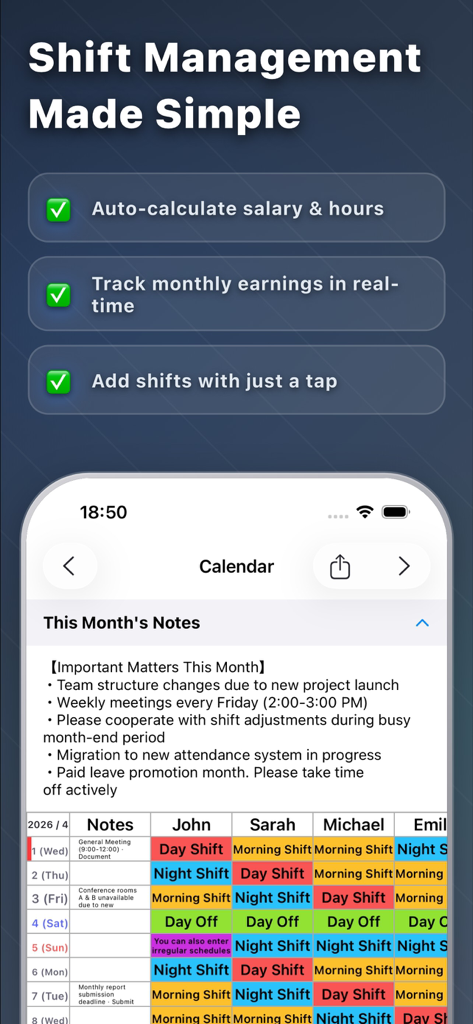
TapShift - Shift manager - TapShift 앱 스크린샷, 근무 관리 기능 및 자동 급여 계산 기능이 있는 색상 구분 직원 스케줄 캘린더 표시
TapShift 앱 스크린샷, 근무 관리 기능 및 자동 급여 계산 기능이 있는 색상 구분 직원 스케줄 캘린더 표시

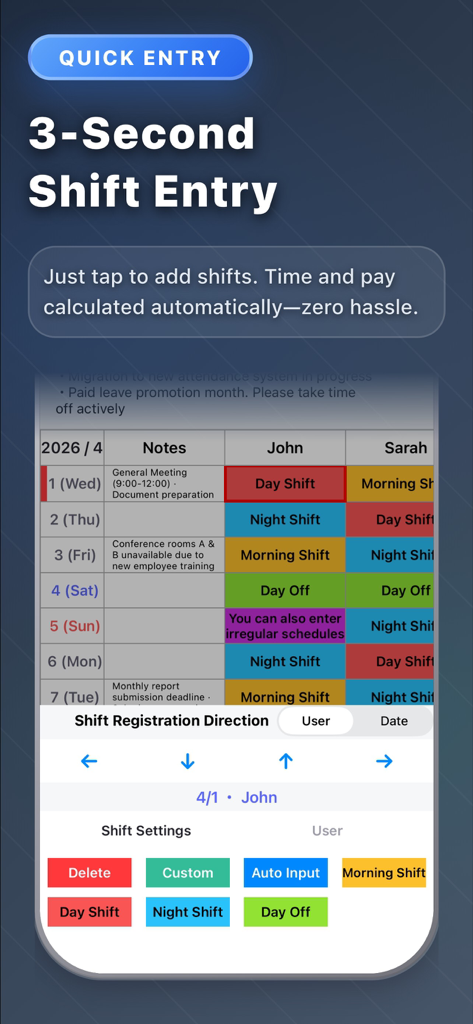
TapShift - Shift manager - TapShift 앱의 모바일 인터페이스, 색상 구분 근무 스케줄 및 직원 근무 시간 관리를 위한 빠른 입력 도구 포함
TapShift 앱의 모바일 인터페이스, 색상 구분 근무 스케줄 및 직원 근무 시간 관리를 위한 빠른 입력 도구 포함

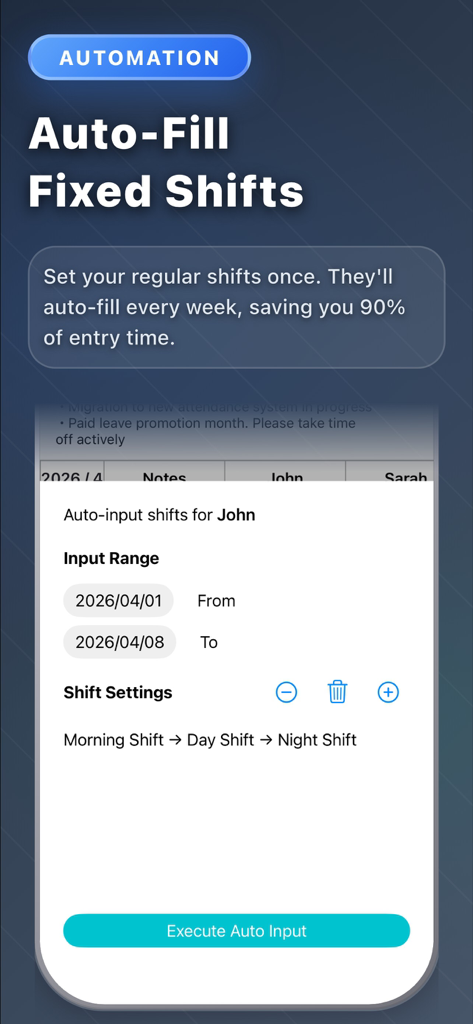
TapShift - Shift manager - 직원 스케줄링을 위한 자동 고정 근무 입력 기능이 있는 TapShift 앱 화면
직원 스케줄링을 위한 자동 고정 근무 입력 기능이 있는 TapShift 앱 화면

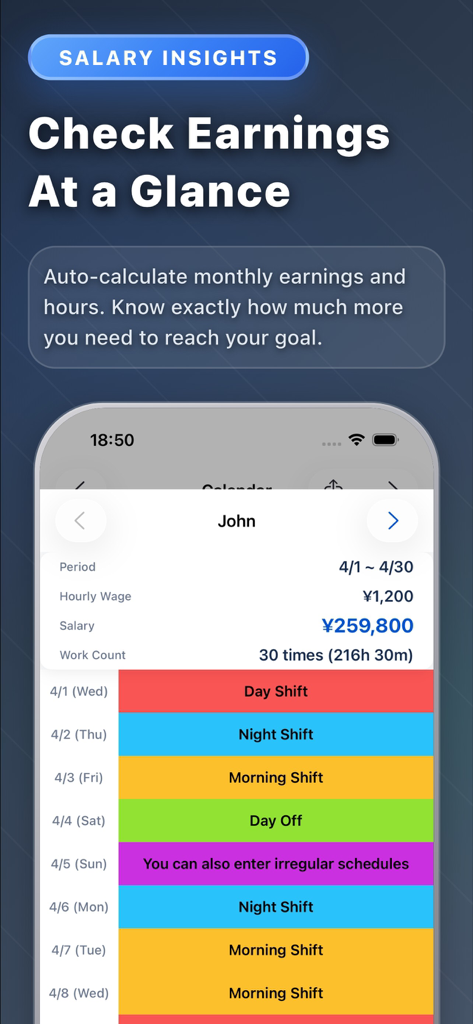
TapShift - Shift manager - 직원들을 위한 월별 수입 계산 및 색상 구분 근무 스케줄을 보여주는 모바일 대시보드
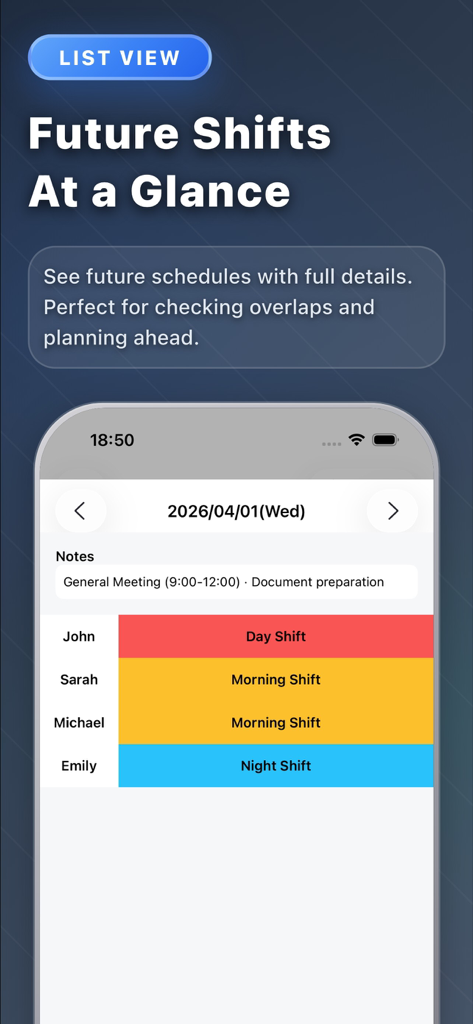
직원들을 위한 월별 수입 계산 및 색상 구분 근무 스케줄을 보여주는 모바일 대시보드

TapShift - Shift manager - 일반 회의 메모를 포함하여 직원들을 위한 색상 구분 일일 근무 목록을 보여주는 TapShift 앱 인터페이스
일반 회의 메모를 포함하여 직원들을 위한 색상 구분 일일 근무 목록을 보여주는 TapShift 앱 인터페이스

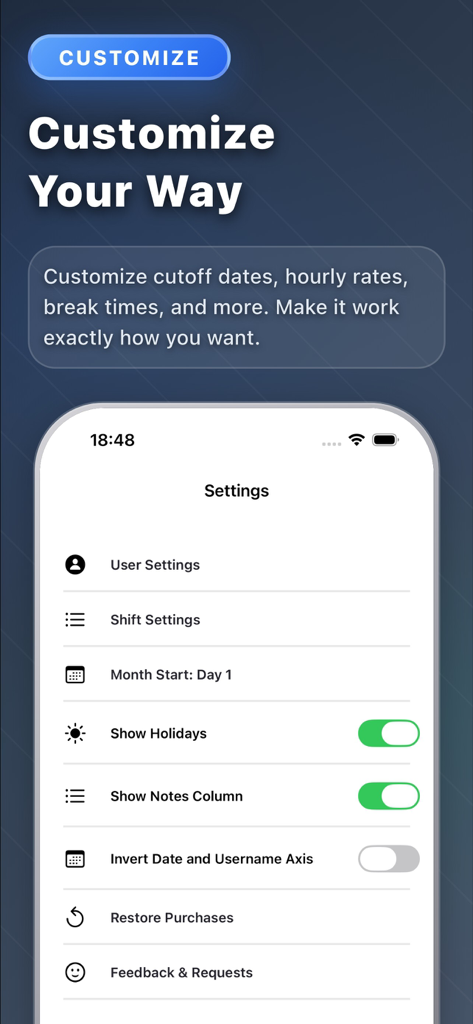
TapShift - Shift manager - 근무 스케줄 및 디스플레이 기본 설정을 위한 사용자 지정 옵션을 보여주는 TapShift 앱 설정 화면
근무 스케줄 및 디스플레이 기본 설정을 위한 사용자 지정 옵션을 보여주는 TapShift 앱 설정 화면

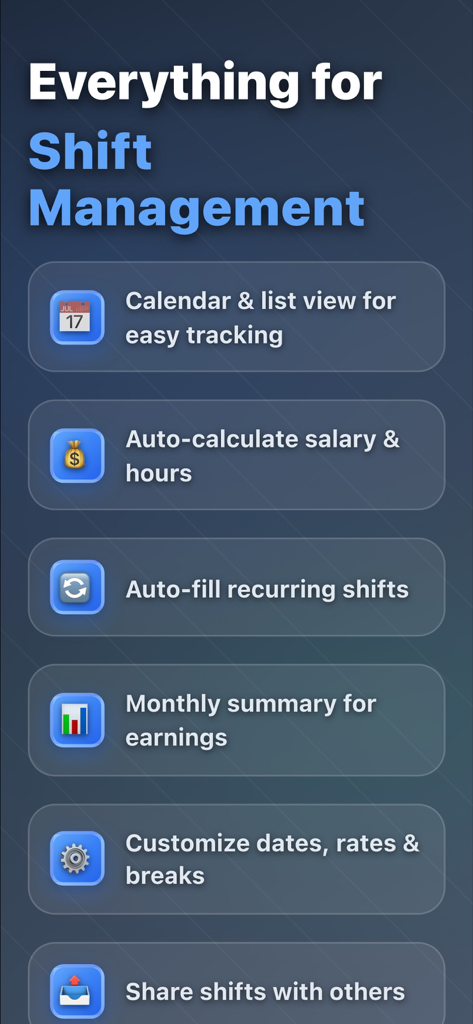
TapShift - Shift manager - 스케줄링, 급여 계산 및 근무 공유를 포함한 TapShift 근무 관리자의 주요 기능 목록

스케줄링, 급여 계산 및 근무 공유를 포함한 TapShift 근무 관리자의 주요 기능 목록

설명

Still managing shifts with paper or Excel? Spending hours every month creating schedules, calculating payroll, and dealing with last-minute changes? TapShift solves these problems. From shift scheduling to payroll calculation, everything is done on your iPhone. 【KEY FEATURES】 ■ Calendar-Style Shift Schedule Create shifts intuitively with just a tap. Select a shift template, assign staff, and choose dates. Color-coded display makes it easy to see who works when at a glance. ■ Shift List View View shifts by date in a list format. Details that are hard to see in calendar view are displayed clearly. Add, edit, and delete shifts easily from this screen. ■ Staff Management Register staff with names and hourly rates. Assign colors to each staff member to quickly identify them on the shift calendar. Hourly rates automatically reflect in payroll calculations. ■ Monthly Summary & Payroll Calculation Automatically calculate monthly work hours and wages for each staff member. Instantly see "How many hours this month?" and "How much is the salary?" ■ Save & Reuse Shift Settings Register frequently used shifts (name, color, work hours) for unlimited reuse. Once configured, just tap to input shifts next time. ■ Auto-Fill by Day of Week For recurring weekly shift patterns, set shifts by day of week for bulk auto-fill. Complete a month's schedule in seconds. ■ Shift Copy Function Copy past shift patterns to different periods. Useful when "I want next week same as last week" or "use last month's shifts as a base for this month." ■ Export & Share Shifts Export shift schedules as PDF or JPEG images. Print for store display or share via email and messaging apps with staff. ■ Note Function Record monthly memos and date-specific notes. Keep reminders like "Busy season on X day" or "Event on Y day" to help with shift adjustments. 【BENEFITS OF TAPSHIFT】 ■ Drastically Reduce Shift Creation Time Tasks that took 1 hour with handwriting or Excel now take just minutes. ■ Automated Payroll Calculation Automatic calculation from work hours and hourly rates. No calculator needed. ■ Check & Edit Anytime, Anywhere With your iPhone, handle urgent changes even when out of the office. ■ Visually Clear Color-coded display makes shift balance obvious at a glance. ■ All Data Stored on Device No cloud sync required. Use with confidence while protecting privacy. 【PRICING PLANS】 ■ Free Version • Shift registration: Up to 50 entries • Staff registration: Up to 3 people • All basic features available ■ Premium Version (Subscription) • Shift registration: Unlimited • Staff registration: Unlimited • Ad-free • 2-month free trial included 【IDEAL FOR】 • Restaurant, cafe, convenience store, retail store managers • Those coordinating part-time and hourly worker shifts • Cram schools, event management staff coordinators • Those managing shifts across multiple sites or projects • Those wanting to reduce shift creation time • Those wanting easier payroll calculation 【FAQ】 Q. Is my data safe? A. All data is stored on your device. No external server transmission. Q. Can I manage shifts for multiple workplaces? A. Currently designed for one workplace, but you can manage by separating staff per workplace. Q. Can I share shifts with other staff? A. PDF and image export features allow sharing via email or messaging apps. Download TapShift now for smarter shift management. Share feedback anytime through the settings screen. We continuously improve based on user input.

Download

다운로드: App Store

이 페이지는 앱이나 개발자의 공식 페이지가 아니며, 정보 제공 및 논평을 목적으로 작성된 독립 편집 간행물입니다. 명시적으로 달리 언급되지 않는 한, 해당 앱이나 개발자는 MWM, Apple, Google Play, 앱 퍼블리셔 또는 앱 개발자와 제휴, 보증, 후원, 승인 또는 공식적으로 연결되어 있지 않으며, 이 페이지의 어떤 내용도 해당 앱이 MWM의 서비스를 사용하여 개발되었음을 의미하지 않습니다. 모든 상표, 로고, 스크린샷 및 기타 콘텐츠는 해당 소유자의 자산입니다.








