
이 페이지는 앱이나 개발자의 공식 페이지가 아니며, 정보 제공 및 논평을 목적으로 작성된 독립 편집 간행물입니다. 명시적으로 달리 언급되지 않는 한, 해당 앱이나 개발자는 MWM, Apple, Google Play, 앱 퍼블리셔 또는 앱 개발자와 제휴, 보증, 후원, 승인 또는 공식적으로 연결되어 있지 않으며, 이 페이지의 어떤 내용도 해당 앱이 MWM의 서비스를 사용하여 개발되었음을 의미하지 않습니다. 모든 상표, 로고, 스크린샷 및 기타 콘텐츠는 해당 소유자의 자산입니다.


Timestamp Camera -AI Timestamp
모든 사진과 비디오를 반박 불가능한 증거로 전환합니다. 이 앱은 당신의 시각적 기록에 대한 신뢰도를 높입니다.
다운로드
100k+사용자 평점
총 평가 수
4.2K개발사
카테고리
Photo & Video지원 언어
27최신 버전
1.2.6크기
184.7 MB출시일
2025년 4월 3일정확하고 검증 가능한 시각적 증거 자료 생성을 위한 핵심 기능 평가
Timestamp Camera - AI Timestamp 앱 분석
실시간 맞춤형 타임스탬프 오버레이
이 앱은 사진과 비디오에 날짜, 시간, 위치, GPS, 날씨, 요일 및 고도를 포함한 실시간 맞춤형 타임스탬프를 추가하여 증거 자료의 신뢰도를 높여줍니다.
전문가급 내보내기 및 공유
이 앱은 타임스탬프가 내장된 사진과 비디오를 전문가급으로 내보내고 공유하는 기능을 제공하여 문서화, 보고서, 소셜 게시물 및 아카이브 사용에 적합합니다.
완벽하게 사용자 정의 가능한 타임스탬프 요소
이 앱은 날짜, 시간, 요일, 위치 이름, GPS 좌표, 고도, 나침반 방향, 날씨 및 사용자 지정 텍스트 등 타임스탬프 요소를 완벽하게 사용자 정의할 수 있도록 지원합니다.
실시간 뷰파인더 타임스탬프 미리보기
이 앱은 촬영 전 뷰파인더에서 실시간 타임스탬프 오버레이를 제공하여, 사용자가 정확한 증거 자료를 확보할 수 있도록 돕습니다.
타임스탬프 스타일링 제어
사용자는 글꼴, 크기, 색상, 불투명도, 선, 그림자 및 위치를 제어하여 타임스탬프의 시각적 스타일을 맞춤 설정할 수 있습니다.
AI 기반 타임스탬프 템플릿 추천
이 도구는 AI 기반의 타임스탬프 템플릿 추천을 제공하여, 장면의 조명, 색상 및 피사체를 분석하여 가독성 있고 세련된 타임스탬프를 제안합니다.
스마트 미디어 정리 및 검색
이 도구는 임베디드 메타데이터(장면 유형, 날짜, 장소)를 기반으로 앨범을 자동 정렬하고, 타임스탬프 데이터로 라이브러리를 검색하여 효율적인 미디어 관리를 지원합니다.
타임스탬프를 존중하는 예술적 필터
이 앱은 타임스탬프 오버레이를 유지하면서 빈티지 페이드, 선명한 흑백, 햇살 가득한 빛과 같은 예술적 필터를 미리 볼 수 있게 하여 스타일과 증거를 조화롭게 결합합니다.
자주 묻는 질문
에 대해 알아야 할 모든 것 Timestamp Camera -AI Timestamp
How does Timestamp Camera's AI Timestamp feature work?
Timestamp Camera's AI analyzes the scene in real time, identifying lighting, colors, and subject matter. It then recommends the perfect timestamp template, tailored to each moment, ensuring precise proof of capture for photos and videos.
Can users customize the data displayed in the Timestamp Camera overlay?
Yes, Timestamp Camera allows extensive customization of data stamp overlays. Users can mix and match elements such as Date, Time, Location Name, GPS Coordinates, Altitude, Compass Heading, and Weather for their proof of capture.
Does Timestamp Camera allow adding timestamps to videos?
Yes, Timestamp Camera enables adding timestamps to videos. The application supports capturing video with real-time data overlays, ensuring documented proof of capture for every recorded moment.
What styling options are available for timestamps in Timestamp Camera?
Timestamp Camera offers fully adjustable timestamp styling. Users can change the font, size, color, opacity, shadow, stroke, and position of their timestamps. AI-recommended templates also enhance images seamlessly.
What scenes does Timestamp Camera's AI recognize for template recommendations?
Timestamp Camera's AI recognizes diverse scenes including beach, sunset, cityscape, food, sports, travel, and events. It uses this analysis to instantly suggest the most suitable timestamp template from its extensive library.
Are artistic filters included in Timestamp Camera?
Yes, Timestamp Camera includes artistic filters and effects. It provides instant presets such as “Vintage Fade” and “Crisp Monochrome” with real-time previews, designed to complement images and timestamps.
How does Timestamp Camera organize photos and videos?
Timestamp Camera uses Smart Media Organization. It automatically sorts photos and videos into albums based on embedded metadata, including scene type, date, and location. Users can also search specific data.
Does Timestamp Camera require a subscription?
Timestamp Camera offers an optional subscription service. Weekly and yearly options unlock all AI templates, premium filters, and priority updates. Pricing and trial details are in the In-App Purchase section.
Where can I find the official privacy policy for Timestamp Camera?
The official privacy policy for Timestamp Camera is located at https://zonghong-chronomark-pro-privacypolicy.pages.dev/. This document outlines data handling practices for the application.
Can Timestamp Camera users adjust the camera's focal length and focus?
Yes, Timestamp Camera provides adjustable focal length and focus. Users can smoothly transition between 0.5×, 1×, and 15× zoom, and use tap-to-refocus or a dedicated focus slider for precise depth of field.
다음 스크린샷과 설명은 앱의 공식 스토어 목록에서 직접 가져온 것이며 앱 개발자의 자산입니다.
앱 스토어
스크린샷

이 앱은 카메라 뷰파인더에 실시간으로 시간 스탬프를 오버레이하여 사용자가 현재 시간과 정확한 GPS 좌표(위도 및 경도)를 동시에 확인할 수 있도록 합니다.
실시간 데이터 기록

사용자는 시간 스탬프의 모든 요소를 상세하게 맞춤 설정할 수 있으며, 시간 및 날짜 정보를 포함하여 글꼴과 위치를 자유롭게 조정할 수 있습니다.
완벽한 맞춤형 설정

이 도구는 동영상 촬영 중에도 실시간으로 시간 스탬프를 추가하여, 녹화 시간과 현재 날짜를 영상에 명확하게 기록할 수 있도록 돕습니다.
동영상에 스탬프 추가
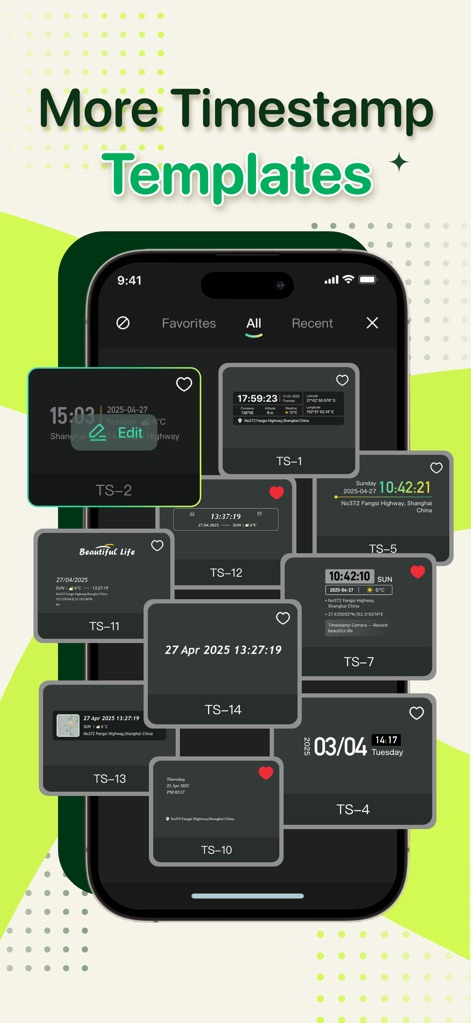
사용자는 다양한 디자인의 시간 스탬프 템플릿을 탐색하고 선택할 수 있으며, 각 템플릿은 고유한 시간 표시 형식과 레이아웃(예: TS-1, TS-2)을 제공합니다.
다양한 스탬프 템플릿

앱은 사용자가 사진을 찍는 순간의 정확한 GPS 위치와 현재 시간을 실시간으로 스탬프에 표시하여 현장 검증에 필수적인 정보를 제공합니다.
실시간 위치 정보

이 도구는 사진에 GPS 지도와 함께 정확한 주소를 스탬프에 포함시켜 사용자가 촬영한 장소의 세부 정보를 명확하게 기록할 수 있게 합니다.
GPS 지도 위치 스탬프

이 앱은 중요한 순간을 포착하고 시간 스탬프와 함께 보관하여, 생일 축하 장면과 같은 소중한 추억을 현재 날짜와 상세한 위치 정보와 함께 영구적으로 기록할 수 있도록 돕습니다.
모든 순간 포착

사용자는 다양한 필터를 적용하여 이미지의 분위기를 조절할 수 있으며, 여러 가지 스타일(예: F1, F6)을 미리보기로 확인하며 선택하여 독특한 시각적 효과를 연출할 수 있습니다.
다양한 필터 효과
설명
Download
비슷한 앱
유사한 기능과 사용자 경험을 가진 앱

Timestamp Camera - Date Stamp
Artify Inc.

Timestamp Camera: Time & GPS
Practical Apps from Sweden AB

Timestamp camera - gps cam
Guangzhou Siyue Network Technology Co., Ltd.

DateStamper
Jordan Hipwell

Timestamp Camera Basic
玉彬 陈

GPS Map Camera : Geo Photos
Chirag Gabani

Timestamp Camera: Time stamp
燕倩 费

Timestamp Camera - Time & GPS
Shaanxi Ruidebao Technology Co.,Ltd
Timestamp Camera - Aio GPS Cam
周萍 黄
이 페이지는 앱이나 개발자의 공식 페이지가 아니며, 정보 제공 및 논평을 목적으로 작성된 독립 편집 간행물입니다. 명시적으로 달리 언급되지 않는 한, 해당 앱이나 개발자는 MWM, Apple, Google Play, 앱 퍼블리셔 또는 앱 개발자와 제휴, 보증, 후원, 승인 또는 공식적으로 연결되어 있지 않으며, 이 페이지의 어떤 내용도 해당 앱이 MWM의 서비스를 사용하여 개발되었음을 의미하지 않습니다. 모든 상표, 로고, 스크린샷 및 기타 콘텐츠는 해당 소유자의 자산입니다.