
이 페이지는 앱이나 개발자의 공식 페이지가 아니며, 정보 제공 및 논평을 목적으로 작성된 독립 편집 간행물입니다. 명시적으로 달리 언급되지 않는 한, 해당 앱이나 개발자는 MWM, Apple, Google Play, 앱 퍼블리셔 또는 앱 개발자와 제휴, 보증, 후원, 승인 또는 공식적으로 연결되어 있지 않으며, 이 페이지의 어떤 내용도 해당 앱이 MWM의 서비스를 사용하여 개발되었음을 의미하지 않습니다. 모든 상표, 로고, 스크린샷 및 기타 콘텐츠는 해당 소유자의 자산입니다.


다운로드
12.5M+사용자 평점
총 평가 수
267.4K개발사
카테고리
Photo & Video지원 언어
16최신 버전
1.155크기
24.2 MB출시일
2014년 3월 25일Timestamp Camera Basic 앱 분석
정확한 시간, 위치 및 컨텍스트 데이터 기록을 위한 핵심 기능
밀리초 단위의 정확한 실시간 타임스탬프 자동 삽입
이 앱은 미디어에 밀리초 단위까지 정확한 시간 정보를 자동으로 기록하여 모든 순간의 신뢰성 있는 기록을 보장합니다.
실시간 위치(주소 및 GPS), 고도 및 속도 정보 자동 삽입
이 도구는 사진 및 비디오에 촬영 당시의 정확한 지리적 위치, 고도, 속도 정보를 추가하여 상황 파악을 용이하게 합니다.
사용자 정의 텍스트 및 Exif 태그 삽입
사용자가 카메라 화면에 직접 사용자 정의 텍스트나 프로젝트 태그를 추가하고, 이를 Exif 데이터에 포함시켜 체계적인 문서화 및 관리가 가능합니다.
다양한 타임스탬프 형식, 글꼴, 색상 및 위치 조절
이 앱은 81가지 이상의 타임스탬프 형식과 글꼴, 색상, 위치를 자유롭게 조정하여 미디어에 필요한 정보를 명확하고 전문적으로 표시할 수 있도록 지원합니다.
비디오 녹화 중 일시 중지 및 재개
이 도구는 비디오 녹화 중 필요에 따라 일시 중지하고 재개하여 여러 장면을 하나의 연속적인 비디오 파일로 효율적으로 촬영하고 관리할 수 있도록 해줍니다.
카메라 내 지도 및 나침반 표시
이 앱은 카메라 화면에 실시간 지도와 나침반을 표시하여 촬영 중 주변 환경과 방향을 즉각적으로 파악하고 기록에 활용할 수 있도록 돕습니다.
워터마크 로고 이미지 삽입
이 도구는 사용자가 커스텀 로고 이미지를 워터마크로 추가하여 촬영물에 브랜드나 프로젝트 아이덴티티를 명확하게 표시할 수 있도록 지원합니다.
사진 및 비디오 해상도와 프레임 속도 조절
이 앱은 촬영하는 사진과 비디오의 해상도 및 프레임 속도를 조절하여 프로젝트 요구사항에 부합하는 최적의 품질로 미디어를 제작할 수 있게 합니다.
자주 묻는 질문
에 대해 알아야 할 모든 것 Timestamp Camera Basic
What is the primary function of Timestamp Camera Basic?
Timestamp Camera Basic adds real-time timestamp watermarks, including current time and address, to photos and videos captured with the camera.
Can Timestamp Camera Basic add custom text to photos and videos?
Yes, Timestamp Camera Basic supports inputting and displaying custom text on the camera feed for both photos and videos.
Does Timestamp Camera Basic record video with millisecond accuracy?
Yes, Timestamp Camera Basic records video with time watermarks accurate to the millisecond (0.001 second). It is the only app with this feature.
How many timestamp formats does Timestamp Camera Basic support?
Timestamp Camera Basic supports 81 different timestamp formats for displaying time on photos and videos.
Can users change the font and color of the timestamp in Timestamp Camera Basic?
Yes, users can change the font, font color, and font size of the timestamp displayed in Timestamp Camera Basic.
What resolution options are available for video recording in Timestamp Camera Basic?
Timestamp Camera Basic supports video resolutions of 540P, 720P, 1080P, and 4K, with frame rates of 30fps and 60fps.
Can I display a map on the camera view using Timestamp Camera Basic?
Yes, Timestamp Camera Basic supports displaying a map directly on the camera view. This feature is toggleable in settings.
Does Timestamp Camera Basic have a battery saver mode?
Yes, Timestamp Camera Basic includes a "Battery saver mode" which adjusts the screen brightness to conserve power.
Can Timestamp Camera Basic import a custom logo as a watermark?
Yes, Timestamp Camera Basic allows users to import a custom watermark logo image to display on the camera feed.
What camera modes are available in Timestamp Camera Basic?
Timestamp Camera Basic offers four modes: Video, Photo, Square, and Timelapse. Video, Square, and Timelapse support both video recording and photo capture.
Can Timestamp Camera Basic record video without audio?
Yes, Timestamp Camera Basic supports recording video without audio. This option is available in the app's settings.
Does Timestamp Camera Basic support pausing and resuming video recordings?
Yes, Timestamp Camera Basic allows users to pause and continue recording fragments, compiling them into a single video.
Where are photos and videos saved after being captured with Timestamp Camera Basic?
Photos and videos captured using Timestamp Camera Basic are saved directly to the device's Camera roll.
다음 스크린샷과 설명은 앱의 공식 스토어 목록에서 직접 가져온 것이며 앱 개발자의 자산입니다.
앱 스토어
스크린샷
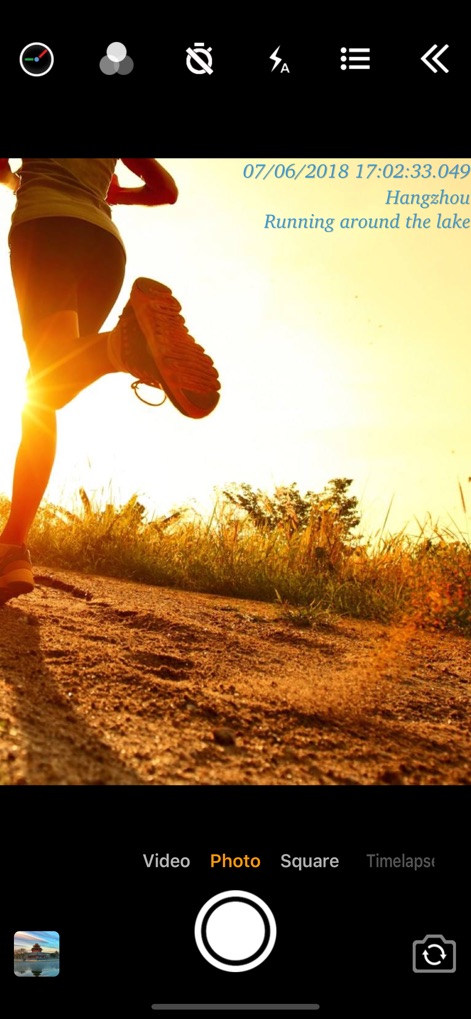
정확한 시간 기록
이 앱은 촬영 시각을 밀리초 단위로 정확하게 표시하며, 'Running around the lake'와 같은 사용자 정의 텍스트를 추가할 수 있습니다.
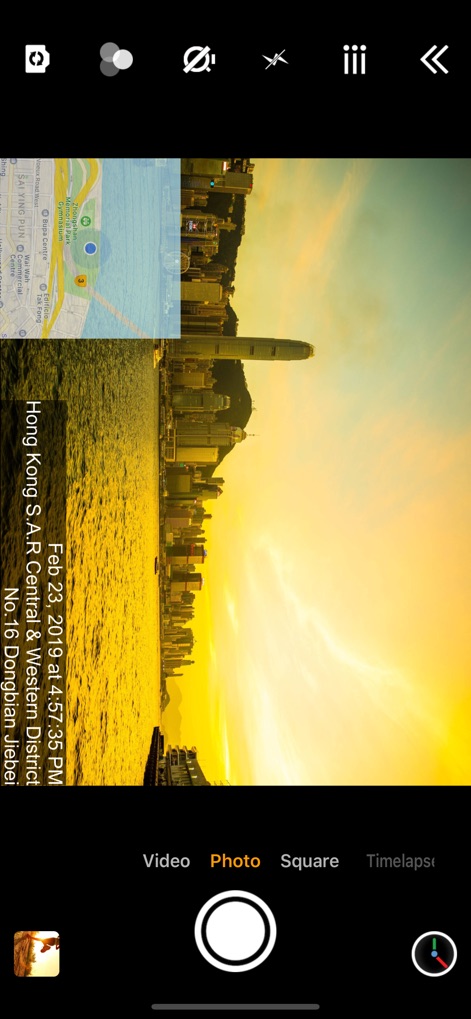
지도 및 위치 정보
사용자는 실시간 지도 오버레이를 통해 촬영 위치를 확인할 수 있으며, 회전된 날짜와 상세 주소 정보를 미디어에 포함합니다.
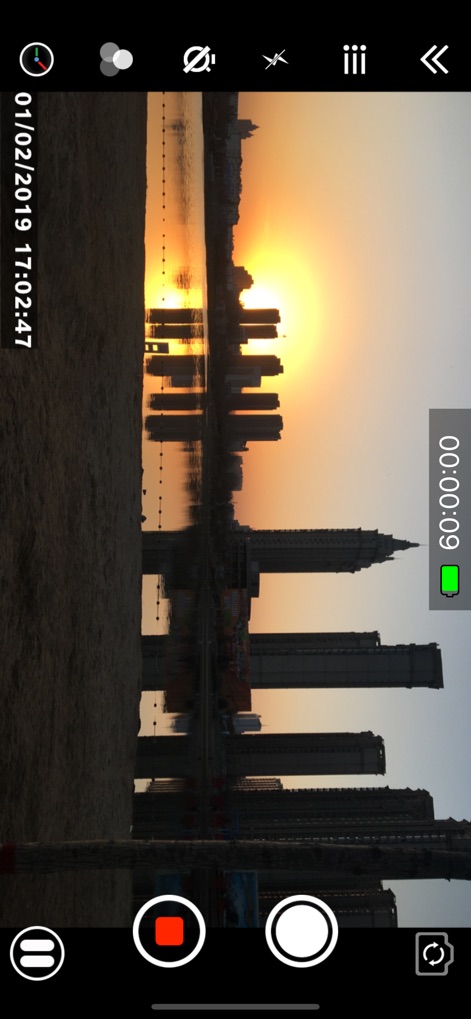
실시간 비디오 기록
이 도구는 비디오 촬영 중 실시간 녹화 시간을 표시하고, 화면에 회전된 날짜 및 시간 스탬프를 선명하게 새깁니다.
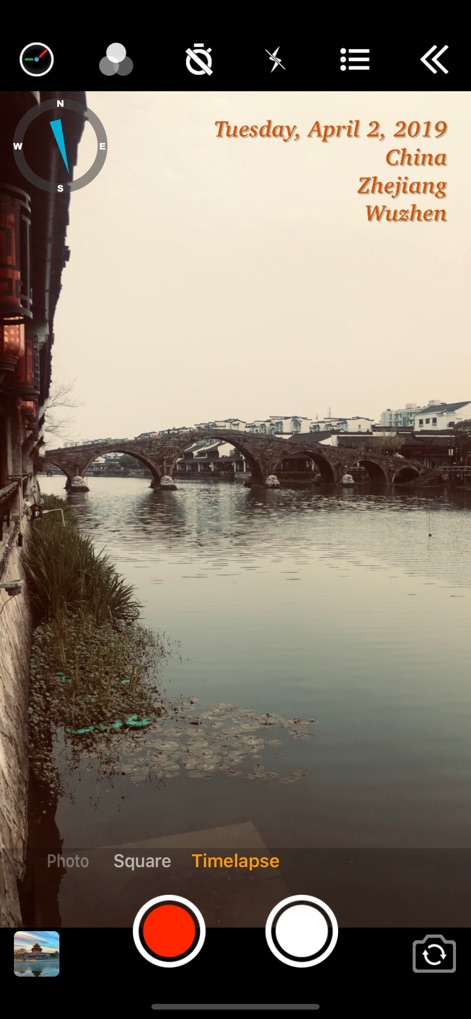
나침반과 상세 주소
이 앱은 촬영 화면에 나침반을 제공하여 방향을 안내하며, 'Tuesday, April 2, 2019'와 같은 상세 날짜 및 지역 정보를 표시합니다.
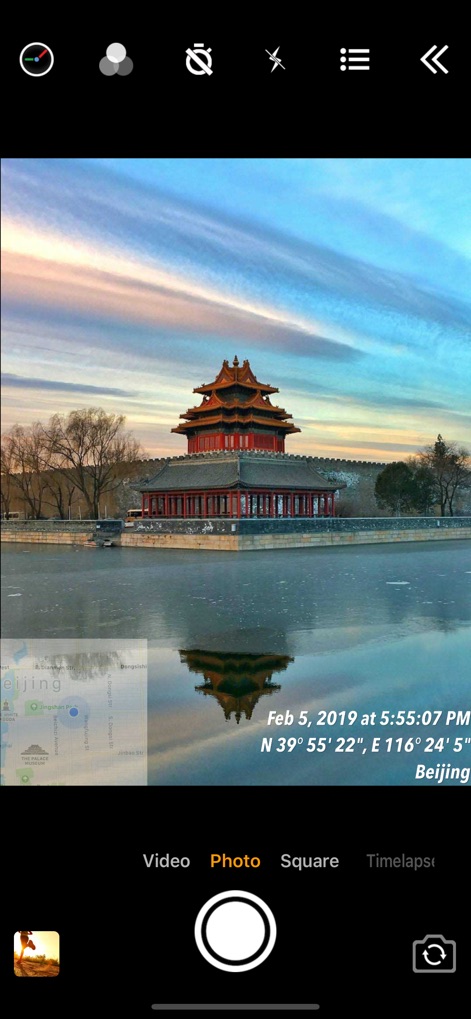
좌표 및 위치 확인
사용자는 이미지에 GPS 좌표('N 39° 55' 22", E 116° 24' 5"')를 추가하여 정확한 위치를 기록하고, 지도 미리보기를 통해 주변 환경을 파악할 수 있습니다.
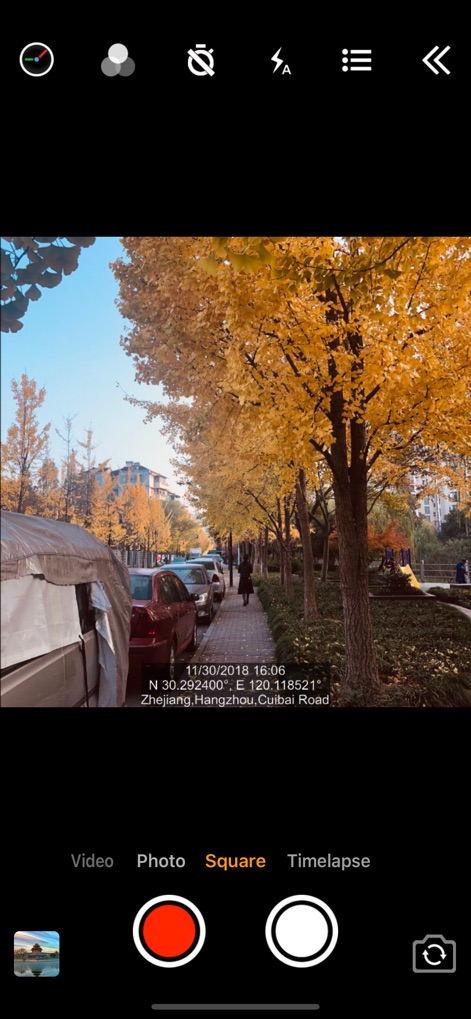
다양한 촬영 모드
이 도구는 'Square' 모드와 같은 다양한 촬영 옵션을 제공하며, 정확한 시간 스탬프와 상세 주소 및 좌표('N 30.292400°, E 120.118521°')를 미디어에 기록합니다.
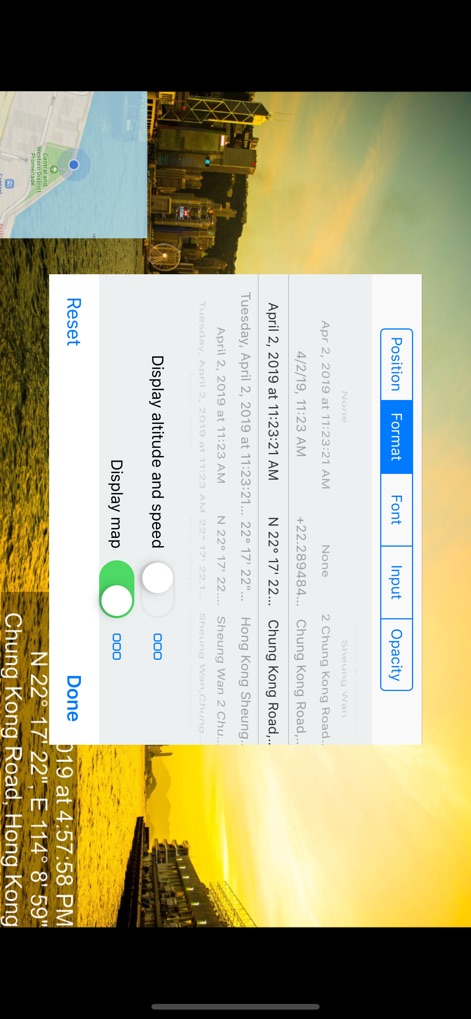
다양한 설정 옵션
이 앱은 스탬프 위치 및 형식과 같은 다양한 설정 옵션을 제공하며, 고도와 속도 표시를 켜거나 끌 수 있는 토글 기능을 포함합니다.
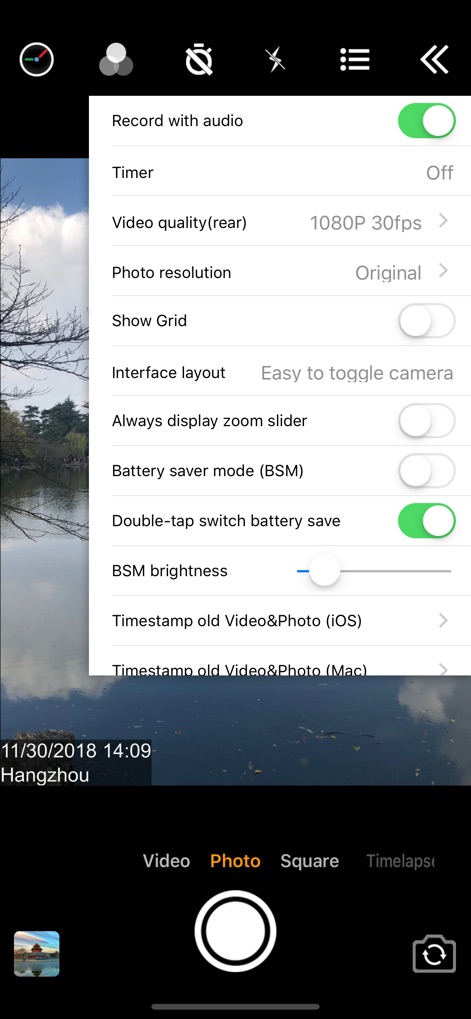
녹화 설정 관리
사용자는 오디오 녹화 여부를 제어할 수 있으며, '배터리 절약 모드'를 활성화하여 장치 사용 시간을 최적화할 수 있습니다.
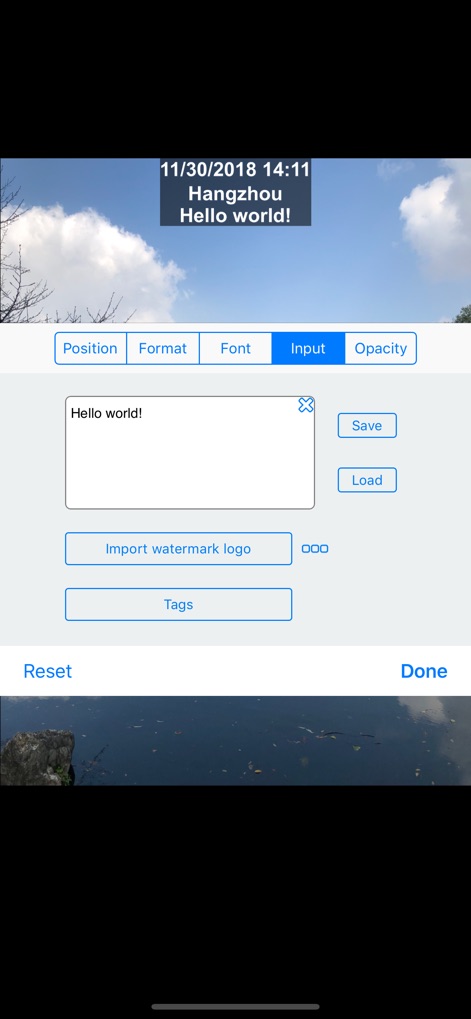
맞춤형 텍스트 및 로고
이 도구는 'Hello world!'와 같은 사용자 정의 텍스트를 입력할 수 있게 하며, 워터마크 로고 이미지를 가져와 미디어에 추가할 수 있습니다.
설명
Download
비슷한 앱
유사한 기능과 사용자 경험을 가진 앱

Timestamp Camera -AI Timestamp
Shanghai Zongchong Information Technology Co., Ltd

Timestamp Camera - Date Stamp
Artify Inc.

Timestamp Camera: Time & GPS
Practical Apps from Sweden AB

Timestamp camera - gps cam
Guangzhou Siyue Network Technology Co., Ltd.

DateStamper
Jordan Hipwell

GPS Map Camera : Geo Photos
Chirag Gabani

Timestamp Camera: Time stamp
燕倩 费

Timestamp Camera - Time & GPS
Shaanxi Ruidebao Technology Co.,Ltd
Timestamp Camera - Aio GPS Cam
周萍 黄
이 페이지는 앱이나 개발자의 공식 페이지가 아니며, 정보 제공 및 논평을 목적으로 작성된 독립 편집 간행물입니다. 명시적으로 달리 언급되지 않는 한, 해당 앱이나 개발자는 MWM, Apple, Google Play, 앱 퍼블리셔 또는 앱 개발자와 제휴, 보증, 후원, 승인 또는 공식적으로 연결되어 있지 않으며, 이 페이지의 어떤 내용도 해당 앱이 MWM의 서비스를 사용하여 개발되었음을 의미하지 않습니다. 모든 상표, 로고, 스크린샷 및 기타 콘텐츠는 해당 소유자의 자산입니다.