Total Command
Total Command
다운로드: App Store

이 페이지는 앱이나 개발자의 공식 페이지가 아니며, 정보 제공 및 논평을 목적으로 작성된 독립 편집 간행물입니다. 명시적으로 달리 언급되지 않는 한, 해당 앱이나 개발자는 MWM, Apple, Google Play, 앱 퍼블리셔 또는 앱 개발자와 제휴, 보증, 후원, 승인 또는 공식적으로 연결되어 있지 않으며, 이 페이지의 어떤 내용도 해당 앱이 MWM의 서비스를 사용하여 개발되었음을 의미하지 않습니다. 모든 상표, 로고, 스크린샷 및 기타 콘텐츠는 해당 소유자의 자산입니다.

로고: Total Command
다운로드: App Store

Total Command

안정적인 단일 화면 디지털 보드로 지휘를 강화하세요. 단위를 추적하고, PAR 타이머를 관리하며, 사건 로그를 자동화하세요. 현장에서 절대적인 신뢰성을 요구하는 대대장 및 응급 구조대원을 위해 설계되었습니다.

주요 수치

다운로드

400

사용자 평점

1.0/5

총 평가 수

0

개발사

EMERGENCY RESPONSE STRATEGIES LLC

카테고리

Productivity

지원 언어

1

최신 버전

1.1.34

크기

2.6 MB

출시일

2016년 4월 10일
기능

명확한 지휘

종이와 클립보드를 버리세요. Total Command는 인지 부하를 줄이고 초가 중요한 인원 계정 관리를 강화하기 위해 설계된 단일 화면 디지털 지휘 보드를 제공합니다.

단일 화면 상황 인식

중요한 세부 정보를 놓칠 위험을 제거하세요. 직관적인 드래그 앤 드롭 인터페이스는 모든 단위, 부서 및 할당을 한 화면에 유지합니다. 사건 중 탭을 전환할 필요가 없습니다.

자동 인원 계정 관리

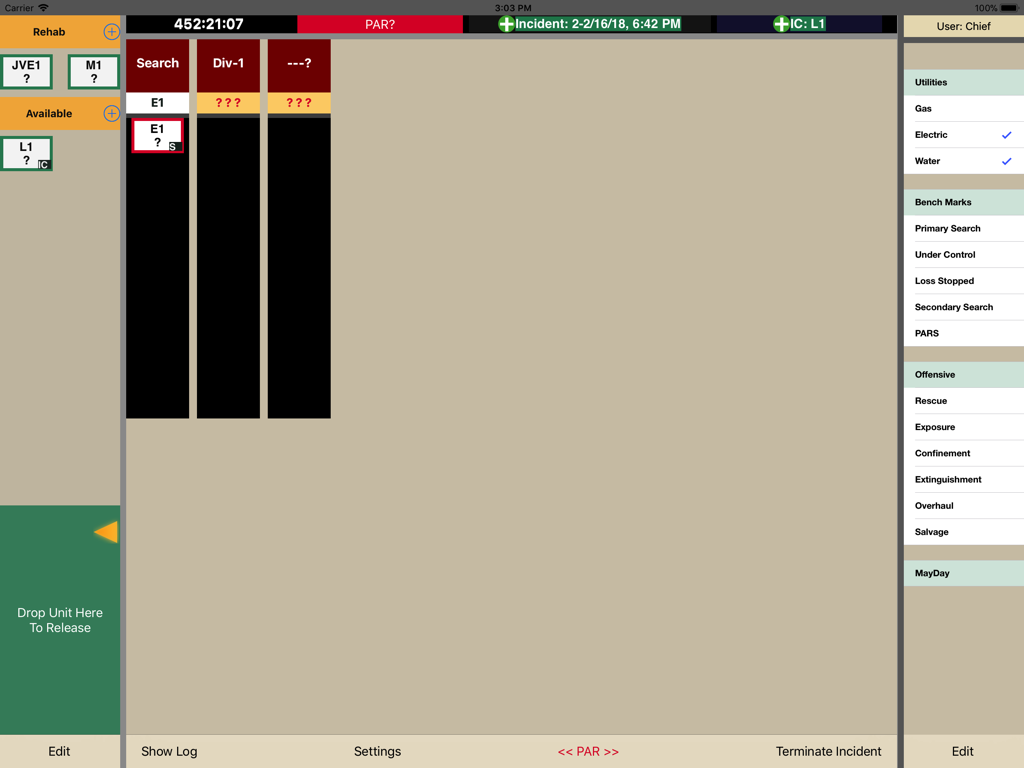
통합 PAR 타이머로 팀을 보호하세요. 색상으로 구분된 상태 업데이트는 단위 작업 시간에 대한 즉각적인 시각적 신호를 제공하며, 모든 작업은 정확한 로깅을 위해 자동으로 타임스탬프가 찍힙니다.

다음 스크린샷과 설명은 앱의 공식 스토어 목록에서 직접 가져온 것이며 앱 개발자의 자산입니다.

앱 스토어

스크린샷
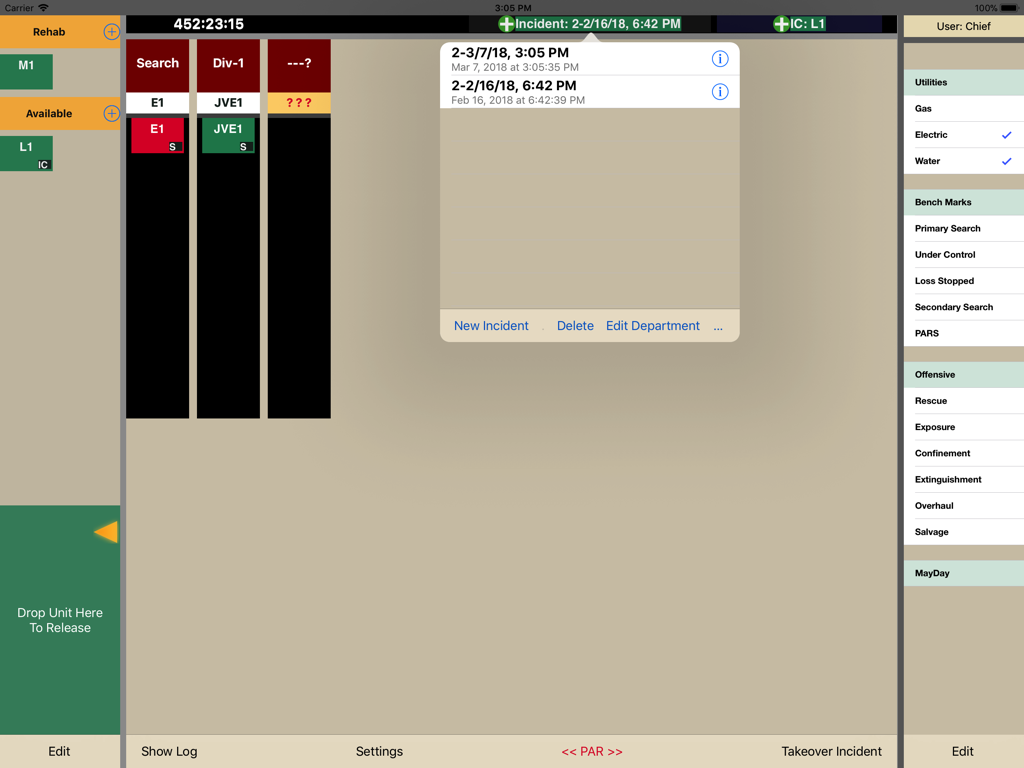
Total Command - 단위 할당 및 비상 대응 체크리스트를 보여주는 디지털 사건 지휘 보드
단위 할당 및 비상 대응 체크리스트를 보여주는 디지털 사건 지휘 보드

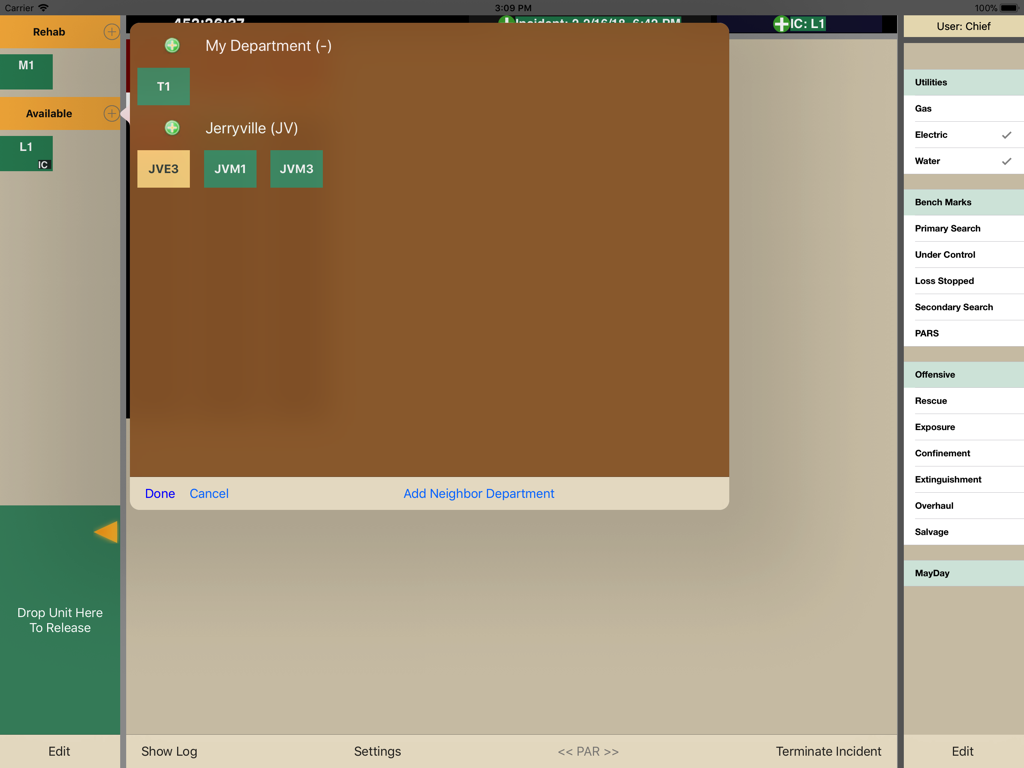
Total Command - 단위 추적 및 사건 지휘관을 위한 부서 관리를 보여주는 iPad의 Total Command 앱 대시보드
단위 추적 및 사건 지휘관을 위한 부서 관리를 보여주는 iPad의 Total Command 앱 대시보드

Total Command - 단위 및 안전 벤치마크를 추적하는 비상 서비스용 디지털 사건 지휘 보드
단위 및 안전 벤치마크를 추적하는 비상 서비스용 디지털 사건 지휘 보드

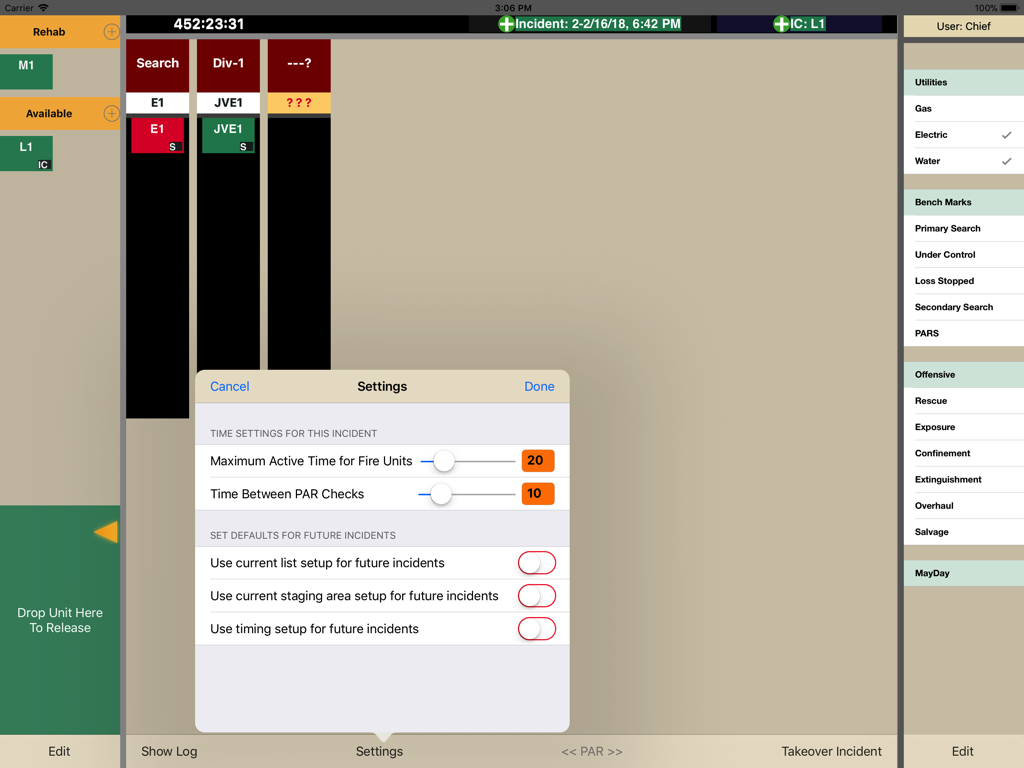
Total Command - 사건 대시보드에서 활성 단위 시간 및 PAR 확인 간격을 구성하기 위한 Total Command 앱의 설정 메뉴
사건 대시보드에서 활성 단위 시간 및 PAR 확인 간격을 구성하기 위한 Total Command 앱의 설정 메뉴

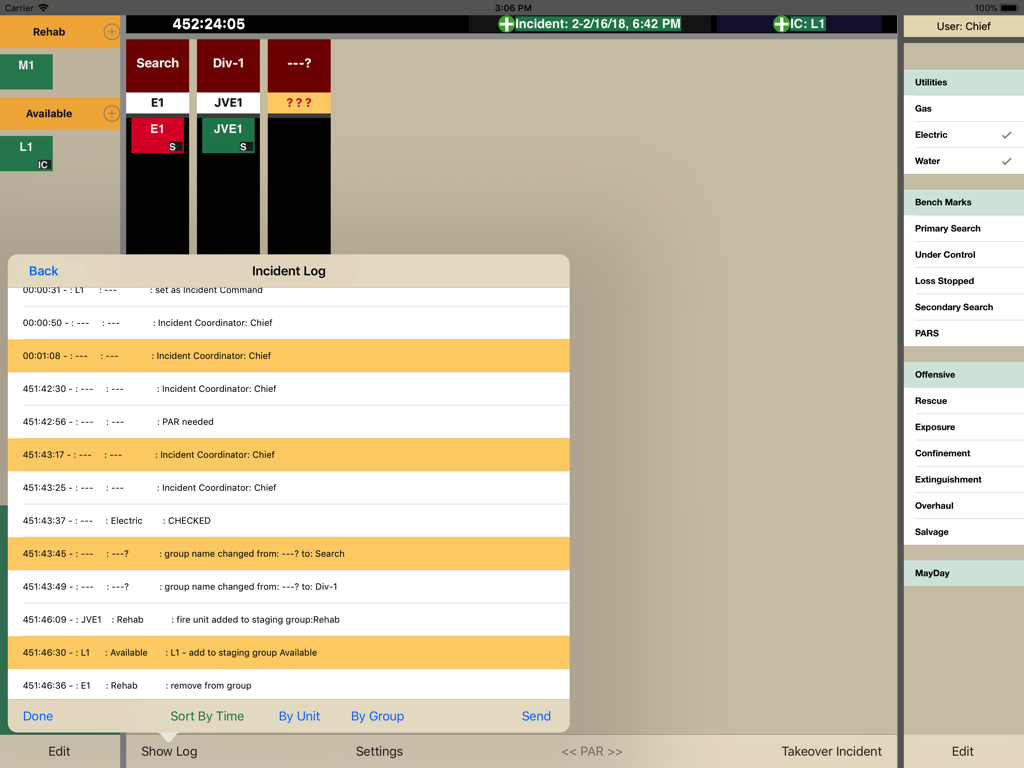
Total Command - 전술적 결정 및 단위 상태 업데이트에 대한 자동 타임스탬프를 보여주는 사건 로그 인터페이스
전술적 결정 및 단위 상태 업데이트에 대한 자동 타임스탬프를 보여주는 사건 로그 인터페이스

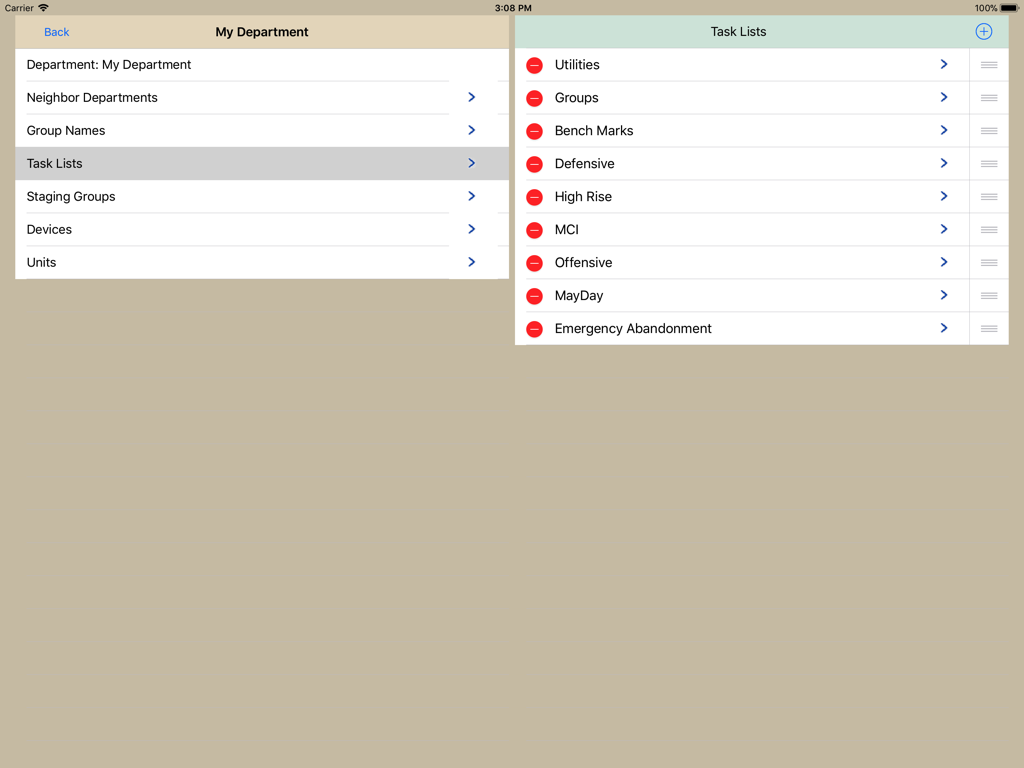
Total Command - 사용자 정의 가능한 사건 작업 목록 및 부서 설정을 보여주는 Total Command 앱의 인터페이스

사용자 정의 가능한 사건 작업 목록 및 부서 설정을 보여주는 Total Command 앱의 인터페이스

설명

Gain Total Command of Your Incident Right At Your Fingertips Watch the app in action. https://emergencyresponsestrategies.com/totalcommand-app/ Take your TotalCommand simulation training to the next level with the TotalCommand app. The app assists with commanding incidents, assigning and tracking units. With departments getting larger and incidents becoming more complex, using a pen and paper to accurately manage incidents has become cumbersome with more room for errors. TotalCommand app allows the incident commander to see everything at once by keeping all relevant information on the same page. No need to switch between pages to check the status of an incident! Features Live Syncing -- planned Design TotalCommand app uses a simple and intuitive single screen design to allow commanders to effectively manage incidents. Using drag and drop technology, assigning units and creating divisions and groups is made simple. Time Tracking TotalCommand app accurately tracks and logs incident times. An incident clock is visible at all times. TotalCommand app also has an integrated customizable PAR timer. Using deteriorating colors for assigned units, the incident commander knows the working times of units with a quick look. Every action made by the incident commander is automatically time stamped and logged. Logs can be viewed and emailed at any time during or after an incident. Easily Customized TotalCommand app is fully customizable to a specific department – from creating time stamped check lists to adding department specific groups and divisions. Configure To Your Needs TotalCommand app can be configured to any department’s needs. The user can add or change units, assignments, checklists, and adjust timers for PAR’s and assigned units. Reliability TotalCommand app was designed with reliability and dependability as a priority. TotalCommand app logs all interactions instantly on a backup file. If a crash or equipment failure should occur, TotalCommand app will reload and continue from the last recorded point. The app does not require the use of a web connection, and can be used at any time without a connection.

Download

다운로드: App Store

이 페이지는 앱이나 개발자의 공식 페이지가 아니며, 정보 제공 및 논평을 목적으로 작성된 독립 편집 간행물입니다. 명시적으로 달리 언급되지 않는 한, 해당 앱이나 개발자는 MWM, Apple, Google Play, 앱 퍼블리셔 또는 앱 개발자와 제휴, 보증, 후원, 승인 또는 공식적으로 연결되어 있지 않으며, 이 페이지의 어떤 내용도 해당 앱이 MWM의 서비스를 사용하여 개발되었음을 의미하지 않습니다. 모든 상표, 로고, 스크린샷 및 기타 콘텐츠는 해당 소유자의 자산입니다.








