
This page is not an official page of the app or its developer, but an independent editorial publication created for informational and commentary purposes. Unless expressly stated otherwise, neither the app nor its developer is affiliated with, endorsed by, sponsored by, authorized by, or otherwise officially connected with MWM, Apple, Google Play, the app publisher, or the app's developer, and nothing on this page implies that the app was developed using MWM's services. Any trademarks, logos, screenshots, and other content remain the property of their respective owners.


Microsoft Teams
Downloads
250M+User Rating
Total Ratings
11.4MPublisher
Category
BusinessLocales
48Latest Version
8.5.1Size
450.0 MBFirst Released
Nov 2, 2016Microsoft Teams: Comprehensive Platform Analysis
An evaluation of core functionalities driving communication, collaboration, and productivity across diverse user groups.
Advanced Security & Compliance
It ensures data protection and adherence to organizational security standards, offering peace of mind for users handling sensitive information.
Unified Communication Hub
The app provides a centralized platform for diverse communication needs, including instant messaging, group chats, and topic-specific channels.
Secure Virtual Meetings & Conferencing
It facilitates effective and secure virtual interactions through audio/video calls, screen sharing, and interactive whiteboards, supporting remote work and learning.
Integrated Collaboration & Project Management
This tool features integrated tools for co-creation, file management, and project tracking, allowing users to collaborate on documents, assign tasks, and manage timelines efficiently.
Centralized File Storage & Sharing
The app offers built-in cloud storage for easy access to shared documents and files on the go, ensuring all relevant resources are organized and readily available.
Robust Task Tracking
It allows users to create and assign tasks, set due dates, and track progress within projects, helping teams stay organized and on schedule.
Seamless External Connectivity
It enables communication with external contacts, including Skype users, and allows guests to join meetings or collaborate via simple link sharing.
Dedicated Community Spaces
The app provides the ability to create and manage dedicated communities for specific topics, fostering structured discussions and content sharing among groups.
Frequently Asked Questions
Everything you need to know about Microsoft Teams
What is Microsoft Teams?
Microsoft Teams is a comprehensive application that brings people together for communication and collaboration. It combines communities, events, chats, channels, meetings, storage, tasks, and calendars into a single platform.
What communication features does Microsoft Teams include?
Microsoft Teams offers secure audio and video calls, 1-1 or group chats, @mentions, and integrations like Skype chats and contacts. Users can express themselves with GIFs, emojis, and message animations.
Can users collaborate on documents and files within Microsoft Teams?
Yes, Microsoft Teams allows users to collaborate on documents and store files and photos using built-in cloud storage. Shared content can be organized within communities, and meetings feature screen sharing and whiteboards.
Does Microsoft Teams support video meetings and calls?
Yes, Microsoft Teams supports video meetings and calls. Users can connect with anyone securely, set up meetings instantly, and invite participants via link or calendar invite. The app displays multiple participants in a grid view.
Can I manage tasks and projects directly within Microsoft Teams?
Yes, Microsoft Teams allows users to manage projects and plans. It includes task lists to assign tasks, set due dates, and track completion, ensuring everyone remains synchronized on project progress.
What security and privacy features does Microsoft Teams provide?
Microsoft Teams provides secure collaboration, user control over data, and tools for community owners to remove inappropriate content or members. It incorporates enterprise-level security and compliance from Microsoft 365.
Is Microsoft Teams free to use?
Yes, basic features of Microsoft Teams are available for free. However, commercial features require a paid Microsoft 365 commercial subscription or a trial subscription of Microsoft Teams for work.
Does Microsoft Teams allow switching between work and personal accounts?
Yes, Microsoft Teams supports switching easily between work and personal accounts. The app provides an interface where users can select or add different organizational or individual profiles from a dedicated menu.
How does Microsoft Teams help organize community events?
Microsoft Teams provides a dedicated space to organize community events, along with photos, links, and files. Users can view and join scheduled events directly from their calendar within the app interface.
Does Microsoft Teams integrate with Skype?
Yes, Skype is now part of Microsoft Teams. Users can continue their chats, calls, and access contacts from Skype directly within Microsoft Teams Free, consolidating communication efforts.
The following screenshots and description are sourced directly from the app's official store listing and are the property of the app developer.
App Store
Screenshots

Unified Chat Hub
Explore the app's central communication interface, showcasing a streamlined chat list with user profile pictures and quick access to meeting functionalities.

Engaging Conversations
Witness dynamic chat interactions, featuring expressive emojis and a prominent 'Join meeting' button for instant collaboration.

Seamless Video Calls
Observe the intuitive video conferencing layout, displaying multiple participants in a grid view and essential call control icons for managing interactions.

Organized Communities
Discover how the app centralizes various groups and communities, presenting clear icons and member counts for easy navigation.

Dedicated Team Spaces
Examine a dedicated team space, highlighting organized content sections like 'Events' and interactive post reactions for collaborative engagement.

Structured Collaboration
Understand the app's channel organization, featuring pinned channels and a hierarchical display of teams and their respective discussion threads.
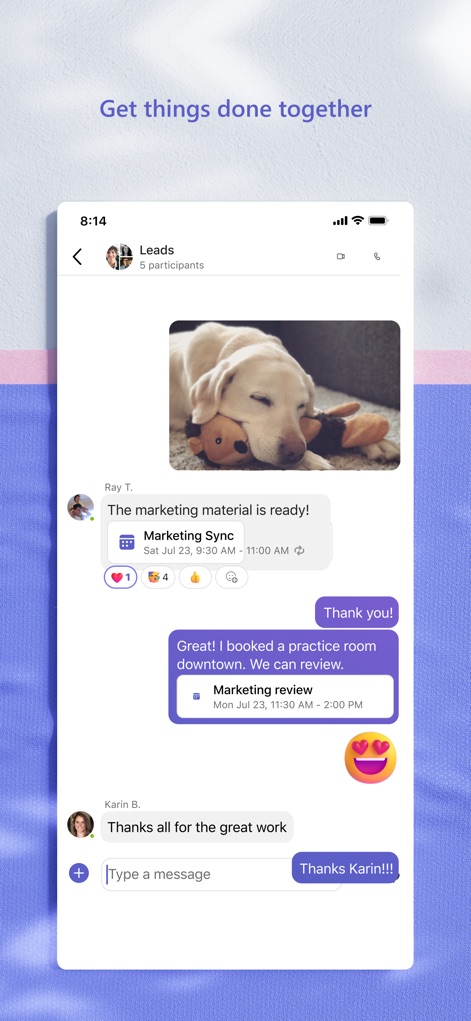
Rich Messaging Features
Experience advanced messaging capabilities, demonstrating embedded image sharing and integrated calendar events within chat conversations.

Flexible Account Management
Appreciate the effortless account switching functionality, clearly presenting options for both 'Personal' and organizational accounts alongside notification controls.

Integrated Scheduling
View the app's comprehensive calendar, showcasing scheduled events with 'Join' buttons and clear time allocations for seamless participation.
Description
Download
More Like This
Apps with similar features and user experience

GoTo
GoTo Group, Inc.

Lark - Team Collaboration
LARK TECHNOLOGIES PTE. LTD.

RingCentral
RingCentral, Inc

MTS Link
VEBINAR TEKHNOLOGII, OOO

Pronto Team Communication
Hit Labs, Inc.

Zoho Cliq - Team Communication
Zoho Corporation

Zoom Workplace
Zoom Communications, Inc.

Google Meet
Google LLC

Google Chat
Google LLC
This page is not an official page of the app or its developer, but an independent editorial publication created for informational and commentary purposes. Unless expressly stated otherwise, neither the app nor its developer is affiliated with, endorsed by, sponsored by, authorized by, or otherwise officially connected with MWM, Apple, Google Play, the app publisher, or the app's developer, and nothing on this page implies that the app was developed using MWM's services. Any trademarks, logos, screenshots, and other content remain the property of their respective owners.