
This page is not an official page of the app or its developer, but an independent editorial publication created for informational and commentary purposes. Unless expressly stated otherwise, neither the app nor its developer is affiliated with, endorsed by, sponsored by, authorized by, or otherwise officially connected with MWM, Apple, Google Play, the app publisher, or the app's developer, and nothing on this page implies that the app was developed using MWM's services. Any trademarks, logos, screenshots, and other content remain the property of their respective owners.

AC Freedom
Take total control of your smart air conditioner from anywhere. Experience the ultimate convenience of remote climate management and smart scheduling for a more comfortable, energy-efficient home.
Downloads
972K+User Rating
Total Ratings
2K+Publisher
Category
LifestyleLocales
18Latest Version
4.0.0Size
79.1 MBFirst Released
Jun 4, 2015Ultimate Comfort, Effortlessly Managed
Take total command of your home environment with advanced cloud-based climate control designed for your modern lifestyle.
Instant Remote Control
Pre-cool your home before you arrive or turn off the AC from the office using our secure cloud-link technology.
Precision Weekly Timing
Set and forget with automated schedules that match your daily routine, maximizing comfort while slashing energy costs.
Frequently Asked Questions
Everything you need to know about AC Freedom
What is AC Freedom?
AC Freedom is a mobile client that uses unique cloud computing to enable remote control and regulation of specific home-used smart air conditioners. It allows users to check working conditions and set weekly timings.
What are the main features of the AC Freedom app?
The AC Freedom app provides remote control for turning on and regulating smart air conditioners, checking their working condition, and setting weekly timing. It uses a cloud computing technique for these functions.
Can I control my air conditioner remotely with AC Freedom?
Yes, the AC Freedom app allows remote control of smart air conditioners. Users can turn the unit on, regulate settings, and monitor its working condition from their mobile client using cloud computing.
How do I add a new air conditioner device in AC Freedom?
To add a new air conditioner device in AC Freedom, navigate to the "My Home" screen. Locate and tap the "Add device" button to initiate the pairing process for your smart air conditioner.
Does AC Freedom support scheduling for air conditioners?
Yes, the AC Freedom app supports scheduling. Users can set weekly timing for their smart air conditioner directly through the mobile client to manage its operation automatically.
What specific types of air conditioners does AC Freedom support?
AC Freedom is specifically designed for home-used smart air conditioners. It does not support an entire production line of AC units, focusing instead on compatible residential models.
Can I check the current temperature with the AC Freedom app?
Yes, the AC Freedom app displays temperature information. The main control screen shows the indoor temperature and the set temperature for the connected smart air conditioner.
What control options are available for the air conditioner in AC Freedom?
AC Freedom offers control options including Switch, Fan Direction, and Timers. Users can also adjust Mode (Cooling/Heating), Fan Speed, Display, Health, Sleep, ECO, Sleep Curve, and Power Limit.
Where can I find help or feedback options in AC Freedom?
Users can find help and feedback options within the AC Freedom app. Navigate to the "Me" section, which lists "Help & feedback" among other support and settings choices.
The following screenshots and description are sourced directly from the app's official store listing and are the property of the app developer.
App Store
Screenshots
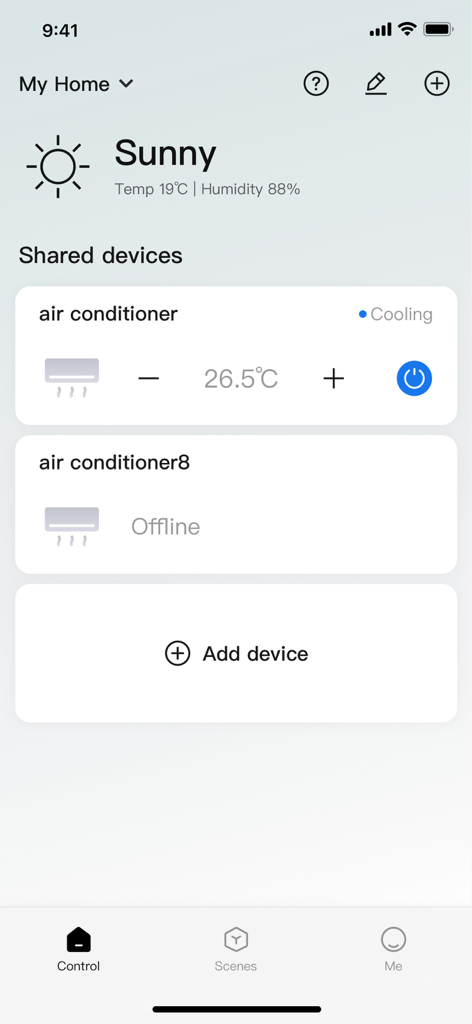
Interface of the AC Freedom app showing remote temperature controls for a smart air conditioner
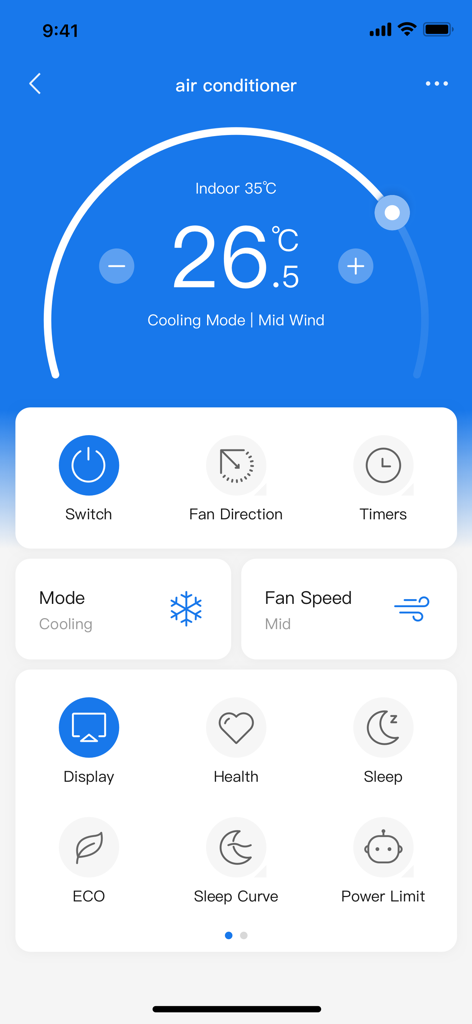
AC Freedom mobile app dashboard showing air conditioner temperature and cooling mode settings.
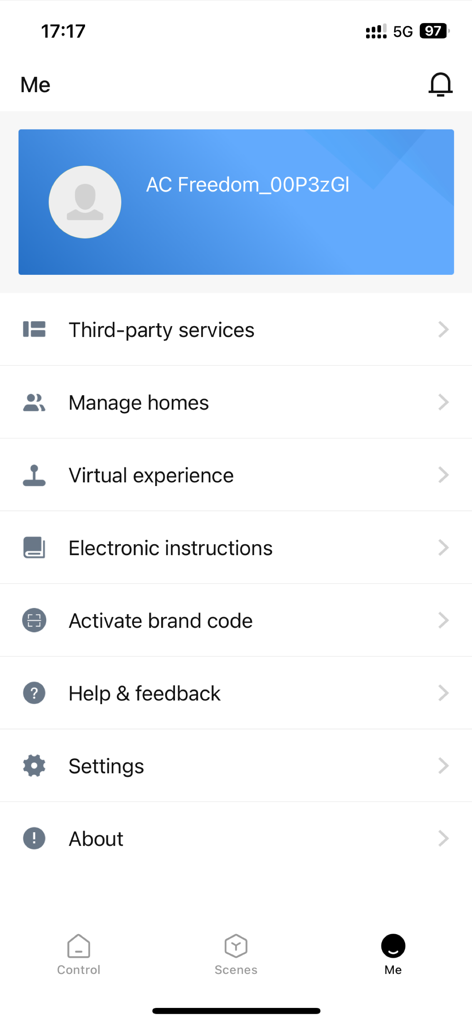
The profile settings screen of the AC Freedom app showing options for managing homes and third party services
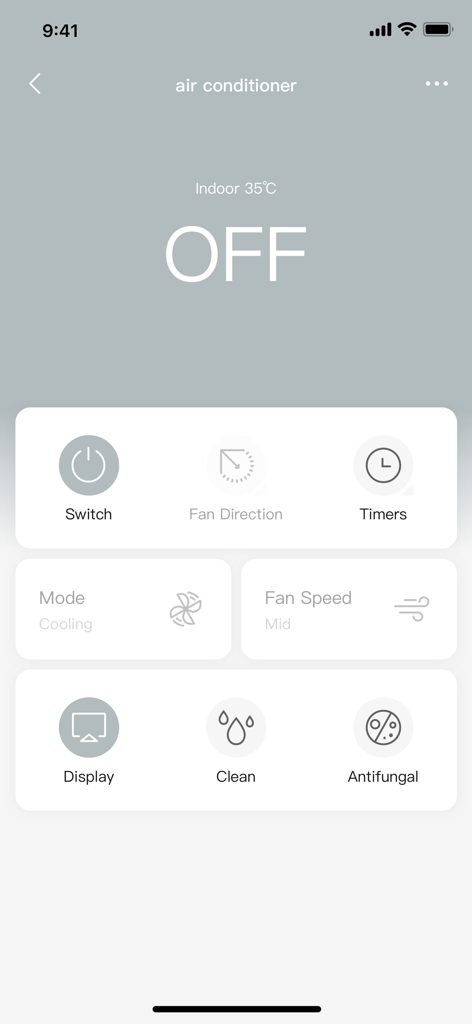
AC Freedom mobile app dashboard showing air conditioner remote control settings
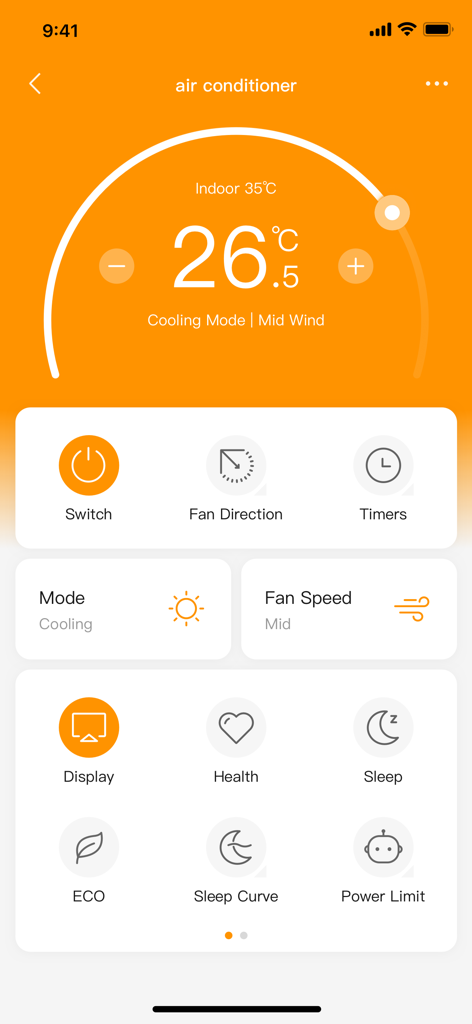
AC Freedom mobile app interface for remote air conditioner temperature and mode control
Description
Download
More Like This
Apps with similar features and user experience

小米音箱
Beijing Xiaomi Co., Ltd

Starlink
Space Exploration Technologies Corp.

Bambu Handy
Shanghai Lunkuo Technology Co., Ltd

DREO
HESUNG INNOVATION LIMITED

My Verisure
Securitas Direct

Whisker
Automated Pet Care Products Inc.

geeni
Merkury Innovations LLC

ADT+
ADT LLC

X-Sense Home Security
X-Sense USA LLC.
This page is not an official page of the app or its developer, but an independent editorial publication created for informational and commentary purposes. Unless expressly stated otherwise, neither the app nor its developer is affiliated with, endorsed by, sponsored by, authorized by, or otherwise officially connected with MWM, Apple, Google Play, the app publisher, or the app's developer, and nothing on this page implies that the app was developed using MWM's services. Any trademarks, logos, screenshots, and other content remain the property of their respective owners.