
This page is not an official page of the app or its developer, but an independent editorial publication created for informational and commentary purposes. Unless expressly stated otherwise, neither the app nor its developer is affiliated with, endorsed by, sponsored by, authorized by, or otherwise officially connected with MWM, Apple, Google Play, the app publisher, or the app's developer, and nothing on this page implies that the app was developed using MWM's services. Any trademarks, logos, screenshots, and other content remain the property of their respective owners.


AC Remote・Air Conditioner
Stop hunting for the remote. The app grants total climate dominion from your phone.
Downloads
750k+User Rating
Total Ratings
3.9KPublisher
Category
UtilitiesLocales
22Latest Version
1.9Size
70.9 MBFirst Released
Jul 23, 2024An evaluation of the AC Remote・Air Conditioner app's core functionalities for smart climate control.
Key Features Analysis
Universal Compatibility
The app supports a vast array of major air conditioner brands, offering a single solution to control various AC units without the need for multiple physical remotes.
Smart Timer Scheduling
It allows users to set automated schedules for their AC units, enabling automatic power-on or shut-off to optimize comfort and energy consumption.
Precise Climate Control
This tool provides granular control over room temperature and fan speed, allowing users to fine-tune their indoor environment with accuracy.
Versatile Mode Control
The app enables seamless switching between various operating modes, including cool, heat, fan, dry, and auto, to suit different climate needs.
Intuitive User Interface
It features a modern and clean design that ensures straightforward navigation and effortless control of air conditioning settings.
Effortless Setup Process
The tool facilitates rapid connection to AC units, allowing users to begin controlling their air conditioner in just a few simple taps.
Frequently Asked Questions
Everything you need to know about AC Remote・Air Conditioner
What is AC Remote, Air Conditioner Pro?
AC Remote, Air Conditioner Pro is a smart app that transforms your phone into a remote control for your air conditioner. It enables users to adjust temperature, change modes, and set timers for their AC units.
Which AC brands does AC Remote, Air Conditioner Pro support?
AC Remote, Air Conditioner Pro supports a wide range of major air conditioner brands. Examples shown include LG, Mitsubishi, and Daikin, confirming its universal AC control capability.
Can I set a timer with AC Remote, Air Conditioner Pro?
Yes, AC Remote, Air Conditioner Pro includes a Timer Function. Users can set schedules to automatically turn their AC units on or off as needed for convenience.
How do I adjust the temperature with AC Remote, Air Conditioner Pro?
AC Remote, Air Conditioner Pro allows precise adjustment of room temperature. The app provides a clean interface with dedicated controls to set the desired climate from your phone.
What control modes are available in AC Remote, Air Conditioner Pro?
AC Remote, Air Conditioner Pro offers various mode selections. Users can switch between cool, heat, fan, dry, and auto modes to effectively manage their indoor climate.
Does AC Remote, Air Conditioner Pro offer a free trial?
AC Remote, Air Conditioner Pro may offer a free trial period. Any unused portion of a free trial is forfeited when a subscription is purchased, where applicable.
How does subscription renewal work for AC Remote, Air Conditioner Pro?
Subscriptions for AC Remote, Air Conditioner Pro automatically renew unless auto-renew is turned off at least 24-hours before the current period ends. Your account is charged for renewal.
Can I manage my AC Remote, Air Conditioner Pro subscription?
Yes, users can manage their subscription and turn off auto-renewal for AC Remote, Air Conditioner Pro. This can be done by accessing Account Settings after the purchase.
Where can I find the Privacy Policy for AC Remote, Air Conditioner Pro?
The Privacy Policy for AC Remote, Air Conditioner Pro is available at: https://docs.google.com/document/d/12HqfYkNkSjS4Dylbnbtj__QrQDK-mknjP-vtiChIZFc/edit?usp=sharing. This link provides details on data handling.
Does AC Remote, Air Conditioner Pro require a network connection for setup?
Yes, for quick setup, ensure your AC unit and mobile phone are on the same network. This is necessary for AC Remote, Air Conditioner Pro to connect to your AC.
The following screenshots and description are sourced directly from the app's official store listing and are the property of the app developer.
App Store
Screenshots
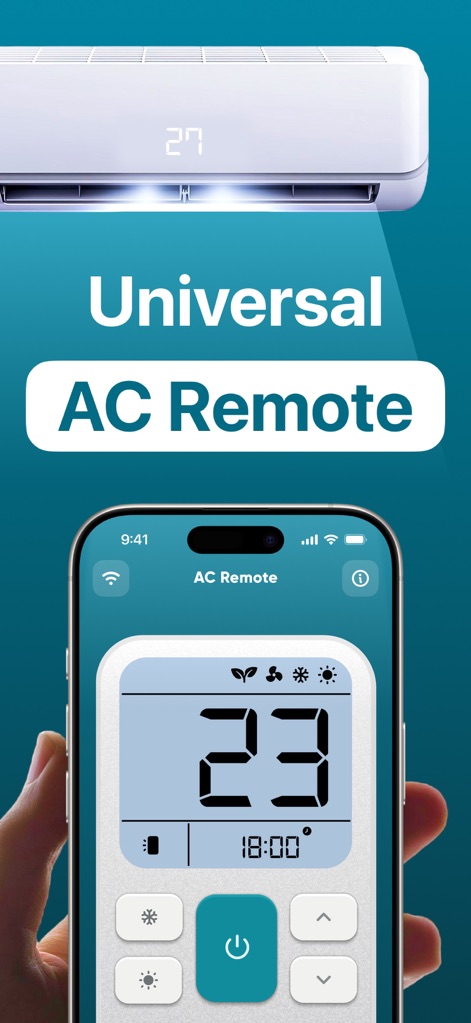
Users can effortlessly manage their climate with the intuitive digital remote interface, which prominently displays the current temperature and an integrated timer function for scheduled control.
Smart Climate Command
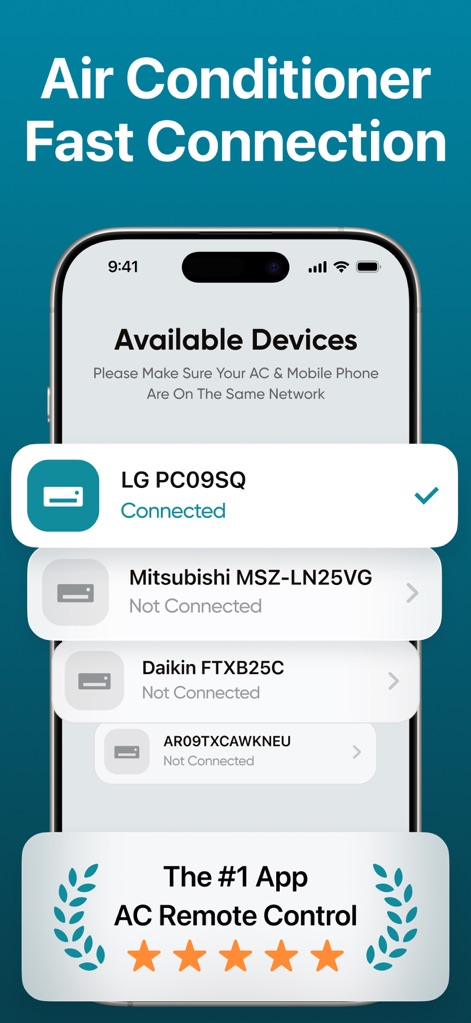
This tool simplifies setup, showcasing a clear list of available devices and indicating the 'Connected' status for quick, hassle-free pairing with a user's AC unit.
Rapid AC Connection

The app allows users to create customizable unit profiles, enabling easy identification with a custom 'AC Name' input and a user-friendly keyboard for seamless data entry.
Customizable Unit Profiles
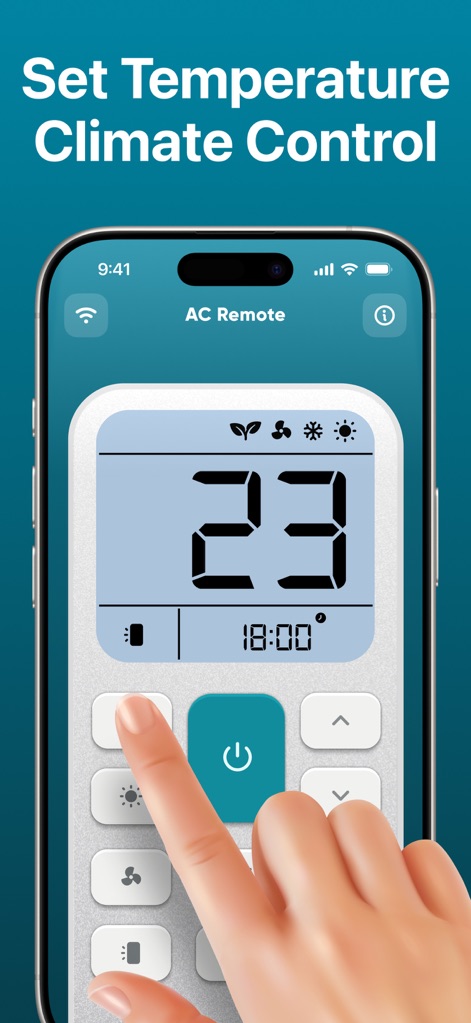
Users gain precise control over their environment through the large digital temperature display and dedicated mode selection icons, allowing for instant adjustments to their desired climate.
Precise Climate Control
Description
Download
More Like This
Apps with similar features and user experience
Air Conditioner Controller
S.I.C.I. SOCIETA' CONSORTILE A RESPONSABILITA' LIMITATA
Universal AC Remote Control .
KUPOLDEV LP
Smart AC Remote Controller App
Faiz Ul Hassan
AC Remote - Universal Control
PATRIC MARCO KUCK
Universal AC Remote Control ㅤ
MSM COMPANY Sp. z o.o

Air Conditioner Pro, AC Remote
Calypso Wilde

AC Universal Remote Control
ALPHA TRAN TRADING AND TRANSPORTATION COMPANY LIMITED

Remote AC Universal & Control
FUJI CAC JOINT STOCK COMPANY
AC Remote & Air Conditioner
HASNA BOUJMIA
This page is not an official page of the app or its developer, but an independent editorial publication created for informational and commentary purposes. Unless expressly stated otherwise, neither the app nor its developer is affiliated with, endorsed by, sponsored by, authorized by, or otherwise officially connected with MWM, Apple, Google Play, the app publisher, or the app's developer, and nothing on this page implies that the app was developed using MWM's services. Any trademarks, logos, screenshots, and other content remain the property of their respective owners.