
This page is not an official page of the app or its developer, but an independent editorial publication created for informational and commentary purposes. Unless expressly stated otherwise, neither the app nor its developer is affiliated with, endorsed by, sponsored by, authorized by, or otherwise officially connected with MWM, Apple, Google Play, the app publisher, or the app's developer, and nothing on this page implies that the app was developed using MWM's services. Any trademarks, logos, screenshots, and other content remain the property of their respective owners.


Add Background Music To Video
Silent videos miss their mark. This tool equips users to infuse immediate energy and narrative depth, turning simple clips into magnetic content.
Downloads
12.5M+User Rating
Total Ratings
49.3KPublisher
Category
Photo & VideoLocales
12Latest Version
5.4.32Size
103.9 MBFirst Released
Jul 16, 2015Key Features of 'Add Background Music To Video'
An analysis of the core functionalities enhancing user experience and content creation.
Background Music Integration
The app provides extensive options to seamlessly add background music, enhancing the emotional tone and engagement of personal videos.
Direct Social Sharing
This tool enables users to effortlessly save their edited videos or share them directly to various social media platforms with a single tap.
Precise Video Trimming
This tool features precise frame-by-frame trimming capabilities, allowing users to effortlessly remove unwanted segments and refine video content.
Dynamic Video Transitions
The app facilitates the addition of dynamic transitions, allowing users to create seamless and visually engaging video flow between clips.
Voice Over Narration
It allows users to record custom voice-overs, enabling personalized storytelling and commentary for their video projects.
Advanced Audio Editing
The app includes advanced audio editing options like trimming, fade-in, and fade-out effects to create a professional sound experience for their video soundtracks.
Frequently Asked Questions
Everything you need to know about Add Background Music To Video
What is the primary purpose of the Add Background Music To Video app?
The Add Background Music To Video app allows users to add background music to their videos and enhance them with voiceovers, trimming, cutting, and audio editing features.
Can users add music to videos with the Add Background Music To Video app?
Yes, the Add Background Music To Video app allows users to add music tracks to their videos. It provides countless soundtrack options and supports imported music.
Does Add Background Music To Video support recording voiceovers?
Yes, the Add Background Music To Video app includes a feature to record your own voice over directly within the application for video narration.
What video editing capabilities does the BackgroundMusic app offer?
The BackgroundMusic app provides trimming and cutting frame by frame, adding transitions, and editing audio with fade-in and fade-out effects to refine videos.
Can users save or share videos edited with the BackgroundMusic app?
Yes, users can save their edited videos to their device or share them directly on social media platforms with a single tap from the BackgroundMusic app.
Does the BackgroundMusic app require a subscription?
Yes, the BackgroundMusic app requires an auto-renewable In-App Purchase subscription to access its features. Payment is charged to the iTunes Account upon purchase.
How does subscription renewal work for the BackgroundMusic app?
The subscription for the BackgroundMusic app renews automatically unless auto-renew is turned off at least 24 hours before the current period ends. Renewal costs are charged 24 hours prior to expiration.
How do I cancel my BackgroundMusic app subscription?
You can manage your BackgroundMusic subscription and turn off auto-renewal from your Account Settings after purchase. The subscription remains active until the end of the paid period.
Is there a free trial for the Add Background Music To Video app?
If a free trial period is offered for the Add Background Music To Video app, any unused portion is forfeited when a subscription is purchased.
Where can I get music tracks for the Add Background Music To Video app?
The Add Background Music To Video app offers hundreds of soundtracks categorized by genre. Users can also import music or use tracks from iTunes.
The following screenshots and description are sourced directly from the app's official store listing and are the property of the app developer.
App Store
Screenshots
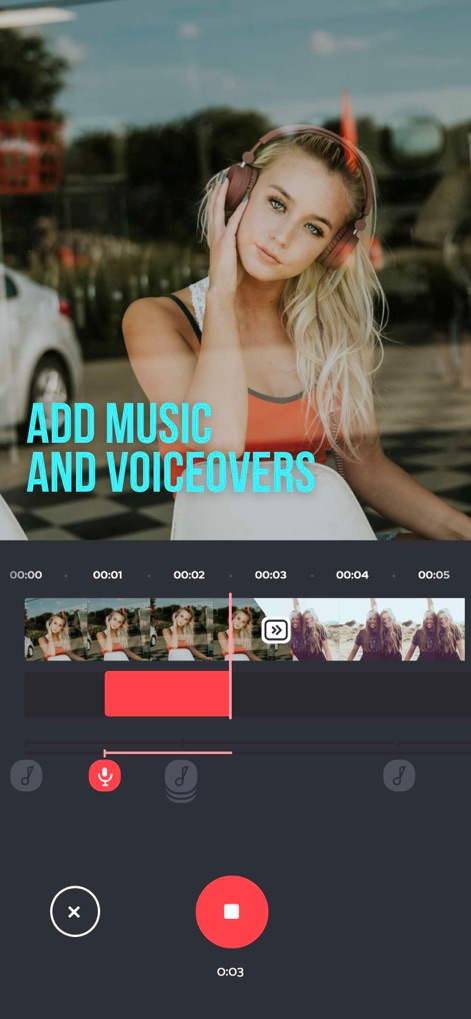
Voiceover & Trim
Observe how the app enables users to easily record voice-overs using the microphone icon and precisely trim video segments directly within the timeline editor.
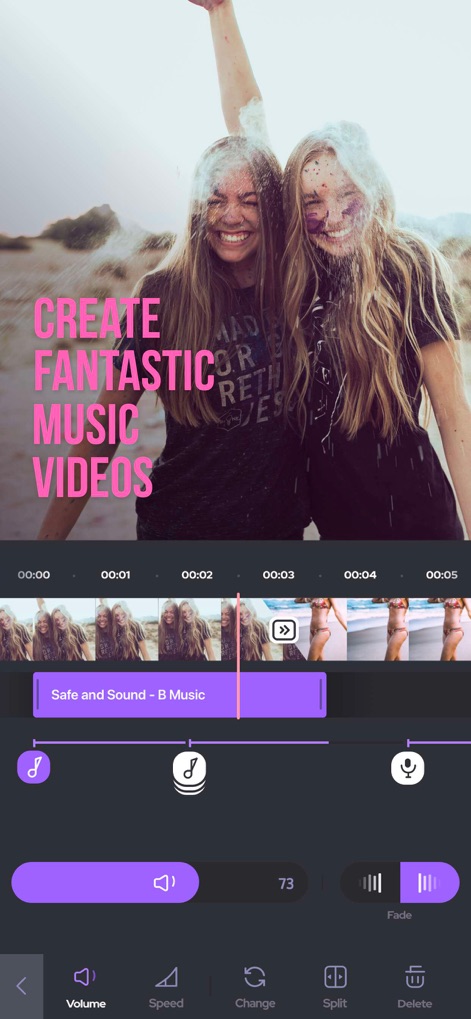
Musical Enhancements
Discover how this tool empowers users to integrate background music tracks, clearly displayed on the timeline, and fine-tune audio dynamics with volume sliders and fade effects.
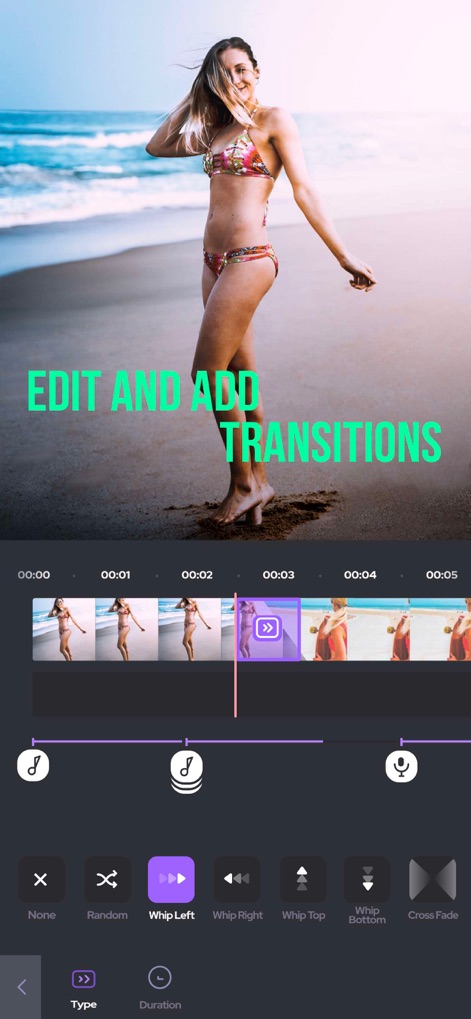
Dynamic Transitions
Explore the app's capability to enhance video flow by applying diverse transitions like 'Whip Left' and 'Cross Fade', alongside detailed editing options for type and duration.

Sound Library Access
The app provides an extensive selection of soundtracks, neatly organized into intuitive categories such as 'Summer' and 'Romantic', for effortless discovery.
Description
Download
More Like This
Apps with similar features and user experience

Dolby On: Record Audio & Video
Dolby Laboratories, Inc.

Add Music to Video, Maker
Honk Honk Punch Pty Ltd

Clips - Video Editor
Video Bakery Ltd.

Add Music into Video Editor
Saturday Technologies Incorporated

Add Music to Video Editor
Add Music to Video Maker & Editor LLC

Add Music to Video Voice Over
Brain Craft Ltd

Add Music to Video
Md Jasim Uddin

Video Maker with Music Editor
Mosaic S.r.l.

Video Music Add Background
Raja Ahmad Ayaz Noor
This page is not an official page of the app or its developer, but an independent editorial publication created for informational and commentary purposes. Unless expressly stated otherwise, neither the app nor its developer is affiliated with, endorsed by, sponsored by, authorized by, or otherwise officially connected with MWM, Apple, Google Play, the app publisher, or the app's developer, and nothing on this page implies that the app was developed using MWM's services. Any trademarks, logos, screenshots, and other content remain the property of their respective owners.