
This page is not an official page of the app or its developer, but an independent editorial publication created for informational and commentary purposes. Unless expressly stated otherwise, neither the app nor its developer is affiliated with, endorsed by, sponsored by, authorized by, or otherwise officially connected with MWM, Apple, Google Play, the app publisher, or the app's developer, and nothing on this page implies that the app was developed using MWM's services. Any trademarks, logos, screenshots, and other content remain the property of their respective owners.


Video Maker with Music Editor
Users seize immediate command over video sound, transforming silent footage into attention-grabbing social media anthems.
Downloads
12.5M+User Rating
Total Ratings
43.1KPublisher
Category
Photo & VideoLocales
1Latest Version
3.7.21Size
64.6 MBFirst Released
Jun 25, 2015App Feature Analysis: Video Maker with Music Editor
An evaluation of key functionalities for socially active content creators.
Seamless Music Integration
The app allows users to easily add an unlimited number of music tracks from a diverse library or their device to their videos, creating highly engaging content.
Direct Sharing Capabilities
This tool facilitates easy saving and direct sharing of edited videos to popular social media platforms, streamlining the content distribution process for users.
Advanced Audio Control
The app provides extensive audio editing options, including trimming, fade-in/fade-out effects, volume control, and the ability to mute/unmute original video audio for a professional sound.
Diverse Music Library
It offers a vast collection of music tracks categorized by genre, allowing users to select the perfect soundtrack to match the mood and style of their videos.
Precise Video Trimming
It features frame-by-frame video trimming and cutting capabilities, enabling users to remove unwanted sections and perfect their video content with precision.
Voice Over Recording
This tool enables users to record their own voice-overs directly onto their videos, adding personal commentary, narration, or dubbing for unique storytelling.
Frequently Asked Questions
Everything you need to know about Video Maker with Music Editor
How can I add music to my videos using Video Maker with Music Editor?
Yes, Video Maker with Music Editor allows users to add music from their iPhone, the app's track list, or by recording. Users press the '+ Add Music' button, then edit and trim audio.
Does Video Maker with Music Editor offer video trimming features?
Yes, Video Maker with Music Editor provides video trimming and cutting capabilities. Users can trim and cut videos frame by frame to remove unwanted sections from their footage.
Can I record my own voice over a video in Video Maker with Music Editor?
Yes, Video Maker with Music Editor enables users to record their own voice over videos. This feature is integrated into the app's audio editing functionalities.
What music categories are available in Video Maker with Music Editor?
Video Maker with Music Editor offers diverse music categories including Free, Club/Party, Cinematic, Rock, Romantic, Sad/Emotional, Acoustic, Pop, Ambient, and Relaxing soundtracks.
Is Video Maker with Music Editor a subscription-based app?
Yes, Video Maker with Music Editor operates on a subscription model. Access to its features requires an auto-renewable In-App Purchase, with a weekly subscription length.
How do I manage my subscription for Video Maker with Music Editor?
Users manage their Video Maker with Music Editor subscription and auto-renewal settings via their iTunes Account Settings. This process is accessible after the initial purchase.
Can I adjust audio levels in Video Maker with Music Editor?
Yes, Video Maker with Music Editor includes volume control for audios. It also supports audio trimming, fade-in, and fade-out effects for comprehensive sound editing.
The following screenshots and description are sourced directly from the app's official store listing and are the property of the app developer.
App Store
Screenshots
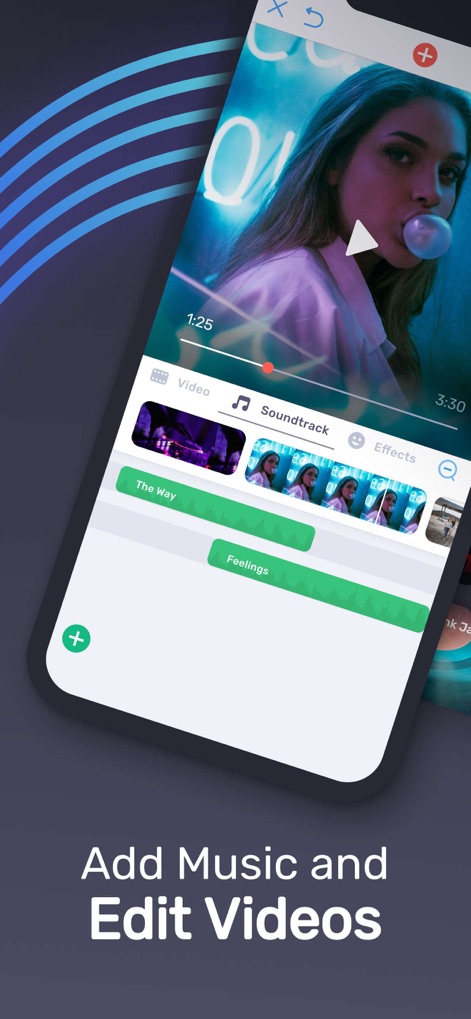
Creative Music Layering
See how the app facilitates creative music layering with its intuitive video player timeline and multiple, adjustable music track bars.

Discover Soundtracks
Users can easily discover new soundtracks through the app's categorized music genre tiles and its extensive library of diverse audio options.

Precision Video Edits
This tool offers precision video edits, featuring a detailed visual timeline for accurate trimming and dedicated controls for adjusting video speed.
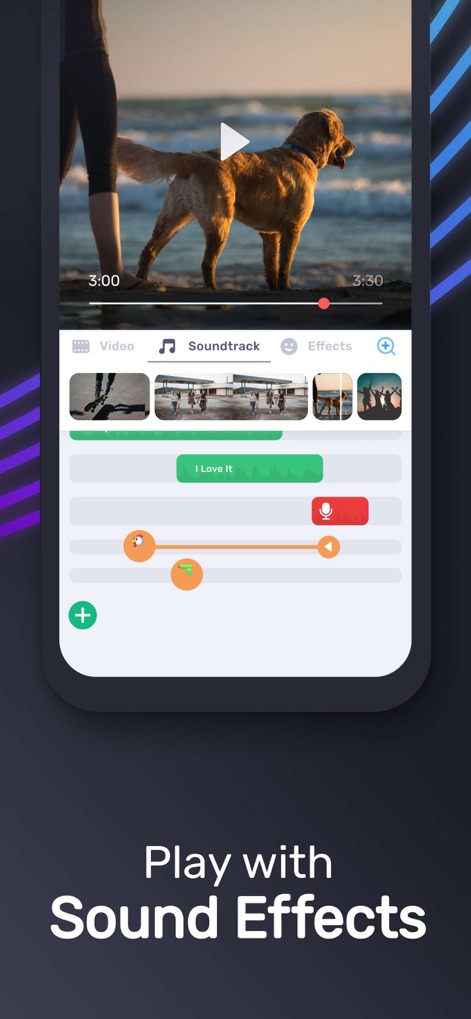
Advanced Audio Controls
The app provides advanced audio controls, including a microphone icon for voice-over recording and interactive orange dot markers for volume and fade adjustments.
Description
Download
More Like This
Apps with similar features and user experience

Dolby On: Record Audio & Video
Dolby Laboratories, Inc.

Add Music to Video, Maker
Honk Honk Punch Pty Ltd

Clips - Video Editor
Video Bakery Ltd.

Add Music into Video Editor
Saturday Technologies Incorporated

Add Background Music To Video
Mosaic S.r.l.

Add Music to Video Editor
Add Music to Video Maker & Editor LLC

Add Music to Video Voice Over
Brain Craft Ltd

Add Music to Video
Md Jasim Uddin

Video Music Add Background
Raja Ahmad Ayaz Noor
This page is not an official page of the app or its developer, but an independent editorial publication created for informational and commentary purposes. Unless expressly stated otherwise, neither the app nor its developer is affiliated with, endorsed by, sponsored by, authorized by, or otherwise officially connected with MWM, Apple, Google Play, the app publisher, or the app's developer, and nothing on this page implies that the app was developed using MWM's services. Any trademarks, logos, screenshots, and other content remain the property of their respective owners.