ADHD Reader - text,web,file
Download on App Store

This page is not an official page of the app or its developer, but an independent editorial publication created for informational and commentary purposes. Unless expressly stated otherwise, neither the app nor its developer is affiliated with, endorsed by, sponsored by, authorized by, or otherwise officially connected with MWM, Apple, Google Play, the app publisher, or the app's developer, and nothing on this page implies that the app was developed using MWM's services. Any trademarks, logos, screenshots, and other content remain the property of their respective owners.


Logo of ADHD Reader - text,web,file
Download on App Store

ADHD Reader - text,web,file

Master your reading list with visual anchors, smart segmentation, and 100% offline privacy. The essential tool for students and professionals to conquer long documents, PDFs, and web articles without losing focus.

Key Figures

Downloads

0

User Rating

1.0/5

Total Ratings

0

Publisher

炳峰 李

Category

Utilities

Locales

2

Latest Version

1.8.0

Size

26.2 MB

First Released

Dec 22, 2024
Features

Master Your Reading, Minus the Overwhelm

Built for the neurodivergent brain, ADHD Reader uses intelligent visual anchoring and smart segmentation to transform dense documents into effortless, high-retention reading sessions.

Visual Anchoring Technology

Stop re-reading the same paragraph. Our first-letter emphasis and custom highlights create 'eye-hooks' that guide your focus and boost reading fluency.

Bite-Sized Segmentation

Instantly dissolve 'walls of text' from PDFs, URLs, or Docs into manageable sections designed to reduce cognitive load and executive dysfunction.

The following screenshots and description are sourced directly from the app's official store listing and are the property of the app developer.

App Store

Screenshots
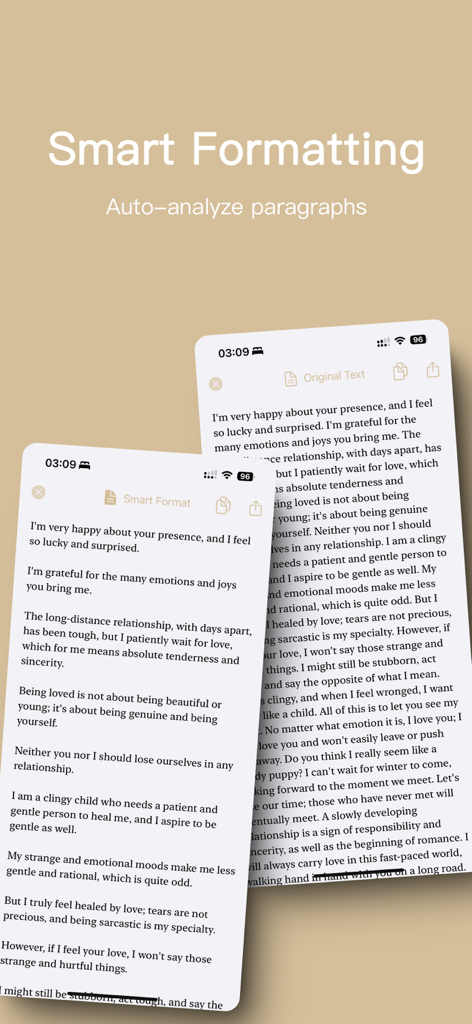
ADHD Reader - text,web,file - Screenshot of ADHD Reader app showing a side by side comparison of a dense block of text versus smart formatted text with improved paragraph spacing
Screenshot of ADHD Reader app showing a side by side comparison of a dense block of text versus smart formatted text with improved paragraph spacing

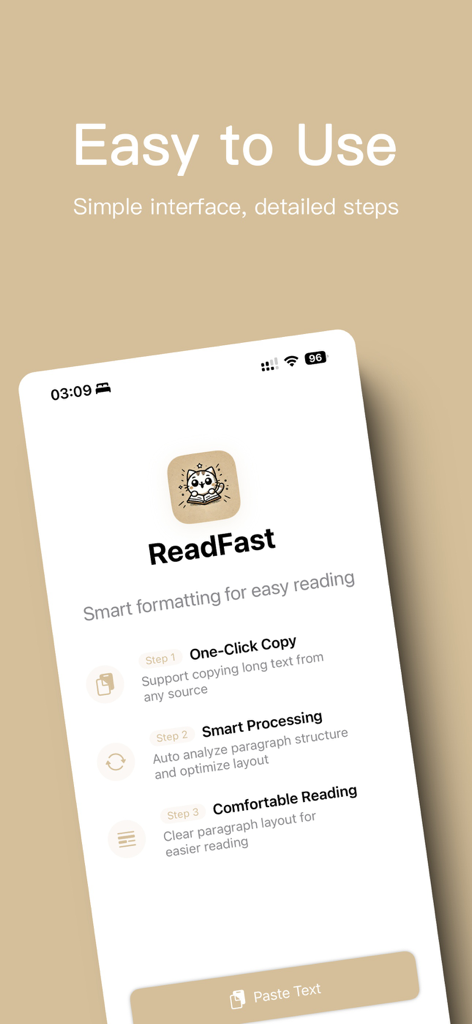
ADHD Reader - text,web,file - Screenshot of the ReadFast app interface highlighting a simple three step process for smart text formatting and comfortable reading for ADHD users

Screenshot of the ReadFast app interface highlighting a simple three step process for smart text formatting and comfortable reading for ADHD users

Description

ADHD Reader is an intelligent long-text reading tool designed to improve the reading experience for users with ADHD and other reading difficulties. Using advanced algorithms, it smartly segments long texts and optimizes the visual display for a smoother, more focused reading journey. 【Simple and Easy to Use】 With an intuitive user interface, you can achieve a seamless reading experience in just two steps, no complex operations required. 【Intelligent Text Segmentation】 Our smart algorithm recognizes paragraph breaks and supports Chinese, English, and mixed-language text, making any content flow more smoothly. 【ADHD-Focused Reading】 Our innovative dual-vision reading technology significantly enhances reading fluency and concentration for individuals with ADHD. It employs multi-dimensional visual aids like first-letter emphasis, color highlighting, and increased line spacing between paragraphs. 【Multiple Reading Themes】 Offers personalized theme colors, custom keyword highlighting, and visual text configurations, all dedicated to providing the most comfortable reading experience. 【Supports Multiple Input Methods】 Import content for reading in various ways to suit your needs, including pasting long text, entering URLs, or opening documents (TXT, PDF, DOCX, RTF, EPUB, etc.). 【History Management】 Processed text is automatically saved to History, featuring search support, versatile view options, and group archiving for effortless management and retrieval. 【Save and Share】 Easily copy the formatted text or share it as an image on social media to let your friends in on a better reading experience. 【Guaranteed Privacy and Security】 All text processing happens locally on your device. We collect zero data, completely protecting your data privacy. The app works fully offline, so you can handle sensitive documents with total peace of mind. 【Small Corner Auto-Renewal Subscription Service Details】 1、 Subscription Service: Professional Version Continuous Package Service 2、Subscription Pricing: Monthly subscription at $0.99/month, Annual subscription at $3.99/year 3、Payment: Purchase will be charged to iTunes Account upon confirmation 4、Your iTunes account will be charged 24 hours before the end of the current period, and the subscription will be extended by one subscription period upon successful payment 5、To cancel subscription, please go to iPhone "Settings" --> "iTunes Store & App Store" --> tap "Apple ID", select "View Apple ID", enter "Account Settings" page, tap "Subscriptions", select "Monthly/Annual Subscription" to cancel. If you don't turn off auto-renewal at least 24 hours before the end of the current period, this subscription will automatically renew Privacy Policy: https://mileson.notion.site/Privacy-Policy-ADHD-Reader-162e107ce54f800b8160e2e89697169f Terms of Use: https://mileson.notion.site/Technical-Support-ADHD-Reader-162e107ce54f8011b745f7f0e37e447c If you enjoy ADHD Reader, please take a moment to leave us a positive review. We would greatly appreciate it! Email: libingfeng007@gmail.com

Download

Download on App Store

This page is not an official page of the app or its developer, but an independent editorial publication created for informational and commentary purposes. Unless expressly stated otherwise, neither the app nor its developer is affiliated with, endorsed by, sponsored by, authorized by, or otherwise officially connected with MWM, Apple, Google Play, the app publisher, or the app's developer, and nothing on this page implies that the app was developed using MWM's services. Any trademarks, logos, screenshots, and other content remain the property of their respective owners.








