
This page is not an official page of the app or its developer, but an independent editorial publication created for informational and commentary purposes. Unless expressly stated otherwise, neither the app nor its developer is affiliated with, endorsed by, sponsored by, authorized by, or otherwise officially connected with MWM, Apple, Google Play, the app publisher, or the app's developer, and nothing on this page implies that the app was developed using MWM's services. Any trademarks, logos, screenshots, and other content remain the property of their respective owners.

AeroCaster LIVE
Transform your iPad and mobile devices into a professional live streaming suite. Switch angles wirelessly, mix pro-grade audio, and stream to your favorite platforms with the devices you already own.
Downloads
3K+User Rating
Total Ratings
0Publisher
Category
UtilitiesLocales
2Latest Version
1.5.136Size
77.7 MBFirst Released
Feb 17, 2022Professional Broadcast Studio, Zero Cable Clutter
Leverage your iPad and the devices you already own to deliver high-end multi-cam productions. Designed for creators who demand professional results without the technical headache.
Wireless Multi-Camera Switching
Turn your iPhones and tablets into high-quality wireless cameras. Switch angles instantly over Wi-Fi or 5G to keep your audience engaged from every perspective.
Pro-Level Graphics and Scenes
Elevate your brand with custom titles, media clips, and Picture-in-Picture layouts. Save 30 unique scenes to launch a polished, TV-style broadcast with one tap.
Frequently Asked Questions
Everything you need to know about AeroCaster LIVE
What is AeroCaster LIVE?
AeroCaster LIVE is an iPad app that transforms your device into a cable-free, multi-camera audio/visual livestreaming switcher. It integrates with the AeroCaster VRC-01 hardware control surface for professional live production.
What devices does AeroCaster LIVE support for video switching?
AeroCaster LIVE supports video switching from connected phones, tablets, and computers. It also integrates media directly, creating a comprehensive production solution for live streams.
Can AeroCaster LIVE stream directly to YouTube?
Yes, AeroCaster LIVE streams directly to major platforms including YouTube, Facebook Live, Twitch, and custom RTMP channels. It uses Wi-Fi or 4G/5G cellular networks for broadcasting.
Does AeroCaster LIVE require external hardware?
Yes, AeroCaster LIVE requires the AeroCaster VRC-01 hardware control surface to function. The app works in conjunction with this hardware to provide multi-camera livestreaming capabilities.
How many scenes can AeroCaster LIVE save and recall?
AeroCaster LIVE allows users to save and recall up to 30 scenes. These scenes can include titles, graphics, and picture-in-picture windows for dynamic live production.
Can AeroCaster LIVE enhance a livestream with graphics and titles?
Yes, AeroCaster LIVE enhances your live feed with various elements. You can add graphics, titles, video clips, and effects to your stream for a professional look.
Does AeroCaster LIVE offer screen sharing capabilities?
Yes, AeroCaster LIVE offers screen sharing. It wirelessly shares screens from computers and mobile devices, integrating seamlessly via the Google Chrome web browser for content sharing.
What audio sources can AeroCaster LIVE mix for a livestream?
AeroCaster LIVE mixes audio from diverse sources. It supports external microphones, on-phone microphones, plus music and videos for comprehensive audio control.
Can AeroCaster LIVE adjust camera settings like lens and zoom?
Yes, AeroCaster LIVE provides control over camera settings. Users can adjust lens modes (Ultra, Wide, Front), zoom, exposure, white balance, focus, LED light, and stabilization directly within the app.
Is AeroCaster LIVE a budget-friendly livestreaming solution?
Yes, AeroCaster LIVE is described as a budget-friendly livestreaming solution. It allows users to leverage existing mobile devices for multi-camera production.
The following screenshots and description are sourced directly from the app's official store listing and are the property of the app developer.
App Store
Screenshots
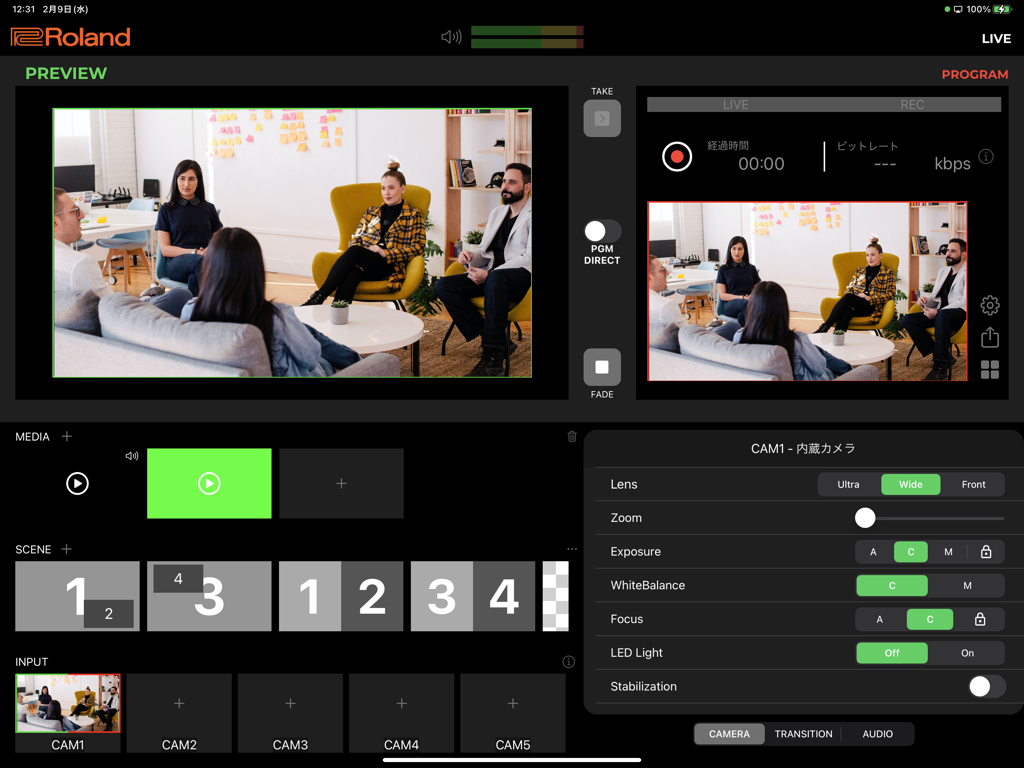
AeroCaster LIVE app interface showing wireless multi-camera live streaming controls on an iPad
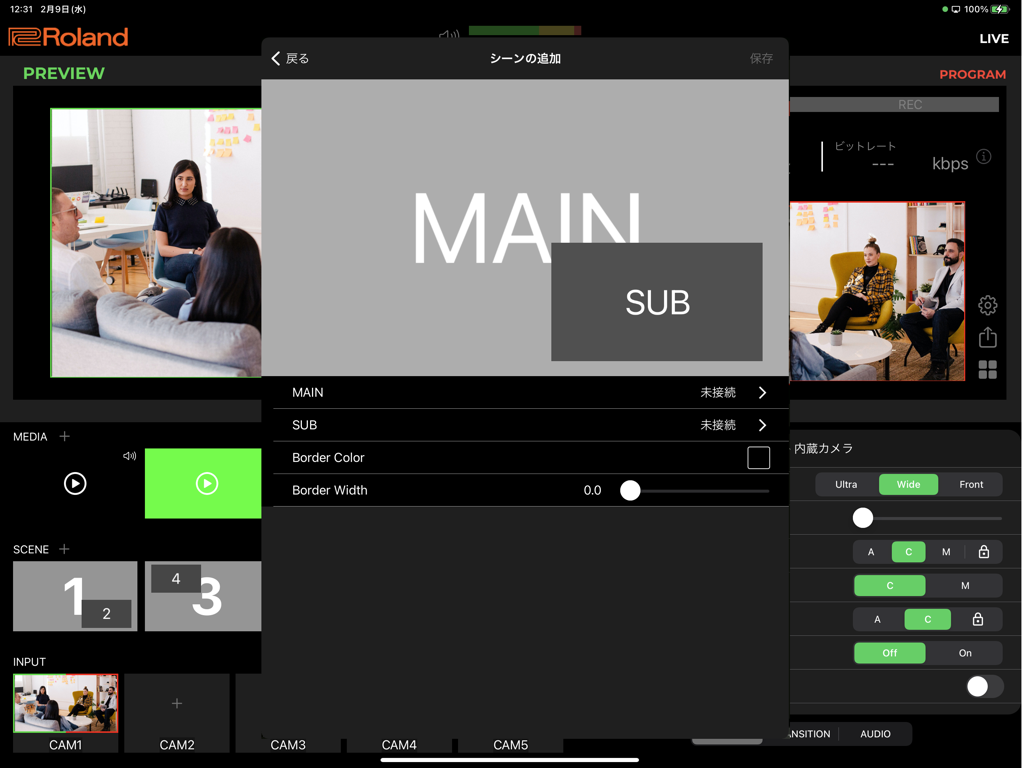
Roland AeroCaster LIVE iPad interface displaying multi-camera preview and picture-in-picture scene configuration menu
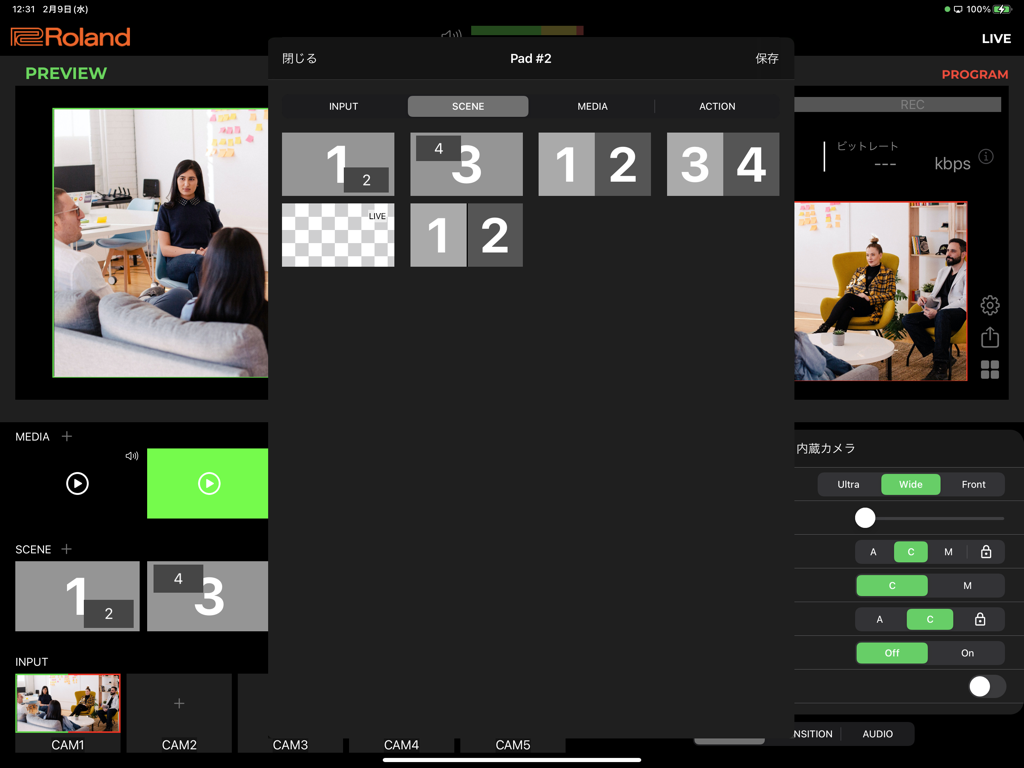
AeroCaster LIVE app interface on iPad showing multi-camera scene management and live video production controls
Description
Download
More Like This
Top-ranked apps in the same category

Google LLC

Google Chrome
Google LLC

中国移动(手机营业厅)
China Mobile Online Services Co., Ltd.

Google Authenticator
Google LLC

CNH do Brasil
Servicos e Informacoes do Brasil

Cleanup: Phone Storage Cleaner
DEEP FLOW SOFTWARE SERVICES - FZCO

gov.br
Servicos e Informacoes do Brasil

中国电信-全国统一官方服务平台
CHINA TELECOM Corporation Ltd.

Microsoft Edge: AI Browser
Microsoft Corporation
This page is not an official page of the app or its developer, but an independent editorial publication created for informational and commentary purposes. Unless expressly stated otherwise, neither the app nor its developer is affiliated with, endorsed by, sponsored by, authorized by, or otherwise officially connected with MWM, Apple, Google Play, the app publisher, or the app's developer, and nothing on this page implies that the app was developed using MWM's services. Any trademarks, logos, screenshots, and other content remain the property of their respective owners.