
This page is not an official page of the app or its developer, but an independent editorial publication created for informational and commentary purposes. Unless expressly stated otherwise, neither the app nor its developer is affiliated with, endorsed by, sponsored by, authorized by, or otherwise officially connected with MWM, Apple, Google Play, the app publisher, or the app's developer, and nothing on this page implies that the app was developed using MWM's services. Any trademarks, logos, screenshots, and other content remain the property of their respective owners.


Affinity Photo 2 for iPad
Unshackle your creative potential: The app transforms your iPad into a professional-grade studio, allowing intricate design and photo work from anywhere.
Downloads
1M+User Rating
Total Ratings
8.0KPublisher
Category
Photo & VideoLocales
8Latest Version
2.6.4Size
1.7 GBFirst Released
Nov 9, 2022An analytical overview highlighting key features that empower photographers, designers, and artists on the go.
Affinity Photo 2 for iPad: Core Capabilities for Creative Professionals
Optimized iPad Workflow & Apple Pencil Precision
The app provides fully integrated and optimized iPad gesture controls for an accelerated workflow. It also harnesses the full power and precision of Apple Pencil, sensitive to pressure, tilt, and angle, for intuitive and accurate input.
Comprehensive Non-Destructive Layer System
The app provides full support for unlimited layers, layer groups, adjustment layers, and filter layers. It allows users to edit live filters, adjustments, effects, and masks non-destructively, ensuring flexibility in complex creative workflows.
Extensive Professional File Compatibility
It allows users to seamlessly open, edit, and save Adobe Photoshop® PSD/PSB files, alongside other standard formats like PNG, TIFF, and JPEG XL, facilitating interoperability and collaborative projects.
Professional Non-Destructive RAW Processing
This tool features non-destructive RAW development of linked/embedded RAW images, enabling photographers to process high-quality images directly from their camera files with complete control.
High-Performance Large Document Handling
The app supports massive images (100+ Megapixels) and offers pan and zoom at maximum refresh rate, ensuring smooth and responsive performance even when working with very large and complex documents.
Comprehensive Retouching & Correction Suite
This tool features intuitive selection brushes, advanced inpainting, object removal, frequency separation for detailed skin retouching, and a dedicated Liquify persona for precise freehand adjustments.
Advanced Color Depth & Space Editing
The app offers full 16-bit and linear unbounded 32-bit per channel editing capabilities, supporting professional-grade color spaces such as RGB, CMYK, Greyscale, and LAB for unparalleled color precision.
Specialized Photographic Merging & Mapping
It allows users to perform Focus Merge, HDR Merge, and Tone Mapping, providing advanced image processing techniques for creating images with extended dynamic range and intricate focus details.
Versatile Advanced Brush Engine
The app includes a massive library of painting, drawing, and texture brushes. It allows users to create custom brushes and nozzles with full control over advanced dynamics, catering to digital artists and illustrators.
Non-Destructive Live Mesh Warp
This tool features a non-destructive Live Mesh Warp filter and other live effect layers, enabling creative and flexible image distortion and manipulation without permanently altering the original pixel data.
Frequently Asked Questions
Everything you need to know about Affinity Photo 2 for iPad
Is Affinity Photo 2 for iPad a professional photo editor?
Yes, Affinity Photo 2 for iPad is a professional, desktop-grade photo editor used by photographers, graphic designers, and other creators.
Is Affinity Photo 2 for iPad optimized for Apple Pencil?
Yes, Affinity Photo 2 for iPad is fully optimized for Apple Pencil, harnessing its pressure, tilt, and angle sensitivity for precise control.
Does Affinity Photo 2 for iPad support non-destructive RAW editing?
Yes, Affinity Photo 2 for iPad provides non-destructive RAW development for linked or embedded RAW images, allowing full editing flexibility.
Can Affinity Photo 2 for iPad open Adobe Photoshop files?
Yes, Affinity Photo 2 for iPad can open, edit, and save Adobe Photoshop PSD/PSB files, ensuring compatibility with industry-standard formats.
Does Affinity Photo 2 for iPad support unlimited layers?
Yes, Affinity Photo 2 for iPad offers full support for unlimited layers, including layer groups, adjustment layers, filter layers, and masks.
Can Affinity Photo 2 for iPad remove objects from photos?
Yes, Affinity Photo 2 for iPad features tools to remove objects or erase backgrounds, blur photos, add filters, cut, and crop images.
Does Affinity Photo 2 for iPad have panorama stitching?
Yes, Affinity Photo 2 for iPad includes functionality to stitch picture-perfect panoramas, allowing users to create wide-angle images.
Does Affinity Photo 2 for iPad offer advanced lens corrections?
Yes, Affinity Photo 2 for iPad provides advanced lens corrections, including chromatic aberration, defringe, vignette, and noise reduction features.
What advanced image processing features does Affinity Photo 2 for iPad have?
Affinity Photo 2 for iPad offers Focus Merge, HDR Merge, and Tone Mapping for advanced image processing, enhancing detail and dynamic range.
Does Affinity Photo 2 for iPad include retouching tools?
Yes, Affinity Photo 2 for iPad provides quality retouching tools such as dodge, burn, clone, patch, blemish removal, and advanced inpainting.
Does Affinity Photo 2 for iPad feature an object selection tool?
Yes, Affinity Photo 2 for iPad includes an Object Selection Tool designed to speed up editing workflows by precisely selecting objects.
Can Affinity Photo 2 for iPad apply live layer masks?
Yes, Affinity Photo 2 for iPad supports applying non-destructive live layer masks, such as Hue range Masks, for flexible editing.
Does Affinity Photo 2 for iPad support blend modes?
Yes, Affinity Photo 2 for iPad allows experimentation with a range of blend modes, including Normal, Multiply, and Overlay, for creative effects.
Can Affinity Photo 2 for iPad perform full RAW development?
Yes, Affinity Photo 2 for iPad offers a dedicated workspace for full RAW development, with adjustments for exposure, clarity, and white balance.
Does Affinity Photo 2 for iPad support drag and drop assets?
Yes, Affinity Photo 2 for iPad allows users to easily drag and drop from saved assets, such as figures and trees, into their projects.
Can Affinity Photo 2 for iPad flawlessly retouch images?
Yes, Affinity Photo 2 for iPad provides a range of tools for flawless image retouching, including dedicated options for eye and skin retouching.
How does Affinity Photo 2 for iPad stitch panoramas?
Affinity Photo 2 for iPad stitches multiple images into perfect panoramas, providing an intuitive interface for panoramic image creation.
Can Affinity Photo 2 for iPad refine selections precisely?
Yes, Affinity Photo 2 for iPad allows users to precisely refine selections, including intricate details like individual strands of hair.
What file types does Affinity Photo 2 for iPad support?
Affinity Photo 2 for iPad supports popular file types including PSD, PNG, TIFF, JPG, JPEG XL, GIF, SVG, EPS, EXR, HDR, and PDF.
Does Affinity Photo 2 for iPad offer focus merge?
Yes, Affinity Photo 2 for iPad features Focus Merge functionality, allowing users to combine multiple images to achieve extended depth of field.
The following screenshots and description are sourced directly from the app's official store listing and are the property of the app developer.
App Store
Screenshots
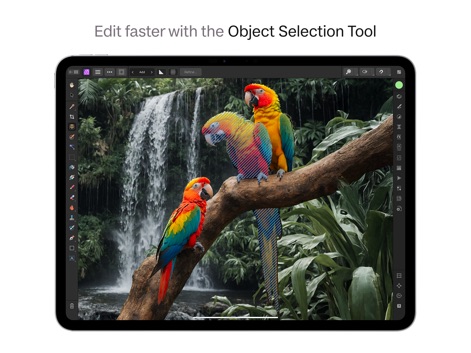
This tool streamlines workflows by enabling rapid object selection and offers a comprehensive toolbar for swift adjustments.
Precision Selection Power

Users can apply non-destructive Hue Range Masks and manage complex edits with the intuitive layers panel and mask settings.
Dynamic Live Masks

The app offers extensive blend modes for creative compositing and provides detailed Layer Options for fine-tuning visual effects.
Creative Blending Options

Experience comprehensive RAW development with precise adjustments for exposure and white balance, complemented by a real-time histogram for accurate tonal control.
Professional RAW Workflow

The app enables seamless drag-and-drop functionality for integrating saved assets into projects, with categories like 'People' and 'Trees' enhancing organization.
Efficient Asset Integration

This tool provides powerful features like Frequency Separation for skin retouching and precise Curves adjustments for unparalleled image refinement.
Advanced Retouching Suite

Create expansive panoramic views with ease, utilizing the Navigator panel for precise control over zoom and rotation.
Seamless Panorama Stitching

Achieve highly accurate selections, even for fine details like hair, leveraging the dedicated selection tools sidebar and refinement options.
Intricate Selection Control
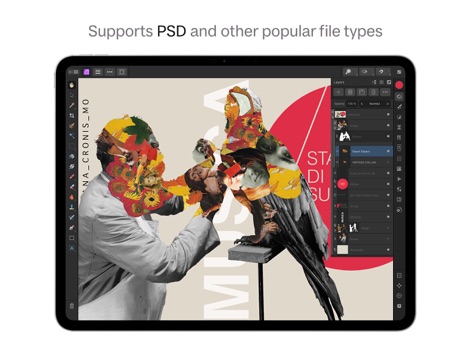
The app provides extensive file type support, including PSD, allowing users to manage complex multi-layered compositions and Smart Objects effortlessly.
Broad File Compatibility

Users can achieve exceptional depth of field with the Focus Merge feature, seamlessly combining multiple images listed in the dedicated dialog box for crystal-clear detail.
Detailed Focus Merging
Description
Download
More Like This
Apps with similar features and user experience
PhotoLayers
handyCloset Inc.

Blend Photos
TAPUNIVERSE LLC

Wand - AI canvas
Wand Technologies Inc.

Superimpose X
Pankaj Goswami

Image Blender
JHND i Sverige AB

Juxtaposer: cut, combine, edit
Pocket Pixels Inc.

Adobe Photoshop: Photo Editor
Adobe Inc.

Matter - 3D Effects
Pixite Inc.

Union - Combine & Edit Photos
Pixite Inc.
This page is not an official page of the app or its developer, but an independent editorial publication created for informational and commentary purposes. Unless expressly stated otherwise, neither the app nor its developer is affiliated with, endorsed by, sponsored by, authorized by, or otherwise officially connected with MWM, Apple, Google Play, the app publisher, or the app's developer, and nothing on this page implies that the app was developed using MWM's services. Any trademarks, logos, screenshots, and other content remain the property of their respective owners.