
This page is not an official page of the app or its developer, but an independent editorial publication created for informational and commentary purposes. Unless expressly stated otherwise, neither the app nor its developer is affiliated with, endorsed by, sponsored by, authorized by, or otherwise officially connected with MWM, Apple, Google Play, the app publisher, or the app's developer, and nothing on this page implies that the app was developed using MWM's services. Any trademarks, logos, screenshots, and other content remain the property of their respective owners.


Afterlight: Film Photo Editor
Unleash genuine film aesthetics on your digital shots.
Downloads
7.5M+User Rating
Total Ratings
23.4KPublisher
Category
Photo & VideoLocales
17Latest Version
5.2.2Size
413.2 MBFirst Released
Nov 2, 2017An evaluation of core functionalities tailored for creative photography enthusiasts.
Afterlight: Film Photo Editor - Key Feature Analysis
Extensive Film-Inspired Presets
The app provides a vast collection of film-inspired presets, allowing users to quickly apply authentic vintage and retro aesthetics to their photos, mimicking classic film stocks like Kodak Gold and Portra.
Unique Film Emulation Effects
This tool features specialized film emulation techniques such as Double Exposure, Halation, Color Shift, and Chroma, enabling creative individuals to add distinct artistic touches.
Authentic Overlays and Textures
It allows users to enhance photos with over 100 genuine overlays, including real 35mm Light Leaks, Natural Dust, Vintage Paper, and VHS effects, adding tactile and nostalgic elements.
Comprehensive Advanced Editing Tools
The app offers more than 30 advanced editing tools like Curves, Clarify, Glow, Grain, and Structure, giving precise control over image details and sophisticated adjustments beyond basic edits.
Customizable Frames and Borders
It provides options to add color borders or Instant Film frames, complete with custom background images, perfect for finishing touches and social media presentation.
Commitment to User Privacy
The app ensures true user privacy by not collecting, storing, or sharing any personal data or photos, offering a secure editing environment.
Frequently Asked Questions
Everything you need to know about Afterlight: Film Photo Editor
Does Afterlight: Photo Editor ensure user privacy?
Yes, Afterlight prioritizes user privacy. The app explicitly states it does not collect, store, or share any user data, ensuring photos remain private.
Does Afterlight: Photo Editor use AI technology?
No, Afterlight: Photo Editor does not use AI. It focuses on authentic presets, effects, and overlays created by real photographers, emphasizing human creativity.
What kind of presets are available in Afterlight: Photo Editor?
Afterlight provides over 300 film-inspired presets. These presets emulate genuine film types like Kodak Gold, Portra, Agfa Vista, and various disposable cameras.
What types of overlays can Afterlight: Photo Editor apply?
Afterlight offers over 100 real overlays. These include genuine Light Leaks made with 35mm film, Natural Dust textures, Vintage Paper, and VHS effects.
What advanced editing tools are in Afterlight: Photo Editor?
Afterlight includes over 30 advanced editing tools. These tools control brightness, contrast, vibrance, sharpening, structure, glow, grain, curves, clarify, and vignette.
Can I create custom presets in Afterlight: Photo Editor?
Yes, Afterlight users can create custom presets by combining various effects and tools. These personalized settings can then be saved as Fusion Filters.
Does Afterlight: Photo Editor have ads?
No, Afterlight: Photo Editor is free of advertisements. The app is dedicated to providing an experience without ads.
The following screenshots and description are sourced directly from the app's official store listing and are the property of the app developer.
App Store
Screenshots

See how the app's extensive library offers one-tap film presets like "IR-Blue" and "Celesta" to instantly transform images with a clear before-and-after view.
Film Presets Unveiled
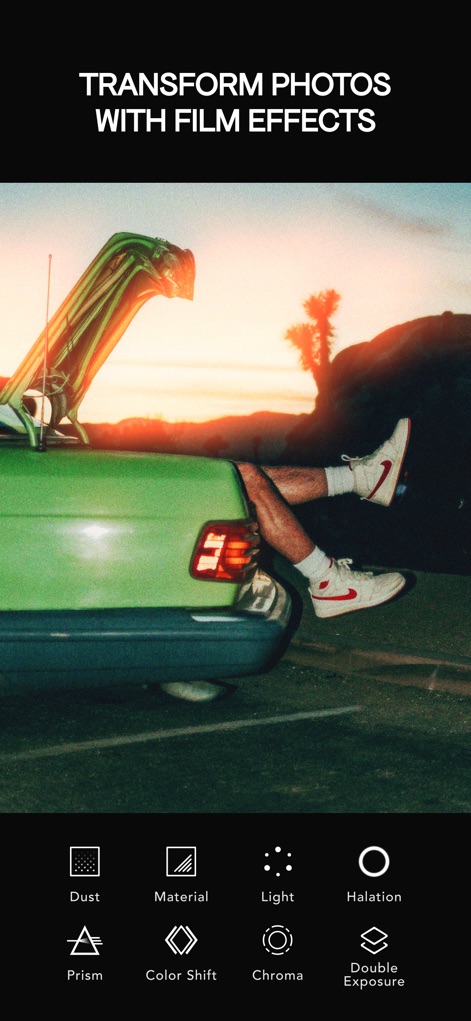
Discover the powerful impact of effects such as "Halation" and "Double Exposure" that provide authentic film emulation techniques to elevate any photograph.
Dynamic Film Effects
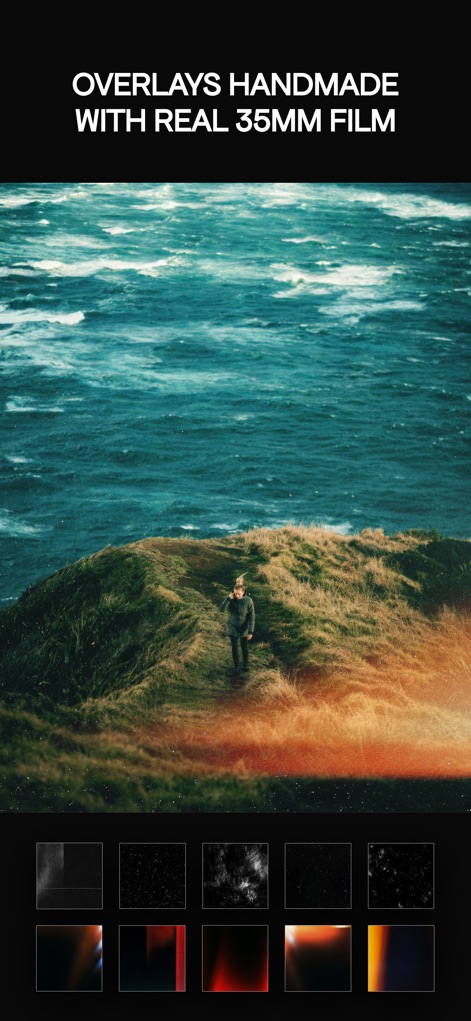
Explore the unique charm of "Light Leaks" and "Natural Dust textures," handcrafted from real 35mm film, adding depth and vintage appeal to images.
Authentic Film Overlays
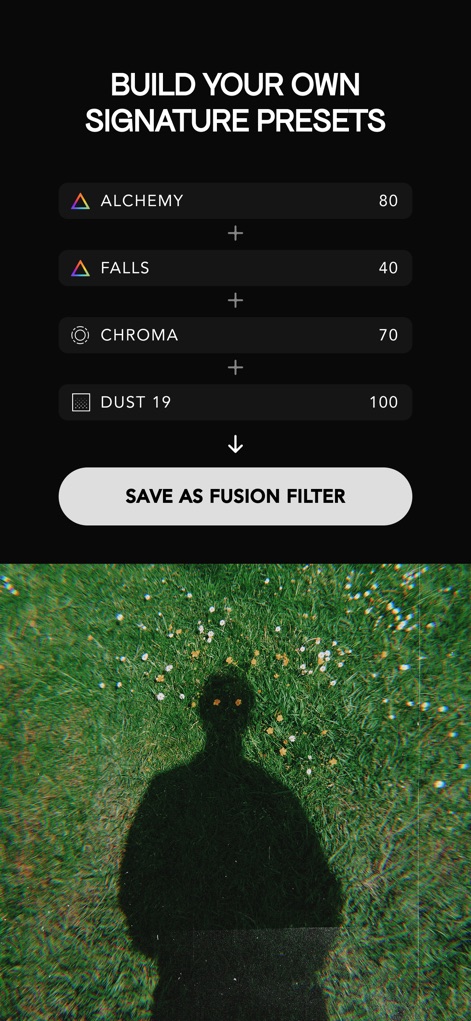
Observe how users can precisely adjust parameters like "Chroma" and "Dust" to create and save their own unique "Fusion Filters" for personalized effects.
Custom Fusion Filters

This tool provides comprehensive control with precise adjustments for "Curves" and "Sharpening," allowing users to refine every detail of their photographs.
Advanced Editing Suite

Users can personalize their final edits with classic "Instant Film frames" or unique "film strip borders," making each photo feel like a cherished memory.
Creative Framing Options
Description
Download
More Like This
Apps with similar features and user experience

Lightroom: AI Photo Editor
Adobe Inc.

MIX-Photo Editor & Filters
灏 徐

Presets for Lightroom - FLTR
Onelight Apps CY Ltd

Colorby: AI Photo Color Editor
Zhanghan Ke

PRESETS: Filters for Pictures
Gustas Brazaitis

Edith: Presets for Lightroom
MWM

Soft Focus Lite 〜beauty selfie
handyCloset Inc.

BerryFilm - Korean Style Cam
Seungyun Kim

Presets for Lightroom: Filters
Alenrom sp. z o.o.
This page is not an official page of the app or its developer, but an independent editorial publication created for informational and commentary purposes. Unless expressly stated otherwise, neither the app nor its developer is affiliated with, endorsed by, sponsored by, authorized by, or otherwise officially connected with MWM, Apple, Google Play, the app publisher, or the app's developer, and nothing on this page implies that the app was developed using MWM's services. Any trademarks, logos, screenshots, and other content remain the property of their respective owners.