
This page is not an official page of the app or its developer, but an independent editorial publication created for informational and commentary purposes. Unless expressly stated otherwise, neither the app nor its developer is affiliated with, endorsed by, sponsored by, authorized by, or otherwise officially connected with MWM, Apple, Google Play, the app publisher, or the app's developer, and nothing on this page implies that the app was developed using MWM's services. Any trademarks, logos, screenshots, and other content remain the property of their respective owners.


Alarm Clock for Me - Wake Up!
No more missed mornings. This app grants users ultimate control over their wake-up call, banishing oversleeping for good.
Downloads
10M+User Rating
Total Ratings
452.6KPublisher
Category
UtilitiesLocales
21Latest Version
3.19.21Size
142.8 MBFirst Released
Dec 12, 2013A comprehensive evaluation of critical functionalities designed for reliable wake-ups, personalized experiences, and integrated daily utilities.
Analysis of 'Alarm Clock for Me - Wake Up!' Key Features
Background Alarm Reliability
The app provides robust background alarm support, ensuring alarms activate even when the application is not actively running.
Customizable Alarm Dismissal
It features various methods to stop an alarm, such as shaking the device or solving a math problem, designed to ensure users are fully awake.
Personalized Wake-Up & Sleep Sounds
Users can create custom wake-up playlists with their favorite music and drift off to sleep with preferred songs or white noise.
Multiple Alarms with Advanced Customization
The tool allows for setting multiple alarms with distinct tunes, adjustable volumes, fade-in options, and the ability to add specific notes.
Integrated Weather Forecast
It includes a live weather conditions and temperature display, offering immediate local weather information to help plan the day.
Designer Clock Themes
The app offers a selection of stylish designer themes for the digital clock display, allowing for personalized aesthetics.
Multi-functional Timers (Countdown & Workout)
This tool incorporates versatile timers, including a countdown for events and a general-purpose timer for activities like cooking or workouts.
Built-in Flashlight Utility
It provides a convenient flashlight that can be activated by shaking the device or double-tapping the screen.
Frequently Asked Questions
Everything you need to know about Alarm Clock for Me - Wake Up!
Can I wake up to my own music with "Alarm Clock for Me"?
Yes, "Alarm Clock for Me - Wake Up!" allows users to wake up to their favorite music. It also offers options to stop the alarm by shaking the device or solving a math problem.
Does "Alarm Clock for Me" work if the app is closed?
Yes, "Alarm Clock for Me - Wake Up!" provides background alarm support. The alarm will ring reliably even if the app is not actively running on your device.
What clock design themes are available in "Alarm Clock for Me"?
"Alarm Clock for Me - Wake Up!" offers various designer clock themes such as Digital (Blue, Green, Red, Yellow), Ultrasonic (Blue, Green, Red, Yellow), Wordy, and ThinLine.
Does "Alarm Clock for Me" have a sleep timer function?
Yes, "Alarm Clock for Me - Wake Up!" includes a Sleep Timer. Users can create a playlist of their favorite songs or choose white noise to fall asleep.
Does "Alarm Clock for Me" show local weather conditions?
Yes, "Alarm Clock for Me - Wake Up!" displays live weather conditions and temperature. It automatically detects your current location and can also show weather for any chosen location.
How do I turn on the flashlight in "Alarm Clock for Me"?
To activate the flashlight in "Alarm Clock for Me - Wake Up!", users can either shake their device or double-tap on the screen. It is a powerful built-in feature.
Why does "Alarm Clock for Me" need access to my location?
"Alarm Clock for Me - Wake Up!" requires location data to provide an accurate weather forecast for your exact location, which is necessary for the weather feature.
Can I set countdowns for events with "Alarm Clock for Me"?
Yes, "Alarm Clock for Me - Wake Up!" includes a Countdown feature. This allows users to track and count down to important events such as vacations, anniversaries, or graduations.
The following screenshots and description are sourced directly from the app's official store listing and are the property of the app developer.
App Store
Screenshots
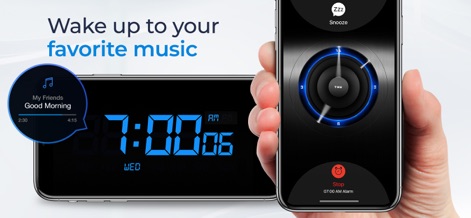
The app allows users to personalize their wake-up experience, featuring custom music playlists and prominent snooze/stop controls for effortless alarm management.
Wake Up Your Way

This tool offers a variety of beautiful designer themes, showcasing vibrant options like the red and green speaker-style clock faces for visual customization.
Express Your Style

Users can prevent oversleeping with engaging dismissal methods, choosing between solving a math problem or utilizing the shake-to-stop function.
Conquer Oversleeping

The app keeps users informed with integrated live weather conditions, displaying essential details like temperature and current forecast directly on the alarm interface.
Informed Beginnings

This tool transforms a device into a functional bedside clock, presenting clear large digital time displays in both green and yellow for easy visibility.
Bedside Companion
Description
Download
More Like This
Apps with similar features and user experience
DClock - Digital Flip Clock
少杰 施
Fullscreen Clock: Flip & Focus
Zhengzhou Sibo Intelligent Technology Co., Ltd.
Flip clock - no ads
Beijing Free Calculator Technology Co., Ltd.
Mugen Clock
Koichiro Kamada

The Clocks: Alarm, World Clock
Meanterm Inc.
Digital Clock - Bedside Alarm
俊杰 阮
Fliqlo
Yuji Adachi
Clocks - A fun standby mode
Daniel Destefanis

FlipClock-Digital Alarm Clock
JSPP(Shanghai)Co,Ltd.
This page is not an official page of the app or its developer, but an independent editorial publication created for informational and commentary purposes. Unless expressly stated otherwise, neither the app nor its developer is affiliated with, endorsed by, sponsored by, authorized by, or otherwise officially connected with MWM, Apple, Google Play, the app publisher, or the app's developer, and nothing on this page implies that the app was developed using MWM's services. Any trademarks, logos, screenshots, and other content remain the property of their respective owners.