
This page is not an official page of the app or its developer, but an independent editorial publication created for informational and commentary purposes. Unless expressly stated otherwise, neither the app nor its developer is affiliated with, endorsed by, sponsored by, authorized by, or otherwise officially connected with MWM, Apple, Google Play, the app publisher, or the app's developer, and nothing on this page implies that the app was developed using MWM's services. Any trademarks, logos, screenshots, and other content remain the property of their respective owners.


Any.do: To do list & Planner
No more dropped balls. This app puts you in command of your chaotic daily demands, across all devices, with brutal efficiency.
Downloads
5M+User Rating
Total Ratings
87.8KPublisher
Category
ProductivityLocales
27Latest Version
5.64.6Size
303.9 MBFirst Released
Jun 4, 2012An analytical overview of key features for seamless personal and professional organization.
Any.do: A Comprehensive Productivity Ecosystem
Cross-Platform Synchronization
The app ensures that all to-do lists, tasks, reminders, and calendar entries are seamlessly synchronized across mobile, desktop, web, and tablet devices, guaranteeing consistent access and information.
Holistic Daily Planning & Organization
It functions as an all-encompassing life organizer, integrating to-do lists, calendars, notepads, and project management capabilities to provide a comprehensive framework for daily planning and overall life management.
Advanced Reminder System
The tool features versatile reminder options, including scheduled times, location-based alerts, and recurring reminders, ensuring users never miss important tasks or events.
Collaborative Task Management
It allows users to work together effectively by sharing lists and assigning tasks, fostering seamless collaboration for family organization or team projects.
Unified Calendar Integration
The app provides a consolidated view of daily, weekly, and monthly events, syncing in real-time with popular calendars like Google Calendar and Outlook to offer a complete schedule overview.
Efficient Task Input Methods
This tool features convenient ways to add tasks, including voice entry and direct forwarding from email inboxes, allowing for rapid and effortless capture of ideas and to-do items.
Intuitive Task Interaction
It offers a highly intuitive user experience with features like drag-and-drop task reordering, swiping to mark tasks complete, and device shaking to clear completed items, simplifying daily task management.
Rich Task Detailing
The app allows users to enhance tasks with comprehensive details, including sub-tasks, notes, and file attachments from various sources like computer, Dropbox, or Google Drive, providing complete context.
Frequently Asked Questions
Everything you need to know about Any.do: To do list & Planner
What is the Any.do app?
Any.do is an all-in-one productivity application combining a to-do list, calendar, planner, and reminders. It helps organize life and work by syncing tasks, events, and notes across various devices.
What devices and platforms does Any.do support?
Yes, Any.do supports multiple platforms including mobile, desktop, web, and tablet devices. It syncs seamlessly across all these platforms to keep your tasks and agenda updated.
Can I integrate Any.do with my existing calendars?
Yes, Any.do seamlessly syncs in real-time with your phone’s calendar, Google Calendar, Facebook events, Outlook Calendar, and other calendars. This keeps your schedule accurate and up-to-date.
Does Any.do allow for collaboration on tasks and lists?
Yes, Any.do offers collaboration features. Users can work together using shared lists and assigned tasks, allowing teams and families to coordinate and get more done collectively.
What kinds of reminders can Any.do set?
Any.do provides various reminder types, including scheduled time-based reminders, location-based reminders, and recurring reminders. This ensures users receive timely notifications for all important events and tasks.
How much does an Any.do subscription cost?
Any.do offers a monthly plan for $9.99, a 6-month plan for $26.99, and a 12-month plan for $59.99. The 12-month plan also includes a 7-day trial.
How do I cancel my Any.do subscription?
Yes, you can manage and cancel your Any.do auto-renew subscription at any time. This is done from the account settings on iTunes after purchase. Ensure cancellation at least 24 hours prior to renewal.
Does Any.do support Apple's Family Sharing feature?
No, Any.do does not support Family Sharing for subscriptions at this time. Each subscription is managed individually through the iTunes account.
Can I add tasks to Any.do using my voice?
Yes, Any.do supports voice entry. You can simply speak your tasks or reminders, and the app will automatically add them to your to-do list for quick and easy management.
Is Any.do an Editors' Choice application?
Yes, Any.do is recognized as an "Editors' Choice" app. It is also trusted by over 40 million individuals, families, and teams globally for organizing their lives and work.
The following screenshots and description are sourced directly from the app's official store listing and are the property of the app developer.
App Store
Screenshots
This screen highlights the app's capability to 'Easily Organize work & life' and showcases its prestigious 'Apple Editor's Choice' award.
Organize Everything
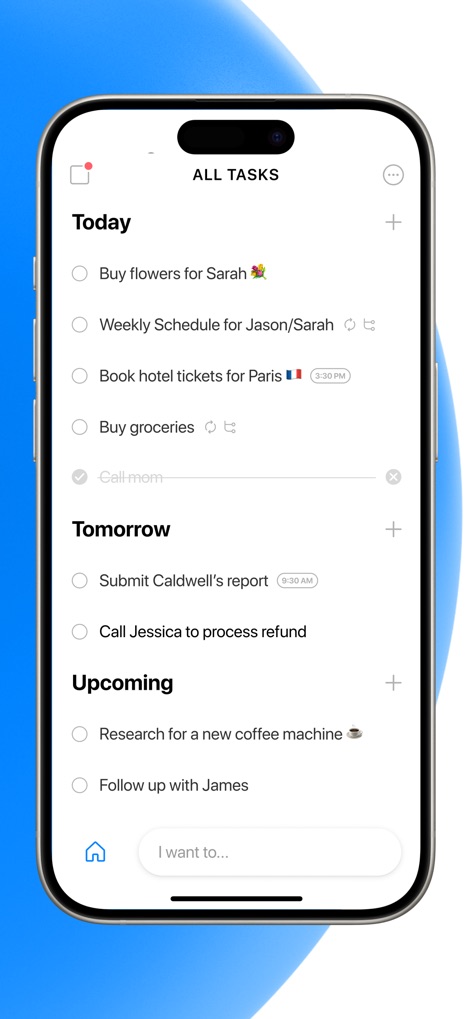
Users can effectively manage their daily tasks through clearly structured 'Today', 'Tomorrow', and 'Upcoming' sections, complemented by an intuitive 'I want to...' input bar.
Intuitive Task Management

The collage provides a quick glance at the app's comprehensive capabilities, including integrated 'Calendar' functionality and robust 'Collaboration' tools for teamwork.
Core Feature Overview

This tool offers a clear calendar overview of daily events like 'Q3 Presentation' and 'Team brainstorm', alongside convenient options to add a 'New Event' or 'New Task'.
Integrated Calendar View
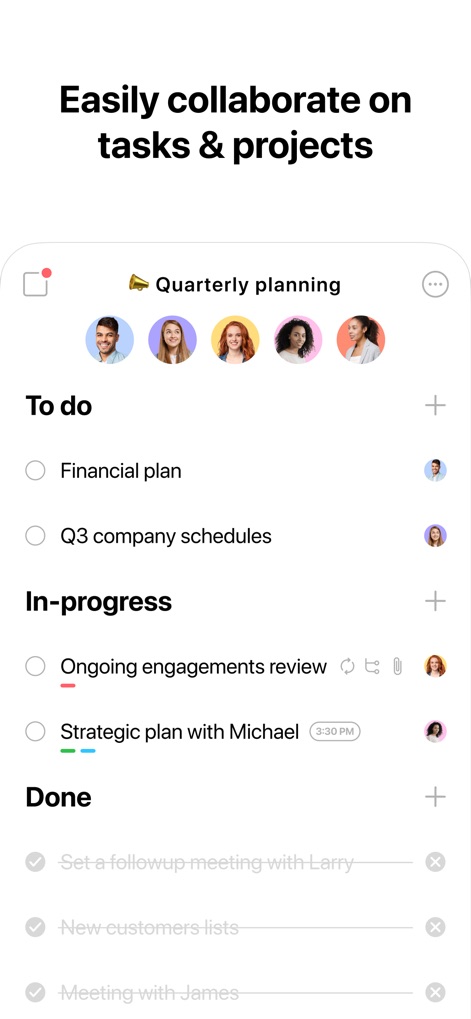
The app facilitates team collaboration with distinct 'To do', 'In-progress', and 'Done' sections for shared tasks and visual assignment of tasks to team members.
Collaborative Project Boards
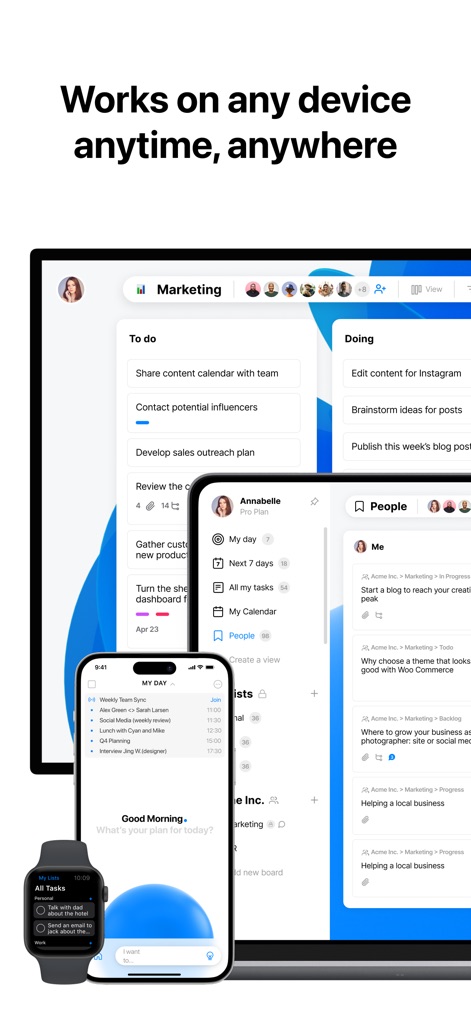
Users can access their tasks and plans across various platforms, as demonstrated by the consistent interface on both an iPhone and a desktop display.
Seamless Cross-Device Sync

The 'MY DAY' screen provides an intelligent overview of upcoming activities such as 'Weekly Team Sync', enhanced by the app's prominent 'AI boost' capabilities.
AI-Powered Daily Planning
This display highlights the app's widespread acclaim, showcasing logos from top media outlets such as 'Forbes' and 'The New York Times' as proof of its trusted status.
Esteemed Industry Recognition

The app connects with a vast ecosystem of over '6000 apps', visually represented by numerous familiar logos like 'Slack' and 'Google Calendar'.
Extensive App Integrations
Description
Download
More Like This
Apps with similar features and user experience

Notion: Notes, Tasks, AI
Notion Labs, Incorporated

Freenotes®: AI Notes Taking
Hangzhou Free Notes Technology Co., Ltd

Structured - Daily Planner
unorderly GmbH

Google Tasks: Get Things Done
Google LLC

TickTick:To-Do List & Calendar
Appest Limited

Noteful: Notes & PDF Markup
Noteful Technologies Ltd

Todoist: To Do List & Calendar
Doist Inc.

To do list MinimaList & Widget
Inner Grow Limited

monday.com - Work Platform
monday.com Ltd.
This page is not an official page of the app or its developer, but an independent editorial publication created for informational and commentary purposes. Unless expressly stated otherwise, neither the app nor its developer is affiliated with, endorsed by, sponsored by, authorized by, or otherwise officially connected with MWM, Apple, Google Play, the app publisher, or the app's developer, and nothing on this page implies that the app was developed using MWM's services. Any trademarks, logos, screenshots, and other content remain the property of their respective owners.