
This page is not an official page of the app or its developer, but an independent editorial publication created for informational and commentary purposes. Unless expressly stated otherwise, neither the app nor its developer is affiliated with, endorsed by, sponsored by, authorized by, or otherwise officially connected with MWM, Apple, Google Play, the app publisher, or the app's developer, and nothing on this page implies that the app was developed using MWM's services. Any trademarks, logos, screenshots, and other content remain the property of their respective owners.


Any Planner-Daily Task Planner
Time blindness crushed. The app grants users total visual command over their day, ending the 'where do I even start?' dilemma.
Downloads
25k+User Rating
Total Ratings
361Publisher
Category
ProductivityLocales
11Latest Version
1.0.23Size
59.2 MBFirst Released
Feb 10, 2026An evaluation of core functionalities for individuals managing ADHD and executive function challenges.
Key Features Analysis: Any Planner-Daily Task Planner
Timeline View
The app provides a timeline view that arranges tasks, offering a visual overview of the entire day at a glance, which helps users always know their next step.
Reminders
The app provides timely reminders before tasks begin, ensuring that important activities are not overlooked.
Later List
This tool features a "Later List" where users can temporarily store tasks they are not yet ready to schedule, reducing immediate pressure and mental clutter.
Recurring Tasks
This tool allows users to set up recurring tasks with automatic repetition, streamlining daily, weekly, or monthly routines.
Snooze
It allows users to snooze tasks for later rescheduling when they are unable to complete them immediately, offering flexibility in task management.
Calendar Sync
It allows users to integrate device calendar events directly into the timeline, providing a consolidated view of appointments and tasks side by side.
Wake Up & Bed Time
It allows users to set personalized wake-up and bedtime parameters, enabling the creation of a daily timeline aligned with their individual rhythms.
Statistics
The app provides statistics to track completed tasks, streaks, and hourly productivity patterns, offering insights into work habits.
The following screenshots and description are sourced directly from the app's official store listing and are the property of the app developer.
App Store
Screenshots
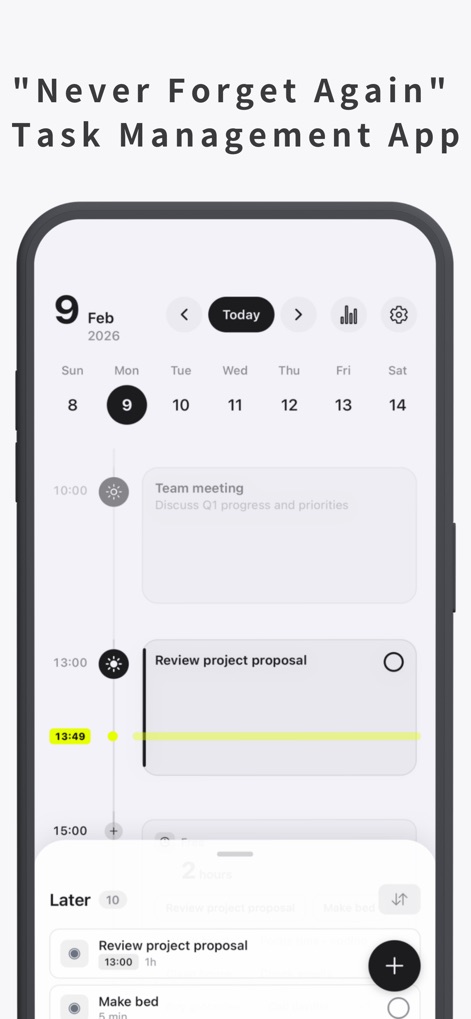
Observe how the app visually organizes the entire day with a dynamic timeline view and a readily accessible 'Later' list for future planning.
Daily Timeline Overview
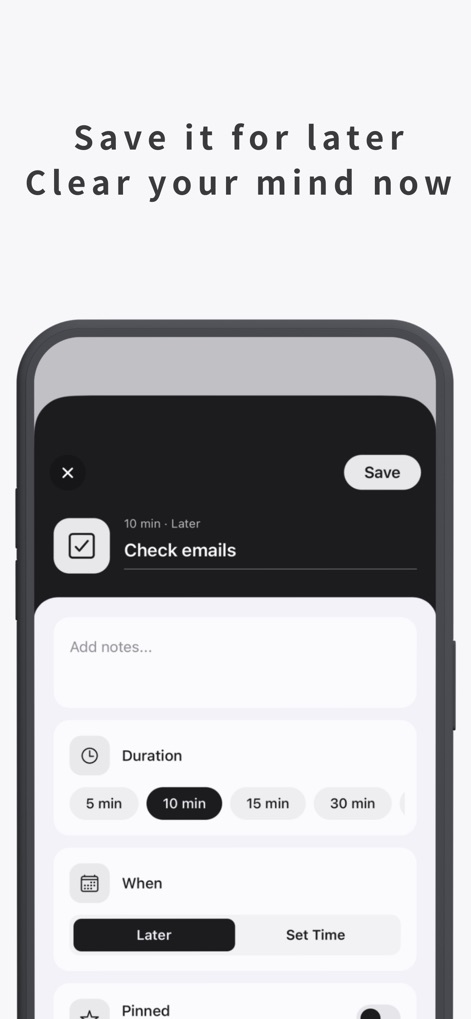
See how the intuitive task creation modal allows users to specify task duration and easily save items to the 'Later' list for flexible scheduling.
Effortless Task Input
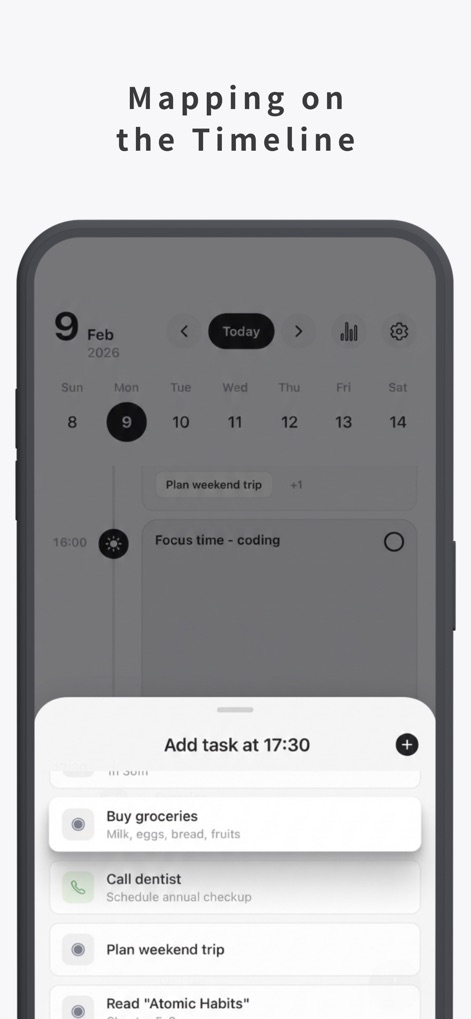
Discover how tasks can be directly placed onto the timeline from a convenient selection list, enabling precise planning and visual organization.
Precise Schedule Building
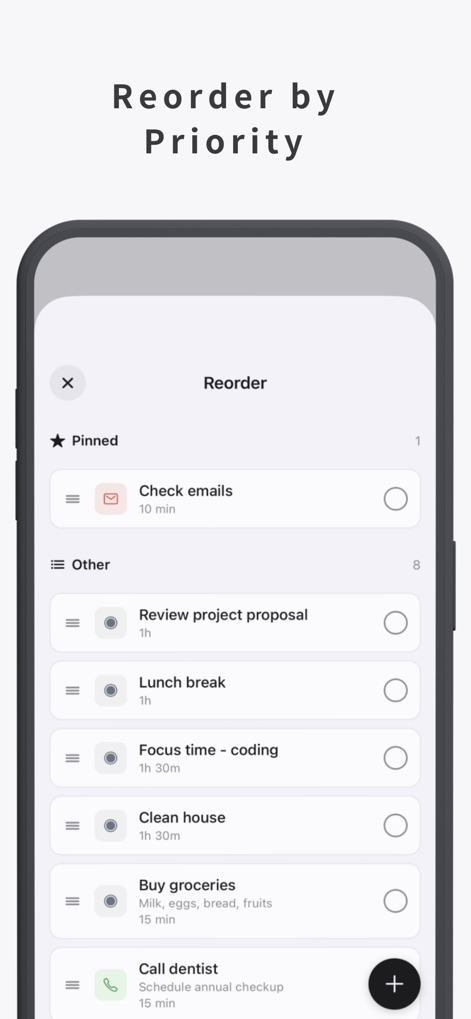
Explore the reordering screen where users can prioritize tasks by pinning important items and dragging others to adjust their sequence, enhancing focus.
Smart Task Prioritization
Description
Download
More Like This
Top-ranked apps in the same category

ChatGPT
OpenAI OpCo, LLC

Google Gemini
Google LLC

Grok
X.AI Corporation

Gmail - Email by Google
Google LLC

千问 - 阿里最强大模型官方AI助手
Shanghai Zhixin Puhui Technology Co., Ltd.

Google Drive
Google LLC

Google Sheets
Google LLC

Microsoft Authenticator
Microsoft Corporation
Google Docs
Google LLC
This page is not an official page of the app or its developer, but an independent editorial publication created for informational and commentary purposes. Unless expressly stated otherwise, neither the app nor its developer is affiliated with, endorsed by, sponsored by, authorized by, or otherwise officially connected with MWM, Apple, Google Play, the app publisher, or the app's developer, and nothing on this page implies that the app was developed using MWM's services. Any trademarks, logos, screenshots, and other content remain the property of their respective owners.