
This page is not an official page of the app or its developer, but an independent editorial publication created for informational and commentary purposes. Unless expressly stated otherwise, neither the app nor its developer is affiliated with, endorsed by, sponsored by, authorized by, or otherwise officially connected with MWM, Apple, Google Play, the app publisher, or the app's developer, and nothing on this page implies that the app was developed using MWM's services. Any trademarks, logos, screenshots, and other content remain the property of their respective owners.


Audio Jam - AI for musicians
Musicians now wield surgical control over sound. Audio Jam hands users the power to dissect tracks, practice with precision, and remix on demand.
Downloads
100k+User Rating
Total Ratings
2.7KPublisher
Category
MusicLocales
6Latest Version
3.8.11Size
106.4 MBFirst Released
May 31, 2025An Analytical Review of Audio Jam's Core Offerings
Comprehensive AI-Powered Toolkit for Modern Musicians
AI-Powered Track Separation & Remixing
The app provides advanced AI technology to instantly isolate vocals, drums, and guitar tracks with high accuracy, enabling users to remix and create custom instrument combinations for deep analysis or backing tracks.
Advanced Practice & Learning Tools
This tool features precise looping of tricky sections, the ability to bookmark key moments like solos or riffs, and pitch-preserving tempo adjustment, allowing musicians to master songs up to three times faster.
Exporting Edits to DAWs
It allows users to export their edited tracks, enabling seamless integration of their work into any Digital Audio Workstation (DAW) for further production, mixing, or creative manipulation.
Guitar Pro/MusicXML Score Syncing
The app supports syncing with Guitar Pro and MusicXML scores, providing an interactive learning experience where musicians can follow along with sheet music or tabs that synchronize with the audio.
3-Band EQ for Live Prep
This tool includes a 3-band equalizer, empowering musicians to fine-tune audio for live performance preparations, ensuring optimal sound for gigs and specific acoustic environments.
Cross-Device Project Syncing
It allows users to sync their projects across all devices, ensuring flexibility and continuous workflow regardless of where or when they choose to practice or work on their music.
Frequently Asked Questions
Everything you need to know about Audio Jam - AI for musicians
What is Audio Jam - AI for musicians?
Audio Jam is an app designed for musicians to master songs faster. It offers studio-grade track separation, smart practice tools like A/B looping, and a studio-ready toolkit including EQ and score syncing.
How accurate is Audio Jam's AI for track separation?
Audio Jam's AI extracts vocals, drums, and guitar tracks instantly with 96% accuracy. This allows users to isolate and remix specific instruments effectively for practice or analysis.
Can I slow down songs without pitch distortion in Audio Jam?
Yes, Audio Jam allows users to slow down songs to 50% speed without pitch distortion. This feature is part of its precision training tools for detailed practice.
Does Audio Jam support A/B looping for practice?
Yes, Audio Jam supports A/B looping, allowing users to endlessly loop tricky 10-second licks. This feature aids precision training for specific musical sections.
What are the benefits of Audio Jam Pro membership?
Audio Jam Pro membership provides 100x more AI power, longer tracks up to 20 minutes, unlimited projects, ad-free experience, and the ability to export edits to any DAW.
How can I cancel my Audio Jam subscription?
Users can cancel their Audio Jam subscription through the subscription settings in their personal iTunes account. Cancellation must occur at least 24 hours before the existing plan expires.
Does Audio Jam allow project syncing across multiple devices?
Yes, Audio Jam uses cloud power to sync projects across all your devices. This enables users to practice anywhere and access their work consistently.
What audio file formats does Audio Jam support for import?
Audio Jam supports importing audio files in mp3, m4a, aac, aiff, and wav formats. Users can import from various sources like local files, iTunes Library, or links.
Can I export my edited tracks from Audio Jam to a DAW?
Yes, Audio Jam Pro membership allows users to export their edited tracks. This feature enables transferring work to any Digital Audio Workstation (DAW).
Does Audio Jam provide real-time chord analysis?
Yes, Audio Jam offers real-time chord analysis. This feature displays chord diagrams (e.g., Am, C, G) as the music plays, assisting with learning and understanding.
What is the maximum track length supported by Audio Jam Pro?
Audio Jam Pro membership supports working with songs up to 20 minutes in length. This is an upgrade from the standard version's track length limitations.
Does Audio Jam include a beat-synced metronome or clicker?
Yes, Audio Jam features an "AI Smart Clicker" that provides a beat-synced countdown. Users can adjust click volume, speed, and tone for seamless transitions.
The following screenshots and description are sourced directly from the app's official store listing and are the property of the app developer.
App Store
Screenshots
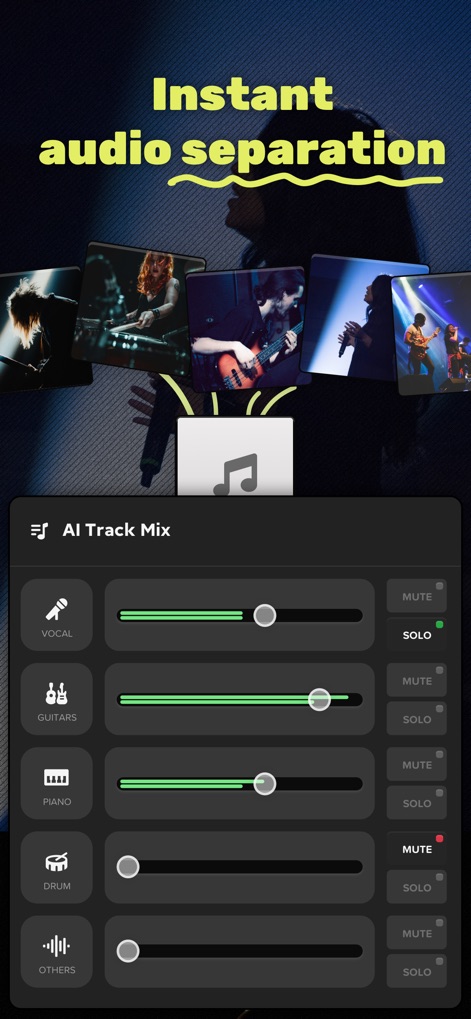
See how Audio Jam provides an AI Track Mix panel with individual sliders for instruments like vocals and drums, enabling users to instantly isolate and remix tracks.
Isolate & Remix
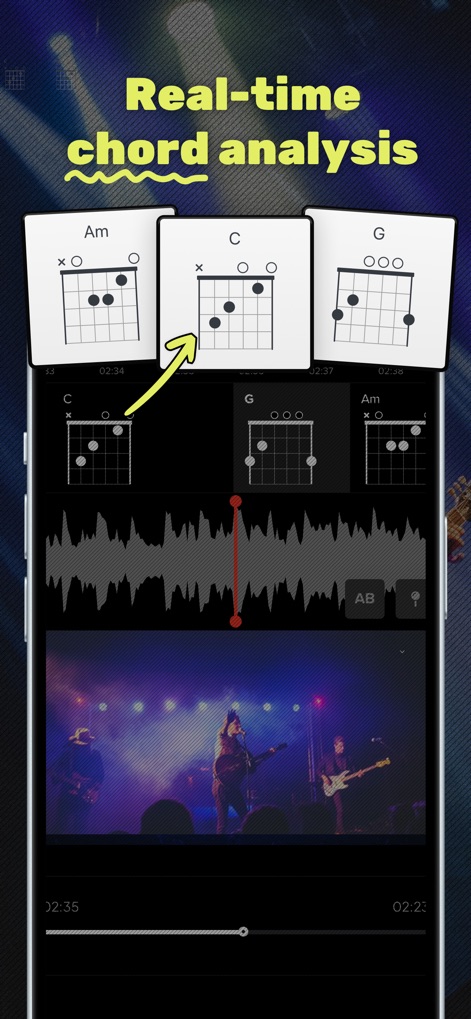
Discover the app's real-time chord analysis, showcasing guitar chord diagrams (e.g., Am, C, G) precisely aligned with the audio waveform for deeper musical understanding.
Chord Analysis Unveiled
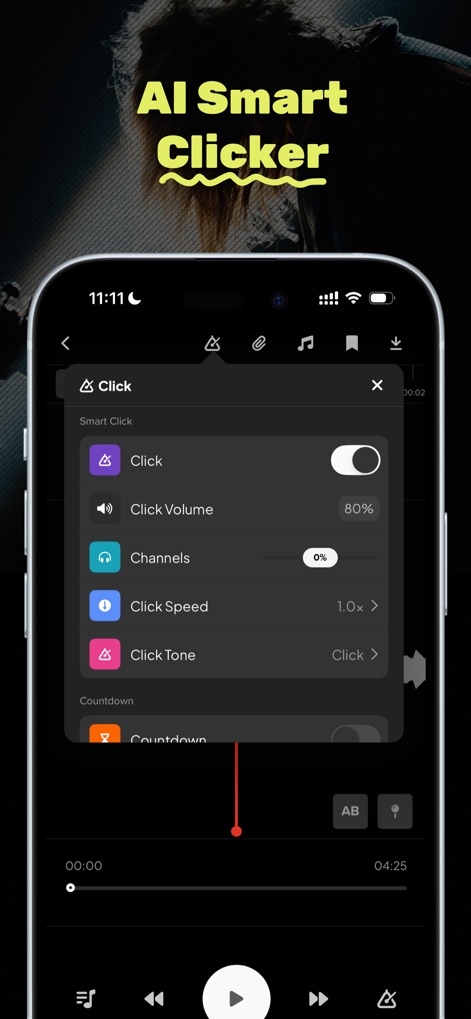
Explore the AI Smart Clicker interface, where users can fine-tune click volume and adjust click speed for tailored practice sessions.
Precision Metronome Control
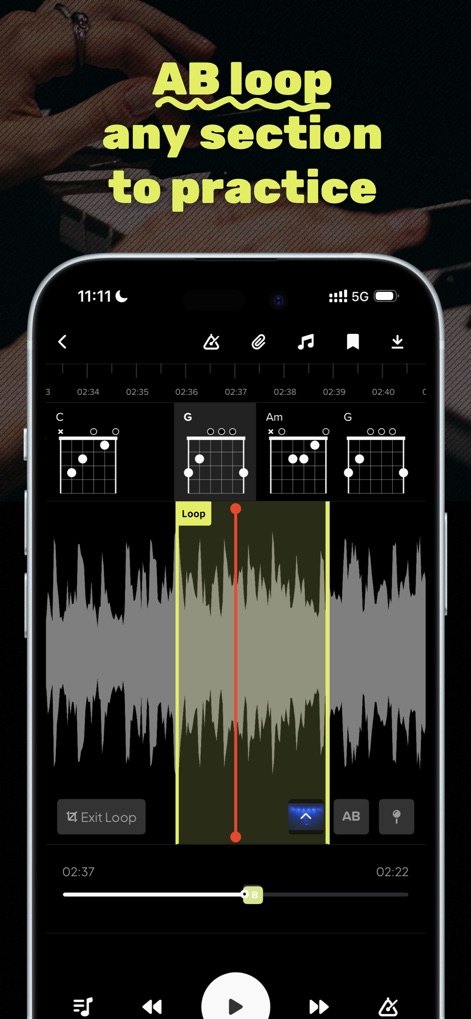
Witness how the app facilitates targeted practice by allowing users to define an A/B loop section within the waveform and simultaneously view corresponding chord diagrams.
Targeted Practice Loops
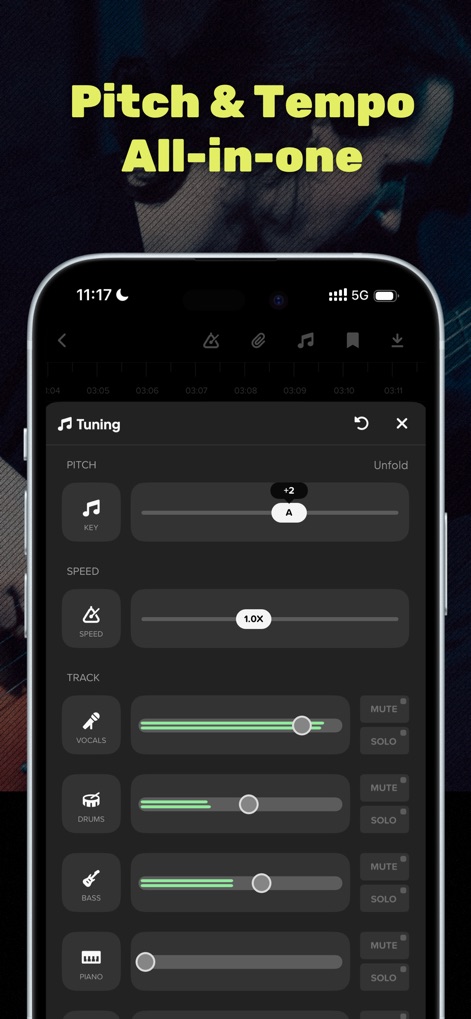
Observe the comprehensive Pitch & Tempo panel, offering precise pitch adjustment for the entire track and individual speed controls to slow down music without distortion.
Dynamic Sound Control
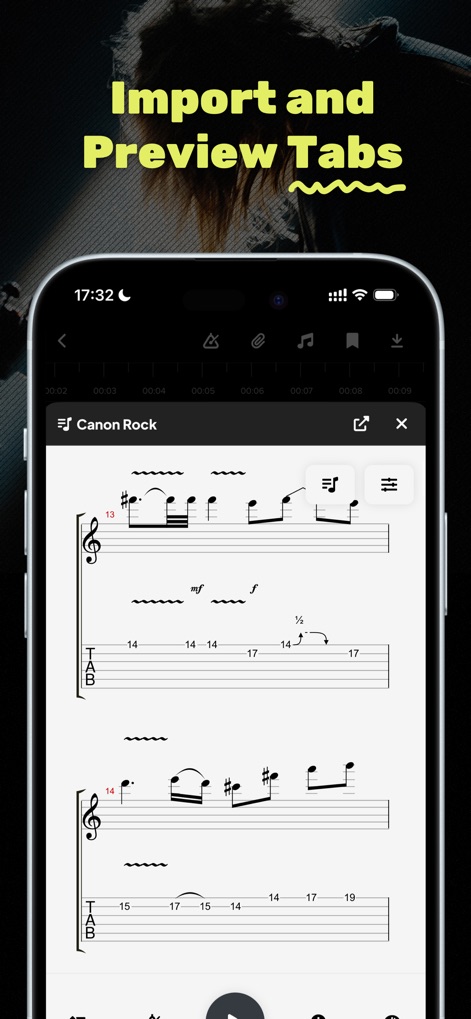
Review the integrated score view, where users can import Guitar Pro/MusicXML scores and preview tablature for detailed study.
Integrated Score View
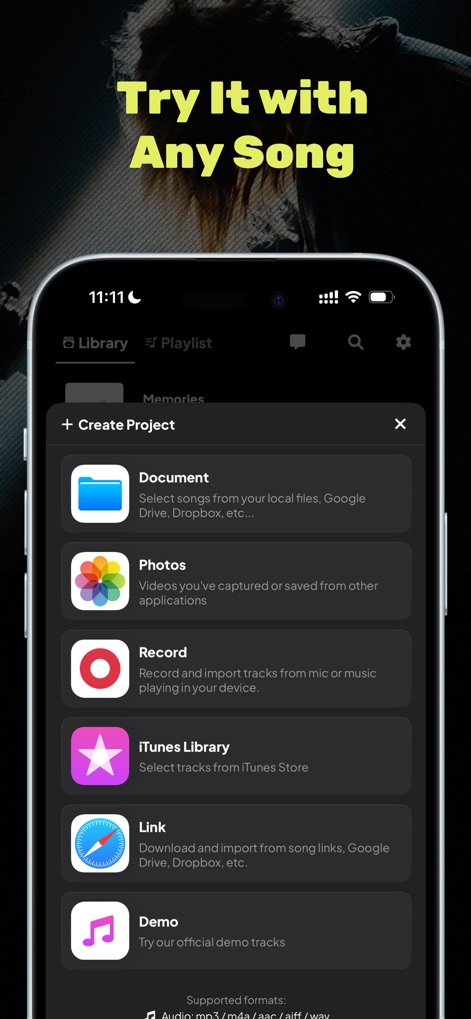
See the versatile content import options, allowing users to create projects from local files, iTunes Library, or by linking directly to songs online.
Seamless Content Import
Description
Download
More Like This
Apps with similar features and user experience

Music Speed Changer ▶▶▶
Single Minded Productions, LLC

Vocal Remover - Musiclab
CHENGDU Yiwo Tech Development Co., Ltd

Audio Fusion
景睿 文

Audio Jam: AI for musicians
Kiraku Tech Co., Ltd.

Anytune Pro+: Studio Tools
Anytune Inc.

Moises: The Musician's App
Moises Systems Inc

Strum - Play Guitar
W185 Holdings LLC

Chordify: Songs, Chords, Tuner
Chordify BV

Chord ai - Play any song!
Nomad AI OU
This page is not an official page of the app or its developer, but an independent editorial publication created for informational and commentary purposes. Unless expressly stated otherwise, neither the app nor its developer is affiliated with, endorsed by, sponsored by, authorized by, or otherwise officially connected with MWM, Apple, Google Play, the app publisher, or the app's developer, and nothing on this page implies that the app was developed using MWM's services. Any trademarks, logos, screenshots, and other content remain the property of their respective owners.