
This page is not an official page of the app or its developer, but an independent editorial publication created for informational and commentary purposes. Unless expressly stated otherwise, neither the app nor its developer is affiliated with, endorsed by, sponsored by, authorized by, or otherwise officially connected with MWM, Apple, Google Play, the app publisher, or the app's developer, and nothing on this page implies that the app was developed using MWM's services. Any trademarks, logos, screenshots, and other content remain the property of their respective owners.


Blur-Video
Protect your identity and secure your content by blurring faces, logos, and backgrounds in seconds. The essential tool for creators and parents to share safely on TikTok, Reels, and YouTube.
Downloads
1M+User Rating
Total Ratings
22K+Publisher
Category
Photo & VideoLocales
15Latest Version
2.8.0Size
33.9 MBFirst Released
May 7, 2021Pro-Level Privacy, Simplified
Protect your identity and maintain a professional look. From AI face-tracking to custom pixelation, secure your content for TikTok, Reels, and beyond in seconds.
AI-Powered Auto-Tracking
Save hours of tedious editing. Our smart tracking follows moving faces and objects automatically, so you stay protected without the manual effort.
Multi-Area Protection
Blur faces, logos, and sensitive background details all at once. Use custom shapes and adjustable intensity to keep your private life truly private.
Frequently Asked Questions
Everything you need to know about Blur-Video
What is the primary function of the Blur-Video app?
The Blur-Video app improves privacy by blurring faces, logos, or objects in video backgrounds. It applies blur effects for platforms like YouTube and TikTok, addressing video editing needs for pixelating unwanted areas.
Does Blur-Video offer automatic tracking for blurring objects?
Yes, Blur-Video includes an auto tracking feature designed to efficiently blur objects in your videos. This functionality significantly speeds up the blurring process for moving elements.
Can Blur-Video blur multiple areas in a single video?
Yes, Blur-Video allows users to define and blur multiple areas simultaneously within a single video. Users can apply either ellipse or rectangle shapes to these distinct blur regions.
What shapes can be used for blurring objects in Blur-Video?
Blur-Video supports both ellipse (round) and rectangle shapes for blurring or pixelating objects. Users can adjust these shapes with an offset feature by using touch input.
What are the benefits of a PRO subscription for Blur-Video?
A Blur-Video PRO subscription grants unlimited access to pro features. These include unlocking all object tracking and feathering functionalities, as well as removing all advertisements from the app.
How do subscriptions work for Blur-Video PRO?
Payment for Blur-Video PRO is charged to your iTunes Account upon purchase confirmation. Subscriptions automatically renew unless auto-renewal is turned off at least 24 hours before the current period ends.
Can users manage their Blur-Video PRO subscription settings?
Yes, users manage their Blur-Video PRO subscriptions. Auto-renewal can be disabled by going to the user's Account Settings after the purchase is complete.
Can Blur-Video animate blur effects with keyframes?
Yes, Blur-Video supports animating blur effects using keyframes. This feature provides precise control over the blur's movement and duration throughout the video timeline.
How can I adjust the intensity of blur or pixelation in Blur-Video?
Users adjust the intensity of blur or pixelation in Blur-Video using a dedicated strength slider. This control allows for fine-tuning the visual effect according to specific requirements.
Where can I find the Privacy Policy for Blur-Video?
The Privacy Policy for Blur-Video is available online. You can access it directly at http://cushwayapps.com/app-privacy/blurvideo/privacy.html for comprehensive information regarding data handling.
How can I contact Blur-Video support for bugs or suggestions?
You can contact Blur-Video support for bugs, suggestions, or new feature requests by sending an email. Direct your inquiries to support@honkhonkpunch.com for assistance.
The following screenshots and description are sourced directly from the app's official store listing and are the property of the app developer.
App Store
Screenshots
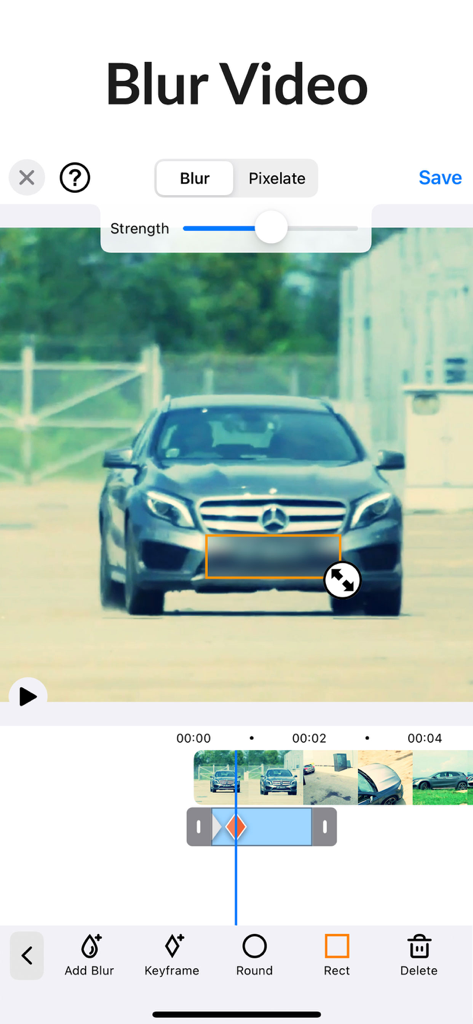
Interface of the Blur Video app showing a rectangular blur applied to a car license plate for privacy
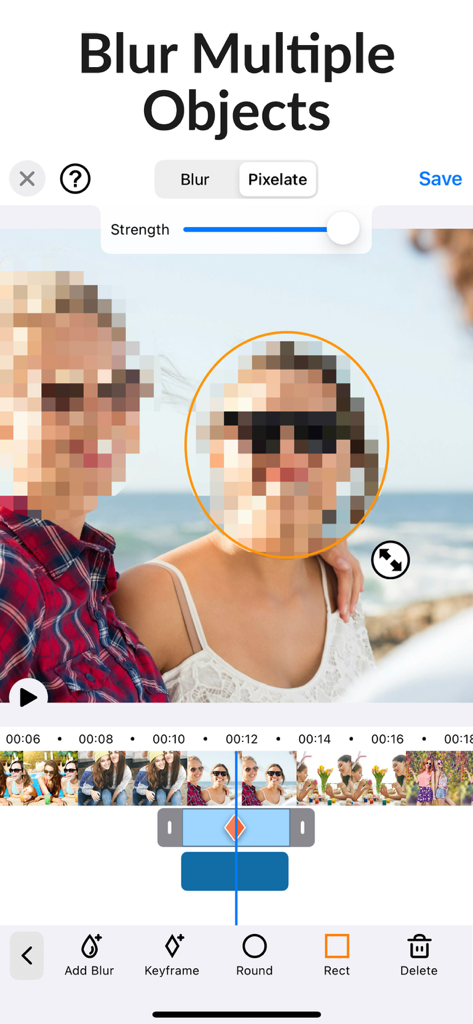
Blur Video app interface showing a pixelated face and editing timeline for mobile video privacy
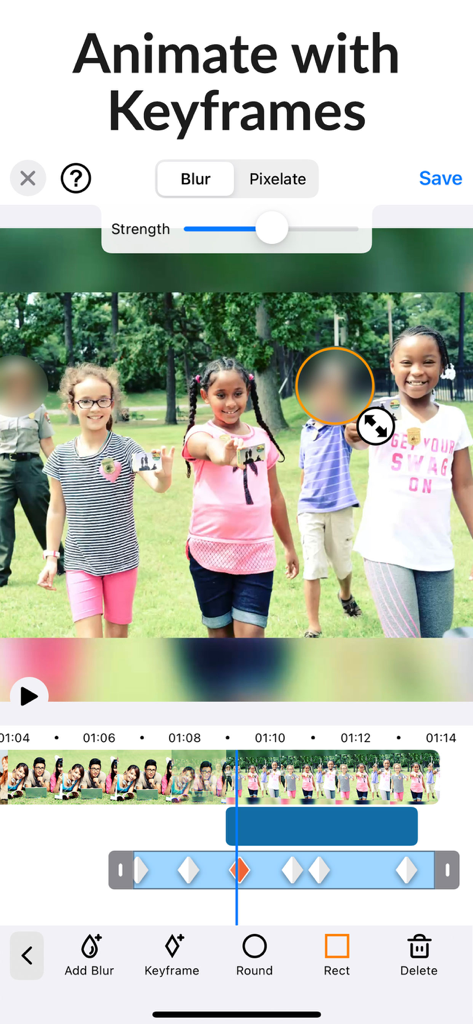
Video editing interface showing how to blur faces with keyframe animation
Description
Download
More Like This
Apps with similar features and user experience




This page is not an official page of the app or its developer, but an independent editorial publication created for informational and commentary purposes. Unless expressly stated otherwise, neither the app nor its developer is affiliated with, endorsed by, sponsored by, authorized by, or otherwise officially connected with MWM, Apple, Google Play, the app publisher, or the app's developer, and nothing on this page implies that the app was developed using MWM's services. Any trademarks, logos, screenshots, and other content remain the property of their respective owners.