
This page is not an official page of the app or its developer, but an independent editorial publication created for informational and commentary purposes. Unless expressly stated otherwise, neither the app nor its developer is affiliated with, endorsed by, sponsored by, authorized by, or otherwise officially connected with MWM, Apple, Google Play, the app publisher, or the app's developer, and nothing on this page implies that the app was developed using MWM's services. Any trademarks, logos, screenshots, and other content remain the property of their respective owners.

CAD Reader-View & Measure DWG
Forget desktop tethering. This app transforms your device into a precise CAD workstation, putting unparalleled DWG control directly in your hands, on any site.
Downloads
12.5M+User Rating
Total Ratings
4.8KPublisher
Category
ProductivityLocales
3Latest Version
6.1.1Size
141.3 MBFirst Released
Jun 8, 2014CAD Reader-View & Measure DWG: An Analytical Overview
Evaluating core functionalities for professional CAD users requiring robust mobile drawing management.
Precise CAD Measurement & Viewing Tools
The app provides a comprehensive suite of measurement tools including length, area, radius, angles, and coordinates, enhanced by automatic snapping points for superior accuracy, crucial for on-site verification and estimations.
DWG/DXF/PDF Compatibility & Viewing
The app offers full compatibility with DWG, DXF, and PDF formats, including seamless integration with AutoCAD, enabling professionals to view and manage diverse technical drawings with ease across various platforms.
Advanced Collaboration & Annotation
This tool features robust collaboration capabilities, allowing users to attach site pictures and voice messages as annotations, draw lines and shapes, and seamlessly import/export comments, fostering efficient team communication.
Layer Management & View Control
It allows users to efficiently manage layers within drawings and switch between model and layout views, providing granular control and contextual understanding of complex designs.
PDF to CAD Conversion
This tool features a valuable function to convert PDF documents directly into editable CAD formats, significantly enhancing usability for historical documents or non-CAD sourced files.
Multi-Drawing Viewing
The app enables simultaneous viewing of multiple drawings, which enhances comparison and review processes for engineers and architects working on complex projects.
Frequently Asked Questions
Everything you need to know about CAD Reader-View & Measure DWG
What is CADReader?
CADReader is a cross-platform CAD software fully compatible with DWG, DXF, and PDF formats. It offers essential viewing, measuring, and annotation tools for engineers, designers, and quantity surveyors.
Which CAD file formats does CADReader support?
CADReader supports DWG, DXF, and PDF formats. It is fully compatible with AutoCAD, allowing users to access and view various drawing types effectively.
Can CADReader convert PDF documents to CAD drawings?
Yes, CADReader offers an advanced feature to convert PDF files directly into CAD format. This functionality streamlines workflows by enabling easy transformation of documents.
What types of measurements can I perform with CADReader?
CADReader provides quick measurement tools including scale, continuous length, polygon area, radius, angles, arc length, and coordinates. It also features automatic snapping points for precision.
How does CADReader facilitate collaboration on drawings?
CADReader offers efficient collaboration tools. Users can attach site pictures and voice messages as annotations, draw lines, shapes, and revision clouds, and import/export comments.
Does CADReader include layer management functionality?
Yes, CADReader includes layer management as an advanced feature. This enables users to organize, control, and switch between different layers within their CAD drawings for clarity.
Is CADReader compatible with AutoCAD files?
Yes, CADReader is fully compatible with AutoCAD. It ensures seamless viewing of multiple AutoCAD drawings, providing users with quick access and comprehensive functionality.
How do I get technical support for CADReader?
You can contact CADReader technical support for free 1-to-1 services via WhatsApp or email. Contact details are available in the app description for direct assistance.
The following screenshots and description are sourced directly from the app's official store listing and are the property of the app developer.
App Store
Screenshots
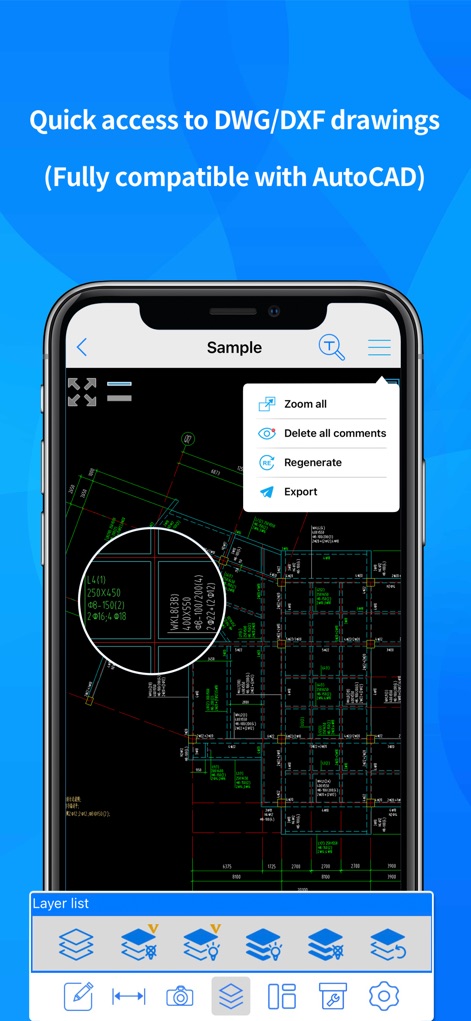
Efficient Drawing Access
See how the app offers quick access to DWG/DXF drawings, complemented by robust layer management features at the bottom of the screen.
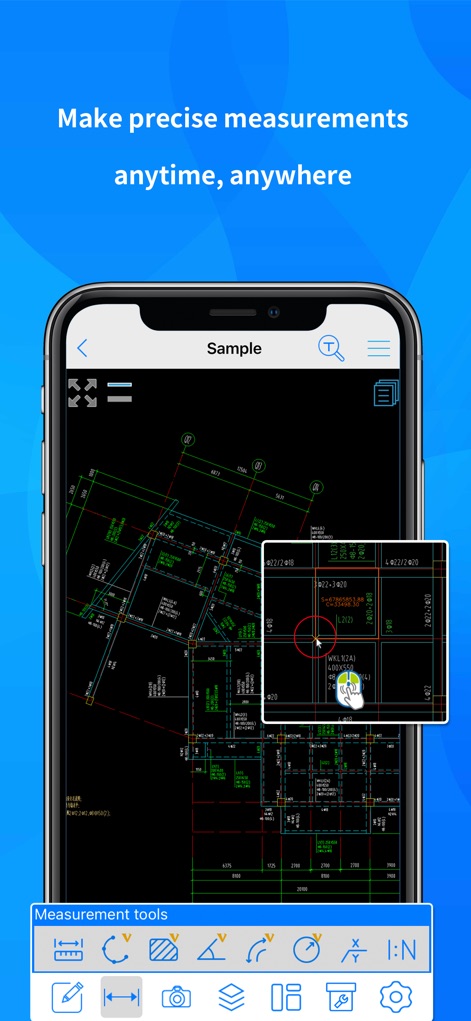
Accurate On-Site Measures
Observe the app's precise measurement tools, showcasing continuous length measurements and automatic snapping points within the magnified view.
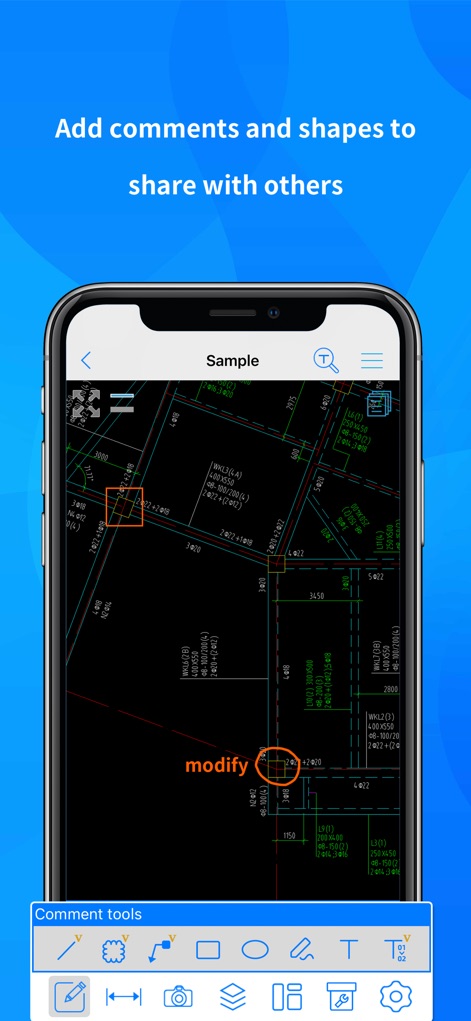
Streamlined Team Comments
Explore how users can add various shapes and text annotations like 'modify' directly onto technical drawings for clear communication.

Visual Site Integration
Witness the app's capability to capture and attach site pictures, identifiable by camera icons, directly within the drawing's exact locations.
Description
Download
More Like This
Apps with similar features and user experience

Shapr 3D CAD modeling
Shapr 3D Zartkoruen Mukodo Reszvenytarsasag

CAD快速看图-dwg手机快速看图,设计图纸工程建筑
Shanghai Tantian Network Technology Co.,Ltd.

DWG FastView-CAD Viewer&Editor
Gstarsoft Co., Ltd

CAD快速看图-CAD手机看图软件
存旺 姜

ZWCAD Mobile - Mobile CAD
ZWCAD Software Co.,Ltd.

CAD快速看图- 手机快速查看cad图纸
嘉欣 朱

Draft Paper
Giles Goddard

CAD FastView King: DWG Viewer
镇源 余

AutoCAD
Autodesk
This page is not an official page of the app or its developer, but an independent editorial publication created for informational and commentary purposes. Unless expressly stated otherwise, neither the app nor its developer is affiliated with, endorsed by, sponsored by, authorized by, or otherwise officially connected with MWM, Apple, Google Play, the app publisher, or the app's developer, and nothing on this page implies that the app was developed using MWM's services. Any trademarks, logos, screenshots, and other content remain the property of their respective owners.