
This page is not an official page of the app or its developer, but an independent editorial publication created for informational and commentary purposes. Unless expressly stated otherwise, neither the app nor its developer is affiliated with, endorsed by, sponsored by, authorized by, or otherwise officially connected with MWM, Apple, Google Play, the app publisher, or the app's developer, and nothing on this page implies that the app was developed using MWM's services. Any trademarks, logos, screenshots, and other content remain the property of their respective owners.


CalenDraw: Calendar Notes
No more digital disconnect; the app gives users a canvas for thought, not just a grid for tasks.
Downloads
250k+User Rating
Total Ratings
3.0KPublisher
Category
ProductivityLocales
34Latest Version
5.9.3Size
72.7 MBFirst Released
Feb 22, 2020An Analytical Overview of Core Functionalities
CalenDraw: Key Features for Apple Ecosystem Users
Apple Pencil Direct Input
The app allows users to write and draw directly on their calendar, providing a highly personalized planning experience with the Apple Pencil.
iCloud Seamless Sync
It provides seamless synchronization of all data across a user's iPhone, iPad, and Mac via iCloud, ensuring consistent access and workflow.
Blended Digital Canvas
This tool features an intuitive digital workspace that seamlessly blends handwritten notes, drawings, and calendar events.
Personalized Drawing Tools
The app enables users to save their favorite drawing tools and colors in a 'Pencil Case' for quick and efficient access, enhancing creative expression.
Unified External Integrations
It allows users to import events from Google Calendar and Microsoft Outlook, and integrate with Apple Reminders for a unified schedule and task management.
Comprehensive Full-Text Search
The app provides a powerful full-text search capability, allowing users to instantly find information across all calendars, notes, and tasks.
Interactive Home Screen Widgets
This tool features customizable Home Screen widgets that offer quick, glanceable views of schedules and tasks directly from the Home Screen.
Visual Planning & Journaling
The app supports visual organization through features like color-coding schedules, linking journal entries to dates, and managing separate notebooks.
Frequently Asked Questions
Everything you need to know about CalenDraw: Calendar Notes
Can I use CalenDraw to write directly on my calendar?
Yes, CalenDraw allows you to write and draw directly on your calendar using an Apple Pencil. This feature personalizes your planning experience within the app.
Does CalenDraw sync with other calendar services like Google Calendar?
Yes, CalenDraw seamlessly integrates with and allows you to import events from Google Calendar and Microsoft Outlook. It also syncs with iCloud across your Apple devices.
How do I manage my CalenDraw subscription?
You can manage or cancel your CalenDraw subscription directly in your iTunes account settings. Subscriptions automatically renew unless canceled 24-hours before the current period ends.
Is CalenDraw available on multiple Apple devices?
Yes, CalenDraw supports iCloud syncing across iPhone, iPad, and Mac. You can also receive notifications on your iPhone, Apple Watch, and Mac for seamless planning.
Can CalenDraw integrate with Apple Reminders?
Yes, CalenDraw integrates with Apple Reminders, allowing you to connect and manage your tasks directly within the app. This ensures cohesive planning.
Does CalenDraw offer a dark mode option?
Yes, CalenDraw provides a dark mode option. This visual theme allows users to customize the app's appearance according to their preference or environment.
What features does CalenDraw offer for organizing tasks?
CalenDraw allows you to create and manage multiple task lists, check off completed tasks, and link journal entries to specific dates. You can also organize thoughts in separate notebooks.
Does CalenDraw support full-text search?
Yes, CalenDraw includes a full-text search feature. This allows users to instantly find anything across all their calendars, notes, and tasks within the app.
Can I use a keyboard to enter events in CalenDraw?
Yes, you can enter events with a keyboard using rich text in CalenDraw. This option is available for convenience when your Apple Pencil is not handy.
The following screenshots and description are sourced directly from the app's official store listing and are the property of the app developer.
App Store
Screenshots
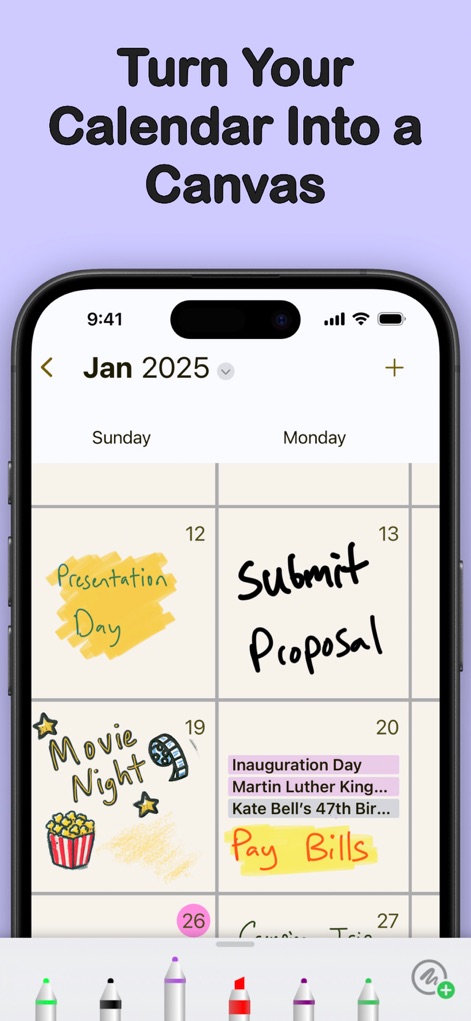
Discover how users can transform their calendar into a personalized canvas with handwritten notes and vibrant drawings, supported by an intuitive Pencil tool selection bar.
Creative Calendar Canvas

Explore the app's seamless integration, allowing users to consolidate integrated calendar events and synchronize effortlessly with Apple Reminders for comprehensive planning.
Unified Planning Hub

Witness the versatility of the app, enabling users to combine sophisticated rich text editing for typed entries with expressive Apple Pencil drawings directly on their schedule.
Flexible Input Options

Admire the app's capacity for personalization, offering users a selection of customizable background colors and various aesthetic theme options to match their preferences.
Personalized Visuals

Experience the app's thoughtful design with its sleek dark mode interface, providing enhanced readability and reduced eye strain during evening planning sessions.
Optimized Night View

Observe the app's robust cross-device consistency, ensuring all plans and notes are perfectly mirrored across devices through seamless iCloud integration.
Seamless Ecosystem Sync
Description
Download
More Like This
Apps with similar features and user experience

Planner, Journal, To Do List
jinal alagiya

2026 Planner & Agenda - Floret
Akash Jain
todo mate: tasks & routines
todo mate

Cute Calendar : Agenda Planner
VU HO NGOC

Cahoカレンダー 人気の可愛い手帳かれんだー
LAN CHEN

Write memos for fun
James Smith

Planner for iPad
Craft LLC

DAYOL : Journal, Calendar
SEUNGAH JO

Penjo: Pencil Journal, Planner
Zafer ARICAN
This page is not an official page of the app or its developer, but an independent editorial publication created for informational and commentary purposes. Unless expressly stated otherwise, neither the app nor its developer is affiliated with, endorsed by, sponsored by, authorized by, or otherwise officially connected with MWM, Apple, Google Play, the app publisher, or the app's developer, and nothing on this page implies that the app was developed using MWM's services. Any trademarks, logos, screenshots, and other content remain the property of their respective owners.