
This page is not an official page of the app or its developer, but an independent editorial publication created for informational and commentary purposes. Unless expressly stated otherwise, neither the app nor its developer is affiliated with, endorsed by, sponsored by, authorized by, or otherwise officially connected with MWM, Apple, Google Play, the app publisher, or the app's developer, and nothing on this page implies that the app was developed using MWM's services. Any trademarks, logos, screenshots, and other content remain the property of their respective owners.


Planner for iPad
Digital planning usually feels sterile. This app hands users back the organic freedom of paper, supercharged with iPad's versatility.
Downloads
1M+User Rating
Total Ratings
9.9KPublisher
Category
ProductivityLocales
8Latest Version
1.6.67Size
61.6 MBFirst Released
Jan 28, 2020A comprehensive analysis of key features for organized, creative iPad users seeking digital flexibility with a tactile planning experience.
Software Evaluation: Planner for iPad
Handwritten Input with Apple Pencil
It allows users to directly write on the calendar using an Apple Pencil, merging the tactile feel of a paper planner with digital flexibility.
Flexible Calendar Views and Integration
The app provides diverse calendar views, including monthly, weekly (vertical and horizontal), and daily, with customizable start days and times, alongside integration with external calendars like Google Calendar.
Creative Personalization and Decoration
This tool features extensive personalization options, enabling users to decorate their planners with digital stamps, refills, masking tapes, and to-do lists to enhance visual appeal and organization.
Deep Style Customization
The app offers diverse style sheets, including pre-installed options and additional designs available for purchase in an online stationery store, allowing users to deeply customize their planner's appearance.
Frequently Asked Questions
Everything you need to know about Planner for iPad
What is Planner for iPad?
Planner for iPad is a flexible digital planning application designed to function like a paper planner, optimized for iPad use. It offers various calendar views and extensive personalization options.
Does Planner for iPad support Apple Pencil handwriting?
Yes, Planner for iPad allows users to write directly on the calendar interface using an Apple Pencil. This feature enhances the tactile experience of digital planning.
Can Planner for iPad sync with Google Calendar?
Yes, Planner for iPad can display schedules from other calendars, including Google Calendar. This feature allows users to integrate external events into their Planner app views.
What calendar views does Planner for iPad offer?
Planner for iPad provides monthly, weekly (vertical and horizontal), and daily calendar views. Users can also customize the starting day of the week and the beginning/ending time of the day.
How can users personalize their Planner for iPad calendar?
Users can personalize their Planner for iPad calendar with materials such as stamps, refills, masking tapes, and to-do lists. New style sheets are also available from an online stationery store.
Does Planner for iPad include cloud storage?
Yes, Planner for iPad includes cloud storage services. A basic plan offers 5GB, and a plus plan provides 10GB for automatically storing data, photos, and other items.
How is the cloud storage subscription for Planner for iPad billed?
The cloud storage service for Planner for iPad is automatically renewed monthly. User fees for this subscription are billed directly to your iTunes account.
How do I cancel the automatic renewal for Planner app's cloud storage?
To cancel automatic renewal for Planner app's cloud storage, go to the subscription management page on iTunes or turn off auto-renewal. This must be done at least 24 hours before the auto-renewal period.
Can I change my storage plan within the Planner for iPad app?
Yes, you can change your storage plan for Planner app. This can be done either directly within the Planner app settings or through the subscription management page on iTunes.
Are there different styles available for Planner for iPad?
Yes, Planner for iPad comes with pre-installed white and black style sheets. Users can also purchase new style sheets from the online stationery store to customize their planning experience.
Can I use Planner for iPad for both business and personal planning?
Yes, Planner for iPad supports multiple planner types including ToDo lists, a Diary, and a Notebook. This makes it suitable for various planning needs, for both business and personal use.
The following screenshots and description are sourced directly from the app's official store listing and are the property of the app developer.
App Store
Screenshots
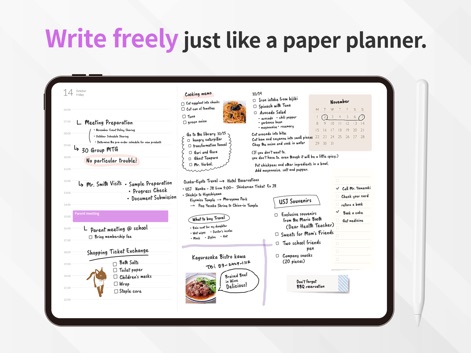
This tool allows users to seamlessly integrate handwritten notes directly onto their daily schedule and organize various tasks like cooking menus and to-do lists.
Handwritten Flexibility

Users can effortlessly blend digital and handwritten entries within the weekly calendar view, importing their work schedule directly via Google Calendar integration.
Seamless Calendar Sync
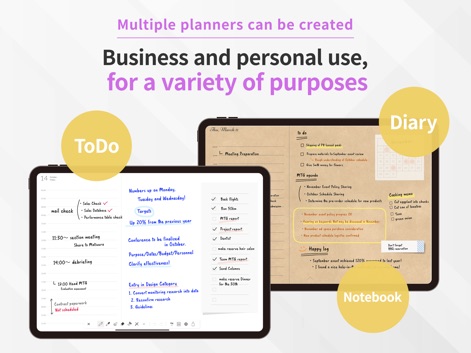
The app offers diverse organizational structures, presenting distinct 'ToDo' and 'Diary' sections alongside adaptable 'Notebook' layouts for varied personal and professional use.
Versatile Layouts

Users can personalize their planners with an array of decorative stamps and stickers, alongside the integration of photos and masking tapes for a truly unique aesthetic.
Creative Personalization

This tool provides dynamic organizational options, allowing users to switch between detailed Monthly, Weekly, and Daily views, including comprehensive Year-at-a-glance and vertical weekly layouts.
Dynamic View Options
Description
Download
More Like This
Apps with similar features and user experience
Planner, Journal, To Do List
jinal alagiya

2026 Planner & Agenda - Floret
Akash Jain
todo mate: tasks & routines
todo mate
Cute Calendar : Agenda Planner
VU HO NGOC

Cahoカレンダー 人気の可愛い手帳かれんだー
LAN CHEN

Write memos for fun
James Smith
CalenDraw: Calendar Notes
DataBeNice LLC

DAYOL : Journal, Calendar
SEUNGAH JO
Penjo: Pencil Journal, Planner
Zafer ARICAN
This page is not an official page of the app or its developer, but an independent editorial publication created for informational and commentary purposes. Unless expressly stated otherwise, neither the app nor its developer is affiliated with, endorsed by, sponsored by, authorized by, or otherwise officially connected with MWM, Apple, Google Play, the app publisher, or the app's developer, and nothing on this page implies that the app was developed using MWM's services. Any trademarks, logos, screenshots, and other content remain the property of their respective owners.