
This page is not an official page of the app or its developer, but an independent editorial publication created for informational and commentary purposes. Unless expressly stated otherwise, neither the app nor its developer is affiliated with, endorsed by, sponsored by, authorized by, or otherwise officially connected with MWM, Apple, Google Play, the app publisher, or the app's developer, and nothing on this page implies that the app was developed using MWM's services. Any trademarks, logos, screenshots, and other content remain the property of their respective owners.

Class Timetable - Schedule App
Academic chaos? This app hands users back control, transforming schedules into a streamlined, always-visible plan.
Downloads
5M+User Rating
Total Ratings
9.8KPublisher
Category
EducationLocales
19Latest Version
13.4.1Size
28.1 MBFirst Released
Mar 30, 2011A comprehensive analysis of key features designed for academic efficiency.
App Evaluation: Class Timetable - Schedule App
Comprehensive Timetable Management
The app provides a robust system for tracking classes and adding events, supporting multi-week timetables for flexible academic planning.
Integrated Task & Assignment Tracking
It allows users to manage college assignments, track school homework, and categorize tasks, ensuring comprehensive organization beyond just class schedules.
Cross-Device Apple Ecosystem Support & iCloud Sync
This tool features extensive support across Apple Watch, macOS, and iPad, coupled with iCloud sync, providing a seamless and synchronized experience across all user devices.
Smart Notifications and Reminders
The app ensures users stay on top of their academic commitments through class notifications and task reminders, critical for avoiding missed deadlines.
Siri Integration for Quick Access
It supports Siri commands, enabling users to quickly inquire about their next class or schedule details using voice commands for enhanced convenience.
Modern iOS Home Screen Widgets
This tool features iOS widgets, offering users quick, at-a-glance access to their upcoming classes and assignments directly from their device's home screen.
Frequently Asked Questions
Everything you need to know about Class Timetable - Schedule App
How does Class Timetable help organize a student's schedule?
Class Timetable tracks classes and events with ease, supporting multi-week timetables. It features a beautiful, color-filled interface and an easy-to-use week display.
Does Class Timetable support Siri commands?
Yes, Class Timetable supports Siri. Users can ask, "Hey Siri, what class do I have next" to quickly check their upcoming schedule.
Can Class Timetable help with managing homework and assignments?
Yes, Class Timetable includes a built-in task list for managing homework and college assignments. Users can organize their tasks with specific categories.
Is Class Timetable available on multiple Apple devices?
Yes, Class Timetable supports Apple Watch, macOS, and iPad. This enables seamless synchronization of schedules and tasks across a user's entire Apple ecosystem.
Are there any professional features available in Class Timetable?
Yes, Class Timetable offers PRO features including class notifications, timetable export, and task reminders. It also provides a detailed week display.
What is the cost of the Class Timetable app?
Class Timetable is free to download. Pro features, such as notifications and exports, are available as an upgrade, but specific pricing is not listed.
Can users customize the appearance of their schedule in Class Timetable?
Yes, users can customize the appearance of their schedule in Class Timetable. The app allows choosing different colors for classes, with various color packs like Classic and Ocean.
Does Class Timetable offer iCloud synchronization for data?
Yes, Class Timetable supports iCloud sync. This feature ensures that schedules and tasks are automatically synchronized across all linked Apple devices.
Does Class Timetable offer home screen widgets?
Yes, Class Timetable supports iOS 14 widgets. These widgets allow users to view their daily schedule directly on their iPhone or iPad home screen.
The following screenshots and description are sourced directly from the app's official store listing and are the property of the app developer.
App Store
Screenshots

Users can effortlessly navigate their daily timetable with color-coded class blocks and easily access their tasks directly from this intuitive interface.
Daily Class Overview

This tool provides a clear, categorized task list, allowing users to track multiple assignments like 'Math Homework' and 'English Assignment' efficiently.
Organize Academic Tasks

Access your daily schedule at a glance with the convenient iOS widget, displaying current classes and upcoming events directly on the home screen.
Home Screen Widget
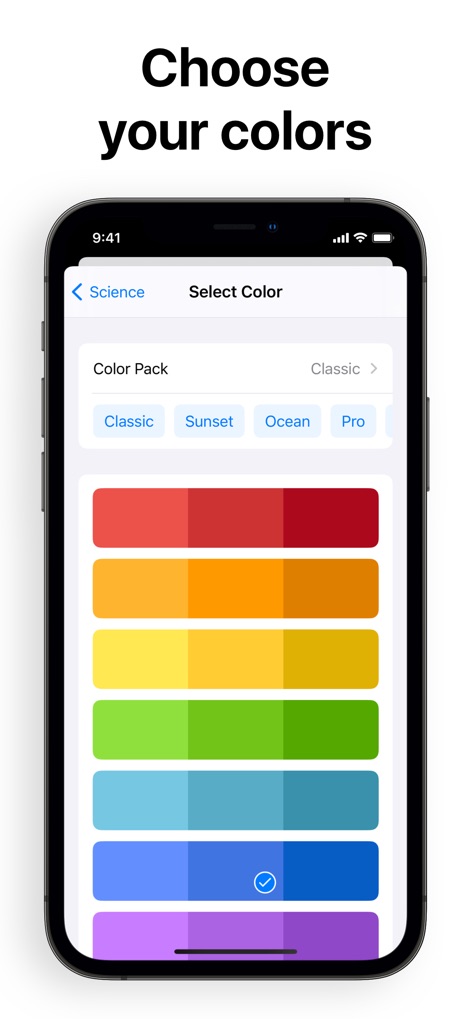
The app offers extensive customization, allowing users to personalize their timetable with various color palettes such as 'Classic' and 'Sunset' to suit their aesthetic.
Personalize Your Schedule

Efficiently manage individual class details by adjusting specific parameters like 'Day' and 'Time' and adding relevant 'Info' notes within the app.
Detailed Class Management

Discover robust functionalities including seamless 'Siri support' for quick inquiries and a comprehensive 'week display' for an overview of the entire schedule.
Explore Advanced Features

Ensure continuity across all devices with robust 'iCloud Sync' capabilities, seamlessly integrating the app experience from Apple Watch to macOS.
Seamless Device Sync
Description
Download
More Like This
Apps with similar features and user experience

Folderly - Academic Organizer
Raethan Christian Supatan

极简课程表 - watch课程表
敏强 李
Smart Timetable: Daily Planner
Denis Kravcov

My Study Life - School Planner
My Study Life Ltd

Khotta AI: Plan & Study
Hadi Albinsaad
SchoolOrganizer
Alexander Steiner

Notenapp - digital school tool
crestalize GmbH

Exam Countdown - School & Uni
ROOT38 LIMITED

Easy Study - Timetable Planner
Aplicativos Legais LTDA - ME
This page is not an official page of the app or its developer, but an independent editorial publication created for informational and commentary purposes. Unless expressly stated otherwise, neither the app nor its developer is affiliated with, endorsed by, sponsored by, authorized by, or otherwise officially connected with MWM, Apple, Google Play, the app publisher, or the app's developer, and nothing on this page implies that the app was developed using MWM's services. Any trademarks, logos, screenshots, and other content remain the property of their respective owners.