
This page is not an official page of the app or its developer, but an independent editorial publication created for informational and commentary purposes. Unless expressly stated otherwise, neither the app nor its developer is affiliated with, endorsed by, sponsored by, authorized by, or otherwise officially connected with MWM, Apple, Google Play, the app publisher, or the app's developer, and nothing on this page implies that the app was developed using MWM's services. Any trademarks, logos, screenshots, and other content remain the property of their respective owners.


CLS쿠펀치
Streamline your workday with the official attendance tool for CLS professionals. Register your account, record your shifts, and manage your work information with precision and ease.
Downloads
249K+User Rating
Total Ratings
100Publisher
Category
BusinessLocales
2Latest Version
1.1.60Size
54.9 MBFirst Released
Oct 12, 2022Streamline Your Shift with CLS Coupunch
The essential mobile companion for Coupang Logistics Service workers to manage attendance and track work hours with total efficiency.
Instant Clock-In/Out
Skip the physical lines. Use your personal device to register your attendance in seconds, ensuring every minute of your hard work is recorded.
Effortless Account Setup
Get started quickly by registering your CLS account and work information directly in the app. No manual paperwork required to begin your shift.
Frequently Asked Questions
Everything you need to know about CLS쿠펀치
What is the CLS쿠펀치 app used for?
The CLS쿠펀치 app is designed for CLS workers to register their work information and manage their clock-in and clock-out processes efficiently.
Who can use the CLS쿠펀치 application?
The CLS쿠펀치 application is specifically provided for and usable exclusively by CLS workers.
How do CLS workers register for the CLS쿠펀치 app?
CLS workers register for the CLS쿠펀치 app by creating an account. This is the initial step required to utilize the app's features.
Can users track their work schedule in CLS쿠펀치?
Yes, CLS쿠펀치 users can view their confirmed working hours, break times, and shift completion times at a glance within the app's interface.
How do CLS쿠펀치 users check in and out for work?
Users check in and out for work directly through the CLS쿠펀치 app. They use the 'Check In' and 'Check Out' buttons upon arrival and departure from their workplace.
How can CLS쿠펀치 users contact support?
CLS쿠펀치 users can contact support by calling 1577-7011 or by sending an email to punch_app_help@coupang.com for any inquiries.
The following screenshots and description are sourced directly from the app's official store listing and are the property of the app developer.
App Store
Screenshots
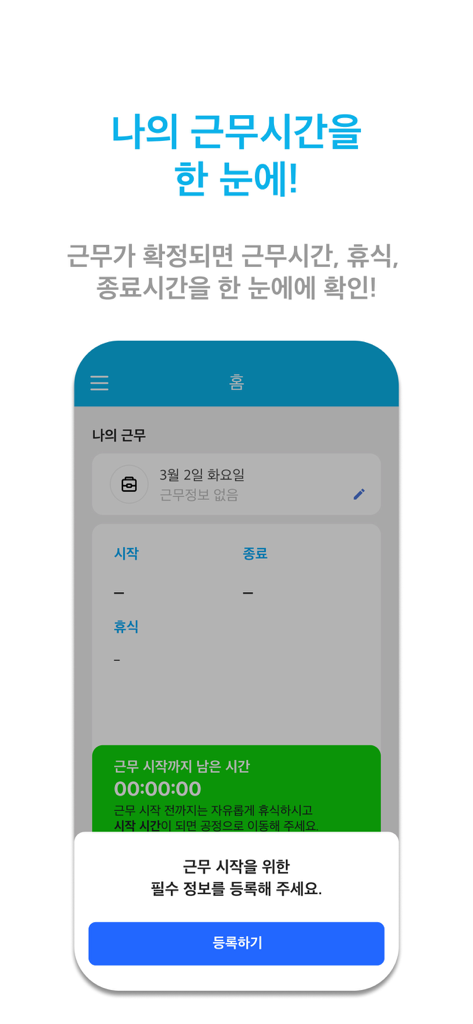
CLS Coupunch app dashboard showing work hours tracking and a registration popup for starting a shift
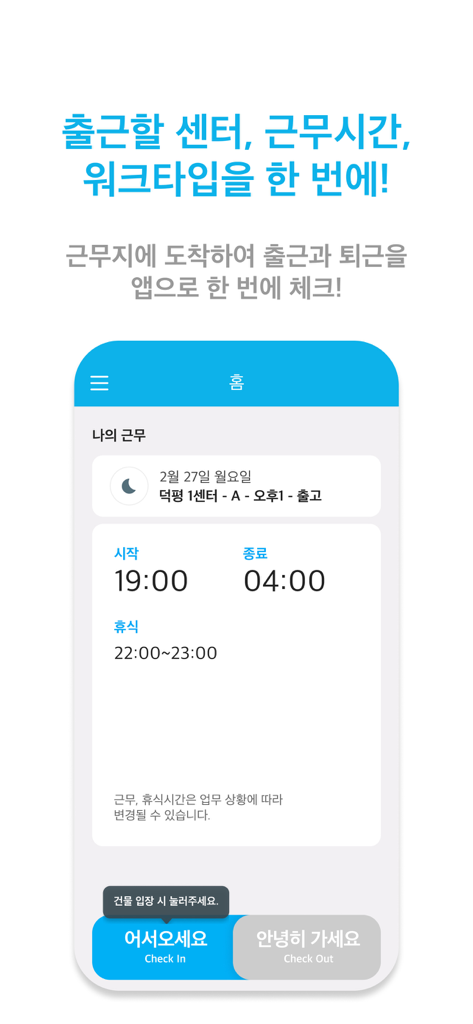
CLS Coupunch app interface displaying a work shift schedule from 19:00 to 04:00 with blue check-in and grey check-out buttons.
Description
Download
More Like This
Apps with similar features and user experience

Paylocity
Paylocity Corporation

Paychex Flex
Paychex Inc.

Paycom
Paycom Payroll, LLC

Gusto Mobile
Gusto, inc.

Amazon A to Z
AMZN Mobile LLC

TaxDome Client Portal
TaxDome LLC

MyWalmart
Walmart

BrightHR
Peninsula Online Services Limited

Waapi
Senior Sistemas S/A
This page is not an official page of the app or its developer, but an independent editorial publication created for informational and commentary purposes. Unless expressly stated otherwise, neither the app nor its developer is affiliated with, endorsed by, sponsored by, authorized by, or otherwise officially connected with MWM, Apple, Google Play, the app publisher, or the app's developer, and nothing on this page implies that the app was developed using MWM's services. Any trademarks, logos, screenshots, and other content remain the property of their respective owners.