
This page is not an official page of the app or its developer, but an independent editorial publication created for informational and commentary purposes. Unless expressly stated otherwise, neither the app nor its developer is affiliated with, endorsed by, sponsored by, authorized by, or otherwise officially connected with MWM, Apple, Google Play, the app publisher, or the app's developer, and nothing on this page implies that the app was developed using MWM's services. Any trademarks, logos, screenshots, and other content remain the property of their respective owners.


Depth Cam - Depth Editor
No more flat images. Depth Cam unlocks spatial control, giving every shot cinematic pop.
Downloads
10k+User Rating
Total Ratings
95Publisher
Category
Photo & VideoLocales
1Latest Version
4.6Size
93.1 MBFirst Released
Sep 23, 2017An analytical overview highlighting key functionalities and their impact on mobile photography and editing workflows for creative users.
Core Capabilities of Depth Cam - Depth Editor
AI-Powered Depth Generation
It allows users to create sophisticated depth maps for any photograph, regardless of whether it was originally captured with a dual-camera setup or portrait mode. This significantly expands creative possibilities for users with single-lens devices or older photos, making advanced depth effects accessible to a wider audience.
Advanced Depth Map Editing
The app provides a comprehensive suite of professional tools for viewing and meticulously editing raw depth data. It enables users to fine-tune focus areas, adjust blur intensity, and correct depth inconsistencies in any loaded Portrait Mode photo, which is crucial for achieving professional-grade results and creative control.
Real-time Depth Visualisation
For compatible devices, it allows users to see a live visualization of the depth effect while framing their shot. This immediate feedback helps in composing images effectively and ensuring the desired depth of field is captured, enhancing the shooting experience and reducing trial-and-error.
Direct Depth API Capture
It enables direct utilization of a device's Depth API (on compatible smartphones) to capture high-quality, precise depth information alongside the image. This ensures optimal foundational data for subsequent sophisticated depth editing and manipulation.
Seamless Depth-Aware Editing
This tool allows users to crop and rotate images without compromising the alignment or integrity of the associated depth data. It ensures that post-editing transformations maintain the quality and accuracy of depth effects, streamlining the workflow for content creators.
Immersive 3D Depth View
The app features a 3D visualization of the depth map, providing a unique perspective to understand and refine the spatial information within the image. It assists advanced users in making precise adjustments for complex scenes, offering a deeper level of control.
The following screenshots and description are sourced directly from the app's official store listing and are the property of the app developer.
App Store
Screenshots

Observe the real-time depth preview directly within the camera interface, alongside intuitive on-screen capture controls for immediate feedback.
Live Depth Capture

Explore advanced blur options like Classic and Anamorphic, while seamlessly integrating with the 3D depth viewer for precise adjustments.
Diverse Blur Effects
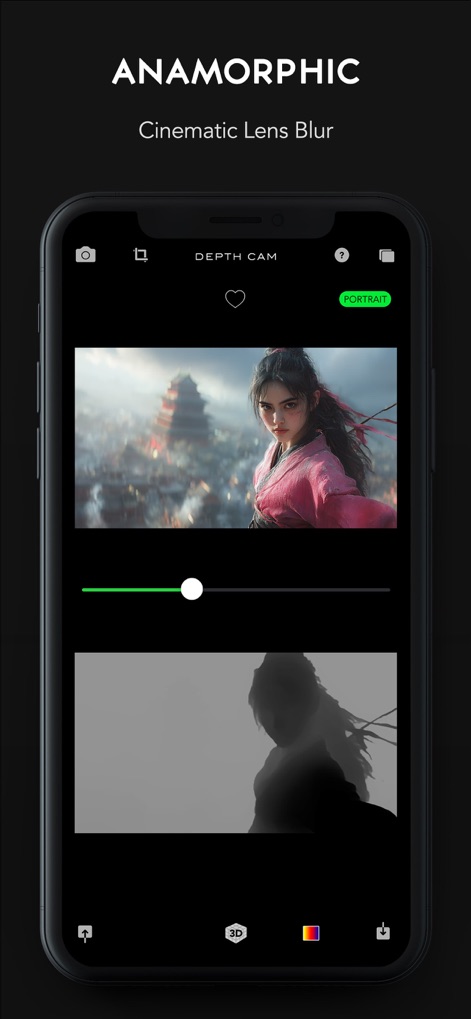
Fine-tune cinematic lens blur effects using the intuitive intensity slider and observe the intricate details of the anamorphic depth map.
Cinematic Anamorphic Blur
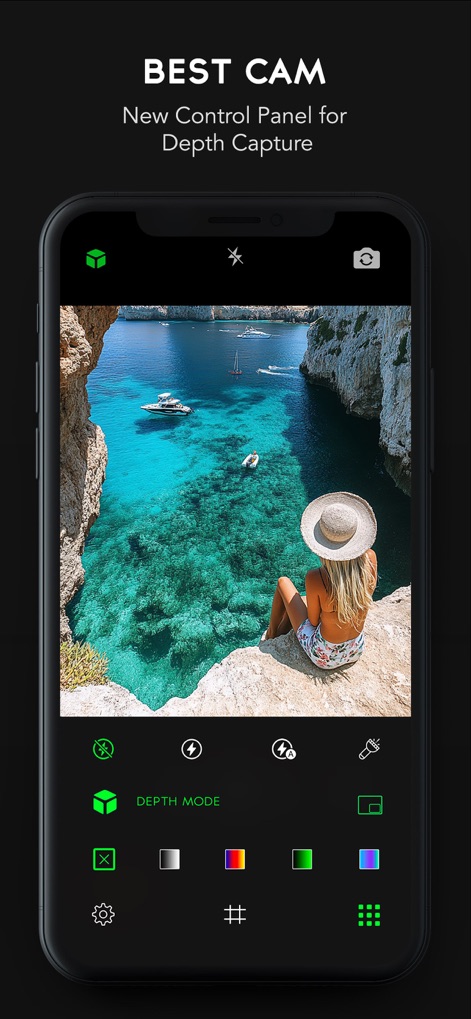
Access a comprehensive control panel for depth capture settings, featuring various depth mode visualizations and essential camera functionalities.
Advanced Capture Controls

Efficiently manage projects by saving the final photo or exporting the depth map separately, as shown by the vivid color-coded depth representation.
Seamless Data Management

Experience depth data in a new dimension through the app's 3D viewer, showcasing intricate wireframe models and detailed depth interpretations from various photos.
Immersive 3D Visualization
Description
Download
More Like This
Top-ranked apps in the same category

CapCut: Photo & Video Editor
BYTEDANCE PTE. LTD.

Instagram, Inc.

YouTube
Google LLC

Canva: AI Photo & Video Editor
Canva Pty Ltd

Snapchat
Snap, Inc.

快手
Beijing Kwai Technology Co., Ltd.

Edits: Video Editor
Instagram, Inc.

Meitu- AI Photo & Video Editor
Xiamen Meitu Technology Co., Ltd.

Google Photos: Backup & Edit
Google LLC
This page is not an official page of the app or its developer, but an independent editorial publication created for informational and commentary purposes. Unless expressly stated otherwise, neither the app nor its developer is affiliated with, endorsed by, sponsored by, authorized by, or otherwise officially connected with MWM, Apple, Google Play, the app publisher, or the app's developer, and nothing on this page implies that the app was developed using MWM's services. Any trademarks, logos, screenshots, and other content remain the property of their respective owners.