
This page is not an official page of the app or its developer, but an independent editorial publication created for informational and commentary purposes. Unless expressly stated otherwise, neither the app nor its developer is affiliated with, endorsed by, sponsored by, authorized by, or otherwise officially connected with MWM, Apple, Google Play, the app publisher, or the app's developer, and nothing on this page implies that the app was developed using MWM's services. Any trademarks, logos, screenshots, and other content remain the property of their respective owners.

DWG FastView-CAD Viewer&Editor
This app shatters the myth of workstation-only CAD, empowering users to command complex designs across every format, wherever they are.
Downloads
25M+User Rating
Total Ratings
65.7KPublisher
Category
ProductivityLocales
23Latest Version
5.18.8Size
368.5 MBFirst Released
Aug 18, 2011DWG FastView-CAD Viewer&Editor: Core Analytical Features
A detailed evaluation for AEC and manufacturing professionals requiring mobile CAD and 3D model management.
Extensive 3D Model & Format Compatibility
The app provides comprehensive compatibility with over 40 3D drawing formats from leading design software, enabling professionals to view, interact with, measure, and annotate complex 3D models on mobile devices.
Comprehensive 2D CAD Editing & Compatibility
This tool offers full compatibility with AutoCAD DWG and DXF formats, providing a complete suite of editing, viewing, measuring, and annotation tools to perform real CAD work on mobile devices.
Advanced Precision & Measurement Tools
It features robust measurement capabilities for both 2D and 3D models, including distance, arc length, and precise coordinate input (absolute, relative, polar, spherical, cylindrical) to ensure accuracy in design tasks.
High-Performance Large File Handling
The app ensures accurate and fast access to drawings, with no limitations on file size, which is critical for professionals working with large and complex CAD and 3D models.
Offline Access & Cloud Integration
It allows users to work on CAD and 3D models offline, save files locally, and seamlessly integrate with popular cloud services like Dropbox and Google Drive for collaborative workflows, ensuring productivity regardless of internet availability.
Versatile Export & Conversion Options
This tool supports exporting CAD drawings to multiple image formats (BMP, JPG, PNG) and PDF, with customization options, and also offers the unique ability to convert PDFs back into DWG format for enhanced interoperability.
Frequently Asked Questions
Everything you need to know about DWG FastView-CAD Viewer&Editor
What is DWG FastView?
DWG FastView is a cross-platform CAD software fully compatible with AutoCAD (DWG, DXF). It allows users to view, edit, measure, and dimension CAD drawings, and supports over 40 formats of 3D designs.
Is registration required to use DWG FastView?
No, registration is not required to use DWG FastView. Users can download and immediately use the app without needing to create an account.
What 3D modeling file formats does DWG FastView support?
DWG FastView supports over 40 3D design software models including BIM, Revit, Solidworks, NX, CATIA, Inventor, SolidEdge, ACIS, and Pro/E, with file types such as .rvt, .sldprt, .stp, and .step.
Can DWG FastView export CAD drawings to other formats?
Yes, DWG FastView supports exporting CAD drawings to PDF, BMP, JPG, and PNG formats. Users can also convert PDF files back to DWG format within the app.
Does DWG FastView work offline?
Yes, DWG FastView allows users to save their work in a local workspace for offline access. Drawings can also be opened, viewed, and edited from cloud services when an internet connection is available.
What is the subscription model for DWG FastView?
DWG FastView offers auto-renewing subscriptions, billed either monthly or annually. Payment is charged to the user's iTunes/App Store account upon confirmation of purchase.
How do I cancel my DWG FastView auto-renewing subscription?
Users can cancel their auto-renewing subscription by turning off the feature in their iTunes/App Store account settings. This must be done at least 24 hours before the current subscription period ends to avoid being billed.
What 3D features are available in DWG FastView?
DWG FastView offers 3D model assembly part preview, scaling, rotation, sectioning, and explosion. It also includes 3D measurement, annotation, PMI display/hiding, color matching, and multiple views.
Can DWG FastView access files from cloud storage?
Yes, DWG FastView can open, view, edit, and share drawings from various cloud services including Dropbox, OneDrive, Google Drive, Box, and WebDAV, provided there is an internet connection.
Does DWG FastView allow users to create new layers in CAD drawings?
Yes, DWG FastView allows users to create new layers within CAD drawings. This functionality is part of its comprehensive tools for real CAD work on mobile devices.
The following screenshots and description are sourced directly from the app's official store listing and are the property of the app developer.
App Store
Screenshots

Precision Measurement & Edit
Users can easily access intuitive measurement tools like 'Distance' and 'Area', complemented by comprehensive editing capabilities for on-the-go CAD drawing modifications.

Dynamic 3D Views
This tool offers dynamic 3D explode views of complex assemblies and extensive support for a wide range of 3D CAD file formats, including CATIA and SolidWorks.

Architectural 3D Power
The app enables seamless viewing of detailed 3D architectural models and offers comprehensive annotation and measurement tools for precise design analysis.

Easy Export Options
The app provides direct export of DWG files to diverse image formats like JPG and PNG, alongside flexible PDF conversion options for sharing.

Seamless Offline Editing
Users benefit from convenient offline saving directly to a local workspace without registration, coupled with diverse editing tools such as 'Move' and 'Rotate' for immediate design adjustments.
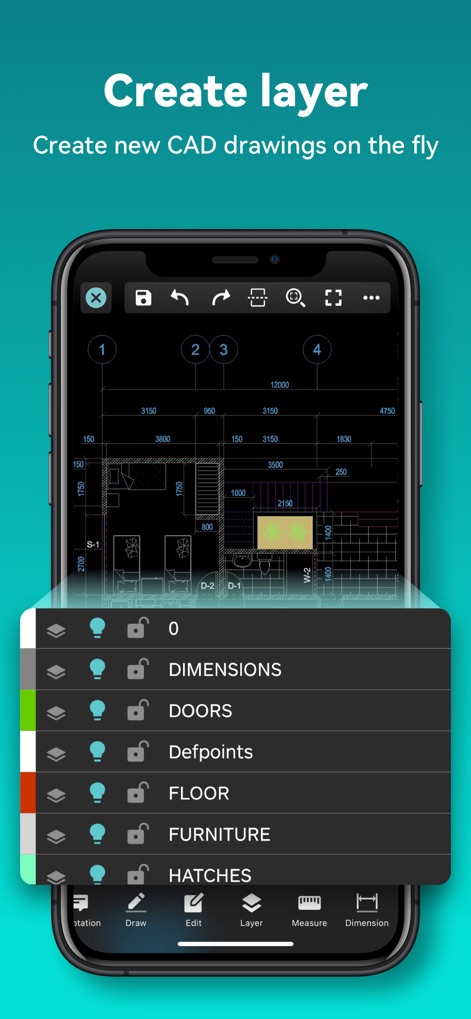
Advanced Layer Control
This tool offers a detailed layer management interface for controlling individual drawing components like 'DOORS' and 'FLOOR', enabling users to create new CAD drawing layers on the fly.

Integrated Cloud Access
The app features direct integration with popular cloud services, allowing users to seamlessly access and manage diverse file types, including DWG and PDF, from their preferred storage.
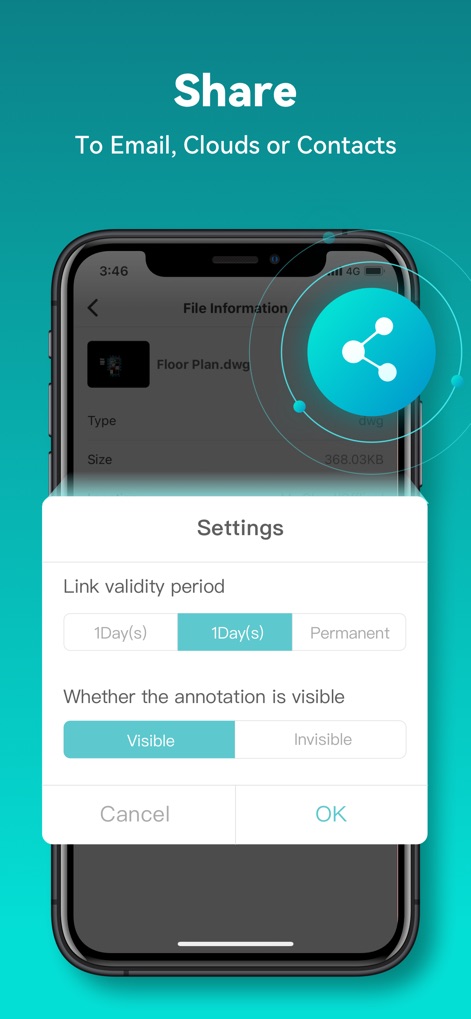
Secure Sharing Options
Users can utilize customizable sharing options, such as setting a 'Link validity period', and control annotation visibility when distributing their CAD files to collaborators.
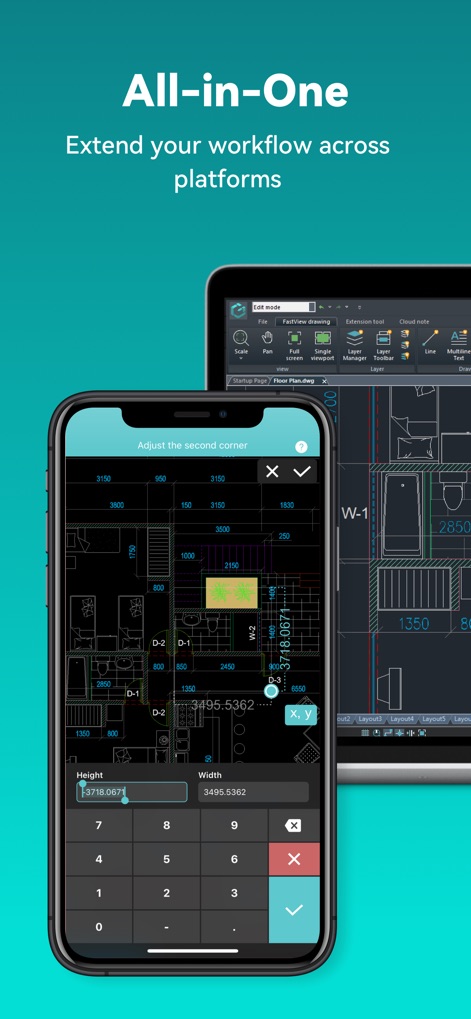
Cross-Platform Workflow
This tool delivers seamless cross-platform compatibility, extending CAD workflows from mobile to tablet devices, and offers precise dimension input for accurate design adjustments.
Description
Download
More Like This
Apps with similar features and user experience

Shapr 3D CAD modeling
Shapr 3D Zartkoruen Mukodo Reszvenytarsasag

CAD快速看图-dwg手机快速看图,设计图纸工程建筑
Shanghai Tantian Network Technology Co.,Ltd.

CAD快速看图-CAD手机看图软件
存旺 姜

ZWCAD Mobile - Mobile CAD
ZWCAD Software Co.,Ltd.

CAD快速看图- 手机快速查看cad图纸
嘉欣 朱

Draft Paper
Giles Goddard

CAD FastView King: DWG Viewer
镇源 余

AutoCAD
Autodesk

CAD Reader-View & Measure DWG
Beijing Honghu Yuntu Technology Co., Ltd.
This page is not an official page of the app or its developer, but an independent editorial publication created for informational and commentary purposes. Unless expressly stated otherwise, neither the app nor its developer is affiliated with, endorsed by, sponsored by, authorized by, or otherwise officially connected with MWM, Apple, Google Play, the app publisher, or the app's developer, and nothing on this page implies that the app was developed using MWM's services. Any trademarks, logos, screenshots, and other content remain the property of their respective owners.