
This page is not an official page of the app or its developer, but an independent editorial publication created for informational and commentary purposes. Unless expressly stated otherwise, neither the app nor its developer is affiliated with, endorsed by, sponsored by, authorized by, or otherwise officially connected with MWM, Apple, Google Play, the app publisher, or the app's developer, and nothing on this page implies that the app was developed using MWM's services. Any trademarks, logos, screenshots, and other content remain the property of their respective owners.

Easy Time Tracker ◴
Stop waiting for HR reports and become your own source of truth. Log shifts, capture receipt photos, and export professional PDF statements to ensure you are accurately compensated for every minute you work.
Downloads
352K+User Rating
Total Ratings
9K+Publisher
Category
ProductivityLocales
6Latest Version
3.1.59Size
163.8 MBFirst Released
Oct 9, 2019Take Total Control of Your Workday
Stop relying on HR reports and spreadsheets. Get a clear, real-time view of your shifts, overtime, and earnings with the ultimate personal time bank designed for the American worker.
Your Personal Source of Truth
Keep your overtime and total hours balance in your pocket. Always know exactly how much you've earned and verify your paycheck accuracy instantly.
Audit-Ready Documentation
Snap photos of physical clock-in receipts and export professional PDF statements to resolve payroll discrepancies with rock-solid evidence.
Frequently Asked Questions
Everything you need to know about Easy Time Tracker ◴
What is the main function of the Easy Time Tracker app?
The Easy Time Tracker app helps users manage and track their work hours, register daily clock-in and clock-out times, and monitor their total balance.
Can I view my time registers in Easy Time Tracker by day, week, or month?
Yes, the Easy Time Tracker app allows users to navigate and view their registers by day, week, or month, including the balance for the viewed period and the total balance.
Does Easy Time Tracker track absences, holidays, and vacations?
Yes, Easy Time Tracker registers absences, holidays, vacations, and extra launches like overtime paid or earned. This keeps the total balance synchronized with reality.
Does Easy Time Tracker provide personal control over my work hours?
Yes, the Easy Time Tracker app provides personal control, allowing users to keep their bank of hours (total balance) readily accessible without requesting reports from their company.
Can I save photos of receipts in Easy Time Tracker?
Yes, Easy Time Tracker allows users to save a photo of the receipt issued by the clock-in machine, associating it with their time registers.
How can I get a record of my hours from Easy Time Tracker?
Easy Time Tracker generates a simple and complete PDF statement of all record details for any period. Users can easily send this statement via email.
Does Easy Time Tracker visualize my time balance history?
Yes, Easy Time Tracker displays the total balance history on a chart. It offers various chart types for different views of records, including day balance and worked hours.
Can I configure my work schedule in Easy Time Tracker?
Yes, Easy Time Tracker allows users to configure their work schedules in detail, defining their daily workload and breaks.
How does Easy Time Tracker manage the total balance?
Easy Time Tracker allows users to balance each month, week, or day. It provides options to clear the total balance weekly, monthly, or manually at any time.
What kind of notifications does Easy Time Tracker provide?
Easy Time Tracker offers miscellaneous notifications, such as time to start, break time, time to return, and time to go home. Users can enable or disable these as needed.
Can Easy Time Tracker synchronize with a company clock?
Yes, Easy Time Tracker can synchronize its app clock with the user's company clock. This removes the need to change the smartphone's internal clock.
How does Easy Time Tracker handle clock-in/out tolerances?
Easy Time Tracker applies tolerances to exact clock-in and clock-out times. These tolerances make necessary adjustments for the accurate calculation of the total balance.
How do I register absences in Easy Time Tracker?
Users can register "justified absences" with a medical certificate, specifying hours to credit. For "unjustified absences," hours are discounted from the total balance.
Is Easy Time Tracker an official legal time registration system?
No, Easy Time Tracker is for personal use and has no legal value. It should not be used as an official registration between employer and employee.
How do I cancel my Easy Time Tracker subscription?
Users can cancel their Easy Time Tracker subscription or turn off automatic renewal at any time from their App Store account. This must be done at least 24 hours before renewal.
Does Easy Time Tracker support a dark theme?
Yes, Easy Time Tracker supports both a light and dark theme, allowing users to customize their visual experience.
Can Easy Time Tracker save my location when I clock in/out?
Yes, Easy Time Tracker offers the option to save the user's localization directly within the clock-in/out register screen.
The following screenshots and description are sourced directly from the app's official store listing and are the property of the app developer.
App Store
Screenshots
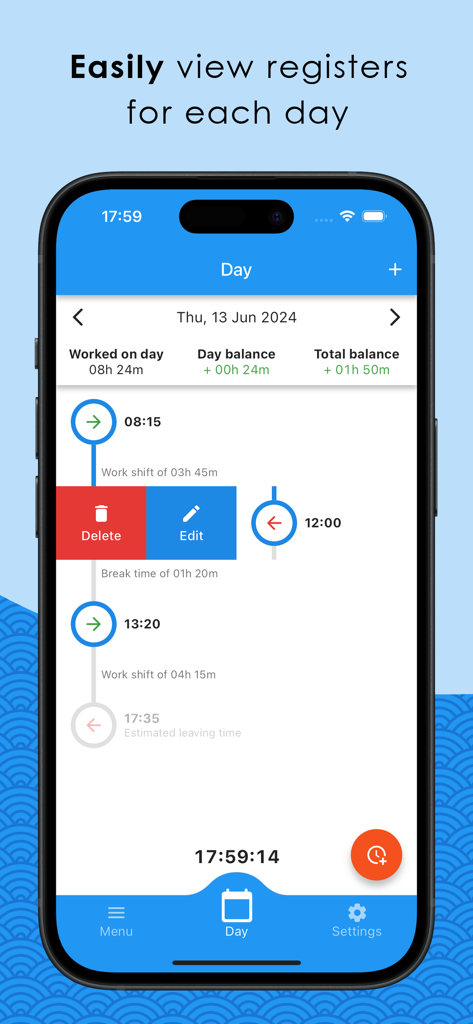
Smartphone screen of Easy Time Tracker app showing a daily timeline of work shifts and hour balances
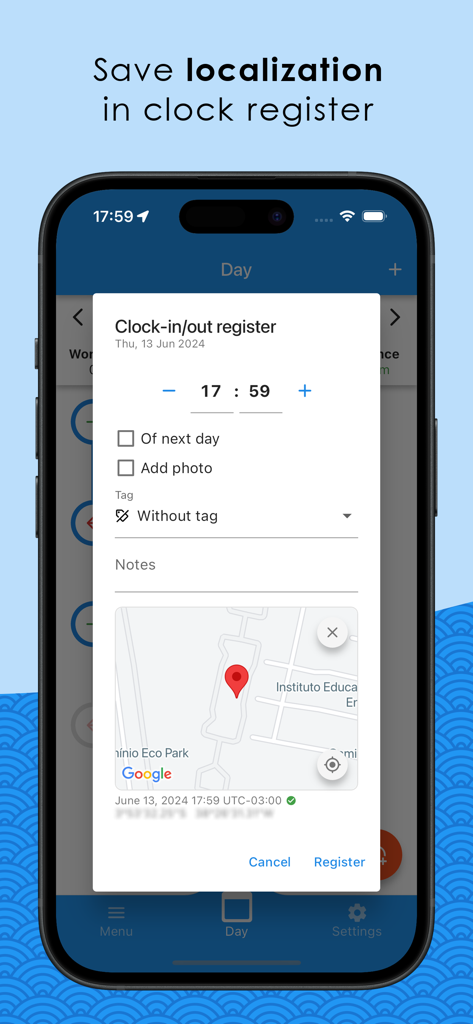
Easy Time Tracker app screen showing the GPS location feature for work clock registers
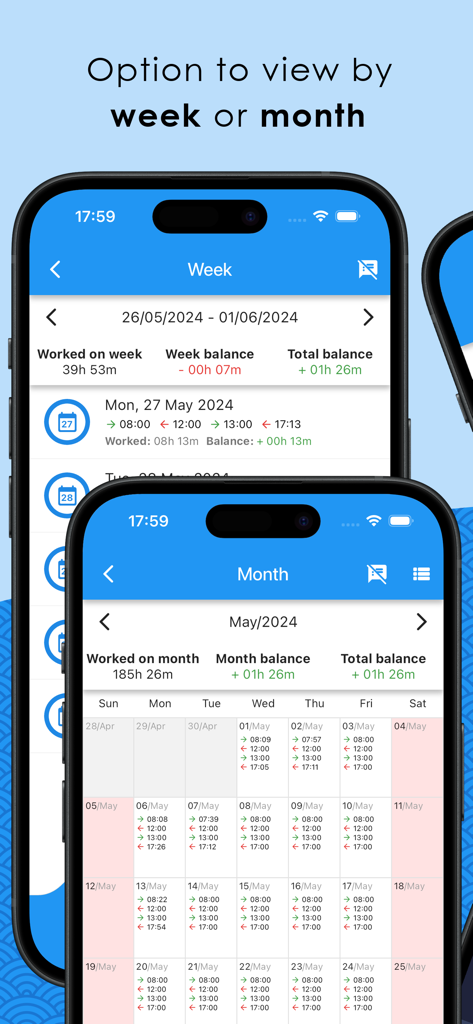
Easy Time Tracker app interface showing work hours organized by week and month on two smartphones
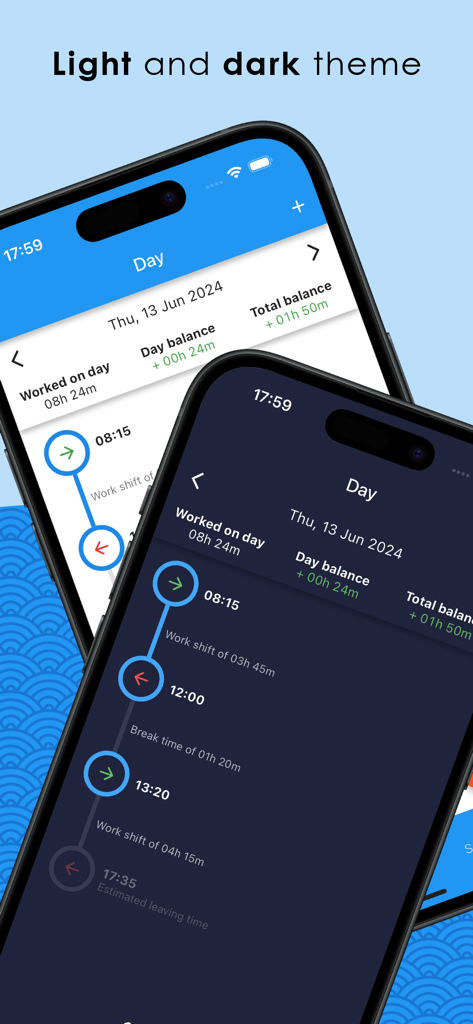
Easy Time Tracker app interface showing light and dark mode themes
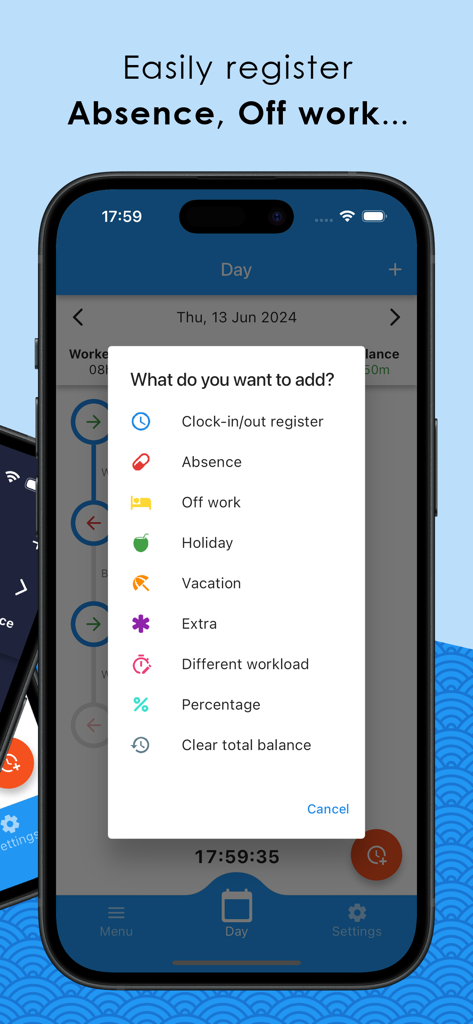
Easy Time Tracker app interface showing a menu to register work absences and vacation days
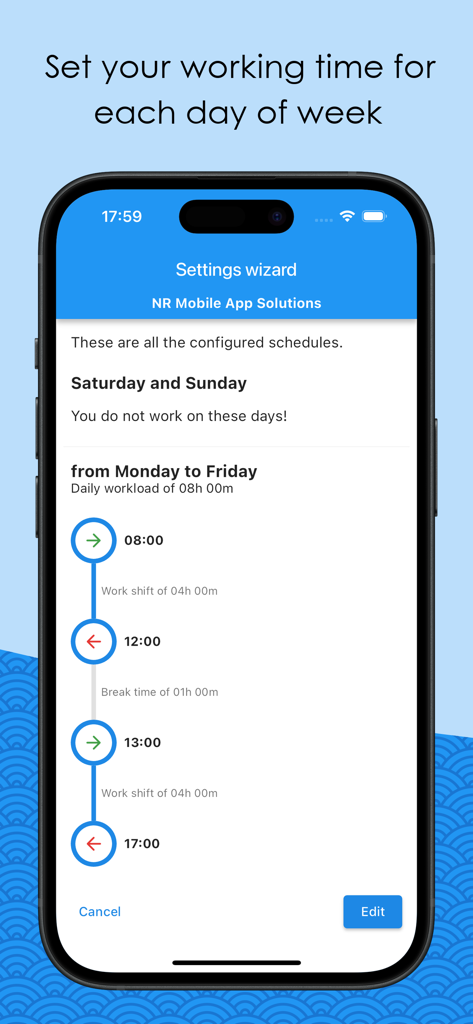
Interface of Easy Time Tracker app showing work schedule settings for Monday to Friday
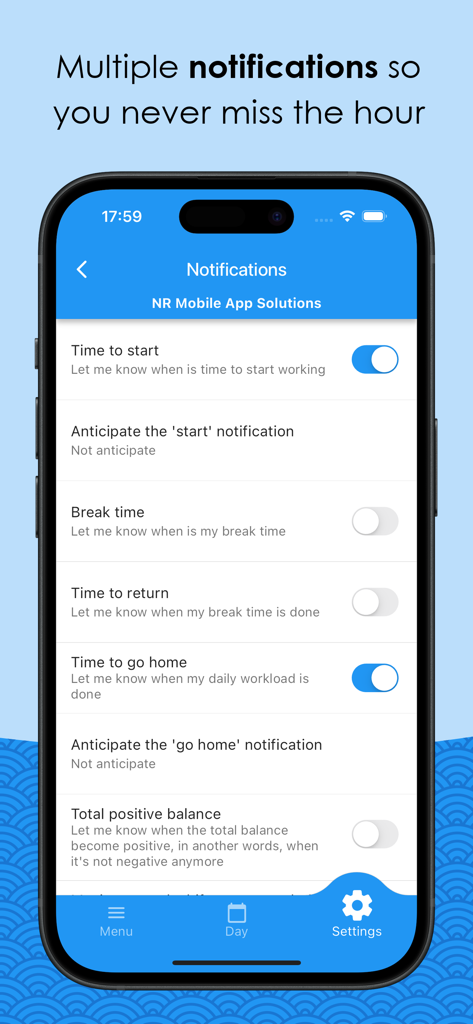
Notification settings for work shifts and breaks in the Easy Time Tracker app
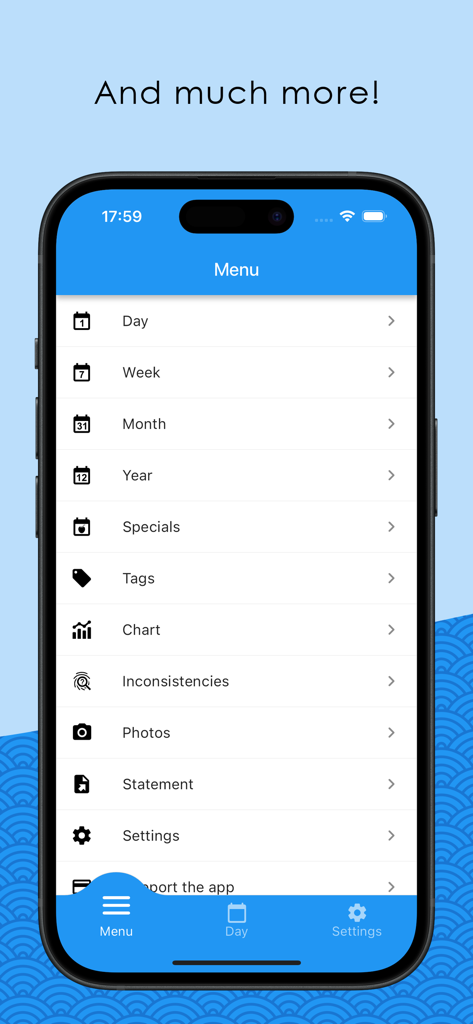
The main menu of the Easy Time Tracker app showing navigation options for daily, weekly, monthly, and yearly reports along with other features like charts and statements.
Description
Download
More Like This
Apps with similar features and user experience

排班日历-值班倒班排班轮班助手
Shanghai Anjiaxin Network Technology Co., Ltd

NurseGrid Nurse Shift Calendar
HCT2 CO
Simple Working Calendar
Нико Беллик

My Calendar - Shift schedule
Mikhail Eremkin

JW Service
Bartlomiej Semanczyk
Shift Work Calendar & Schedule
4TH FLOOR APPS SIA

MYDUTY - Nurse Calendar
Fourwheels Inc.

Shift Work Calendar Planner
Ebisu Soft Inc.
Today's Shift
Hodosoft Co.,Ltd.
This page is not an official page of the app or its developer, but an independent editorial publication created for informational and commentary purposes. Unless expressly stated otherwise, neither the app nor its developer is affiliated with, endorsed by, sponsored by, authorized by, or otherwise officially connected with MWM, Apple, Google Play, the app publisher, or the app's developer, and nothing on this page implies that the app was developed using MWM's services. Any trademarks, logos, screenshots, and other content remain the property of their respective owners.